Obsidian + Claude Code: A Practical Guide to AI-Automated Personal Knowledge Base Management

Use Claude Code to automatically manage your Obsidian knowledge base and solve note organization challenges
This article introduces a method for managing an Obsidian knowledge base powered by Claude Code (a Coding Agent). The core design uses a three-layer architecture: a RAW folder for read-only raw materials, a Wiki folder where AI automatically generates and maintains a cross-referenced knowledge network, and a Schema file defining system specifications. Daily operations are simplified into three workflows: Ingest (import new materials with automatic extraction), Query (search the knowledge base), and Maintain (periodic health checks). This approach frees humans from the burden of tedious note organization.
The Persistent Problem with Knowledge Base Management
Anyone who takes notes in Obsidian has likely experienced this predicament: you've clipped a massive collection of notes, but they sit in isolation within your vault, disconnected from everything else. When adding new notes, you know you should link them to existing content, but the task is so tedious that you abandon it after a few attempts. When writing an article and wanting to reference a concept from your notes, you simply can't find it.
Obsidian is a local Markdown file-based knowledge management tool whose core philosophy draws from the "Zettelkasten" (slip-box) method—a note-taking methodology developed by German sociologist Niklas Luhmann that emphasizes weaving atomized knowledge points into a network through bidirectional links. Obsidian files are essentially plain-text Markdown stored locally, which makes them naturally suited for direct read/write operations by AI tools. However, the essence of the Zettelkasten method—continuously maintaining connections between nodes—is precisely the most labor-intensive part.
These problems all share the same root cause: maintaining a knowledge base requires enormous amounts of complex, repetitive organizational work that humans simply can't sustain. And this is exactly what large language models excel at.
Recently, Andrew Capazzi published an article explaining how he uses Obsidian with Claude Code and other Coding Agents to manage his knowledge base. This workflow closely aligns with approaches that many heavy Obsidian users have independently developed. This article will combine Capazzi's ideas with practical experience to introduce this AI-driven knowledge base management method.
Why Claude Code Over Other AI Tools
Some have previously tried using Gemini CLI to build a "second brain" in Obsidian. Gemini CLI's advantage lies in its generous free tier. However, after using it for a while, the experience was underwhelming. After switching to Claude Code, the difference was stark—Claude Code is significantly better than Gemini CLI in context understanding, tool use, and text generation.
Claude Code is a command-line AI programming assistant from Anthropic, falling under the "Coding Agent" category. Unlike conversational AI chatbots, Coding Agents have tool-use capabilities, allowing them to autonomously execute file read/write operations, terminal commands, code execution, and more, forming a "perceive-plan-execute" Agent loop. This architecture enables them to complete multi-step complex tasks without human intervention, rather than merely generating text responses. Because of this, Claude Code, as a Coding Agent, inherently possesses the ability to read and write local files, allowing it to directly manipulate Obsidian's Markdown files without additional plugins or API integrations.
Three-Layer Architecture: The Core Design of the Knowledge Base
Capazzi's note vault employs a clear three-layer architecture, with each layer serving a distinct purpose. The design philosophy is: separate raw materials from processed content, manage system specifications independently, and let AI operate autonomously within well-defined boundaries.
Layer One: RAW Folder (Raw Materials)
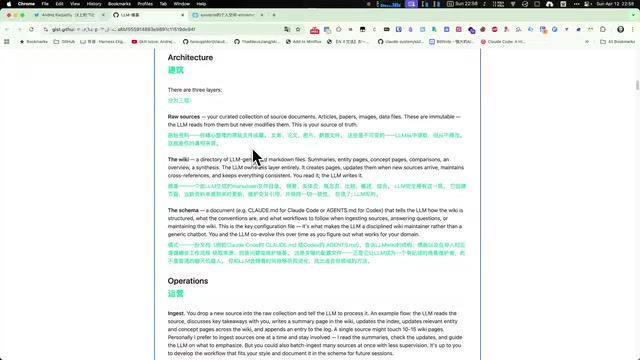
The RAW folder follows a "write-only" principle. All research papers, GitHub repositories, web articles, screenshots, and other raw materials go into this folder. The LLM can read its contents but never modifies them—raw materials always remain in their original state.
Layer Two: Wiki Folder (AI-Generated and Maintained)
This is the core of the entire system, with the LLM responsible for creating, updating, and maintaining it. It includes summaries, concept explanations, people profiles, topical articles, and more—all with cross-references that weave knowledge into a network.
Cross-referencing is the core mechanism in knowledge management that transforms isolated information into a structured knowledge network. From a graph theory perspective, each note is a node, cross-references are edges, and together they form a knowledge graph. Research shows that human memory retrieval efficiency correlates positively with the connection density of memory nodes—this is the theoretical foundation of the Zettelkasten method. AI automatically maintaining cross-references essentially simulates the process of human brains building associations, but executes it with machine speed and consistency.
This layer has two key files:
- index.md: A master index file listing all files in the Wiki along with their summaries. The LLM reads this file first during each Q&A session, finds relevant entries, then dives deeper into corresponding articles. This design closely resembles Retrieval-Augmented Generation (RAG) technology—RAG's core challenge is how to help the model find the most relevant knowledge fragments given limited context windows. Traditional RAG relies on vector databases for semantic retrieval, while index.md replaces vector retrieval with a structured Markdown index. For personal knowledge bases with fewer than a thousand files, this lightweight approach is actually more stable and interpretable.
- log.md: An operation log file that records every modification, query, and maintenance operation. This log itself documents the growth trajectory of the knowledge base, making it easy to trace all changes the AI has made to the vault.
Layer Three: Schema File (System Specifications)
Similar to a claude.md configuration file, this defines the operating specifications for the entire system: how to process new materials, what format articles should use, how long summaries should be, and how to handle contradictions. This is where human effort is most concentrated—you adjust AI behavior by modifying this file, rather than manually organizing Wiki content.
Three Daily Workflows: Ingest, Query, Maintain
Under this architecture, daily operations are simplified into three workflows:
Workflow One: Ingest (Acquiring New Content)
Place new materials into the RAW folder and trigger a processing flow. The LLM automatically reads the content, extracts core summaries, and creates or updates Wiki pages. Typically, a single content addition generates cross-reference updates across 10-15 pages, with the operation recorded in log.md.
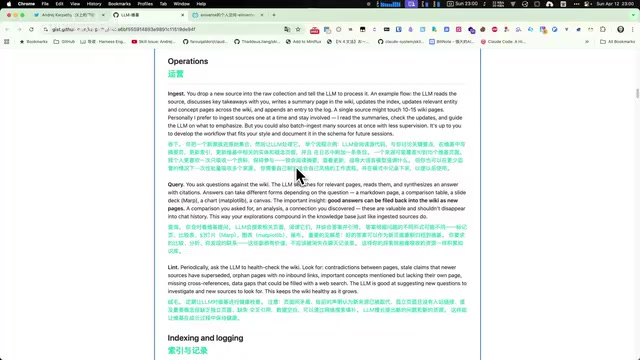
In practice, you can save processing instructions as Claude Code slash commands, then simply execute the slash command and specify the article to analyze for automatic content addition. Slash commands are essentially pre-stored prompt templates that allow users to encapsulate complex multi-step instructions into a single command—similar to Shell scripts or Makefiles, standardizing repetitive operations. Packaging Ingest, Query, and Maintain operations each as slash commands achieves a "one-click trigger, automatic execution" workflow, dramatically lowering the usage threshold and cognitive burden.
Workflow Two: Query (Searching the Knowledge Base)
When you want to learn about a topic, instead of searching raw documents in the RAW folder, you search directly in the Wiki. Because the AI has already distilled all raw materials into a cross-referenced knowledge structure, search results are far more useful than directly searching source texts. If a particular answer is especially valuable, you can write it back to the Wiki as a new knowledge entry.

For example, when querying "AI Agent memory systems" in the vault, Claude Code not only finds directly relevant content (such as the Hermes Agent memory system, Memo Base open-source project, Memo9, etc.) but also discovers related plugins and tools through associative retrieval like OpenCloud. More importantly, it can identify areas not yet deeply covered in the notes, such as memory system classification frameworks, Context Engineering definitions, and memory evaluation methods.
Workflow Three: Maintain (Periodic Maintenance)
Periodically have the LLM perform a "health check" on the entire Wiki directory: identify contradictory statements, outdated information, orphaned entries not linked by any other page, and obvious knowledge gaps. Maintenance instructions can also be saved as slash commands and executed periodically.
This workflow completely replaces the tedious chore of manually organizing notes, keeping the knowledge base continuously updated rather than slowly forgotten.
Practical Tools and Efficiency Tips
In practice, several tools can significantly improve material collection and knowledge base management efficiency:
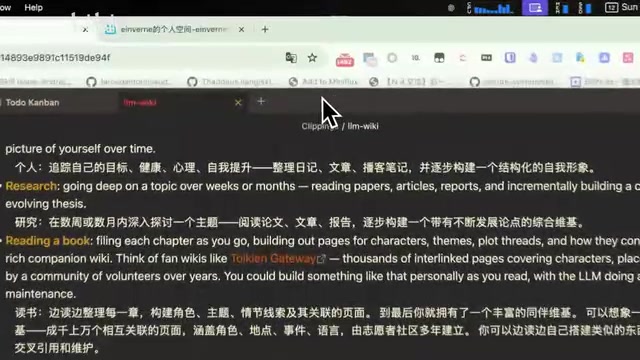
- Obsidian Web Clipper: A Chrome extension that converts web pages to Markdown format with one click and saves them to Obsidian. After clicking the extension button, the web page is automatically converted into a previewable Markdown file, then clicking "Add to Obsidian" completes the save.
Related articles
 Tutorials
ChatGPT Plus Subscription Guide: Are GPT-5.5, image-2, and Codex Worth the Upgrade?
A detailed look at ChatGPT Plus features — GPT-5.5, image-2, and Codex — with a Plus vs Pro comparison and a complete step-by-step subscription guide for users outside the US.
 Tutorials
Harness AI Engineering in Practice: Using Claude Code to Master Enterprise-Level E-Commerce Development
Deep dive into Harness AI Engineering: master enterprise e-commerce development with Claude Code using the Rules, Skills, Wiki, and Changes framework.
 Tutorials
Cursor + Codex Dual-IDE Collaboration: A Practical Methodology for Open-Source Project Customization
A complete methodology for open-source project customization based on real-world experience, detailing the Cursor+Codex dual-IDE workflow, seven-stage process, MVP validation, and AI source code reading techniques.