Obsidian + Claude Code Three-Layer Memory System: A Complete Solution to AI Cross-Session Amnesia

Build a three-layer memory system with Obsidian to solve AI's cross-session amnesia problem
This article introduces a three-layer memory system built on Obsidian and Claude Code that solves the pain point of AI starting every conversation from scratch. The architecture simulates human brain memory mechanisms: a long-term memory layer stores structured knowledge foundations, a session memory layer records conversation threads in real-time to keep thinking uninterrupted, and a brain directory layer (Memory.md) serves as a navigation file telling AI its identity, data locations, and usage methods. The solution runs entirely locally with zero API costs.
The Most Frustrating Problem with AI Tools
What's the most frustrating problem with AI tools? It's not that they aren't smart enough—it's that every conversation starts from scratch. A topic you discussed in depth yesterday? Open a new session today, and it's like talking to a completely different person. This pain point plagues everyone who uses AI intensively.
Recently, a creator shared his "three-layer memory system" built with Obsidian and Claude Code, turning a local knowledge base into AI's external neurons and achieving memory continuity across sessions. This solution runs entirely locally with zero API costs, and the approach is well worth learning from.
Why Does AI Need "External Memory" to Solve Its Amnesia Problem?
The working mechanism of current mainstream large language models makes them inherently "forgetful"—each session is an independent context window that gets cleared when the conversation ends. Even top-tier models like Claude and GPT can't truly remember your project progress from last week, your writing style preferences, or reading notes you organized two weeks ago.
The root cause of this "forgetfulness" lies in the architectural design of LLMs themselves. Each conversation is essentially an independent forward inference process—the model can only process information within the current input's "Context Window." Even Claude 3.5 with its 200K token ultra-long context window can only maintain coherence within a single session—once the session ends, all intermediate states are not persistently stored. This is fundamentally different from human brain memory mechanisms: the human brain converts short-term memory into long-term memory through the hippocampus, while an LLM's "memory" only exists during the inference process and is essentially stateless computation. Current industry solutions fall into three main categories: expanding the context window (treats symptoms, not the cause); RAG (Retrieval-Augmented Generation) technology that dynamically injects external knowledge during inference; and the external memory system introduced in this article, which is essentially a lightweight RAG practice.
This creates a very practical problem: you have to spend significant time re-explaining background context and repeating requirements every single time. AI remains a "new hire that needs retraining every time" rather than a partner that understands you better with use.
The core idea of this three-layer memory system is: Don't change the AI itself—build a structured memory system externally that allows AI to quickly "recall" who you are, what you're working on, and where the last conversation left off every time it starts.
Detailed Breakdown of the Obsidian Three-Layer Memory Architecture
The entire system simulates the human brain's memory circuits, dividing the Obsidian knowledge base into three logically distinct functional partitions.
Before diving into the architecture, it's important to understand why Obsidian was chosen as the platform. Obsidian is a bi-directional linking note-taking application based on local Markdown files, with a core design philosophy of "your data always belongs to you." Unlike cloud-based tools such as Notion or Roam Research, Obsidian stores all notes as plain-text .md files—a characteristic that makes it naturally suited as an external knowledge base for AI. Claude Code can directly read and write to the file system without any API middleware. An Obsidian Vault is essentially an ordinary folder, and this structured local file system perfectly aligns with LLMs' file-reading capabilities, enabling "AI reading a knowledge base" at zero cost.

Layer One: Long-Term Memory Layer — AI's Knowledge Foundation
Corresponding to the cerebral cortex in the human brain, this layer stores all stable, structured, long-term valuable information. Physically, it's simply the note folders you've already organized in Obsidian, but in this system it plays a completely different role—it's Claude Code's knowledge foundation.
Using the author's vault as an example, the long-term memory layer contains five core folders:
- Context: Personal identity, brand positioning, user personas, core preference rules
- Clippings: Articles and web pages collected from the internet as raw materials
- Script: All video scripts and tutorial materials
- Daily: Daily records and daily inspiration capture
- Reading: Book notes and deep reflections
The cognitive quality of all Claude Code outputs depends on the quality of this layer.
Layer Two: Session Memory Layer — Keeping AI's Thinking Uninterrupted
Corresponding to the prefrontal cortex working memory in the human brain, this layer specifically solves the "AI forgets everything when closed" problem. It's a dedicated folder called Claude Memory, where Claude Code records current conversation threads, temporary inspirations, reasoning processes, and decision paths in real time.
Its core function is singular: keeping the thinking uninterrupted.
More importantly, this content doesn't go to waste. After a session ends, you can distill, upgrade, and migrate valuable content to the first layer, creating continuous knowledge accumulation. This "short-term → long-term" migration mechanism simulates the process by which the human hippocampus consolidates working memory into long-term memory.
Layer Three: Brain Directory Layer — The Memory.md Navigation File
This is the most invisible yet most critical layer in the entire system—a file called Memory.md. Its function is to tell Claude Code who you are, where your data is, and how it should be used.
From a technical perspective, Memory.md is a carefully designed "System Prompt" engineering practice. In LLM interaction architecture, system prompts are instruction layers injected before user input, used to define the model's role, behavioral norms, and contextual background. Through its modular design, Memory.md solidifies background information that would otherwise need to be manually repeated by the user into a reusable prompt template—it not only tells the AI "who you are" but also "where your knowledge is," serving as the core knowledge routing function.
Every time Claude Code starts, it reads this file first, then instantly completes three things:
- Identity confirmation: Who you are and what you're doing
- Locating long-term knowledge: Where the first layer's memory is
- Picking up the previous thread: Where the second layer is
If the first two layers are the memory itself, this layer is the navigation system plus operating system.
Six Core Modules of the Memory.md Template
As the soul file of the entire system, the writing quality of Memory.md directly determines how well the three-layer memory system operates. The author divides it into six core sections:
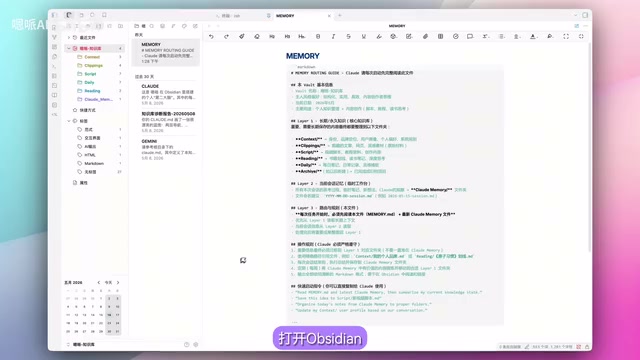
Section One: File Header Basic Information — Includes Vault name, owner, style preferences, and current date—essentially a quick self-introduction for Claude Code.
Section Two: Long-Term Knowledge Layer Description — Draws a detailed knowledge base map for Claude Code, clarifying the positioning of each folder and significantly reducing AI's "guessing" behavior.
Section Three: Session Memory Layer Description — Clarifies storage rules for temporary content and migration mechanisms.
Section Four: Routing and Core Rules — This is the soul section, defining Claude Code's workflow, usage priorities for the three memory layers, and output requirements.
Section Five: Operational Rules and Best Practices — Includes using precise paths, mandatory migration of important content to the long-term memory layer, output format requirements, etc.
Section Six: Quick Command Templates — Common shortcut command examples for quick access during daily use.
Complete Steps for Connecting to Claude Code and Five Application Cases
Understanding Claude Code's capability boundaries helps in better designing this system. Claude Code is a command-line AI programming assistant from Anthropic whose core capabilities far exceed ordinary conversational AI—it has full "Agent" characteristics, capable of autonomously executing file read/write operations, code execution, directory traversal, and more.
Related articles
 Tutorials
ChatGPT Plus Subscription Guide: Are GPT-5.5, image-2, and Codex Worth the Upgrade?
A detailed look at ChatGPT Plus features — GPT-5.5, image-2, and Codex — with a Plus vs Pro comparison and a complete step-by-step subscription guide for users outside the US.
 Tutorials
Harness AI Engineering in Practice: Using Claude Code to Master Enterprise-Level E-Commerce Development
Deep dive into Harness AI Engineering: master enterprise e-commerce development with Claude Code using the Rules, Skills, Wiki, and Changes framework.
 Tutorials
Cursor + Codex Dual-IDE Collaboration: A Practical Methodology for Open-Source Project Customization
A complete methodology for open-source project customization based on real-world experience, detailing the Cursor+Codex dual-IDE workflow, seven-stage process, MVP validation, and AI source code reading techniques.