Offline JS Playground: A Browser-Based JavaScript Sandbox That Works Without Internet
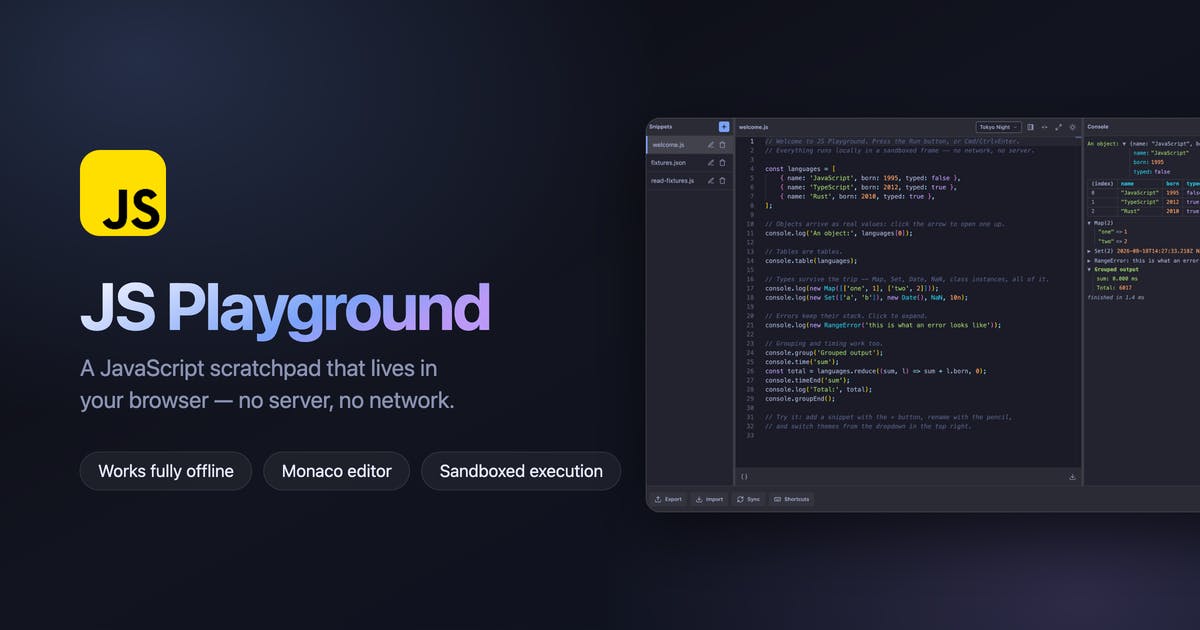
A Chrome extension that lets you run JavaScript and process JSON offline, right in your browser.
Offline JS Playground is a Chrome extension that provides a lightweight, offline JavaScript sandbox directly in your browser. It features a built-in console for instant code execution feedback, dual support for JavaScript and JSON processing, and a privacy-first design that keeps all code local. Ideal for quick experiments, isolated debugging, and learning, it earned 83 upvotes on Product Hunt and reflects the growing "Vibe coding" trend toward low-friction developer tools.
An Offline Tool Built for Quick Experimentation
Every developer has those moments: you want to verify a piece of JavaScript logic or quickly format some JSON data, but firing up a full IDE feels like overkill. Offline JS Playground was created for exactly this pain point — an offline JavaScript sandbox that runs directly inside the Chrome browser.
The tool has already earned 83 upvotes and 7 comments on Product Hunt, landing at #10 on the daily leaderboard. It's categorized under Chrome Extensions, Productivity, Developer Tools, and "Vibe coding," and was created by Suman Hansada.
Core Features: Write, Run, and See Results — All in One Flow
Built-in Console with Instant Feedback
The standout feature of Offline JS Playground is its built-in UI console. Write your code in the browser extension interface, hit run, and the results appear right there in the same view — no switching to DevTools or opening a terminal.
From a technical architecture perspective, Chrome extensions run on the Manifest V3 architecture, where each extension has its own sandboxed environment that includes a Service Worker (background script), Content Script (injected into web pages), and Popup/Side Panel (UI). Offline JS Playground's code execution relies on the extension's own JavaScript runtime rather than directly calling the page's DevTools Console. This architecture provides inherent isolation — code executed within the extension won't affect the webpage you're browsing, nor can it be accessed by page scripts. From a security standpoint, this adds an extra layer of protection compared to running code directly in the DevTools Console.
Whether you want to test an array method, verify a regex's matching behavior, or troubleshoot a function's edge cases, you can get it done in seconds: write code → hit run → see results, forming a tight feedback loop.
Dual Support for JavaScript and JSON
Beyond running JS code snippets, the tool also provides dedicated JSON data processing support. During front-end/back-end integration, developers frequently need to inspect API response JSON structures, format messy data, or validate syntax. Having this capability integrated into the same Playground eliminates the hassle of constantly switching between tools.
In modern web development, JSON (JavaScript Object Notation) is the de facto standard format for data exchange between front-end and back-end systems. When working with RESTful APIs or GraphQL endpoints, developers often deal with deeply nested JSON responses containing numerous fields. Common operations include: formatting compressed JSON strings for readability (Pretty Print), validating JSON syntax (Validation), extracting values at specific field paths, and comparing differences between two JSON objects. The traditional approach involves using Postman, the jq command-line tool, or online JSON formatting websites. Integrating this capability into a code Playground means developers can directly use JavaScript's native methods like JSON.parse() and JSON.stringify() combined with custom logic to process data — far more flexible than a pure formatting tool.
The Real Value of "Offline First" Design
Your Code Always Stays Local
Online platforms like CodePen and JSFiddle require uploading code to the cloud for execution, creating privacy risks when handling code containing sensitive information. Offline JS Playground runs everything locally in your browser, without routing through any third-party servers — a clear advantage for enterprise developers or users who prioritize data security.
It's worth noting that these online coding platforms use different technical approaches. CodePen and JSFiddle are earlier solutions that execute and render results by injecting user code into iframe sandboxes; newer platforms like StackBlitz use WebContainer technology to run a complete Node.js environment in the browser. While these platforms are powerful, they all require a network connection to load the editor framework, save code snippets, or sync collaboration state. Offline JS Playground takes the fully local route, trading cloud sync and sharing capabilities for zero-latency startup and complete privacy.
Always Available, No Network Required
The offline capability means that whether you're on a plane, in the subway, or in an environment with unstable connectivity, the Playground works as long as you can open your browser. This "available anytime, anywhere" characteristic aligns perfectly with its "quick experimentation" positioning.
"Offline First" is a mature software design philosophy that was first widely discussed in the mobile app and Progressive Web App (PWA) space. Its core principle: assume the network is unavailable from the start, making local storage and local computation the default mode, with network connectivity as an optional enhancement. The technical foundation for this approach includes mature browser-side storage technologies (IndexedDB, localStorage, Cache API) and the performance of modern JavaScript engines (V8, SpiderMonkey) that can handle substantial computation tasks on the client side. Against the backdrop of increasingly strict privacy regulations (such as the EU's GDPR and China's Personal Information Protection Law), offline-first design also offers inherent compliance advantages — data never leaves the user's device, fundamentally eliminating compliance risks associated with data transmission and storage.
Use Cases
According to the official description, Offline JS Playground covers the following primary scenarios:
- Quick experimentation: Verify a syntax feature or API behavior without setting up a project
- Isolated debugging: Pull out problematic code for standalone troubleshooting
- Learning and practice: A lightweight environment for beginners practicing JavaScript
- Validating ideas: Test your logic before committing it to a project
It doesn't aim to replace full development environments like VS Code. Instead, it precisely positions itself as a lightweight, instant, zero-barrier supplementary tool — "use JavaScript without needing a full development environment."
Product Positioning and Thoughts
Offline JS Playground is a textbook "small but beautiful" tool: no feature bloat, just a laser focus on one clear need — letting developers run JS and process JSON in the browser at minimal cost.
It's categorized under Product Hunt's emerging "Vibe coding" category, a concept worth exploring. "Vibe Coding" is a philosophy that emerged in the developer community during 2024-2025, originally coined by AI researcher Andrej Karpathy. It refers to a more intuitive, lower-friction way of coding — where developers don't need to strictly follow traditional engineering processes (creating projects, configuring build tools, setting up dependency management) and instead write and validate code based on "feel." The popularity of this concept is closely tied to the proliferation of AI-assisted programming tools (such as GitHub Copilot and Cursor) and reflects the developer community's pushback against over-engineering. Product Hunt establishing it as a standalone category signals that the platform sees this as a noteworthy direction in the tool ecosystem.
Offline JS Playground fits squarely into this trend, reflecting developers' current pursuit of lightweight, instant coding experiences: more natural, lower-friction code experimentation without having to spin up a full engineering workflow every time.
Of course, as a browser extension, its capability boundaries are clear: it's great for handling standalone code snippets but not suited for running full projects that require complex dependencies, module bundling, or backend environments. Those needs still call for a local development environment.
Takeaway
With its clean feature set and "offline first" design, Offline JS Playground provides developers with a convenient in-browser JavaScript sandbox. Bucking the trend of tools moving to the cloud, it puts privacy, immediacy, and availability first. For developers who frequently need to quickly verify JavaScript logic or process JSON data, this lightweight tool is well worth adding to your toolkit.
Related articles

Resume Guide for Programmers Transitioning to AI: From an HR Perspective to Job Requirement Matching
How should programmers transitioning to AI write a resume? This Bilibili tutorial gives five key preparation actions: set aside two or three days to review skills and projects, choose a simple template, reverse-engineer the tech stack from job sites, emphasize LLM capabilities, and do a final check from an HR perspective.

Building a RAG Knowledge Base: A Complete Guide from Architecture to Retrieval Evaluation
A systematic overview of the full RAG knowledge base workflow: from overall architecture and mature retrieval solutions to key details of retrieval evaluation and who should learn it, helping developers build a path from beginner to hands-on practice.

Turn Screenshots into Web Code in Seconds: Anyone Can Write HTML with AI
A Bilibili creator demonstrates using AI to turn webpage screenshots directly into HTML and CSS code without manual coding. The article analyzes the tool's usage, new features like video-based app cloning, iterative refinement, and the real boundaries of AI giving zero-foundation users programming ability.