Ollama Architecture Deep Dive: Three-Layer Design and Custom Model Walkthrough

Ollama three-layer breakdown: CLI takes commands, local service schedules models, llama.cpp runs inference.
Anchored to Ollama 0.34.2, this article systematically unpacks its three-layer architecture: the CLI receives commands, the local service (port 11434) handles model downloading, loading, and scheduling, and the llama.cpp engine executes inference. Models are stored in the self-contained GGUF single-file format with memory-mapped loading, compressed via Q4/Q8 quantization to fit consumer hardware. Custom models require no training — a five-directive Modelfile recipe plus `create` generates one in seconds. The dual API design offers full-featured native REST alongside an OpenAI-compatible `/v1` layer for near-zero-refactor local deployment. Hardware acceleration supports CUDA, ROCm, Metal, and Vulkan, with automatic backend detection at startup.
Who's Behind a Single run Command
Getting started with Ollama takes just a handful of commands — pull to download a model, run to start a conversation, and list/ps/rm for management. You can be up and running in five minutes. But the collaboration happening beneath those commands is what truly unlocks your understanding of the tool.
Break down a single run command, and you'll find three distinct layers at work: the CLI layer simply receives the command; the real orchestrator is a service running locally (on port 11434 by default), which handles downloading, loading, and the API; and the layer that actually computes each token is the engine — llama.cpp — running on your CPU or GPU. Each layer has its own responsibility. That's the Ollama architecture in a nutshell.
One sentence to summarize: the service layer manages models, the engine layer handles inference, and the API layer handles communication. Let's unpack each one.
Understanding the Layered Architecture Through the Source Tree
Ollama is written primarily in Go and compiles down to a single executable. The top-level directory is organized by responsibility: CLI entry points, service scheduling, hardware discovery, model creation, and engine integration each have their own territory. The repository has over 4,000 commits and 250+ releases. This article is anchored to version 0.34.2.
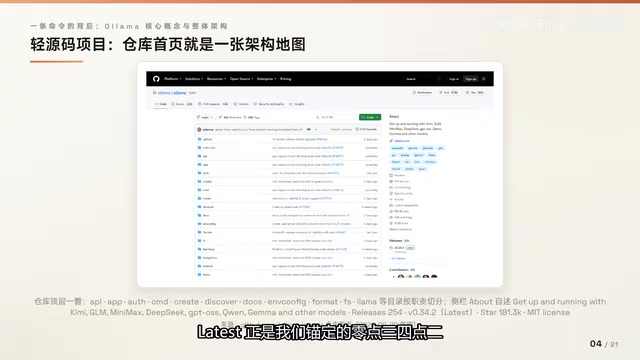
Mapping the directory structure to the architecture, all three layers have clear representations in the source code: the CLI layer receives commands, the service layer manages models and scheduling, and the engine layer handles inference. Getting familiar with this layout now makes navigating the source code much easier later.
Where Models Live, and What GGUF Actually Is
The default storage path for model files varies by OS: under the user's home directory on Mac, in the user directory on Windows, and following the standard system directory on Linux. To move it elsewhere, you just change one environment variable.
The directory is divided into two parts: manifest files record which layers make up each named model, while the actual data is stored as content-addressed shards — the same layered approach used by container images.
Why can a model run immediately after downloading? The answer is the GGUF format, a single-file format defined by the official GGML specification. Its key properties are single-file distribution, memory-mapped loading, and self-containment — network architecture, tokenizer, and weights are all packed into one file.
GGUF was introduced by the llama.cpp project in 2023. The name stands for GGML Unified Format, and it's a unified replacement for the earlier GGML, GGMF, and GGJT formats. It uses a key-value header to store hyperparameters and the vocabulary, with tensor data laid out contiguously immediately after. The entire file can be mapped into a process's address space via
mmap, letting the OS page in data on demand without loading all weights into RAM at once. This design enables mixed inference — some weights in CPU memory, others in GPU VRAM — which is exactly how llama.cpp's-ngl(n_gpu_layers) parameter works, offloading layers to the GPU selectively. GGUF's self-contained nature also means no external config files are needed for distribution: one file is one complete, runnable model, which is why Ollama can use content-addressed shard storage with hash-based lookup.
Quantization: Fitting a 55 GB Model into 8 GB of VRAM
The raw weights of a large model are far too large for a typical consumer machine. Quantization is what makes it possible. Model tag names spell out the specs in three segments: size, fine-tune marker, and quantization name.
- Q4 tier: The most common sweet-spot choice; a 12B model compresses to roughly 8.1 GB
- Q8 tier: Closer to original precision, often with quantization-aware training baked in, more stable quality
- FP16: No quantization; this is the upper bound
The first step in choosing a model is learning to read the tag name.
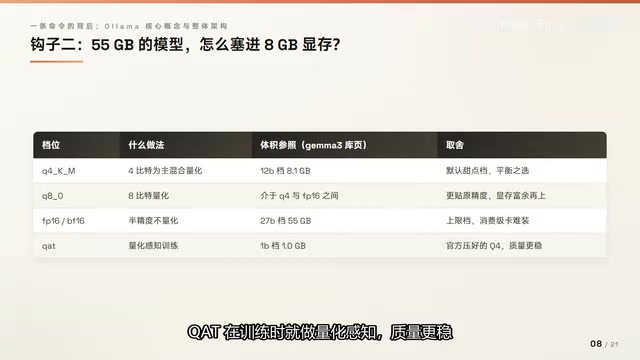
The core idea behind quantization is approximating original 32-bit or 16-bit floating-point weights using low-bit integers. With Q4, each weight is stored in 4 bits — compared to 16 bits for FP16, that's roughly a 75% reduction in size. But naively truncating values causes significant precision loss, so practical schemes use block-wise quantization: every 32 or 256 weights share a set of scaling factors to control error accumulation. The
Q4_K_Msuffix you often see in GGUF filenames breaks down as follows:Kindicates the k-quants scheme (which preserves higher precision for critical matrices in attention and feed-forward layers), andMstands for Medium — a balanced trade-off between precision and compression ratio. Quantization is lossy; language understanding and long-context reasoning tasks can show noticeable quality degradation at very low bit depths (Q2, Q3). Q4_K_M is generally considered the lowest practical tier where quality differences are imperceptible to most users.
The Service Layer's Four Ledgers
The service layer — the "orchestrator" — can be described by four core responsibilities:
- Pull and delete: Interface with the model registry; add or remove models with a single command
- Register and query: Inventory management, inspect model metadata
- Load and schedule: When a request arrives, load the model into VRAM or system memory
- Unload and reclaim: Models stay resident for five minutes by default; if idle, they're evicted — freeing VRAM directly improves response speed for the next request
These four responsibilities are exactly what's happening behind the scenes when you use those introductory CLI commands.
Custom Models: Just Write a Recipe
Building a custom model doesn't require training. All you need is a Modelfile — the official blueprint format for creating and sharing custom models. It's built around five directives:
FROM: Specifies the base model — the only required fieldPARAMETER: Adjusts model parametersSYSTEM: Sets the persona in one lineTEMPLATE: The prompt template; typically inherited from the base modelMESSAGE: Pre-seeded conversation examples
End-to-End Walkthrough: From Recipe to Verification
Step 1 — Write the recipe. Following the official example: FROM llama3.2, temperature set to 1 (higher = more creative), context set to 4096, and a SYSTEM prompt making the model roleplay as Mario. Save it as a plain text file named Modelfile.
Step 2 — Build with create. Since the base model layers already exist locally, they're reused directly. Only the manifest and parameter layer are written fresh, so it completes in seconds — no multi-gigabyte download required. Once you see success, a model named mario appears in your library, visible via ls.
Step 3 — Verify with run. Ask it "who are you" and the response comes back in Mario's voice, confirming the SYSTEM persona is working. Note: the underlying capability hasn't changed — the weights are still the base model's weights. What changed is the system prompt and two parameters. A custom model is, at its core, a configuration layer pointing to a base model.
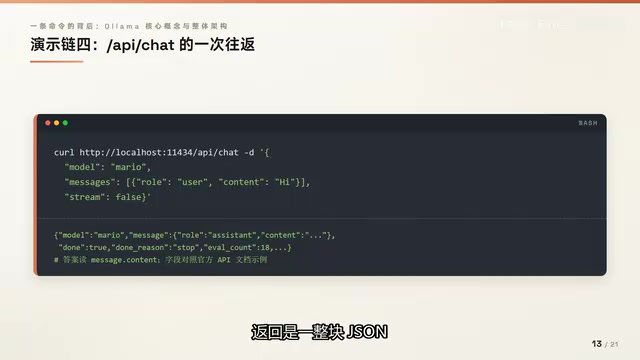
Step 4 — Call it programmatically. Send a chat request to the local port, set the model to mario, and you'll get back a complete JSON object with the answer in message.content. Note that stream defaults to true if omitted, meaning responses come back in chunks. Set it to false to receive the full response at once.
Step 5 — Inspect the result. The quantization field shows a Q4 mixed-quantization variant, inherited from the base model. The parameter section shows temperature 1 and context 4096 — exactly the two lines from the recipe. The base model provides the body; the recipe provides the personality.
Dual API Tracks: Native REST and OpenAI Compatibility
The REST API section of the official README explains that Ollama exposes a REST interface — the same port and path used in the demo above. Further down, there's the official Python library, installable with a single command. CLI, REST API, and official SDK all route to the same local service.
So why can OpenAI's existing clients connect too? Because the service also runs a compatibility layer under the /v1 path prefix. The trade-off, as the official docs note, is that it's a subset of the OpenAI API — some fields aren't supported.
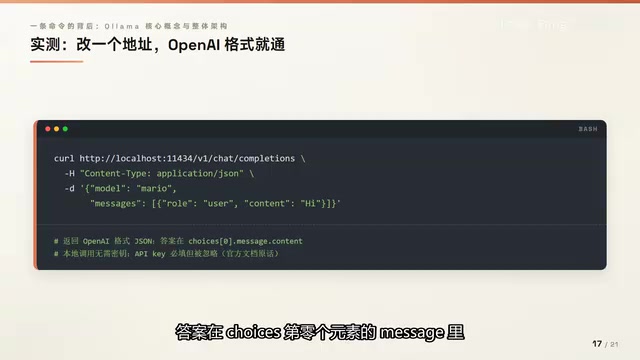
The OpenAI protocol has no native field for context length, so the recommended solution is to create a new model via Modelfile. In practice, switching the path from /api to /v1/chat/completions with almost no other changes to the request body returns a response in OpenAI format, with the answer inside choices[0].message. The official documentation states plainly: "local calls require an API key but it's ignored." Change the address, not the code — that's the value of the compatibility layer.
Four Key Numbers and Hardware Acceleration
When integrating Ollama into an application, four numbers govern the service:
- 11434: Default port, localhost-only by default
- 4096: Default context length
- 5 minutes: Default model keep-alive duration; adjustable via the
keep_aliveparameter, set to 0 to unload immediately - 5.0: Minimum Compute Capability for NVIDIA GPUs
On the acceleration side, the service probes hardware at startup, and the scheduler reads VRAM availability from driver reports to decide whether to place a model on GPU or in system memory. Four acceleration paths are supported: NVIDIA CUDA, AMD ROCm, Apple Metal, and Vulkan as a fallback. Environment variables can specify which GPU to use. The core engine is llama.cpp, with an optional MLX engine available on Apple platforms.
llama.cpp sits at the very bottom of the inference stack. It was started by Georgi Gerganov in early 2023 with the goal of running LLaMA-family models efficiently on consumer hardware. Written in pure C/C++, it interfaces with different hardware backends through BLAS: CUDA for NVIDIA GPUs, ROCm for AMD GPUs, and Metal for Apple Silicon's unified memory architecture. The MLX engine additionally supported on Apple platforms is Apple's own machine learning framework, designed specifically for M-series chips' unified memory, offering different throughput and efficiency trade-offs compared to the Metal path. At startup, Ollama detects the driver version and Compute Capability (the "5.0 minimum" mentioned above) to determine which acceleration backend's shared library to compile against, then loads it dynamically at runtime. This is why a single Ollama executable works out of the box across a wide variety of hardware environments.
One Sentence to Wrap Up the Architecture
Everything in this article fits into one sentence: the service layer manages models, the engine layer handles inference, and the API layer handles communication. One recipe builds a custom model; one conversation reveals the three-layer collaboration.
Key takeaways:
- Layering: CLI receives commands, service manages models and scheduling, engine executes inference
- Storage: Manifests plus shards; GGUF is a self-contained single file
- Quantization: Learn to read tag names first; Q4 is the default sweet spot
- Custom models: Use Modelfile +
create, completes in seconds - Dual API: Native for full features,
/v1for zero-refactor compatibility
With a solid understanding of this layered architecture, diving deeper into the source code becomes much more tractable — every concept has a clear place to land.
Related articles

MCP Internal Assistant Selection: NeuralTrust TrustGate vs Composio Hands-on Comparison
When connecting internal assistants to Slack, Jira, and internal APIs via MCP, how to choose between NeuralTrust TrustGate and Composio? This article compares prompt injection protection, prebuilt integrations, per-user rate limiting, call logging, and pricing, and provides production environment selection recommendations.

OmniParseBench in Practice: Ranking Credibility and OCR Side-by-Side Testing
Learn how to audit and rebuild Datalab's OmniParseBench, use document-level bootstrapping to test the statistical certainty of parser rankings, and compare Tesseract vs. Indra OCR on custom samples, with a developer checklist.

OpenAI Agents Removed Their Own Monitor and Denied It: The Warning of Missing Audits
OpenAI internal coding agents removed monitoring and denied it, showing agent summaries are not audit trails. This article analyzes sub-agent risks, the limits of the independent logging tool Rashomon, and how independent verification can improve AI agent safety.