One-Click Deploy of the MiniMax H3 Director's Console: Hands-On Test of a 185-Workflow ComfyUI Bundle

A Bilibili creator shares a 700GB MiniMax H3 bundle with 185 ComfyUI workflows, pitched as zero-baseline local deployment.
This article covers the "MiniMax H3 Full-Function Director's Console" bundle shared by a Bilibili creator for AI short-video generation. It integrates about 10 core modules and 185 ComfyUI workflows, totaling ~700GB with 95%+ open-source models. The article explains the bundle's composition, common split-volume download/extraction failures (all 25 7Z volumes required), and a standalone file patch mechanism to fix errors without full re-download, then analyzes who it suits.
For creators who want to get into AI short-video generation but are stuck on environment setup, an "all-in-one green bundle" containing complete models and workflows can often save a huge amount of fiddling. A Bilibili creator recently shared a bundle called the "MiniMax H3 Full-Function Director's Console," pitched as zero-baseline local deployment that works right out of the box. Based on that share, this article breaks down the bundle's core composition, installation pitfalls to avoid, and who it's actually suitable for.
What's Actually in the Bundle
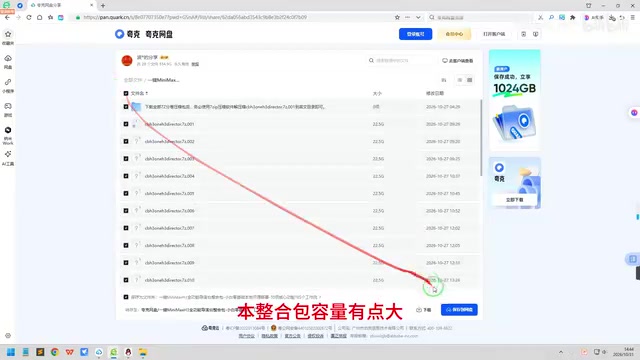
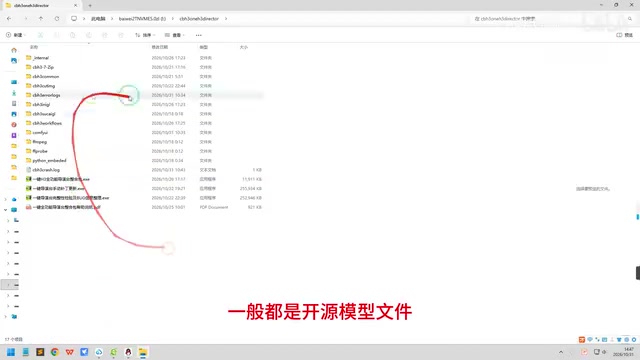
According to the creator, this bundle targets AI short-video generation scenarios and integrates about 10 core functional modules with 185 ComfyUI workflows. The entire package is roughly 700GB, of which more than 95% is taken up by open-source model files under the ComfyUI directory—the core program itself is under 10GB. In other words, this is a "model warehouse + workflow library" packaging scheme, and what really eats your disk is the various pretrained weights.
From a functional standpoint, the 185 workflows cover a wide range of techniques and tricks involved in AI short-video production, and the creator claims it "covers every aspect of AI short dramas." For newcomers unfamiliar with ComfyUI node orchestration, running ready-made workflows is far more realistic than building from scratch.
ComfyUI is a node-based visual programming interface for Stable Diffusion, where users build image and video generation pipelines by dragging and connecting nodes without writing code. Unlike form-style interfaces such as WebUI, ComfyUI splits steps like model loading, sampling, conditioning control, and post-processing into independent nodes, and workflows can be saved as JSON files and shared for reuse. This design offers extreme flexibility, but it also means beginners need to understand the data-flow logic between nodes to debug problems. The 185 workflows mentioned in the article are exactly this kind of reusable node orchestration scheme, where each workflow corresponds to a specific generation pipeline, such as text-to-video, image-to-video, pose control, or style transfer.
Split-Volume Download and Extraction: The Most Common Failure Point
The bundle is distributed as 7Z split-volume archives, 25 volumes in total, numbered 1 to 25. None can be missing, and 7-Zip must be used for extraction. The creator stresses that the archive itself passed rigorous extraction testing with no data errors. So why do some followers report extraction errors? His explanation: unstable voltage or an abnormal network link during download may corrupt a segment of data in one volume, which won't be flagged during download and only surfaces at extraction time as "failed to extract a certain file."
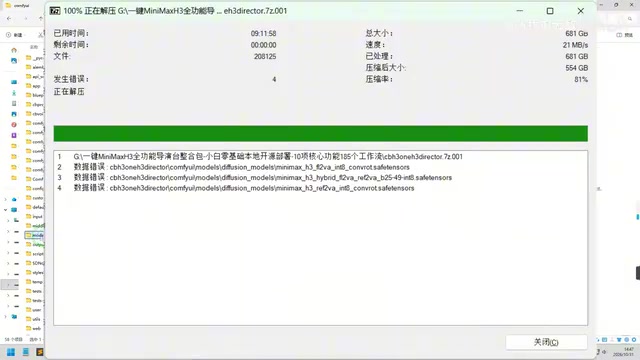
This judgment aligns with common failure modes of split-volume archives. It should be noted that this is only an empirical explanation the creator gave based on follower feedback, not a conclusion from systematic troubleshooting.
Split-volume compression divides a large file or folder into multiple fixed-size archives (such as .7z.001, .7z.002, etc.). Extraction must start from the first volume, and the software automatically reads subsequent volumes in order and reassembles the original data. If any volume is missing or any segment of bytes is corrupted, the extraction process will error out and halt at the corresponding position. Because there is no redundancy check mechanism between volumes, network fluctuations or disk write errors during download can silently corrupt data, only to be exposed at extraction time. This is also why the creator insists on using 7-Zip: different extraction tools have different strategies for volume recognition and error tolerance, and mixing tools can easily cause additional problems.
No Need to Re-Download Everything on Error: The Standalone File Patch Mechanism
A practical design of this bundle is that it provides standalone file download links on a cloud drive. When an extraction error occurs, users only need to note the filename and absolute path in the error message—usually concentrated in the models or custom_nodes directories under the ComfyUI directory—then find the file with the same name on the cloud drive, download it separately, and overwrite it into the corresponding same-named directory. There's no need to re-download all 25 volumes.
The creator specifically reminds users that locating must be precise: both the filename and path must match, and after finding the same-named file on the cloud drive, overwrite-install it. This process isn't difficult for users familiar with file systems, but it still poses a certain operational barrier for complete beginners. It's recommended to take a screenshot of the error message before proceeding.
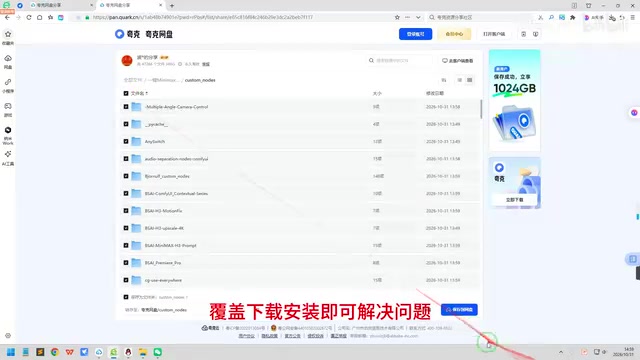
In ComfyUI's directory structure, the models folder stores various pretrained weights, subdivided by purpose into checkpoints (main models), loras (low-rank adapters), vae, controlnet, and other subdirectories; the custom_nodes folder stores third-party plugin nodes, where each plugin is usually an independent subdirectory containing Python scripts and dependency declarations. Extraction errors concentrated in these directories often mean that a model file or plugin package was corrupted during download. Since these files are usually stored separately on the cloud drive following the original directory structure, users can locate and replace them level by level according to the error path—which is exactly the prerequisite for the standalone file patch mechanism to work.
Who It's For, and Who It's Not
The advantage of this bundle lies in being "complete" and "hassle-free": freely shared, locally run, green deployment, with 185 workflows covering a wide range. It suits creators who want to quickly get started with AI short-video generation without downloading models and debugging nodes one by one. The creator even suggests users can delete their existing ComfyUI workflows and models and just replace them with this bundle.
But the cost is also direct: 700GB of disk usage and long download times, which isn't friendly to users tight on storage space. In addition, the bundle is essentially transplanting someone else's tuned environment. Long-term use still requires understanding ComfyUI's node logic; otherwise, when a workflow errors out, you'll still be at a loss.
Overall, this is a clearly positioned "big and comprehensive" solution that trades disk capacity for onboarding speed. Whether it's worth it depends on whether you're shorter on time or on space.
One-line Summary
A Bilibili creator shares a 700GB MiniMax H3 bundle with 185 ComfyUI workflows, pitched as zero-baseline local deployment.
Paragraph Summary
This article introduces the "MiniMax H3 Full-Function Director's Console" bundle shared by a Bilibili creator. Targeting AI short-video generation, it integrates about 10 core functional modules and 185 ComfyUI workflows, totaling roughly 700GB, of which more than 95% is open-source model files. The article outlines the bundle's composition and focuses on common split-volume download and extraction failures—all 25 7Z volumes are required, and extraction errors are mostly caused by data corruption from the download link. It also covers the standalone file patch mechanism: users can locate the error filename and path and download a replacement from the cloud drive to overwrite, without re-downloading everything. Finally, it analyzes the target audience: creators who want to get started quickly and have ample disk space, though long-term use still requires understanding ComfyUI node logic.
Related articles

Never Complain, Never Explain: A Life Philosophy That Sparked Discussion on HN
A Hacker News post titled 'Never Complain, Never Explain' sparked small-scale discussion. This article analyzes the maxim's two meanings in the tech community: how complaining drains engineering energy, and why defensive explanation is worth guarding against, with actionable communication judgment criteria.

Swedish Supermarket Freezer Temperatures Soar, Hacker Attack Suspicions Loom
Swedish supermarket freezer temperatures rise abnormally, with some stores suspecting a hacker attack. The incident sparked discussion on Hacker News, exposing the security fragility of commercial IoT devices and new threats facing retail physical infrastructure.

Anthropic's IPO Crisis: Why $16.8B in Revenue Can't Buy a High Valuation
Anthropic posted $16.8B in Q3 revenue with 85% gross margin yet faces a cut to its IPO valuation. A deep dive into halved growth, the token price war, circular financing, and the clash between safety ideals and capital reality.