One-Sentence Prompts to Make AI Write 10 Web Games: A Zero-Code Development Journey

Using natural language prompts to have AI generate 10 web games with zero code and deploy them live
This article documents a zero-code development experiment using the Claude CLI to generate 10 classic web-based mini-games—including 2048, Gomoku, Tetris, and Flappy Bird—in minutes through natural language descriptions alone, then deploy them to GitHub Pages. The experiment showcases AI programming's impressive rapid prototyping capabilities while also highlighting its limitations: complex products still require iterative human-AI collaboration.
Introduction: One Sentence to Get AI to Write a Complete Game
While we're still debating whether AI can replace programmers, someone has already used a one-sentence prompt to have AI write a fully playable web game in just a few minutes. This isn't science fiction — it's the real capability of today's AI coding tools.
This article documents a complete zero-code development experiment: using the Claude command-line tool, generating 10 classic web-based mini-games through natural language descriptions alone, and ultimately deploying them to GitHub Pages for public access. The entire process required not a single line of hand-written code.
Experiment Tools and Environment Setup
This experiment used Claude's command-line interface (CLI). The key difference between Claude CLI and the web-based Claude is that it can directly interact with the local file system — reading, creating, and modifying files, as well as executing terminal commands. This transforms AI from a mere chatbot into a programming assistant that can truly participate in the development workflow. Despite being a command-line interface, all interaction is done in natural language. Developers simply describe their requirements in plain language, and the AI automatically generates HTML, CSS, and JavaScript code and saves it as files.
The tech stack is remarkably simple:
- Frontend trio: HTML + CSS + JavaScript
- Canvas rendering: Canvas API
- Deployment platform: GitHub Pages
The Canvas API is a core drawing interface introduced with HTML5 that allows developers to perform pixel-level 2D graphics rendering on web pages through JavaScript. It's essentially a programmable canvas where every frame of a game is dynamically drawn via JavaScript code. Canvas is particularly well-suited for game development because of its immediate mode rendering mechanism — clearing the canvas and redrawing all elements each frame. This is fundamentally different from the retained mode of DOM manipulation and enables smooth animation effects. For games like Tetris or Flappy Bird that require 60-frame-per-second refresh rates, Canvas's performance advantage is especially apparent.
The crucial point is: the prompts contained no technical terminology whatsoever. There was no need to tell the AI what data structures or algorithms to use — just describe what the game is and what effects you want.
The Complete Process of 10 AI-Generated Games
2048: From Zero to Playable in 1–3 Minutes
The first prompt was roughly: "Create a 2048 game in the 01-2048 directory, web-based, dark theme, supporting keyboard arrows and mobile swipe controls, with a link back to the game lobby at the bottom."
With just that one sentence, the AI completed the code in 1–3 minutes. It generated a single-file HTML containing a complete 4×4 board, number sliding logic, and merge rules. While it didn't include full-screen adaptation (after all, it was just a one-sentence prompt), the game was fully playable.
Gomoku: AI Autonomously Implements Player-vs-Computer Strategy
The second game was a human-vs-AI version of Gomoku (Five in a Row). The prompt required: Canvas-drawn board, player plays black, AI plays white, and the AI should have basic offensive and defensive strategies.
What's interesting is that the prompt didn't specify which algorithm the AI should use at all. Gomoku AI typically relies on game tree search algorithms: the Minimax algorithm is the most basic approach, where the AI simulates all possible moves for both sides several steps ahead and scores each position through an evaluation function. Alpha-Beta pruning is an optimized version that improves search efficiency several-fold by eliminating branches that can't possibly affect the final decision. Evaluation functions typically assign different weights to patterns like open fours, closed fours, and open threes. All these decisions were left entirely to the large language model. The fact that Claude could autonomously implement offensive and defensive logic without being explicitly told which algorithm to use demonstrates that large language models have internalized vast amounts of game AI implementation patterns from their training data. In actual testing, if the player made careless moves, the AI quickly won — proving it had indeed implemented basic offensive and defensive logic.
Tetris: A Perfect Recreation of the Classic
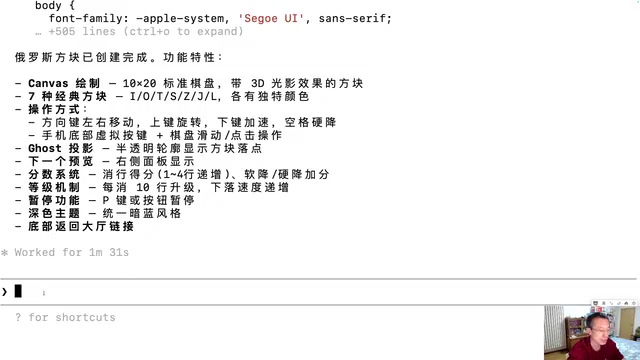
The prompt included: Canvas rendering, dark theme, seven classic piece types, arrow key controls, line clearing, score display, and next piece preview.
Testing confirmed that the line-clearing logic and scoring system both worked correctly. For a game of this scale — a few hundred lines of code — the AI completed it in just a few minutes as well.
Flappy Bird: Automatic Physics Engine Simulation
This pixel bird game involves simple physics simulation: gravity-based falling, tap-to-jump, and collision detection. The AI automatically implemented a mechanism where each frame applies a downward velocity to the bird to simulate gravity, and tapping gives an instantaneous upward velocity — the combination of both creates a parabolic trajectory.
Although this physics simulation mechanism is only about a dozen lines of code, it embodies the core principles of a game physics engine: gravity is implemented by adding a fixed downward acceleration each frame, jumping assigns an instantaneous impulse with a negative (upward) velocity value, and both are combined in each frame's requestAnimationFrame callback to produce motion that follows a parabolic equation. Collision detection works by comparing the bird's bounding box rectangle against the coordinate ranges of pipes and the ground. This is a simplified version of the core logic found in commercial physics engines like Box2D. The fact that the AI can automatically implement this demonstrates a considerable depth of understanding of the underlying mechanisms of game development.
The Remaining 6 Games and Game Lobby Integration
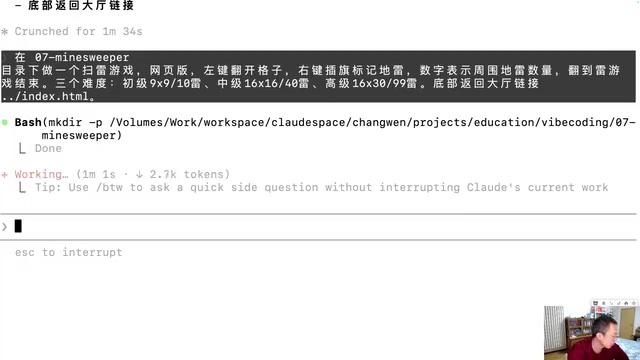
The remaining games included classics like Minesweeper and Snake, each generated from a one-sentence prompt. Finally, using a slightly longer prompt, the AI generated a game lobby page that integrated all 10 games together and successfully deployed it to GitHub Pages.
GitHub Pages is a static website hosting service provided by GitHub that allows developers to publish HTML, CSS, and JavaScript files from a code repository as publicly accessible web pages without configuring a server. It works by mapping the contents of a specified branch to a fixed URL (in the format username.github.io/repository-name). For purely frontend web games, GitHub Pages is the ideal zero-cost deployment solution — no backend server needed, no database required, no domain name to purchase. Just push the AI-generated single-file HTML to the repository and deployment is complete. This is also one of the key reasons this experiment chose single-file HTML as the game format.
The Capability Boundaries of AI Programming: What It Can and Can't Do
What AI Programming Can Do
- Rapid prototyping: Generate runnable code from a one-sentence prompt
- Autonomous technical decisions: No need to specify algorithms or data structures
- Multi-language, multi-framework support: Handles HTML/JS/CSS, Python, Java, and more
- Correct basic logic: Game rules, scoring systems, and AI opponents all work properly
What AI Programming Can't Do
- Build complex products from a single sentence: Having AI write something like Bilibili or QQ from one sentence is unrealistic
- Understand business requirements: AI doesn't know who your users are or what your business logic entails
- Complex architecture design: System decomposition, database design, and payment integration require human planning
- Quality judgment: Whether the code meets user needs still requires human verification
Human-AI Collaborative Iteration Is the Key
Code generated from a one-sentence prompt will inevitably have bugs, UI issues, and playability gaps. The real AI programming workflow is: AI generates the first version → human verifies the results → provides modification feedback → AI iterates and improves. This cycle may need to be repeated many times.
Takeaways for Developers: Role Transformation and Skill Evolution
The core message of this experiment isn't "how powerful AI is"
Related articles
 Tutorials
ChatGPT Plus Subscription Guide: Are GPT-5.5, image-2, and Codex Worth the Upgrade?
A detailed look at ChatGPT Plus features — GPT-5.5, image-2, and Codex — with a Plus vs Pro comparison and a complete step-by-step subscription guide for users outside the US.
 Tutorials
Harness AI Engineering in Practice: Using Claude Code to Master Enterprise-Level E-Commerce Development
Deep dive into Harness AI Engineering: master enterprise e-commerce development with Claude Code using the Rules, Skills, Wiki, and Changes framework.
 Tutorials
Cursor + Codex Dual-IDE Collaboration: A Practical Methodology for Open-Source Project Customization
A complete methodology for open-source project customization based on real-world experience, detailing the Cursor+Codex dual-IDE workflow, seven-stage process, MVP validation, and AI source code reading techniques.