One Sentence to Generate a Workflow: Hands-On with n8n Assistant's Natural Language Workflow Builder

n8n Assistant generates complete workflows from one natural language sentence, lowering the automation barrier—but the hard part shifts to knowing what to automate.
n8n Assistant demonstrates the ability to automatically generate workflows from natural language descriptions. Users simply type one sentence, and AI plans nodes, places them automatically, and tests data flow—no manual dragging required. This dramatically lowers the barrier to entry for n8n, shifting workflow construction from "operating nodes" to "describing intent." However, the video creator points out that the real difficulty is no longer building, but deciding which processes are worth automating. The demo only covers simple scenarios; complex branching and error handling capabilities remain unverified. Tools solve "how to do it," but "what to do" still depends on human understanding of the business.
From Dragging Nodes to One Sentence: How n8n Assistant Lowers the Automation Barrier
Traditionally, building an automation workflow in n8n meant you needed to be familiar with the node library, understand data flow, and manually configure every parameter. Now, a demo video shows another possibility: type a single natural language description, and AI automatically plans and generates a complete workflow.
In the video, the creator types one sentence: "When someone fills out my contact form, save them to a spreadsheet and notify me on Slack." The AI then begins planning the workflow, nodes automatically drop onto the canvas, and after clicking test, data flows through successfully. No nodes were dragged manually at any point.
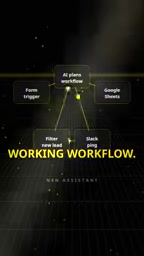
The core shift in this interaction model is that workflow construction goes from "operating nodes" to "describing intent." For users unfamiliar with the n8n node system, this dramatically lowers the barrier to entry.
The Actual Workflow Generation Steps: Planning, Placement, Testing
According to the video demo, the entire process can be broken down into three clear stages:
1. Intent Parsing and Workflow Planning
After the user inputs natural language, the AI first understands the task goal and plans the required node sequence. In the example above, the AI identifies three types of operations needed: form trigger, spreadsheet write, and Slack notification.
2. Automatic Node Placement
Once planning is complete, nodes automatically appear on the canvas and are connected. The video describes this as "Nodes snap into place"—nodes automatically snap to the correct positions.

3. Testing and Data Flow
The final step is clicking test to verify whether data flows as expected. The video demonstrates successful data flow, showing that the generated workflow is runnable.

From a product experience perspective, this "one sentence to runnable workflow" loop compresses what previously required multiple manual configuration steps into one description plus one verification.
The Real Difficulty Isn't Building—It's Deciding What to Automate
The most noteworthy point in the video comes from the creator's summary: "The hard part isn't building it, it's knowing what to automate."
This observation highlights the new bottleneck as automation tools become widespread. When the cost of building approaches zero, the tool itself is no longer the obstacle—the real challenge shifts to the business understanding level: you need to judge which repetitive tasks are worth automating and which processes offer the highest return on investment.
This also means that the stronger AI's workflow generation capabilities become, the more important users' ability to map out their own business processes becomes. Tools solve "how to do it," but "what to do" still depends on human judgment.
Product Positioning and Use Cases
At the end of the video, a product called Elitrix is mentioned, with the tagline "Built to run without you." Combined with the demo content, the target scenarios for this type of tool include:
- Automatic form-to-CRM/spreadsheet sync: Such as the contact form being saved to a spreadsheet and notifying the team, as shown in the demo.
- Cross-application notifications and reminders: Pushing events from one application to Slack, email, or other channels.
- Lightweight data pipelines: Moving and transforming data between multiple SaaS tools.
For users already familiar with n8n, AI-generated workflows can serve as a starting point for further manual fine-tuning; for new users, it offers a shortcut that bypasses the node learning curve.
Elitrix is the product name mentioned in the video, and its tagline "Built to run without you" emphasizes unattended automation capabilities. Based on the demo content, Elitrix is likely an AI-assisted layer built on top of or integrated with n8n, focused on generating and running automation workflows through natural language. It targets teams looking to reduce manual configuration and quickly achieve business automation, especially those needing cross-application data sync and notifications. However, public information about Elitrix's specific features and positioning is currently limited and requires further investigation.
Limitations and Points to Watch
That said, this demo only shows a single simple scenario (form → spreadsheet → Slack notification). Whether AI can generate equally accurate workflows involving conditional branches, loops, error handling, or complex data transformations is not addressed in the video.
Additionally, the ambiguity of natural language descriptions may introduce problems: how AI handles details not explicitly specified in a sentence—such as field mappings, trigger conditions, and authentication configurations—still requires more real-world usage to verify.
Overall, the "natural language workflow building" direction represented by n8n Assistant is pushing the barrier to using automation tools to new lows, but the value of the tool ultimately depends on how deeply users understand their business processes.
Background
n8n is an open-source workflow automation tool that uses a node-based visual programming model. Users build automation workflows by dragging nodes with different functions (such as triggers, HTTP requests, conditional logic, etc.) and connecting them. Each node represents an operation or service integration, and the connections between nodes define the data flow. n8n supports self-hosting, has a vast node library, can connect to hundreds of applications and services, and is an open-source alternative to commercial automation platforms like Zapier.
Related articles

Gemini 4 Argon Hands-On: AI Builds Board Games, Constructs Temples, and Trains Robots Autonomously
Gemini 4 Argon hands-on roundup: AI autonomously builds a desk racetrack and temple in Blender, writes a ray tracing engine, trains a humanoid robot to sink 7 shots, plus API pricing and developer access.

The Magic Octagonal Coin: Why Only 9% of People Can Predict Its Flip?
Only 9% of people can correctly predict the Magic Octagon coin flip. This article explains its spatial rotation mechanism, common cognitive pitfalls, and a new hypothesis based on Relevance Theory, exploring the limits of human spatial reasoning.

Sam Altman: AI Is Entering the Era of Scientific Discovery — Math Breakthroughs Will Replicate in Biology and Energy
Sam Altman says AI is entering the era of scientific discovery — math breakthroughs will replicate in biology, materials science, and energy to help develop new drugs and energy sources.