ONNX Model Deployment in Practice: A Complete Guide from PyTorch Export to Cross-Framework Inference

ONNX is a universal exchange format for neural networks that decouples model training from inference.
ONNX (Open Neural Network Exchange) is an open universal exchange format for neural networks, co-developed by Meta and Microsoft in 2017 to solve the problem of model incompatibility across deep learning frameworks. It completely decouples the training environment from the inference environment, supporting model export from PyTorch, TensorFlow, and other frameworks, enabling efficient inference on different hardware through the lightweight ONNX Runtime, and enabling edge deployment through the HuggingFace ecosystem and quantization techniques.
What is ONNX? A Universal Exchange Format for Neural Networks
If you've ever trained a model in PyTorch but needed to deploy it in an environment without PyTorch, you'll immediately appreciate the value of ONNX (Open Neural Network Exchange). ONNX is essentially a universal exchange format for neural networks — much like PDF is for documents: no matter what software you use to create it, you can ultimately open it in any PDF reader.
ONNX was born in 2017, at the peak of the deep learning framework wars — PyTorch, TensorFlow, Caffe2, and MXNet all operated in silos, and models couldn't flow between frameworks. ONNX was originally co-developed by Facebook (Meta) and Microsoft with the explicit goal of breaking this fragmentation. In 2019, ONNX was transferred to the LF AI & Data Foundation under the Linux Foundation, marking its evolution from a corporate project into a truly open community standard. ONNX now has support from dozens of major hardware and software vendors including Amazon, Intel, NVIDIA, and Qualcomm, and has become a fully open standard.
Its core philosophy is simple: completely decouple the model's training environment from its inference environment. You can train a model in PyTorch, train a model in TensorFlow, or download a model from HuggingFace, then uniformly export it to ONNX format and use the lightweight ONNX Runtime for inference — without any dependencies on the original framework.
Exporting PyTorch Models to ONNX in Practice
Minimal Example: An Add-One Network
To demonstrate how ONNX works, let's start with the simplest possible example — a neural network that only performs an "input plus one" operation:
import torch

class AddOne(torch.nn.Module):
    def forward(self, x):
        return x + 1

model = AddOne()
model.eval()
Exporting to ONNX format requires just a single function call. However, in PyTorch, you need to provide sample data during export to infer the computation graph (this differs from TensorFlow). This difference stems from PyTorch's Dynamic Computation Graph mechanism — PyTorch uses a "define-by-run" strategy where the computation graph is dynamically constructed during each forward pass, and the framework doesn't know the graph structure in advance. During export, PyTorch captures a static snapshot of the computation graph by tracing one real forward pass, so dummy data must be provided to trigger this tracing:
x = torch.tensor([1.0, 2.0, 3.0])
torch.onnx.export(
    model, (x,), "add_one.onnx",
    input_names=["input"],
    output_names=["output"],
    dynamo=True
)
After execution, you'll get an add_one.onnx file — this is your model, completely independent of PyTorch.
Inference with ONNX Runtime
ONNX Runtime (ORT) is not simply a model interpreter. Its core architecture is a pluggable Execution Provider (EP) system. ORT has built-in EPs for different hardware: the CPU EP uses Intel MKL-DNN/OpenBLAS to accelerate matrix operations, the CUDA EP calls cuDNN and cuBLAS for GPU acceleration, the TensorRT EP further leverages NVIDIA's inference optimization compiler, the DirectML EP targets GPUs on Windows platforms, and the CoreML EP is designed specifically for Apple Silicon. This architecture allows the same ONNX model file to achieve near-native performance on different hardware without modification.
The inference code has absolutely no PyTorch dependency — it only requires onnxruntime and numpy:
import numpy as np
import onnxruntime as ort

session = ort.InferenceSession("add_one.onnx")
input_name = session.get_inputs()[0].name
output_name = session.get_outputs()[0].name

x = np.array([10, 15, 23], dtype=np.float32)
output = session.run([output_name], {input_name: x})[0]
print(f"Input: {x}, Output: {output}")
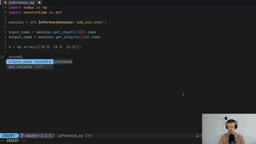
The result: input [10, 15, 23], output [11, 16, 24] — each value incremented by one. The entire process has zero PyTorch dependencies. You can copy the .onnx file to any machine and run it with just ONNX Runtime installed.
Differences in Exporting TensorFlow Models to ONNX
The same functionality implemented in TensorFlow can, after export, run with exactly the same inference code:
import tensorflow as tf
import tf2onnx

class AddOne(tf.Module):
    @tf.function(input_signature=[tf.TensorSpec([None], tf.float32, name="input")])
    def __call__(self, x):
        return x + 1

model = AddOne()
onnx_model, _ = tf2onnx.convert.from_function(
    model.__call__,
    input_signature=[tf.TensorSpec([None], tf.float32, name="input")],
    output_path="add_one_tf.onnx"
)
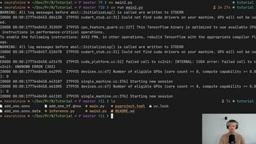
Interestingly, TensorFlow does not require dummy data to infer the computation graph during export. The reason lies in the fundamentally different graph construction mechanisms of the two frameworks: TensorFlow's tf.function compiles Python code into a static graph via AutoGraph, and the type and shape information provided by the input_signature decorator is sufficient to fully describe the computation graph structure without running any data. The exporter can therefore extract all necessary metadata directly from the graph definition. This is a fascinating difference between the two frameworks in the ONNX export workflow.
The key point is: as long as you maintain the same input_names and output_names during export, the inference code is completely universal, regardless of which framework the model came from.
Real-World Scenario: ONNX Deployment of an MNIST Handwritten Digit Classifier
The simple add-one network is just a proof of concept. In real applications, we can train a complete MNIST classifier and then export it to ONNX format for deployment. The model architecture includes:
- A Flatten layer (flattening the 28×28 image)
- A Linear layer + ReLU activation function
- An output layer (10 classes)
After training for 5 epochs, export only requires providing a random 28×28 pixel tensor as dummy data:
dummy = torch.randn(1, 1, 28, 28)
torch.onnx.export(model, (dummy,), "mnist_mlp.onnx", ...)
During inference, real images from the MNIST test set are loaded and predicted through ONNX Runtime. Testing shows the model correctly predicts the digit "7" — the only PyTorch dependency in the entire inference process is for loading the test dataset; the model inference itself is handled entirely by ONNX Runtime.
Pulling ONNX Models Directly from HuggingFace
Another powerful use case for ONNX is downloading pre-converted ONNX format models directly from HuggingFace. Many model repositories already provide ONNX versions, particularly quantized models optimized for CPU and mobile deployment.

The "cpu-int4" commonly seen in repository names involves model quantization technology. Standard neural network weights are typically stored in FP32 (32-bit floating point) or FP16 (16-bit floating point), while INT4 quantization compresses weights to 4-bit integer representation, reducing model size by approximately 8x and significantly lowering memory usage and computation. The trade-off is a slight loss in precision, but modern quantization algorithms (such as GPTQ and AWQ) compensate for precision loss using calibration datasets, making quantized models perform comparably to original models on most tasks. For running large language models on CPU or mobile devices, INT4 quantization is practically a necessity rather than an optional optimization.
The download process is very straightforward:
hf download <model_path> --include <onnx_file> --local-dir ./model_onnx
Once downloaded, you can use the onnxruntime-genai package for generative AI inference directly:
import onnxruntime_genai as og

model = og.Model("./model_onnx/cpu_and_mobile/cpu-int4-...\
Related articles
 Tutorials
ChatGPT Plus Subscription Guide: Are GPT-5.5, image-2, and Codex Worth the Upgrade?
A detailed look at ChatGPT Plus features — GPT-5.5, image-2, and Codex — with a Plus vs Pro comparison and a complete step-by-step subscription guide for users outside the US.
 Tutorials
Harness AI Engineering in Practice: Using Claude Code to Master Enterprise-Level E-Commerce Development
Deep dive into Harness AI Engineering: master enterprise e-commerce development with Claude Code using the Rules, Skills, Wiki, and Changes framework.
 Tutorials
Cursor + Codex Dual-IDE Collaboration: A Practical Methodology for Open-Source Project Customization
A complete methodology for open-source project customization based on real-world experience, detailing the Cursor+Codex dual-IDE workflow, seven-stage process, MVP validation, and AI source code reading techniques.