Open Design Hands-On Review: How Does This Free Open-Source Claude Design Alternative Perform?

A practical comparison testing the free open-source Open Design against Claude Design across multiple design scenarios.
This article compares the free open-source project Open Design against Anthropic's commercial product Claude Design across multiple design scenarios. Open Design supports 16 AI Coding CLIs and local deployment, addressing Claude Design's quota limitations. Testing reveals Claude Design excels in UI refinement and image generation, while Open Design delivers impressive results as a free alternative, particularly suited for internal prototyping and data-privacy-sensitive use cases.
Background: Why Do We Need a Claude Design Alternative?
Last month, Anthropic released Claude Design, a product that caused Figma's stock price to drop 9% within the same week—a testament to its disruptive impact on the design industry. This disruption was no accident. Since its founding in 2012, Figma leveraged browser-based collaborative design to upend Adobe's desktop monopoly, reaching a $20 billion valuation in a 2022 acquisition by Adobe (later terminated in 2023 due to antitrust scrutiny). Claude Design represents an entirely different AI design tool paradigm: it generates interactive prototypes directly from natural language descriptions, bypassing the traditional workflow of "learning tools → manual drawing → component assembly." The market's concern isn't feature replacement—it's the reconstruction of the entire design workflow, which is the deeper logic behind Figma's stock decline.
However, despite its excellent experience, Claude Design has one critical drawback—extremely limited usage quotas. Many users can exhaust a week's allocation in half a day.
Against this backdrop, the open-source community launched the Open Design project. It's completely free, supports 16 different AI Coding CLIs (including mainstream AI Coding Agents like Claude Code and Codex), and recently added support for the Codex desktop application, allowing users to do design work directly within Codex.
AI Coding CLIs are tools that accept natural language instructions through the terminal and automatically generate or modify code. Unlike traditional IDE plugins, CLI tools can directly operate on the file system, execute commands, and call external APIs, giving them stronger autonomous execution capabilities—hence why they're also called AI Coding Agents. The significance of Open Design supporting 16 CLIs lies in abstracting design generation tasks into standardized code generation tasks. Any Agent with code generation capabilities can serve as its execution engine, thereby avoiding dependency on a single service provider.
This article will compare Open Design and Claude Design's design outputs across multiple real-world scenarios to help you determine whether this free open-source alternative is worth trying.
Deployment & Configuration: Zero-Barrier Setup
Using Open Design in the Codex desktop application is straightforward. Simply enter a prompt in the input field and let Codex handle the local deployment automatically—no manual environment configuration needed. Within minutes, you'll see the Open Design UI interface.
As an open-source project supporting local deployment, Open Design holds significant importance for enterprise-level use cases. When design work involves unreleased product UIs, confidential data visualizations, or internal system prototypes, uploading design prompts and generated results to third-party cloud services poses data leakage risks. Local deployment means all computation and data remain on the user's own device or private server, typically accessed through a browser at a local address (e.g., localhost:3000). It's worth noting that if the underlying system calls CLI tools requiring API Keys (such as Claude Code or Codex), design requests will still pass through the corresponding provider's API. True fully-local operation is only achievable when paired with CLIs that support local models (such as local models based on Ollama).
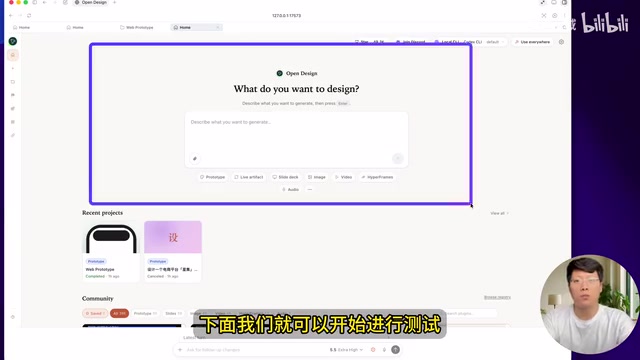
Key Configuration Options
- CLI Selection: Click the gear icon to choose which CLI to use for design development. The default is Open Design's built-in CLI, but you can also select Codex, etc.
- Model Settings: Supports model selection and API Key configuration for API-based design generation
- Language Support: Supports English, Simplified Chinese, Traditional Chinese, and other languages
- Connection Test: Click the Test button to verify whether the connection is successful
Scenario 1: Mobile Food Delivery APP Prototype Design
Testing with the same food delivery APP design prompt used for Claude Design. Open Design provided several confirmation options:
- Interaction Depth: Static high-fidelity display / Clickable prototype / Full interaction (including shopping cart, etc.)
- Interface Language: Chinese
- Image Handling: Abstract placeholder covers with realistic food photography feel
These three tiers correspond to different prototype levels in the UI/UX design field: static high-fidelity displays approximate the final visual effect but lack interaction; clickable prototypes feature real page transitions and component state change logic, typically implemented through frontend framework (e.g., React) state management; full interaction additionally requires generating business logic code for cart quantity accumulation, price calculation, etc., making it the most time-consuming option.
After selecting "clickable prototype," development completed within a few minutes. The results were quite impressive: browsing restaurant listings, tapping the plus button to add items to the cart, and viewing categories all functioned with proper interactions.
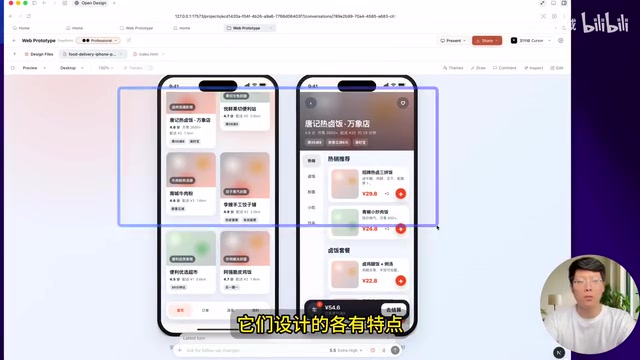
Comparison Conclusions
The most obvious difference between the two: Open Design doesn't generate image assets, while Claude Design automatically generates accompanying images. This difference stems from two distinct approaches to AI capability integration—Claude Design, as a commercial product, can seamlessly invoke image generation models within the design generation pipeline, converting text descriptions into placeholder or scene images matching the design style. Open Design currently relies solely on code generation capabilities, with images typically replaced by CSS gradient blocks or SVG placeholders. For high-fidelity prototypes that need to be presented to clients, the lack of image assets reduces persuasiveness; however, for functional prototypes in internal reviews, this gap has limited impact.
Overall design quality has its own strengths on each side, with the gap not being substantial. Open Design also supports a comment feature for selecting areas that need modification—for example, entering "change the theme color to green" completes localized edits.
Scenario 2: Mobile Vocabulary Learning APP
Testing with a vocabulary learning APP prompt, Open Design generated display results for both iPhone and Android devices, including complete functional modules for learning, review, quizzes, and settings.
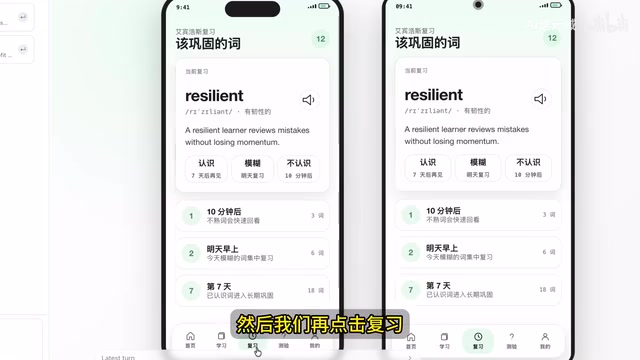
Open Design vs Claude Design Comparison
| Dimension | Claude Design | Open Design |
|---|---|---|
| UI Refinement | More polished, excellent color schemes | More basic but functionally complete |
| Dynamic Effects | Card flip animations | No flip animations |
| Settings Page | Richer elements | Relatively minimal |
| Overall Maturity | More mature | Good results but slightly inferior |
Claude Design clearly excels in UI detail polish, but Open Design's performance as a free open-source solution is already quite impressive.
Scenario 3: Web Dashboard Page Design
Testing dashboard page generation with responsive web platform, Chinese interface, and static image mode selected. Development completed within minutes, including a dashboard homepage and task viewing pages.

Claude Design's dashboard outperforms in element richness and theme color schemes, but Open Design's results are equally usable. However, a bug was exposed here: when switching themes, sub-page themes don't follow the change, requiring a fix in future versions.
Scenario 4: PPT Generation Test
Selecting the "slide deck" type for PPT generation testing. Open Design successfully completed a multi-page PPT design, but one issue emerged: inconsistent themes across pages, with a mix of light and dark styles.
The solution is to manually specify via prompts—for example, entering "change the theme to light theme."
Related articles
 Tech Frontiers
A Rare Quiet Day in AI: Recursive Self-Improvement Stirs Beneath the Surface
A rare quiet day in AI sees multiple sources go silent simultaneously. Behind the calm, Recursive Self-Improvement (RSI) research continues. What this means for the industry.
 Tech Frontiers
Reve 2 vs. Ideogram 4: A Deep Dive into Layout Control in AI Image Generation
A deep comparison of Reve 2 and Ideogram 4's layout control capabilities, covering technical approaches, real-world use cases, and industry trends for designers and creators.
 Tech Frontiers
In the Weights: Check Your Influence Score in the AI World
In the Weights is an AI influence search engine that quantifies your presence in the AI world with a score. Explore how it evaluates practitioners and what it means for digital identity.