Open-Source Automated News Briefing Generator: A Zero-Technical-Barrier AI Deployment Analysis
An open-source news briefing system that AI deploys for you—zero coding, completely free.
An open-source automated news briefing generator that requires no coding—just let an AI read the project docs to complete deployment. It features a six-stage pipeline, four-channel search covering 16+ platforms, intelligent classification and deduplication, and daily auto-push to Feishu, all completely free.
An Information Briefing System That AI Can Deploy For You
For professionals who need to compile large volumes of news and produce briefings every day, manually searching, categorizing, scoring, deduplicating, and formatting content is an incredibly tedious task. Information sources are scattered across Weibo, Douyin, Bilibili, and various overseas websites—no single person can keep up with all of them. And even once collected, the content still needs to be sorted by section, ranked by score, filtered for duplicates, and finally written up in a standard format.
Bilibili creator Lao Wang recently shared an open-source solution called the "Automated News Briefing Generator." Its biggest selling point is this: you don't need to know any technology at all—you just let an AI read a project document, and it handles the entire deployment for you. The system is open-sourced on GitHub, requires zero manual operation, and automatically pushes briefings to Feishu every day. This article breaks down its technical architecture and design philosophy.
A Six-Stage Automated Pipeline Design
At its core, this automated news briefing generator is an information-processing pipeline executed automatically by AI. The entire workflow is broken into six interlocking stages:
- Pre-check: Automatically verifies that all tools and configurations are ready;
- Collection: Simultaneously scrapes news from various platforms via four search channels;
- Classification: Automatically scores and categorizes content based on preset section keywords;
- Evaluation: Assigns a popularity score to each item and filters out duplicate content;
- Generation: Automatically writes briefing copy using preset templates;
- Publishing: Automatically creates a Feishu document, writes content into sections, and sends a notification to the group.
This assembly-line design breaks a complex task—one that would normally require multiple rounds of human intervention—into standardized steps that can be chained together automatically. Throughout the entire process, the user does nothing. It's a textbook example of an AI Agent workflow.
The "AI Agent workflow" mentioned repeatedly in the article is the key concept for understanding this system. Traditional AI applications are mostly "question-and-answer" style conversational tools, whereas an AI Agent emphasizes giving large language models the ability to plan, call tools, and execute multi-step tasks. A typical Agent breaks down a complex goal into subtasks, autonomously decides which tools to call (such as search, code execution, or file read/write), and adjusts subsequent actions based on intermediate results. Over the past two years, as the Tool Use capabilities of models like GPT-4 and Claude have matured—and with the spread of local AI Agent tools like Cursor and Claude Code—it has become possible for AI to directly read project documents and set up environments hands-on. This briefing system is precisely a design where the "six-stage pipeline" is structured as a standard process that an Agent can execute step by step—essentially codifying a human engineer's deployment expertise into instructions the AI can understand.
Four-Channel Search: Covering 16+ Domestic and International Platforms
The system's most central capability is search. It's designed with four parallel multi-platform search channels, aiming to cover as broad a range of information sources as possible:
Channel One: Platform Built-in Search
This directly calls results from mainstream search engines, offering the widest coverage with no additional configuration needed.
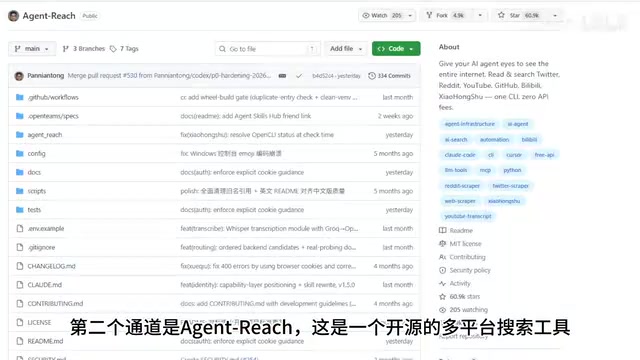
Channel Two: Agent Reach
This is a multi-platform search tool open-sourced under the MIT license, capable of covering 16 platforms including Bilibili, YouTube, Weibo, and Zhihu. Seven of these platforms work right out of the box after installation, while others (such as Douyin, Twitter, and Xiaohongshu) require login credentials to be configured.
Channel Three: Media Crawler
This specifically scrapes social media content from Weibo and Douyin. Once you scan a QR code to log in for the first time, it runs fully automatically.
Channel Four: RSS Subscription
Using a Feed Parser, this subscribes to various international and industry-specific professional websites, automatically scraping the latest content.

It's worth noting that the RSS subscription and Feed Parser used in the fourth channel are a long-standing yet still practical technology. RSS (Really Simple Syndication) is an XML-based content distribution format. By publishing an RSS feed, a website lets users get the latest updates without having to visit each site individually. Although RSS was once considered "outdated" after Google Reader shut down in 2013, its value in content aggregation and decentralized subscription has never faded—it's especially well-suited for scraping professional websites and international media that don't offer open APIs. A Feed Parser is the library that parses these RSS feeds, converting structured XML data into program-processable entries. Compared to calling a commercial search API, the RSS approach is completely free and stable, which is one of the key reasons the entire system can achieve "zero cost."
All four channels work simultaneously, and a single run can cover multiple types of information sources—social media, professional websites, and more—solving the pain point of "flipping through platforms one by one."
Keyword Scoring: Intelligent Classification and Deduplication
How is the massive amount of collected news categorized? The system uses keyword scoring to achieve automatic classification. Each section is equipped with a set of classification keywords. Taking a tech news briefing as an example, you could set up sections such as "Industry Trends," "Trending Topics," "In-Depth Analysis," "Technology Frontier," and "Policy Interpretation."
The classification logic is straightforward: as each item comes in, the system checks which keywords it matches—matching a section's keywords earns points, matching exclusion keywords deducts points, and the section with the highest score becomes its assigned category.
After classification, the evaluation stage begins. The system assigns each item a popularity score, downweights items with low confidence, and performs deduplication to ensure no repeated content appears in the briefing. Each section is sorted by popularity, with the Top 5 selected—both the quantity and the threshold can be adjusted in the configuration.
Configuration-Driven: Switch Domains by Changing a Single File
The most noteworthy design of this system is that it is "configuration-driven." All section keywords, search terms, subscription feeds, and stylistic preferences are managed centrally in a single configuration file.
This means that if you want to switch from "tech news" to "finance," you don't need to modify any code—you just replace the keywords and section definitions with finance-related content. The system's six-stage pipeline, four-channel search, scoring and deduplication logic, and Feishu publishing workflow are all reused. Want to do entertainment gossip? Same procedure.
What's even more convenient is that you don't need to write this configuration file by hand either—after the AI reads the project document, it automatically generates an initial configuration. All the user needs to do is specify what domain they want to work on. This design dramatically lowers migration costs and is key to the system's versatility.
Copy Generation and Automatic Feishu Publishing
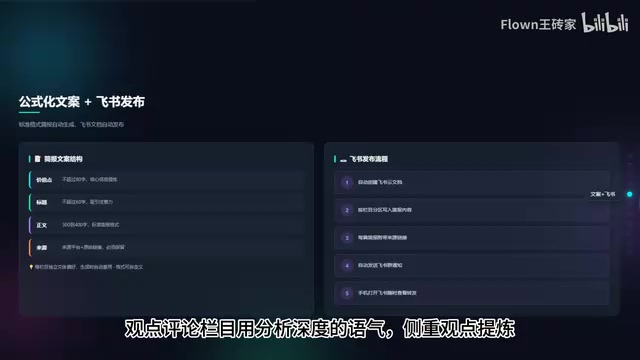
Copy generation uses formulaic templates. Each briefing item contains four parts: Value Point (the core information, no more than 80 characters), Title (no more than 60 characters), Body (300–400 characters), and Source Information with the original link.
Each section also has its own stylistic preferences—for example, "Industry Trends" uses an objective, neutral tone that emphasizes facts, while "Opinion & Commentary" uses an analytical tone that emphasizes distilling viewpoints. These are all preset in the configuration file and applied automatically during generation. Users can also send their frequently used templates to the AI to learn from, replacing the default format.
Once generation is complete, the system automatically creates a Feishu cloud document, writes content into sections, attaches source links to each item, and finally sends a notification to the Feishu group. Users can view and forward the content by simply opening Feishu on their phones.
The system's choice of Feishu (Lark) as the final publishing channel has both technical and ecosystem considerations behind it. Feishu, developed by ByteDance, offers fairly comprehensive open-platform capabilities, including custom bots (Webhook), cloud document APIs, group message pushing, and other interfaces—and the personal edition is free to use. For an automated system, this means it can programmatically create structured documents, write content into designated sections, and trigger group notifications, all without human intervention. Compared to email or plain-text notifications, Feishu cloud documents support rich-text formatting and multi-device syncing, letting users view and forward content right on their phones—an experience much closer to a finished briefing. This approach of combining open APIs with collaboration tools is becoming a common pattern for putting personal automation projects into practice.
A Zero-Technical-Barrier AI Deployment Method
The biggest difference between this system and other tools lies in its deployment method. Users don't need to install anything or write any code. The only thing they need to do is let the AI read a document in the project called AGENTS.md.
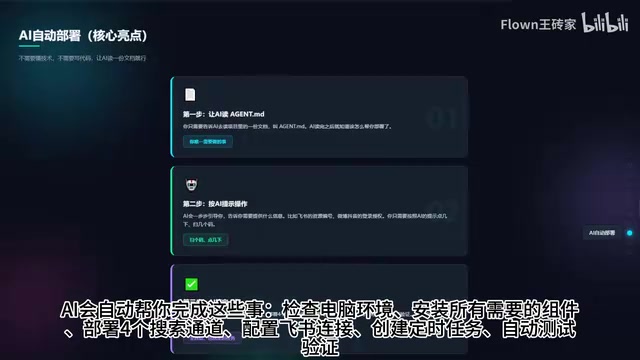
After reading it, the AI guides the user step by step to provide the necessary information (such as Feishu bot configuration and Weibo/Douyin login), and automatically completes everything: checking the computer environment, installing all components, deploying the four search channels, configuring the Feishu connection, creating scheduled tasks, and running tests to verify. The user only needs to click and scan QR codes as prompted.
Once deployment is complete, the system sets up a daily scheduled task that automatically runs the entire workflow at the appointed time. The system also accumulates deduplication records, becoming more accurate the more it's used, and caches search results to improve efficiency.
Cost and Target Users
It's worth emphasizing that this system is completely free. Of the four search channels, the platform's built-in search has no fees, and Agent Reach (MIT open-source), Media Crawler, the Feed Parser used for RSS, the open-source tools used for Feishu publishing, and the Feishu personal edition are all free. Classification, scoring, deduplication, and copy generation are built into the system and don't call any paid interfaces. Add up all the components and the total cost is zero—the only requirements are a computer and a local AI Agent tool.
In terms of target users, anyone whose role requires regularly gathering information can benefit:
- Information reporting professionals: Regularly compile news and produce briefings in a fixed format;
- Content operations staff: Continuously track industry hot topics and generate competitive analysis;
- Self-media creators: Need abundant sources of inspiration and hot-topic tracking;
- Team managers: Stay informed daily about industry trends and competitive intelligence.
Conclusion
This system embodies a typical trend in current AI Agent applications: using natural-language-driven AI to complete the deployment and operation of complex tool chains. Its value lies not only in being free and open-source, but more importantly in combining "configuration-driven" design with "AI automatic deployment," enabling even non-technical users to own an automated information-processing pipeline.
Of course, systems like this still depend on the stability of login states across platforms and the availability of search tools, so their real-world effectiveness needs to be validated over long-term use. But for professionals plagued daily by the work of information compilation, this undoubtedly offers a low-barrier solution worth trying. The project is already open-sourced on GitHub, and interested readers can obtain it themselves.
Key Takeaways
Related articles

The Truth Behind Codex 'Build a Website in 5 Minutes': AI Isn't Creating Sites—It's Helping You Copy Them
Exposing the truth behind viral Codex 5-minute website videos: creators aren't building original sites with AI—they're copying shared prompts or scraping others' work. Learn AI coding tools' real limits.

Getting Started with AI Agent Development: A Complete Guide from Concept to Practice
A comprehensive guide to AI Agent architecture and development, covering automated marketing, intelligent customer service, and investment analysis scenarios with single and multi-agent collaboration.

The Truth Behind Codex 'Build a Website in 5 Minutes': AI Isn't Creating Sites — It's Helping You Copy Them
Exposing the truth behind viral Codex 5-minute website videos: creators aren't building original sites with AI — they're copying shared prompts or scraping others' work.