Open-Source Desktop Pet of Murasame with 503 Voice Lines: Customizable and Cries 'Goshujin-sama' on Click

Bilibili developer open-sources a Murasame desktop pet with 503 TTS voice lines, voice library management, and custom characters.
A Bilibili developer has open-sourced a desktop pet of Murasame from *Senren * Banka*, featuring 503 synthesized voice lines; clicking the character plays lines like "Goshujin-sama." The project offers sequential, random, and single-track repeat playback modes, with sequential mode continuing from the last played position. The voice library supports starring favorites, playing only favorites, excluding unwanted lines, and displaying numbers for positioning, with favorites and playback settings saved per library. Users can customize characters by preparing images and voices, and multiple characters can theoretically be switched within one program. Voices are generated via speech synthesis rather than all from original game audio, lowering the barrier to adding new lines. Usage instructions and the program are in the video description, and the author explicitly states it's an open-source share.
A developer on Bilibili has turned Murasame from Senren * Banka into a desktop pet: click on her and she'll call you "Goshujin-sama" (ご主人様) in her signature tone, with 503 built-in voice lines, and the program has been open-sourced. Compared to most desktop pets on the market that can only loop a few character illustrations, this project is clearly a cut above—it treats "voice management" as a core feature rather than a bonus easter egg.
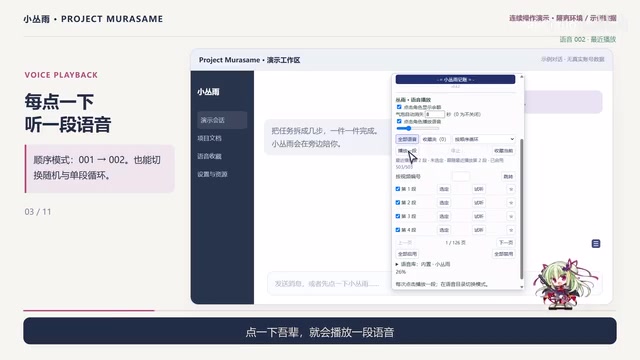
Core Gameplay: Click to Hear, Three Playback Modes
The interaction logic is straightforward: Murasame follows the chat window, and users can place her wherever they like, keeping her by their side while working. Clicking the character triggers a voice line, with three playback options: sequential, random, and single-track repeat, covering both "listen in story order" and "just listen casually" needs.
One detail worth noting about sequential mode: it continues from the last played voice line rather than starting over with each click. This design turns repeated clicking into an experience of "browsing the voice library" instead of hearing the same line over and over.
Text-to-Speech (TTS) is the technology that converts text into natural speech, with its core components including text analysis, acoustic models, and vocoders. In recent years, deep learning-based TTS (such as Tacotron and VITS) has been able to generate near-human speech with support for emotion and timbre control. In this project, TTS is used to generate 503 lines, meaning the developer doesn't need to rely on original game audio—simply inputting text can expand the voice library, greatly reducing content production costs. This also explains why the project can include so many voice lines—synthesis is more efficient and flexible than recording.
Voice Library Management: Favorites, Filtering, and Numbered Positioning
With 503 voice lines, if they could only be played sequentially, it would quickly become torture. The developer's solution is a lightweight voice library management mechanism:
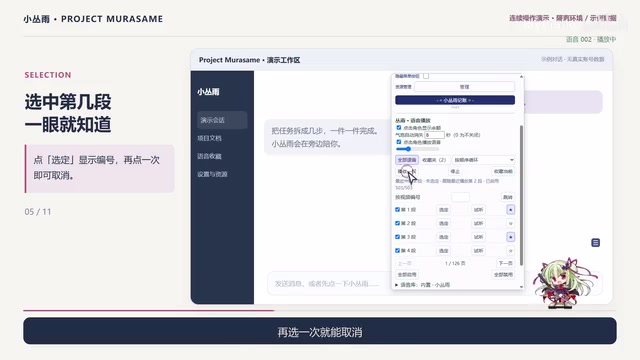
- Favorite marking: Voice lines you like can be starred, you can play only the favorites list, or exclude unwanted lines;
- Number display: When a voice line is selected, its number is shown; clicking again deselects it, making it easy to locate and organize;
- Independent configuration: Voice libraries can be renamed and switched, with favorite status and playback settings saved separately per library.
This design approach is similar to a local music player—treating voice lines as manageable assets rather than hardcoded resources. For users who want "multi-character desktop pets," saving configurations per library is a necessary prerequisite.
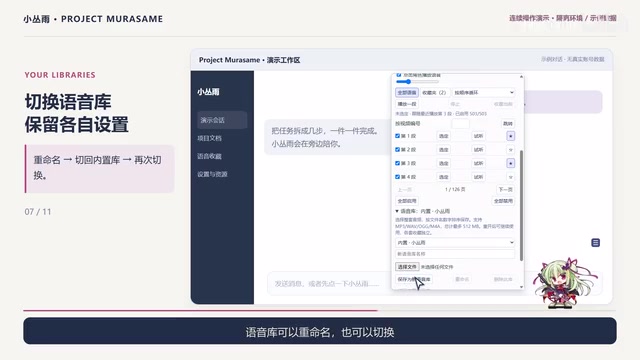
The management logic of local music players typically includes playlists, favorites, exclusion lists, and metadata editing. This project borrows from these designs: each voice library is equivalent to a playlist, favorite marks are like "I like this," the exclusion list is like "hide," and numbers correspond to track numbers. This mechanism of saving configuration independently per library allows users to maintain separate voice preferences for different characters without interference. For multi-character desktop pets, this is the foundation for personalized management.
Custom Characters: Swap Images and Voices to Change Characters
The project isn't bound to Murasame alone. As long as images and voices are prepared, users can assemble their own desktop pet—theoretically any character can fit into this framework. Combined with the voice library switching capability, it's technically feasible to have multiple characters in a single program.
The voices themselves are generated by speech synthesis rather than all coming from original game audio. This determines the project's scalability—adding new lines doesn't require waiting for official assets; synthesis can fill the gap. For players who want to make desktop pets for their favorite niche characters, this may be the most practical path.
Desktop pets are interactive virtual characters that run on the desktop, usually displayed in transparent windows, supporting clicks, dragging, and other interactions. Early desktop pets were mostly based on Flash or simple GUI frameworks, with functionality limited to animation loops and a few voice lines. Modern desktop pets often use Electron, Unity, or Python (such as PyQt) for development, supporting richer media management and user configuration. This project is open-source, and its architecture may include resource loading, event handling, and configuration storage modules, making it easy for secondary development.
Details and Open Source
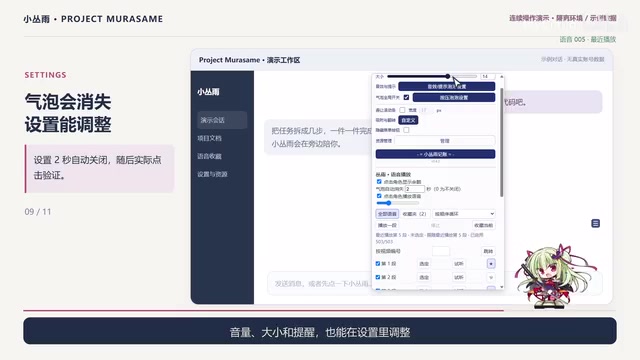
Other adjustable options include: auto-closing the speech bubble after a set time, adjustable volume and character size, and display of remaining usage count and balance (involving another application). These features aren't stunning, but they all point to the same orientation—polishing the desktop pet as a tool to keep on the desktop long-term, rather than a one-off demo.
Usage instructions and the program itself are in the video description, and the author explicitly states it's an open-source share. For developers who want to do secondary development or learn how desktop pets are implemented, this is a sample they can directly take apart and learn from.
Why This Kind of Project Is Worth Attention
Desktop pets have long been in a state of "good-looking but not useful": beautiful character art, thin interaction, and voices often limited to a few looping lines. The value of this project isn't in how complex the technology is, but in how it seriously addresses "voice manageability"—503 voice lines paired with favorites, filtering, numbering, and per-library saving are what turn "click to hear a line" from a novelty into a feature usable in daily life.
For AI application developers, it also offers a lightweight reference: speech synthesis lowers content production costs, and the remaining competitiveness lies in interaction design and management mechanisms.
Related articles

OpenAI Partners with Shield: How the Astra Agent Revolutionizes IT Troubleshooting
OpenAI and Shield launch the Astra agent, which autonomously logs into computers and legacy systems to fix IT issues in real time, 35-40% faster than traditional models, with humans involved only when judgment is needed.

iPhone Duo Battery Life Tested: One Charge a Day Is Unavoidable, and the Large Screen Is the Culprit
iPhone Duo battery test: heavy use needs at least one charge a day, and about 30% remains after 6.5 hours of screen-on time. How often the large screen is unfolded is key; a MagSafe battery pack helps, and long-term degradation is also worth watching.

Kimi K3.1 Pro Open-Sourced: 2.8 Trillion Parameters Close In on Opus
Moonshot releases the open-source MoE model Kimi K3.1 Pro, with 2.8T total parameters and 104B activated, trailing Opus 5.5 by under 1 point on Terminal Bench 4.0.