OpenAI Codex AppShot Feature Explained: Double-Tap Command to Instantly Share Screen Context with AI

OpenAI Codex launches AppShot: double-tap Command to screenshot and send to AI instantly
OpenAI Codex has launched AppShot, a feature that lets users double-tap the Command key to instantly send a screenshot to the chat window as AI context. Powered by multimodal AI's visual understanding capabilities, it supports scenarios like email processing and image editing, dramatically reducing context transfer friction in human-AI collaboration. It reflects the industry trend of AI assistants moving toward OS-level integration and is currently available only for Mac users, with privacy considerations to keep in mind.
OpenAI's Codex recently rolled out a handy new feature — AppShot — that lets users double-tap the Command key to instantly send a screenshot of their current screen to the chat window, providing direct context for AI processing. While this interaction improvement may seem simple on the surface, it dramatically reduces the "context handoff" friction in human-AI collaboration.
What Is AppShot?
AppShot is a new desktop-level interaction feature added to Codex. Its core logic is highly intuitive: press both the left and right Command keys simultaneously, and the system automatically captures the current screen and adds the screenshot as an attachment to the Codex chat window.
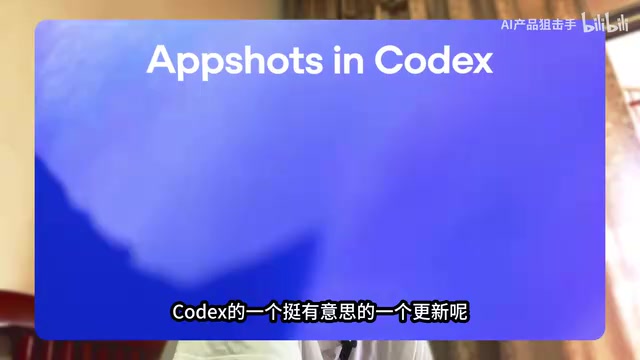
Users no longer need to manually take screenshots, save files, and then upload them to the dialog box — the entire workflow is compressed into a single keyboard shortcut. This means anything you see in any application can instantly become input context for the AI.
Practical Use Cases for AppShot
Scenario 1: Quick Email Processing
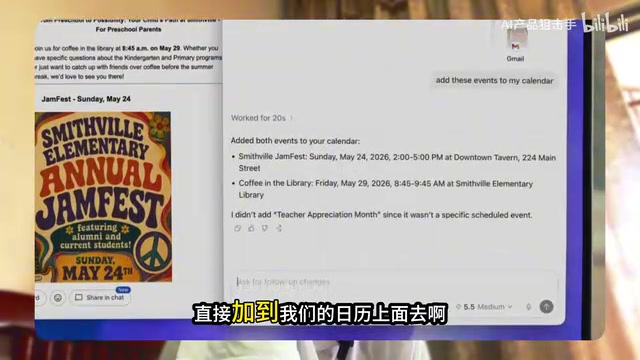
Imagine you're reading an email from a friend inviting you for coffee and discussing scheduling. The traditional approach: read email → open calendar → manually create event → fill in time and location. With AppShot, the workflow becomes:
- While reading the email, double-tap Command to capture the screen
- The screenshot automatically appears in the Codex chat window
- Type your instruction: "Add this appointment to my calendar"
- Codex recognizes the email content and automatically creates the calendar event

This workflow is made possible by the multimodal capabilities of large language models (Multimodal AI). Traditional LLMs can only process text input, but next-generation models like GPT-4V incorporate a Vision Encoder that converts images into vector representations the model can understand, enabling joint reasoning with text instructions. After a screenshot is uploaded, the model doesn't simply "describe what it sees" — it performs cross-modal alignment between image content and user instructions, identifying structured information like email text and UI elements, then mapping them to specific operational intents. This is the technical reason why "screenshot + natural language instruction" can trigger complex operations like calendar creation.
From "seeing information" to "completing an action," the cognitive load and manual steps in between are drastically reduced.
Scenario 2: Instant Image Editing
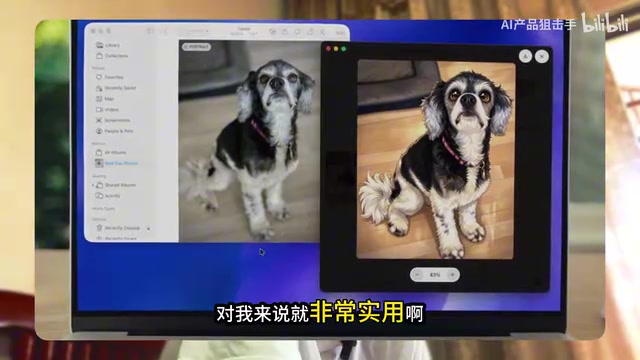
Another typical scenario is image processing. Say you're viewing a photo of a dog in your browser and want to convert it to an anime style. Previously, you'd need to download the image first, then upload it to some AI tool. Now you simply:
- Double-tap Command to capture the current screen
- Tell Codex in the chat window: "Convert this to anime style"
- The AI performs the style transfer directly based on the screenshot
This "what you see is what you get" interaction model truly integrates AI into your daily workflow, rather than treating it as a separate tool you have to switch to.
Why AppShot Deserves Attention
Dramatically Reduces Context Transfer Costs
In human-computer interaction, the biggest efficiency bottleneck is often not the AI's processing capability, but the cost for users to transfer context to the AI. You need to describe what you're seeing, copy and paste text, take screenshots and upload files... every step consumes time and attention.
Psychological research shows that each task switch takes an average of about 23 minutes to return to a state of deep focus. For AI tools, this problem is particularly acute — users often need to bounce back and forth between their "current work environment" and the "AI chat window." This friction is known in the HCI (Human-Computer Interaction) field as the "Gulf of Expression" — the distance between user intent and system input.
AppShot's design philosophy is clear: let the AI see what you see. A single shortcut achieves "perceptual alignment," allowing subsequent instructions to be more concise and natural.
The Industry Trend Toward Desktop-Level AI Assistants
This feature also reflects a broader industry trend — AI assistants are evolving from "dialog boxes" to "operating system-level" integration. The essence of this competition is the battle over "AI's perceptual boundaries": Apple's Apple Intelligence is deeply integrated into macOS Sequoia, capable of understanding user intent across applications and directly calling system APIs; Google's Project Astra demonstrated real-time video stream comprehension, aiming to let AI continuously perceive users' physical and digital environments; Microsoft has embedded Copilot into the Windows 11 taskbar, attempting to build continuous memory of user behavior. Whoever can more naturally integrate into users' workflows will command the gateway to the next computing platform.
While Codex's AppShot is relatively simple in functionality (essentially just quick screenshot + auto-upload), it represents the right product direction: reduce user steps, expand AI's perceptual range.
Current Limitations and Future Outlook
It's important to note that AppShot is currently only available for Mac users — Windows and Linux users cannot use it yet. There are specific technical reasons behind this: AppShot relies on macOS's "Global Hotkey" mechanism, requiring the application to request Accessibility Permission and Screen Recording Permission. These system-level permissions belong to a high-sensitivity tier within macOS's sandbox security model, and the significant differences in permission models and API interfaces across operating systems make cross-platform adaptation considerably more complex.
It's also worth noting that when using AppShot, screenshot content is uploaded to OpenAI's servers for processing — exercise caution with sensitive information. This is a common "convenience vs. privacy" tradeoff that desktop-level AI integration universally faces.
From a product evolution perspective, AppShot is likely just the first step. In the future, we may see deeper desktop integration, such as:
- Automatic detection of the current application type, providing targeted operation suggestions
- Continuous context tracking, understanding not just a single screenshot but the user's sequence of actions
- Direct manipulation of desktop applications, evolving from "seeing" to "doing"
At a time when major models (Gemini 2.5 Flash, Qwen 3.7 Max, etc.) are fiercely competing on foundational capabilities, OpenAI's choice to continue refining the product interaction layer with an "experience-first" strategy is worth watching. After all, the strongest model doesn't necessarily win — the most usable product does.
Key Takeaways
- Codex's new AppShot feature lets users double-tap Command to instantly send a screenshot to the chat window as AI context
- It relies on multimodal AI's visual understanding capabilities, supporting practical scenarios like quick email processing and instant image editing
- The feature reflects the industry trend of AI assistants moving from dialog boxes to OS-level integration, aligned with the strategic directions of Apple, Google, and Microsoft
- Currently limited to Mac users only; cross-platform support is constrained by differences in system permission models and has yet to be released
- Users should be aware of privacy risks from uploaded screenshot content; amid fierce competition in foundational model capabilities, OpenAI continues to polish user experience at the product interaction layer
Related articles
 Tech Frontiers
A Rare Quiet Day in AI: Recursive Self-Improvement Stirs Beneath the Surface
A rare quiet day in AI sees multiple sources go silent simultaneously. Behind the calm, Recursive Self-Improvement (RSI) research continues. What this means for the industry.
 Tech Frontiers
Reve 2 vs. Ideogram 4: A Deep Dive into Layout Control in AI Image Generation
A deep comparison of Reve 2 and Ideogram 4's layout control capabilities, covering technical approaches, real-world use cases, and industry trends for designers and creators.
 Tech Frontiers
In the Weights: Check Your Influence Score in the AI World
In the Weights is an AI influence search engine that quantifies your presence in the AI world with a score. Explore how it evaluates practitioners and what it means for digital identity.