OpenAI Codex Automated Registration Bot: Zero-Cost Deployment Tutorial

Technical breakdown of a zero-cost automated batch registration system for OpenAI accounts with API key management.
This solution uses three components—Registration Bot, New API, and CLProxy API—combined with free disposable email services and smart proxy switching to achieve zero-cost batch registration of OpenAI accounts with unified API key management. Real-world testing yields approximately 200 valid accounts in 10 hours, with proxy quality and email stability as core bottlenecks. However, OpenAI's multi-layer anti-abuse mechanisms create uncertainty around account survival, and the approach may violate Terms of Service.
Introduction
Recently, an automated registration solution for OpenAI Codex has attracted considerable attention in the tech community. A developer shared a nearly zero-cost automated registration workflow that combines multiple open-source tools to achieve batch registration of OpenAI accounts with automatic API key synchronization. Based on real-world testing, approximately 36,768 seconds (about 10 hours) can yield 200 valid accounts—not exactly fast, but completely free.
OpenAI Codex is a code generation and understanding model released by OpenAI, fine-tuned specifically for programming tasks based on the GPT architecture. It can transform natural language descriptions into executable code, supports dozens of programming languages, and serves as the underlying engine for products like GitHub Copilot. Since Codex API calls require an OpenAI account and corresponding API Key, and OpenAI typically provides new accounts with a certain amount of free trial credits, this has spawned a gray-area demand for batch registration to obtain free API quotas. Against the backdrop of persistently high LLM API calling costs (GPT-4 level models can cost tens of dollars per million tokens), such solutions maintain steady interest in the tech community.
This article will outline the core architecture, deployment steps, and key configuration points of this solution, helping technically-minded readers understand its working principles and complete actual deployment.
Disclaimer: This article is for technical analysis purposes only. Automated batch registration may violate OpenAI's Terms of Service. Readers must assess compliance risks on their own.
Architecture Overview: Three Core Components
The entire OpenAI Codex automated registration system consists of three core components:
- Registration Bot Main Program: Handles the automated OpenAI account registration process, including email verification, account creation, and other steps
- New API: Serves as the API key management middleware layer for unified management and distribution of API Keys obtained after successful registration
- CLProxy API (CPA): A proxy API service responsible for syncing registered account credentials to the cloud, providing a unified API calling endpoint
The three components each handle their own responsibilities, connected through configuration to form a complete automation pipeline. Compared to the first version which required minimal paid costs, the second version achieves truly zero-cost operation through the use of free email services.
From an architectural design perspective, New API plays a role similar to an API Gateway in microservice architecture. An API Gateway is the unified entry point between clients and backend services, responsible for request routing, load balancing, authentication, rate limiting, and other functions. In this solution, New API's core value lies in aggregating API Keys from multiple OpenAI accounts into a unified calling interface—upstream applications only need to connect to New API's single endpoint, and New API automatically selects available Keys on the backend for request forwarding. This design addresses issues like limited quotas per individual account and rate limits per single Key, while also facilitating monitoring of each Key's usage and status. Similar open-source projects include One API, Chat Nio, and others, which have formed a small ecosystem in the LLM API aggregation management space.
Environment Preparation and Basic Installation
Prerequisites Checklist
Before deployment, ensure the following base environments are installed on your system:
- Conda (Anaconda/Miniconda): Python environment management tool
- Go language environment: Some components are developed in Go
- PowerShell: Command-line tool for Windows
Conda is an open-source, cross-platform package and environment management system originally designed for Python and R, but capable of managing packages for any language. Its core value lies in "environment isolation"—allowing developers to create multiple independent virtual environments on the same machine, each with different Python interpreter versions and dependency libraries. Anaconda is the full distribution containing Conda plus a large set of pre-installed scientific computing packages (approximately 3GB), while Miniconda is the minimal version containing only the Conda core and Python (approximately 200MB). In this solution, Conda is primarily used to prevent the registration bot's Python dependencies from conflicting with other projects on the system.
Installation of these basic tools is fairly standard—detailed installation guides can be found through official documentation or search engines.
Registration Bot Main Program Installation
After downloading and extracting the toolkit, navigate to the Registration Bot 2 folder, copy the path, enter the directory using the cd command in PowerShell, then execute the installation commands as specified in the documentation. The first installation requires downloading dependency packages and takes a while—be patient. After successful installation, launch the program, and the interface will display the access address and login password.
New API Installation Steps
Similarly, navigate to the New API folder, copy the path, and execute the installation commands in a new PowerShell window. Once launched successfully, you can access its management interface through a browser for subsequent API key management and distribution.
CLProxy API Configuration Details
This is the most meticulous configuration step in the entire process—manual editing of the configuration file is required, and every step must be accurate.
Configuration File Modification Method
Navigate to the CLProxy API folder, find the config.example.yaml file, make a copy and rename it to config.yaml (removing the "example" in the middle). Open it for editing and modify the following key parameters:
- allow_remote: Change to
trueto allow remote access - secret_key: Set a login password—define a strong password of your choosing
- usage_statistics_enabled: Change to
trueto enable usage statistics
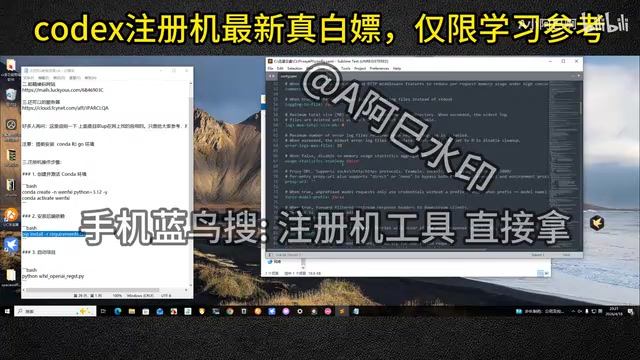
After saving the file, locate the clipproxyapi executable and right-click to run as administrator. Once the program launches, a runtime window will appear. Access the corresponding address through a browser and enter the password to access the management interface.
Registration Bot Core Parameter Configuration
Concurrency and System Settings
After logging into the registration bot management interface, first navigate to the "Concurrency & System" menu. Several key configurations here affect registration efficiency:
- Multi-threaded concurrency: Disabled by default—must be manually enabled to improve registration speed
- Concurrency count: Set reasonably based on your network bandwidth and proxy quality
- Output count: Expected number of successful registrations per task—default 0 means unlimited output

For first-time use, it's recommended to start with a low concurrency count, observe the success rate, and then gradually increase.
Proxy Configuration (The Key to Success Rate)
Proxy configuration is the core factor affecting OpenAI registration success rates. You can use local proxy tools like Clash, but there's one mandatory option that must be enabled—the "Smart Switching" feature.
Let me explain the technical principles behind proxies and smart switching. A proxy in this context refers to a network proxy server used to forward client requests and hide the real IP address. Clash is a popular open-source proxy client supporting multiple proxy protocols including Shadowsocks, VMess, Trojan, and providing rule-based traffic routing. OpenAI's anti-abuse system performs risk control detection on the source IP of registration requests—multiple registrations from the same IP within a short time will trigger rate limiting or outright banning. "Smart Switching" is essentially an automated IP rotation strategy: when the current proxy node returns a registration failure (such as HTTP 429 Too Many Requests or a CAPTCHA challenge), the program automatically selects the next available node from the proxy pool and reinitiates the request. The size of the proxy pool and node quality (whether they're residential IPs, whether they've been flagged) directly determine the upper limit of registration success rates.
In real-world testing, forgetting to enable the proxy caused all tasks to fail, while enabling smart switching showed noticeable improvement in success rates.
Free Email Configuration (Core of Zero Cost)
Email is a necessary component of the registration process and the key to achieving zero cost. The system supports multiple email services, including both paid and free options.
The free email services mentioned here typically refer to "temporary email" or "disposable email" services, such as Guerrilla Mail, TempMail, Mail.tm, etc. These services provide temporary email addresses that can be used without registration, allowing users to receive emails (primarily for obtaining verification codes or confirmation links), with email addresses automatically expiring after a set period. The technical principle is that service providers register several domains and set up mail servers, exposing mail-receiving functionality to external programs through API interfaces. An Access Token is the credential these services use for API authentication—the registration bot automatically creates temporary addresses, polls the inbox, and extracts verification codes through the email service's API, achieving a fully hands-free process.
Specific configuration steps:
- Navigate to the "Email Configuration" menu
- Select a free email service
- Visit the corresponding email service website to obtain an Access Token
- Paste the Token into the configuration form and save
Note that if many users concentrate on using the same free email service, success rates may decrease. Additionally, OpenAI maintains a blacklist of known temporary email domain names, so not all disposable email services can successfully pass registration verification. It's recommended to try several different free email options and find the one with the best current availability.
Launch, Run, and Results Management
Starting the Automated Registration Task
Once all configuration is complete, navigate to the "Run Homepage" menu and click the start button in the upper right corner to begin the automated registration task.
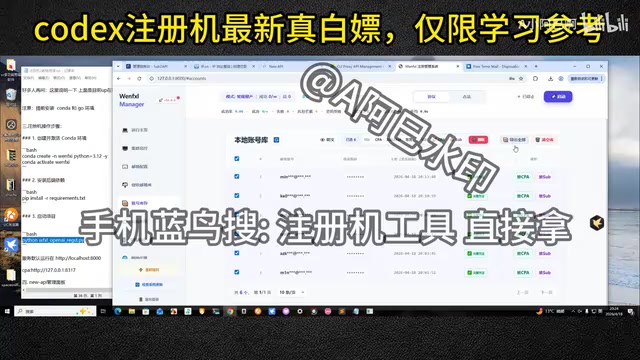
During task execution, you can view registration records in real-time. In testing, about 7 valid accounts were produced in approximately 3 minutes—reasonable efficiency.
Account Status Filtering
In the "Account Inventory" menu, you can view all registration results. Pay attention to distinguishing between two states:
- Yellow (registration successful only): Account created successfully but lacking complete credentials—unusable
- Green (complete credentials): Contains full API access credentials—ready to use
Only green-status accounts are truly usable—yellow accounts can be deleted and cleaned up directly.
Syncing Accounts to CLProxy API
The final step is syncing valid accounts to the CPA service, completing the full automation loop:
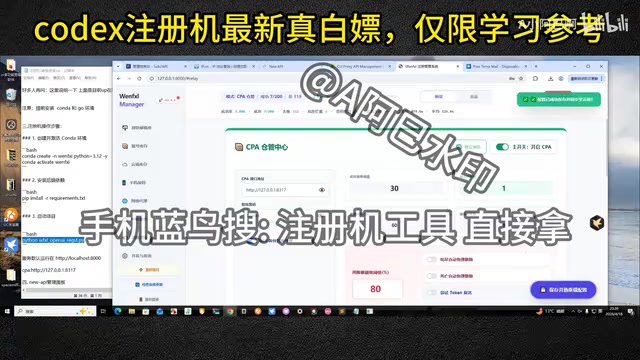
- Navigate to the "Cloud Inventory" menu and enable the CPA management master switch
- Enter the CLProxy API link address and login password
- Return to Account Inventory, select all green valid accounts, and click "Sync to CPA"
- Wait for synchronization to complete, then confirm sync status in the CPA management interface
After successful synchronization, you can call these accounts' API capabilities uniformly through CLProxy API, subsequently connecting to New API for key management and distribution.
Efficiency and Cost Analysis
Based on real-world testing data, the solution's operational performance is as follows:
| Metric | Data |
|---|---|
| Time for 200 accounts | Approximately 36,768 seconds (≈10.2 hours) |
| Average time per account | Approximately 3 minutes |
| Financial cost | Zero (using free email + free proxy) |
| Primary bottleneck | Proxy quality and email service stability |
While not exactly fast, the cost-effectiveness as a zero-cost solution is quite remarkable. If you're willing to invest a small amount in paid email services and higher-quality proxies, both registration efficiency and success rates can be further improved.
OpenAI Anti-Abuse Mechanisms: Why Accounts May Be Short-Lived
When evaluating the practical value of this solution, it's important to understand the multi-layer anti-abuse detection mechanisms OpenAI has deployed. The first layer is IP reputation assessment—data center IPs and known VPN/proxy IP ranges are flagged as high risk. The second layer is device fingerprinting, which generates unique device identifiers through browser Canvas fingerprints, WebGL rendering characteristics, screen resolution, timezone, and other parameters. The third layer is behavioral analysis, detecting whether mouse movement trajectories, keyboard input rhythms, and other patterns match real human operation. The fourth layer is email and phone number verification, filtering known temporary email domains and virtual number service providers through blacklists.
Additionally, OpenAI conducts post-creation audits on accounts, performing batch bans on accounts exhibiting abnormal patterns. This means even if registration succeeds, the account's survival period may be very short—this is the greatest uncertainty in such solutions. Understanding these adversarial mechanisms helps in more rationally evaluating the actual returns and risks of batch registration schemes.
Conclusion
This OpenAI Codex automated registration solution demonstrates a complete batch registration and API management pipeline. The three components—Registration Bot Main Program, New API, and CLProxy API—have clear division of responsibilities and a reasonably designed technical architecture. The core advantage lies in achieving zero-cost operation through free email services and smart proxy switching, offering reference value for developers seeking to batch-obtain OpenAI API keys.
However, it must be emphasized again that automated batch registration carries compliance risks, and OpenAI may adjust anti-abuse strategies at any time, rendering the solution ineffective. For personal learning and technical research purposes, understanding the automation architecture concepts and component collaboration patterns holds more long-term value than actual implementation.
Key Takeaways
- The solution achieves zero-cost automated OpenAI account registration through three components: Registration Bot Main Program, New API, and CLProxy API
- Real-world testing shows approximately 10 hours to produce 200 valid accounts, with core bottlenecks being proxy quality and email service stability
- The "Smart Switching" feature in proxy configuration is critical for improving registration success rates and must be enabled
- Registration results come in two states—yellow (unusable) and green (complete credentials, usable)—requiring careful filtering
- OpenAI deploys multi-layer anti-abuse mechanisms including IP reputation assessment, device fingerprinting, behavioral analysis, and email blacklists, creating uncertainty around batch-registered account survival periods
- Automated batch registration may violate OpenAI's Terms of Service and carries compliance risks
Related articles
 Tutorials
ChatGPT Plus Subscription Guide: Are GPT-5.5, image-2, and Codex Worth the Upgrade?
A detailed look at ChatGPT Plus features — GPT-5.5, image-2, and Codex — with a Plus vs Pro comparison and a complete step-by-step subscription guide for users outside the US.
 Tutorials
Harness AI Engineering in Practice: Using Claude Code to Master Enterprise-Level E-Commerce Development
Deep dive into Harness AI Engineering: master enterprise e-commerce development with Claude Code using the Rules, Skills, Wiki, and Changes framework.
 Tutorials
Cursor + Codex Dual-IDE Collaboration: A Practical Methodology for Open-Source Project Customization
A complete methodology for open-source project customization based on real-world experience, detailing the Cursor+Codex dual-IDE workflow, seven-stage process, MVP validation, and AI source code reading techniques.