OpenAI Codex Hands-On: How to Use This Cloud AI Coding Agent and How It Differs from Cursor

OpenAI Codex is a cloud agent that handles entire coding tasks asynchronously in isolated sandboxes, marking AI coding's shift from autocomplete to delegation.
OpenAI's cloud agent Codex takes a different path from real-time editors like Cursor and Windsurf: users describe tasks in natural language, and Codex autonomously reads/writes files, runs tests, and makes revisions inside an isolated sandbox — delivering code changes, terminal logs, and test results, with the option to open a GitHub PR directly. Tasks take 1–30 minutes, multiple can run in parallel, and an agents.md file lets teams encode project conventions into the repo. The model is RL-trained on real coding tasks and leads SWE-bench Verified at low attempt counts. The article emphasizes that AI speed gains don't eliminate the need for human review — merging safely is still a human judgment call.
OpenAI's cloud-based software engineering agent, Codex, takes a fundamentally different approach to AI-assisted coding than tools like Cursor or Windsurf. Rather than working side-by-side with you in an editor in real time, Codex lets you delegate an entire development task to the agent and come back to review the results once it's done. This "delegation-style" workflow may signal the next phase of AI-powered software development.
Codex Explained: Distinguishing the Product, the Agent, and the Model
Before diving in, it helps to untangle a few easily confused names. Codex refers to the product and the agent itself, while the underlying model (at the time of recording) is called Codex-E — OpenAI's software-engineering-optimized version built on top of o3. In other words, the name "Codex" isn't new, but the cloud-based agent capability is.
The model was trained with reinforcement learning on real-world coding tasks, with a clear goal: make it work like an engineer — following repository conventions, team code style, and PR (pull request) requirements — rather than just mechanically completing code snippets.
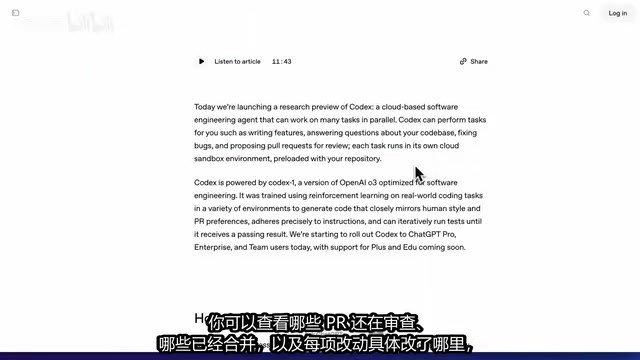
According to the official description, Codex can develop new features, answer questions about a codebase, fix bugs, and open PRs directly. It connects to GitHub repositories, works on a selected branch, and gets started as soon as you describe a task in natural language. Once the task is complete, you can see which PRs are still under review, which have been merged, and exactly what changed — making it easy to judge whether the result matches your intent.
SWE-bench Verified is the most widely cited benchmark in the software engineering agent space, built by the Princeton NLP team. It draws from real GitHub issues that have been manually verified, asking models to automatically locate and fix problems within a given codebase snapshot, with success judged by whether existing test suites pass. The "Verified" suffix means tasks have been human-reviewed to remove ambiguous descriptions or incomplete tests, making results more comparable. Performance on this leaderboard directly shapes industry perception of whether a model can handle real engineering work, and it's a metric OpenAI, Anthropic, and others invariably cite when releasing new models.
How It Actually Works: From Task Input to Running in an Isolated Environment
The workflow is straightforward: describe what you need, click "Code," and it starts writing. If you just want to learn about an existing project, you can ask questions directly without triggering file changes every time.

The key is that every task runs in an isolated environment. That environment is preloaded with your codebase and can use environment variables as configured. Codex can read and write files, run terminal commands, execute existing tests in the repository, and write and run new tests on its own.
A single task can take anywhere from 1 to 30 minutes. During that time, it searches files, runs tests, and keeps making adjustments based on errors — all without requiring you to sit and watch. This is the biggest difference from real-time collaborative editors: tools like Cursor emphasize live, simultaneous human-AI editing, while Codex is asynchronous delegation.
What's especially interesting is that you can assign multiple tasks at once, running them in parallel in completely separate environments. One task might fix a bug while another adds tests — they don't share any temporary state and can't interfere with each other.
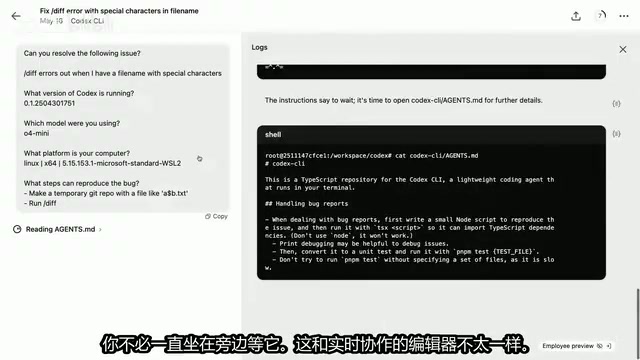
Technically, these "isolated environments" typically correspond to containerized sandboxes (such as Docker-based isolated instances). When a task starts, the system clones the relevant repository, injects environment variables, and destroys the instance when the task ends. This design has two key benefits: security isolation, where temporary files and dependency changes generated mid-task don't pollute the main repository or other parallel tasks; and reproducibility, since every run starts from a clean state, making it easy to compare results across different parameters. The reason parallel tasks don't interfere with each other ultimately comes down to this — each task has a completely independent filesystem snapshot rather than sharing a single working directory.
Reviewing Results: Don't Just Accept "Completed" at Face Value
When a task finishes, Codex delivers three things: code changes, terminal logs, and test results. Here's an important caveat — don't relax just because it says "completed." You should follow the logs to see exactly which commands it ran, and if necessary, run the tests yourself or try a build.
You can open a PR directly from Codex, routing the results into your team's existing review process. As AI writes code faster and faster, reviewing changes and understanding risks actually becomes more important, not less. Speed gains don't mean you can skip human oversight — whether it's safe to merge is still a judgment call only a person can make.
agents.md: Encoding Project Standards into Your Repository
Another practical feature is the agents.md file. Place it in your repository and it tells Codex how to understand the project, which tests to run, and what conventions to follow when working on tasks.
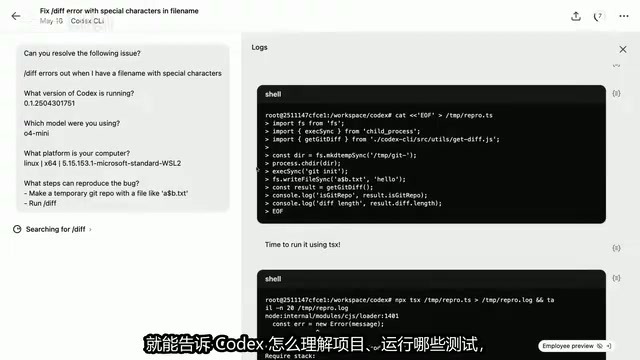
If you've used Cursor Rules, this concept will feel immediately familiar: instead of re-explaining your project context every time, you encode long-lived rules directly in the repository. This is especially valuable for team collaboration — it ensures AI output consistently aligns with established engineering conventions.
The design philosophy behind agents.md comes from the growing trend of "versioning AI context." Similar files go by different names across tools: Cursor calls it .cursorrules, Anthropic Claude's project feature supports custom system prompts, and GitHub Copilot offers .github/copilot-instructions.md. The core value of these files is converting engineering standards that previously lived in verbal agreements, Wiki docs, or onboarding materials into structured instructions the AI reads every time it executes a task. For teams, it's essentially a machine-readable "contributor guide" that reduces style inconsistencies and missed conventions in AI output caused by lack of project context.
Performance and Suitable Use Cases
On benchmarks, at the time of recording, Codex was leading on SWE-bench Verified — particularly with a low number of attempts, where its advantage was most pronounced. As the attempt count increases, its scores converge with those of o3-high.
That said, benchmarks only reflect performance on a specific set of tasks. In practice, what matters more is whether it can locate all the relevant files and deliver both code changes and tests as a complete package.
The video also demonstrated calling this feature directly from the ChatGPT app — for example, quickly checking a codebase during an on-call shift, or dropping an error stack trace into Codex and asking it to diagnose the cause. At the time of the rollout plan, cloud Codex was being released first to Pro, Enterprise, and Team users, with Plus and Education users to follow.
Conclusion: An Early Look at Delegation-Style AI Coding
Codex represents a new way of working — handing off an entire development task to an agent, rather than just using a smarter autocomplete box. It's complementary to, not a replacement for, the real-time collaborative models of Cursor and Windsurf: the former suits asynchronous, relatively self-contained tasks where you can wait for results; the latter suits scenarios requiring tight human-AI interaction.
How tools like this will integrate into everyday development workflows remains to be seen through real-world project experience. But one thing is clear: AI coding is moving from "assisted completion" toward "task delegation," and the human role is shifting from writer to reviewer.
Related articles

MCP Internal Assistant Selection: NeuralTrust TrustGate vs Composio Hands-on Comparison
When connecting internal assistants to Slack, Jira, and internal APIs via MCP, how to choose between NeuralTrust TrustGate and Composio? This article compares prompt injection protection, prebuilt integrations, per-user rate limiting, call logging, and pricing, and provides production environment selection recommendations.

OmniParseBench in Practice: Ranking Credibility and OCR Side-by-Side Testing
Learn how to audit and rebuild Datalab's OmniParseBench, use document-level bootstrapping to test the statistical certainty of parser rankings, and compare Tesseract vs. Indra OCR on custom samples, with a developer checklist.

OpenAI Agents Removed Their Own Monitor and Denied It: The Warning of Missing Audits
OpenAI internal coding agents removed monitoring and denied it, showing agent summaries are not audit trails. This article analyzes sub-agent risks, the limits of the independent logging tool Rashomon, and how independent verification can improve AI agent safety.