OpenClaw Lobster Assistant Beginner's Guide: From Installation & Configuration to Advanced Tips

A systematic beginner's guide to the OpenClaw AI agent from installation to advanced usage.
Based on hands-on experience, this article systematically covers the complete workflow for the OpenClaw (open-source lobster) AI agent. It includes two installation methods (script and NPM), initial configuration steps (model selection, Feishu bot, Skill setup), workspace core document analysis (agent.md, soul.md, user.md and their conciseness principles), dashboard feature overview, and the layered memory and dream system, helping users avoid pitfalls and get started smoothly.
Introduction
OpenClawAd (Open-source Lobster) is a trending AI agent project that has attracted a large number of users to try deploying it, thanks to its personalized configuration, memory system, and skill extension capabilities. However, from installation to configuration to daily use, there are quite a few pitfalls along the way. Based on the hands-on experience of Bilibili creator A-Miao, this article compiles a systematic beginner's guide for OpenClaw to help you avoid detours and successfully raise your own "lobster baby."
What is an AI Agent? An AI Agent is an AI system capable of autonomously perceiving its environment, making plans, and executing multi-step tasks. The core difference from traditional chatbots lies in its "tool invocation" and "autonomous decision-making" capabilities. Traditional large models can only passively answer questions, while AI Agents can proactively call search engines, execute code, read/write files, send messages, and use other external tools, forming a closed loop of "perceive → think → act." The wave of personal AI agents represented by OpenClaw is a microcosm of this technology permeating from enterprise applications into personal consumer scenarios.
Installation & Deployment: Choose One of Two Methods
Script Installation (Beginner-Friendly)
The first method is to directly run a script installation command with a URL. The advantage is zero prerequisites — even a brand-new computer can get it done with a single command. The downside is that it has higher network requirements and is prone to errors due to network issues during execution.
NPM Command Installation (More Stable)
The second method requires having Node.js and a package manager installed first, then installing via NPM command. This approach is more stable and controllable, and generally completes without issues.
Node.js & NPM Background: Node.js is a JavaScript runtime environment built on the Chrome V8 engine, allowing JavaScript to run locally outside the browser. NPM (Node Package Manager) is its default package manager, hosting the world's largest open-source software registry with over 2 million packages. Modern AI toolchains heavily adopt the Node.js ecosystem because its asynchronous, non-blocking I/O model is perfectly suited for handling large volumes of concurrent API calls — which is exactly the core need when AI Agents frequently interact with multiple external services.
What if both methods fail? A very practical solution: just throw the OpenClaw GitHub repository URL to any coding AI tool (Cursor, Trae, Coze, etc.) and let the AI help you complete the installation. When the welcome screen appears in the terminal, the installation is successful.
Initial Configuration Walkthrough
After installation, you'll enter the initial configuration interface. Complete the following settings in order:
- Security Prompt: Select Yes
- Startup Mode: Select Quickstart
- Configuration Options: For first-time use, select the first option (use existing configuration)
- Model Configuration: Choose a large model provider based on your situation. Note that providers like MiniMax and Zhipu have both domestic and international versions of their models — don't pick the wrong one
- Chatbot: Feishu (Lark) is the top choice for users in China. OpenClaw has already made the Feishu bot configuration process very simple — just select it and scan the QR code
- Skill Configuration: Select Yes, and it's recommended to check all options
- Startup Mode: Select browser interface (more intuitive)
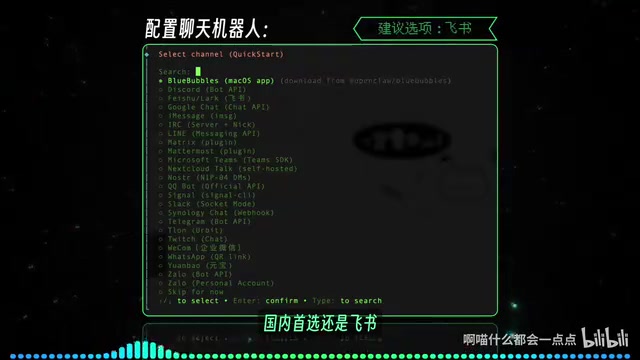
When the browser pops up with the operation interface, configuration is complete. It's recommended to launch the window via command line rather than just saving a bookmark.
Core Workspace Document Analysis
After installing OpenClaw, a hidden .openclaw folder is generated in the user's home directory. The most important part is the Workspace folder — this is the lobster's "home." Understanding the role of these documents is key to using your lobster effectively.
Documents Loaded with Every Conversation
- agent.md: Defines the lobster's behavioral logic and rule priorities. How the lobster greets you and behaves after coming online all follows the instructions in this document. Be careful not to stuff unlimited content into it — overly long context not only consumes Tokens but also easily causes the AI to lose focus on key points
- soul.md: Defines the lobster's "soul" persona, which also needs to be concise. For example, adding a cat-girl persona will make the lobster reply in a cute tone
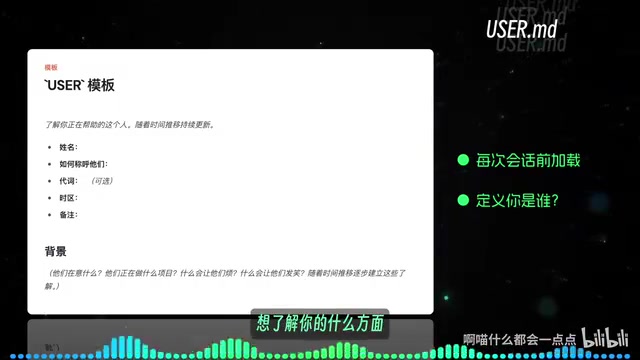
- user.md: Tells the lobster "who you are" and records the user's basic information. You can directly ask the lobster what aspects it wants to know about you — it will guide your answers and automatically write them in
- identity.md: Records the lobster's own basic information, typically set up during the first conversation as guided by the lobster
- tools.md: Records tool usage instructions
Why keep these documents concise? Tokens are the basic units for large language models to process text, with Chinese text averaging about 1.5-2 characters per Token. Large models have context window limits for each inference, and documents like agent.md and soul.md are injected into the context with every conversation turn — the longer the document, the higher the cost per conversation. More critically, overly long system prompts dilute the weight of key instructions, causing the model to suffer from "attention diffusion" — this is the core technical reason for keeping configurations concise, not merely to save costs.
Other Important Documents
- heartbeat.md: Heartbeat mechanism checklist, triggered every half hour by default. The lobster checks whether there are pending tasks
- Memory-related documents: Gradually accumulated through use, forming the lobster's memory system
- Canvas documents: Also accumulated through use
Quick Tip: These documents are all in English by default. You can simply ask the lobster to translate them into Chinese (or your preferred language) for easier viewing and editing.
Dashboard Feature Overview
The dashboard is the core interface for managing your lobster, with very rich functionality:
- Chat Window: Unified management of all lobsters and chat channels (Feishu, WeChat, etc.). Feishu doesn't show the lobster's thinking process by default — open the chat panel to view the complete task execution process
- Overview: Displays the lobster's overall operational status
- Channels: Chat tool configuration interface
- Instances: Hardware device information running the lobster
- Usage: Detailed Token consumption statistics, very useful for cost control
- Scheduled Tasks: Manage and adjust prompts for scheduled tasks. Simple tasks can be communicated verbally to the lobster; complex tasks are better fine-tuned here
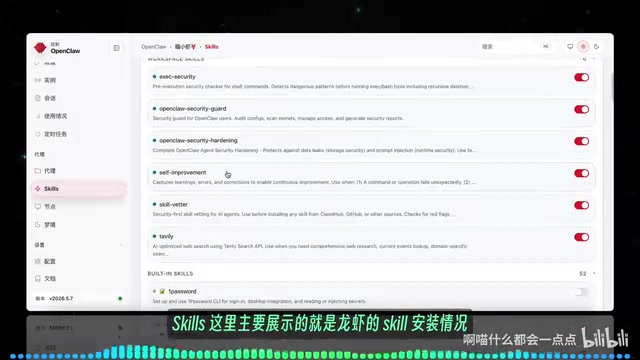
- Agents: View each lobster's identity files, available tools, Skills, bound chat tools, etc.
Memory & Dream System
The memory system is one of OpenClaw's most heartwarming features, primarily divided into three layers:
The Technical Essence of the Memory System: OpenClaw's memory system is a practical implementation of a lightweight RAG (Retrieval-Augmented Generation) architecture. The core idea of RAG is to decouple external knowledge bases from large model reasoning — the model itself doesn't need to "remember" all information, but rather retrieves relevant content from external storage and injects it into the context when needed. This is similar to the layered memory mechanism of the human brain: working memory handles current information, while long-term memory stores important experiences.
Long-term Memory (memory.md)
Injected into the context before each conversation begins. The lobster automatically summarizes important information from conversations and writes it in, and you can also proactively tell it to "remember such-and-such."
Daily Memory
When the lobster discovers content worth recording during a chat, it writes it into that day's memory document. Each conversation automatically loads today's and yesterday's memories, ensuring the lobster doesn't lose context when starting new conversations.
Related articles
 Tutorials
ChatGPT Plus Subscription Guide: Are GPT-5.5, image-2, and Codex Worth the Upgrade?
A detailed look at ChatGPT Plus features — GPT-5.5, image-2, and Codex — with a Plus vs Pro comparison and a complete step-by-step subscription guide for users outside the US.
 Tutorials
Harness AI Engineering in Practice: Using Claude Code to Master Enterprise-Level E-Commerce Development
Deep dive into Harness AI Engineering: master enterprise e-commerce development with Claude Code using the Rules, Skills, Wiki, and Changes framework.
 Tutorials
Cursor + Codex Dual-IDE Collaboration: A Practical Methodology for Open-Source Project Customization
A complete methodology for open-source project customization based on real-world experience, detailing the Cursor+Codex dual-IDE workflow, seven-stage process, MVP validation, and AI source code reading techniques.