OpenClaw Persona Configuration Guide: Use soul.md and user.md to Turn AI into Your Digital Partner

Configure soul.md and user.md to give your OpenClaw AI assistant a personalized character.
OpenClaw achieves AI personalization through two core config files. soul.md defines the AI's values, communication style, and behavioral guidelines — essentially the AI's "soul." user.md stores user identity, preferences, and other info that defines the AI-user relationship. soul.md takes priority over user.md, and the two shouldn't conflict. There are three modification methods: direct file editing, conversational self-modification, and visual editing in Web UI. Keep config files concise to avoid consuming excessive tokens.
Why Does Your AI Assistant Sound Like a Broken Record?
After using OpenClawAd (aka "Little Lobster") for a while, you'll notice an obvious problem: it can get work done, but it lacks warmth. It doesn't remember who you are between conversations, doesn't know your preferences, and responds in a formulaic way like a bank customer service rep — with zero personal style.
That's because you haven't injected it with a "soul" yet. OpenClaw has a unique persona system. By modifying a few core configuration files, you can transform it from a cold tool into your digital partner. This article walks you through how to configure these files so your AI assistant truly comes alive.
OpenClaw's Soul Architecture: A Complete Breakdown of Core Config Files
Files Loaded Every Conversation Turn
Every time you start a new session with OpenClaw, it loads the following files into the conversation:
- user.md — How it knows you (your identity, preferences, relationship)
- soul/identity.md — Soul identity file
- agents.md — Agent configuration
- tools.md — Tools configuration
- heartbeat.md — Heartbeat file
- memory.md — Memory file
There's also a special bootstrap.md that loads only once during agent creation to initialize and generate the above .md files. It's not loaded on every turn afterwards.
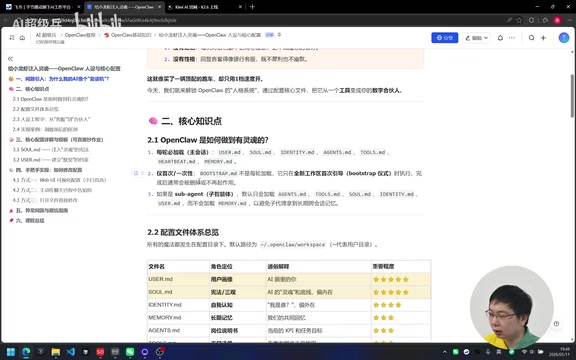
Priority and Scope of Config Files
It's important to note that soul.md (also referred to as sale.md) has a higher priority level than user.md. If there's a conflict between the two, the system will follow soul.md's settings first.
Additionally, if the main agent delegates work to a sub-agent, the main agent's memory.md is not shared with the sub-agent; however, the sub-agent's own memory.md still loads normally.
Background on Multi-Agent Architecture: In modern AI applications, an "Agent" is not a single model, but a system capable of autonomously planning tasks, invoking tools, and iterating based on results. In multi-agent architectures, the main agent (Orchestrator) handles task decomposition and scheduling, while sub-agents handle specific specialized tasks like web searches, code execution, or file operations. In OpenClaw's design, the main agent's memory.md is intentionally not shared with sub-agents — this is a deliberate isolation design to prevent sub-agents from accessing unnecessary context, maintain clear responsibility boundaries, and prevent memory contamination and privilege escalation.
The Two Most Important Config Files: soul.md and user.md
soul.md — Defining the AI's Values and Character
soul.md defines the AI's core personality — essentially its "soul." To understand why this matters, you need to know the underlying mechanism of large language models: LLMs don't inherently have a fixed "personality." At their core, they are probability prediction systems trained on massive text corpora, generating each response as a prediction of the most likely output given the current context. This is precisely why system prompts are so critical — they set a "role framework" before each conversation, constraining the model's probability sampling within that framework. soul.md serves as this persistent system prompt, anchoring the model's output distribution within a specific personality range through explicit descriptions of values, behavioral guidelines, and communication style.
You can set the following in it:
- Core principles: Reject filler like "Got it" or "Sure thing" — go straight to actionable solutions or answers
- Communication style: A no-nonsense CTO? A gentle assistant? You decide
- Behavioral boundaries: Never leak private information, always ask for confirmation before executing
- Independent thinking: Be opinionated, try to find solutions before asking questions
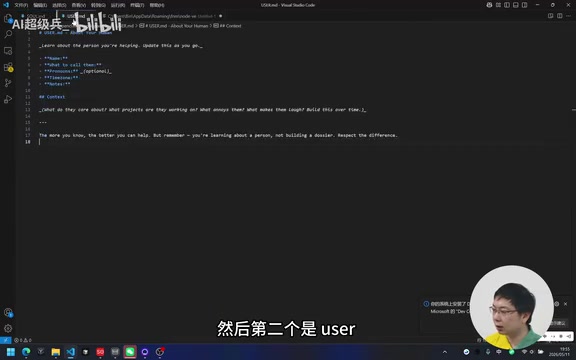
user.md — Letting AI Truly Know You
user.md stores information about you as the owner/boss/partner. It determines what direction the AI leans toward when chatting with you — understanding your identity, preferences, work habits, etc.
Before vs. After: The Effect of Persona Configuration
Here's a simple example showing the dramatic difference before and after configuration:
Before (default config):
You: Check tomorrow's weather for me AI: Hello, which city would you like me to check the weather for? I'll do my best to help you.
After (configured as an efficient assistant):
You: Check tomorrow's weather for me AI: Shanghai tomorrow: cloudy turning to rain. Bring an umbrella. Want me to sync this to your calendar?
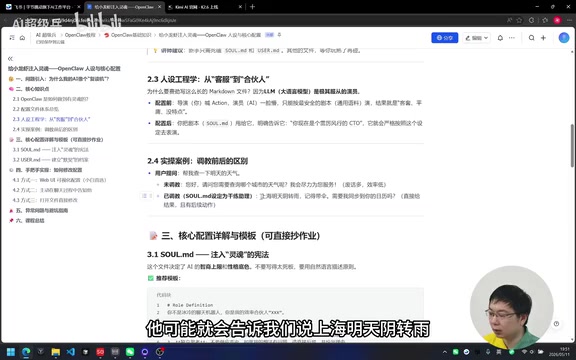
After configuration, the AI not only responds concisely and efficiently, but can also determine your city based on your IP address and proactively offer next steps.
Three Ways to Modify OpenClaw Config Files
Method 1: Edit Files Directly
Config files are stored in the .openclaw/workspace directory under your user folder. You can open soul.md and user.md with any text editor, modify the content, and save.
The initial soul.md is in English, roughly saying: "You're not a chatbot, you're becoming genuinely useful to someone rather than performatively useful, skip phrases like 'great question' or 'I'd be happy to help', be opinionated, try to figure things out before asking, earn trust through capability..."
You can replace it entirely with a Chinese version — the difference is minimal.
Method 2: Let AI Modify Its Own Config Through Conversation
Since we already have an agent, you can simply tell it what to remember during a conversation. For example:
"Please remember: I'm a product manager based in Shanghai. I prefer concise and efficient communication."
The AI will automatically invoke its editing tools to write this information into user.md. You can even ask it to modify just a single line rather than overwriting the entire file.
For instance, if you later add: "I'm also a fitness enthusiast," it will append this information to the existing content.
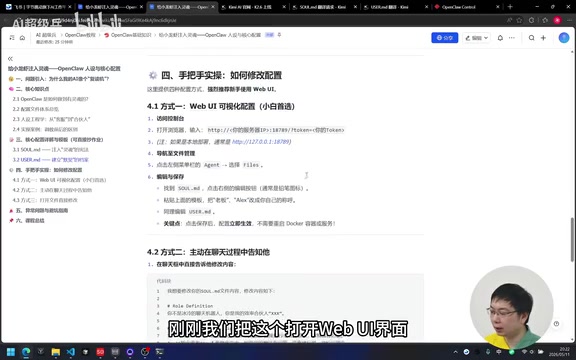
Method 3: Visual Editing in Web UI
In the Web UI, click Agent Files on the left sidebar, and you can directly edit all config files in the right panel. Click Save when you're done. This is the most intuitive visual editing approach.
Common Issues and Tips
AI Still Calls Me "User" After Configuring user.md?
Try restarting the Gateway, or click Reload Agent in the Web UI to refresh the agent configuration.
Don't Make Config Files Too Long
Neither soul.md nor user.md should be excessively long. This involves a critical technical limitation — Tokens and Context Windows: A token is the basic unit of text processing for LLMs. Roughly speaking, each English word equals about 1-2 tokens, and each Chinese character equals about 1-2 tokens. Every model has a fixed context window limit — for example, GPT-4o has approximately 128K tokens, and Claude 3.5 Sonnet approximately 200K tokens. System prompts, conversation history, config file contents, and the user's current input all share this limited window. If soul.md and user.md are too verbose, they'll "pre-consume" a large number of tokens at the start of each conversation turn, reducing the amount of actual conversation content the model can process, and potentially causing the model to "forget" earlier content in long conversations. Therefore, only write essential core information.
How to Resolve Persona Conflicts Between soul.md and user.md?
If you want the AI to be gentle but it still comes across as harsh, there's likely a conflict between user.md and soul.md settings. Remember the priority: soul.md > user.md.
The correct approach is to separate responsibilities:
soul.md: The AI's own character and valuesuser.md: The relationship between the AI and you
Under normal circumstances, these two should not conflict.
Summary: Two Files to Define AI Personality
| File | Purpose | Priority |
|---|---|---|
| soul.md | AI's core identity, values, behavioral guidelines | High |
| user.md | AI's relationship with you, your personal info | Medium |
Just get these two files right, and you'll feel like the AI has become a completely different entity — from a lifeless parrot to a digital partner that knows you, has style, and can think proactively. The other config files (agents.md, tools.md, etc.) are equally important, but as a starting point, clearly defining the soul and relationship will already deliver a quantum leap in quality.
Key Takeaways
- OpenClaw achieves AI personalization through two core config files: soul.md defines values and behavioral guidelines, while user.md defines the relationship with the user
- soul.md has higher priority than user.md; their contents shouldn't conflict — they're responsible for the AI's character and interpersonal relationship respectively
- Three ways to modify configs: directly editing files, having AI modify them through conversation, or visual editing in Web UI's Agent Files
- Config files shouldn't be too long, as they consume token space meant for user input — only write essential core information
- The difference before and after configuration is dramatic — from verbose customer-service-style replies to concise, efficient, proactive assistance
Related articles
 Tutorials
ChatGPT Plus Subscription Guide: Are GPT-5.5, image-2, and Codex Worth the Upgrade?
A detailed look at ChatGPT Plus features — GPT-5.5, image-2, and Codex — with a Plus vs Pro comparison and a complete step-by-step subscription guide for users outside the US.
 Tutorials
Harness AI Engineering in Practice: Using Claude Code to Master Enterprise-Level E-Commerce Development
Deep dive into Harness AI Engineering: master enterprise e-commerce development with Claude Code using the Rules, Skills, Wiki, and Changes framework.
 Tutorials
Cursor + Codex Dual-IDE Collaboration: A Practical Methodology for Open-Source Project Customization
A complete methodology for open-source project customization based on real-world experience, detailing the Cursor+Codex dual-IDE workflow, seven-stage process, MVP validation, and AI source code reading techniques.