OpenCode Browse: A New Entry Point for AI Coding Tools

OpenCode launches Browse, a browser-based AI coding assistant extending from IDE to research workflows.
OpenCode has launched Browse, extending its AI coding toolchain from terminal and IDE plugins into the browser. It drew 257 points and 145 comments on Hacker News. The article notes that much developer cognitive load—docs, READMEs, issues—happens outside the IDE, a gap browser-side AI can fill. OpenCode enters via "browsing" rather than "generation" to capture workflow upstream, but web parsing difficulty and privacy concerns remain key challenges.
From Command Line to Browser: OpenCode's Product Extension
OpenCode recently launched a new product called Browse, and judging from its name and the positioning on its product page, this is very likely an extension of its AI coding toolchain into the browser scenario. On Hacker News, the product link received 257 points and sparked 145 comments, indicating considerable discussion. For a developer-facing tool, this level of attention shows the community has strong interest in the next form of "AI-assisted coding."
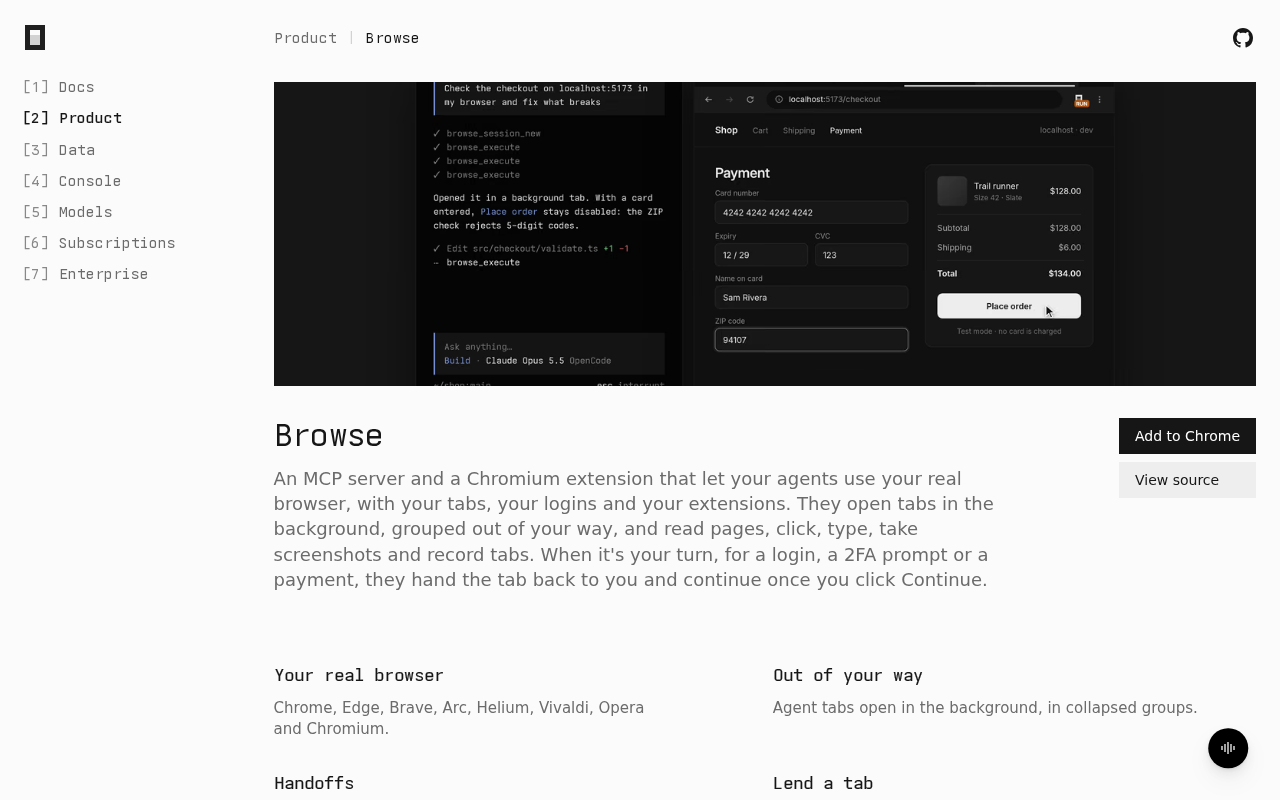
Previously, OpenCode left developers with an impression mostly at the terminal and editor plugin level. The emergence of Browse means it is trying to extend its capabilities into areas closer to everyday research and information gathering. Developers spend a great deal of time before writing code looking up documentation, browsing repositories, and reading issues. If AI can participate directly in this process within the browser, the toolchain's coverage becomes much more complete.
Why Developers Need an AI Coding Assistant "in the Browser"
The working boundaries of traditional AI coding assistants are usually clear: autocompleting code in the IDE, explaining errors, and generating unit tests. But in real development workflows, a large amount of cognitive load occurs outside the IDE. Reading READMEs of open-source projects, comparing APIs across libraries, and searching issue discussions for records of pitfalls—these actions all happen in the browser, where AI assistants are often absent.
The value of products like Browse lies in filling this gap. If it can connect browsing, retrieval, understanding, and writing back to code, developers won't need to repeatedly copy and paste across multiple windows. The heated discussion in the HN comments also indirectly confirms this: developers' need for "AI participating in the information-gathering process" genuinely exists, rather than being a scenario imagined by vendors.
IDE (Integrated Development Environment) is the primary software developers use to write and debug code, such as VS Code and the JetBrains suite; IDE plugins can access files, syntax trees, and runtime state within the editor, so traditional AI coding assistants can obtain high-quality code context. But web pages in the browser are HTML-rendered results intended for human reading, lacking both a unified semantic structure and the deterministic boundaries of code files. Browser-side AI assistants typically need to rely on content scripts, accessibility trees, or page screenshots to understand pages, and their parsing accuracy and stability are inherently weaker than in the IDE environment—which is one of the fundamental reasons such products are hard to get right.
Competitive Landscape and Differentiation Space
The AI coding track is already quite crowded, with products ranging from IDE plugins to cloud agents all competing for developers' attention. OpenCode's choice to enter from the Browse angle differentiates it by emphasizing "browsing" rather than "generation"—this is more like capturing the upstream of developers' workflows.
The advantage of an upstream position is stronger stickiness: once developers get used to using a certain tool for technical research, the subsequent code generation and debugging steps will naturally continue within the same ecosystem. But the risks are equally obvious: the interaction complexity of the browser scenario and the difficulty of parsing web pages are far higher than for code files, and whether the product experience can be as smooth as an IDE plugin is the key to success or failure.
Signals from Community Feedback
A discussion volume of 145 comments is quite substantial for a product that has just debuted. HN users' discussions usually focus on a few directions: the actual capability boundaries, comparisons with existing tools, and privacy and data flow concerns. For browser-based AI tools, the last point is especially sensitive—letting AI read browsed pages means it may come into contact with code repositories, internal documents, or even credential information.
If OpenCode wants to establish itself in this direction, it needs to give clear answers to these doubts. Developers' trust in tools is built on transparency, especially when a tool's capability boundary shifts from "what I paste to it" to "what it can see on its own," the cost of trust rises significantly.
Next Steps Worth Watching
Judging from the product page and community discussion, Browse currently looks more like a directional statement, and more information is needed to assess its actual form and user experience. For developers, what's worth observing is whether it can truly reduce the number of switches between browser and editor, and how accurately it understands complex web pages.
Competition in AI coding tools is shifting from "who autocompletes faster" to "who better understands the developer's complete workflow." OpenCode Browse is betting on the latter, and whether this path works out will be answered by the product iterations over the next few versions.
One-line Summary
OpenCode launches Browse, a browser-side AI coding assistant that extends its capabilities from the IDE to developers' research phase.
Paragraph Summary
OpenCode has launched a new product called Browse, seen as an extension of its AI coding toolchain from the terminal and IDE plugins into the browser scenario. It received 257 points and 145 comments on Hacker News, drawing considerable community attention. The article notes that a large amount of developers' cognitive load occurs outside the IDE—looking up documentation, reading READMEs, and browsing issues—and a browser-side AI assistant can fill this workflow gap. OpenCode chose to enter through "browsing" rather than "generation," aiming to capture the upstream of developers' workflows to boost stickiness. However, the interaction complexity and web page parsing difficulty of the browser scenario are far higher than for code files, and privacy and data flow are also major community concerns. Browse currently looks more like a directional statement, and its actual success will depend on future iterations.
Related articles

Gemini 4 Neon Leak: A Potential Strong Contender Against Opus 5.5
A Hacker News thread suggests Gemini 4 Neon looks like an Opus 5.5 competitor. This article unpacks the product positioning behind this community signal, shifts in the top-model competitive landscape, and what it means for developers' model selection strategy.

Claude Fable 5.2's Self-Authored Short Film 'Fable' Sparks Discussion
A short film 'Fable,' credited to Claude Fable 5.2 for script, visuals, and directing, appears on Hacker News. This article analyzes the significance of full-pipeline AI creation, community reactions, and what it means for content creators.

Anthropic IPO Pricing: A Signal of AI Giants Going Public
Anthropic's IPO pricing draws attention. This article analyzes its potential impact on AI industry valuation, commercialization paths, and the competitive landscape, and highlights public-market expectations and challenges for AI companies.