OpenCode in Practice: Building a Fully Automated YOLOv8 Object Detection Pipeline with Zero Code

Use OpenCode Skills and natural language to run the entire YOLOv8 object detection pipeline with zero code.
This article demonstrates how to use OpenCode's Skill mechanism to drive the full YOLOv8 object detection workflow through natural language instructions. The pipeline covers recording 30 seconds of video, automatic frame extraction and annotation using VLM and FastSAM, fine-tuning YOLOv8 via transfer learning, and real-time detection verification — all with zero code in about two hours, achieving detection confidence above 0.99. The approach embodies a "humans set goals, AI executes" collaboration model that dramatically lowers the technical barrier to object detection.
How Easy Is It to Let AI Run Through the Entire YOLO Workflow?
Anyone who's tried to get started with object detection has probably experienced this pain: the full YOLOv8 pipeline — data collection, annotation, training, inference — requires substantial code at every step and plenty of pitfalls along the way. Manual annotation of a few hundred images alone is enough to scare off most beginners.
Now there's a more efficient approach: using OpenCode's Skill model, you can run through the complete loop from camera recording to model training to real-time detection using natural language instructions, without writing a single line of code.
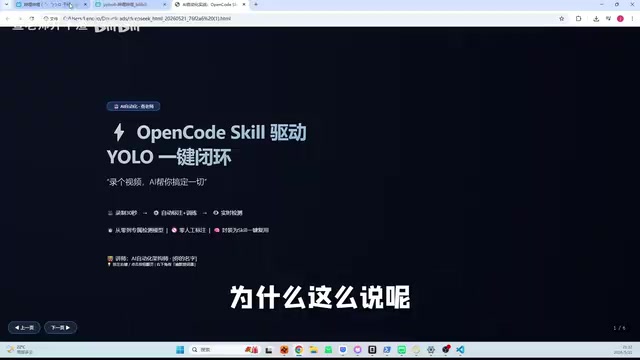
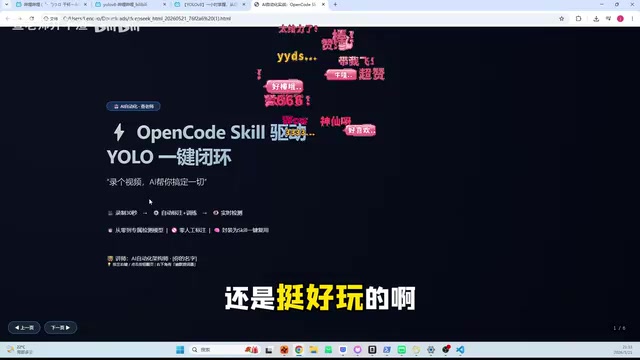
This article documents exactly such a hands-on case — building a YOLO Skill with OpenCode to achieve a fully automated pipeline of "record 30 seconds of video → automatic frame extraction and annotation → model training → real-time detection."
YOLO Technical Background: YOLO (You Only Look Once) is one of the most influential algorithm families in object detection, first proposed by Joseph Redmon in 2015. Unlike traditional two-stage detectors (such as the R-CNN series), YOLO treats object detection as a single regression problem, simultaneously predicting bounding boxes and class probabilities in one forward pass — hence the name "You Only Look Once." YOLOv8 is the latest backbone version released by Ultralytics in 2023, introducing architectural innovations such as Anchor-Free detection heads and C2f modules, achieving a better balance between speed and accuracy. It has become one of the most widely used object detection frameworks in both industry and research.
Core Concept: You Set the Direction, AI Handles the Execution
What Is a YOLO Skill?
A Skill is a core concept in OpenCode — simply put, it encapsulates a series of complex operations into reusable skill modules. OpenCode's Skill mechanism is essentially an implementation of the AI Agent architecture — an AI Agent is an autonomous AI system capable of perceiving its environment, planning steps, invoking tools, and executing tasks, fundamentally different from traditional single-turn Q&A AI. Skills encapsulate multi-step operations as reusable atomic capability units. After receiving natural language instructions, the Agent automatically orchestrates the calling sequence of these Skills, handling intermediate states and exceptions.
In this case, the YOLO Skill packages the following four steps into one automated pipeline:
- Video Recording: Invokes the camera to record 30 seconds of target video
- Automatic Frame Extraction and Annotation: Uses a Vision-Language Model (VLM) to automatically annotate video frames
- YOLOv8 Model Training: Automatically completes model fine-tuning based on annotated data
- Real-time Detection Verification: Loads the trained model for real-time object detection on camera feed
A Key Principle
There's an important mindset here: it's not about letting AI control us, but about us taking the lead. AI doesn't know what product you want to build or what objects you want to detect — you need to figure out the direction yourself, then let AI handle the technical implementation. This collaborative model of "humans set goals, AI executes" is the correct way to use current AI tools.
YOLOv8 Fully Automated Pipeline: Step-by-Step
Step 1: Environment Setup and Video Recording
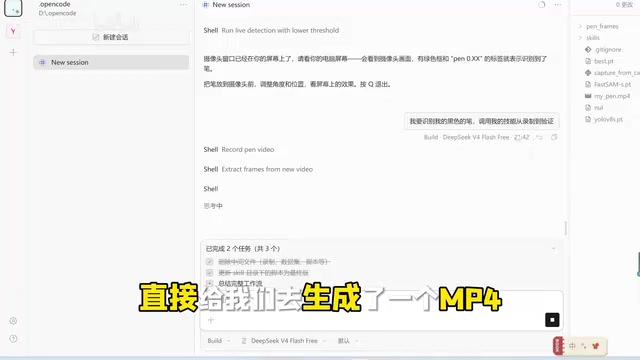
Open OpenCode, issue a natural language command, and the system automatically invokes the camera to start recording. In the demo, a mypain.mp4 file was generated — this serves as the raw data for all subsequent processing.
What you need to prepare is extremely simple:
- A computer with a camera
- An installed OpenCode environment
- The target object you want to detect (a pen was used in the demo)
Recording time is just 30 seconds — the barrier to data collection is reduced to near zero.
Step 2: Automatic Frame Extraction and Smart Annotation
This step saves the most time in the entire workflow. In the traditional approach, manually annotating hundreds of images takes hours or even days. OpenCode automatically splits the video into frame images, then calls a Vision-Language Model to automatically annotate each frame, compressing the entire process to just a few minutes.
Vision-Language Models (VLMs) and Automatic Annotation Principles: Vision-Language Models are multimodal large models capable of understanding both images and text simultaneously, with representative products including GPT-4V, LLaVA, and Qwen-VL. In automatic annotation scenarios, VLMs can locate target regions in images based on text descriptions (e.g., "pen"), generating bounding box coordinates to replace manual annotation. FastSAM (Fast Segment Anything Model) is a lightweight version of Meta's SAM model, capable of generating segmentation masks for arbitrary objects in milliseconds. Combined, they form a "VLM localization + FastSAM precise segmentation" automatic annotation pipeline, compressing what originally required hours of manual work down to minutes.
Key technologies used by the system include:
- FastSAM: Responsible for fast image segmentation and object annotation
- YOLOv8 pre-trained model (yolov8.pt): Serves as the base model for fine-tuning
Step 3: Automatic YOLOv8 Model Training
Once annotation data is ready, the system automatically launches the YOLOv8 training process. The training here is essentially an application of Transfer Learning: the pre-trained yolov8.pt model has already learned rich visual features on large-scale datasets like COCO. During fine-tuning, only a small amount of domain-specific data is needed to adjust model parameters, enabling rapid adaptation to new detection targets. This is why a high-confidence model can be trained from just the limited frames extracted from a 30-second video — the pre-trained weights provide powerful feature extraction capabilities, and the fine-tuning stage only needs to teach the model the visual characteristics of the new target.
After training completes, a best.pt model file is generated. According to the author's testing, the entire process from recording video to finishing training takes approximately two hours.
Step 4: Real-time Object Detection Verification
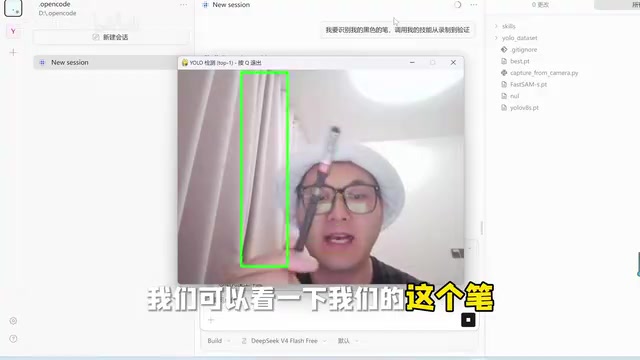
Load the trained best.pt model, and the system can perform real-time detection on the camera feed. In the demo, detection confidence for the pen reached 0.99 to 1.0 — remarkably solid results.
What Are the Technical Highlights of This Approach?
Truly Zero-Code Object Detection
The entire workflow is driven entirely by natural language — no code writing required. Even users with zero programming knowledge can independently complete a full YOLOv8 object detection project.
High Reusability Through Skill Encapsulation
The author packaged the entire workflow into a single Skill that can be invoked with one click and reused repeatedly. Want to switch to a different detection target? Just record another 30-second video — the rest of the pipeline runs automatically. This architecture allows complex machine learning engineering workflows to be abstracted into high-level semantic instructions, representing an important paradigm in current LLM engineering practice.
Evolution from Manual Configuration to Natural Language Instructions
Looking back to when YOLOv8 was first released, developers had to handle dataset organization, YAML configuration file writing, training script debugging, and a host of other tedious tasks themselves. Now, through Skill model encapsulation, these operations are abstracted into a single natural language instruction. This isn't just an efficiency improvement — it represents an important evolutionary direction in AI toolchains.
Conclusion: AI Is Becoming the Tool That Helps Us Train AI
This case reveals a noteworthy trend: AI is not just the object being trained — it's also becoming the tool that helps us train AI. Through OpenCode's Skill mechanism, complex machine learning pipelines are simplified into natural language interactions, dramatically lowering the technical barrier.
If you want to try it yourself, here are a few suggestions:
- First understand the logic of the entire workflow and what each step does
- Start with simple single-object detection
- Once comfortable, gradually challenge yourself with multi-object and complex scene applications
In the future, this "natural language-driven AI development" model will likely become mainstream, enabling more people without technical backgrounds to build their own AI applications.
Key Takeaways
- Through OpenCode's Skill model, you can achieve a fully automated YOLOv8 loop from data collection to real-time detection using natural language
- The entire process requires only 30 seconds of video recording; the system automatically handles frame extraction, annotation, training, and verification, taking approximately two hours total
- FastSAM and VLM enable automatic annotation, dramatically reducing the time cost of traditional manual annotation
- YOLOv8 training is essentially transfer learning — pre-trained weights enable high accuracy with minimal data
- The trained model achieves detection confidence of 0.99-1.0 for target objects — excellent performance
- The core principle is human-led direction-setting with AI executing the technical implementation, rather than being controlled by AI
Related articles
 Tutorials
ChatGPT Plus Subscription Guide: Are GPT-5.5, image-2, and Codex Worth the Upgrade?
A detailed look at ChatGPT Plus features — GPT-5.5, image-2, and Codex — with a Plus vs Pro comparison and a complete step-by-step subscription guide for users outside the US.
 Tutorials
Harness AI Engineering in Practice: Using Claude Code to Master Enterprise-Level E-Commerce Development
Deep dive into Harness AI Engineering: master enterprise e-commerce development with Claude Code using the Rules, Skills, Wiki, and Changes framework.
 Tutorials
Cursor + Codex Dual-IDE Collaboration: A Practical Methodology for Open-Source Project Customization
A complete methodology for open-source project customization based on real-world experience, detailing the Cursor+Codex dual-IDE workflow, seven-stage process, MVP validation, and AI source code reading techniques.