OpenCode + LLM Automated Environment Patching: A Complete JS Reverse Engineering Workflow

Automate JS reverse engineering environment patching using LLMs with custom System Prompts
This article introduces a novel approach to automating the "environment patching" task in JS reverse engineering by combining an LLM (such as DeepSeek) with the OpenCode terminal tool and a carefully crafted System Prompt. Traditional manual environment patching requires simulating browser object properties one by one, which is time-consuming and error-prone. This approach injects a reverse engineer's domain knowledge, operational workflows, and code templates into a System Prompt, enabling AI to systematically patch environments — successfully tested on major platforms like Taobao and Xiaohongshu in approximately 10 minutes.
Introduction: Let AI Handle the Tedious Work of Environment Patching
Anyone who's done JS reverse engineering knows that "environment patching" (补环境) is the most grueling part of the process. You need to identify environment detection points in the JS code one by one, manually simulating browser objects like navigator, window, and document — miss a single property and the target website might flag you.
Now there's a new approach: use an LLM (like DeepSeekAd) combined with the OpenCode terminal tool and a carefully crafted System Prompt to let AI handle environment patching automatically. Based on real-world testing, this approach has been successfully applied to major platforms including Taobao, Xiaohongshu (RED), Pinduoduo, and JD.com, with each environment patch taking only about 10 minutes.
This article is based on a practical walkthrough shared by a reverse engineer, breaking down the complete workflow and key details of this AI-assisted environment patching approach.
What Is Environment Patching? Why Is Manual Patching Slow and Difficult?
How Websites Detect You're Not in a Real Browser
Modern websites embed extensive environment detection logic in their JS code as part of their anti-scraping and anti-reverse-engineering mechanisms. Notably, commercial anti-bot solutions represented by Akamai, Cloudflare, and Shape Security have evolved this detection into a multi-layered browser fingerprinting system — they inject thousands of lines of obfuscated JS code during page load, collecting over 100 browser feature dimensions. These checks cover not only static property values but also property access order, timing characteristics, and even Canvas/WebGL rendering differences to distinguish real browsers from simulated environments. Common detection types include:
- Browser fingerprint detection: Reading properties of global objects like
navigator.userAgent,window.chrome, anddocument.cookieto check if values are normal - Function protection detection: Calling the
toString()method of native functions to check if the return value contains[native code], determining whether functions have been tampered with - Prototype chain detection: Verifying whether an object's
__proto__chain matches that of a real browser - Property descriptor detection: Using
Object.getOwnPropertyDescriptorto check property descriptors likeconfigurableandenumerable
Among these, function toString detection is one of the hardest checks to bypass in anti-bot systems. In a real browser, native functions (like Array.prototype.push) return 'function push() { [native code] }' when toString() is called. When reverse engineers rewrite these functions in JS, toString() exposes the actual JS implementation. Bypassing this detection requires using Proxy or directly modifying a function's toString method, but this itself may trigger Proxy detection. Advanced anti-bot systems also check whether Function.prototype.toString has been replaced, forming multi-layered nested detection chains — this is why environment patching must strictly follow property descriptor specifications.
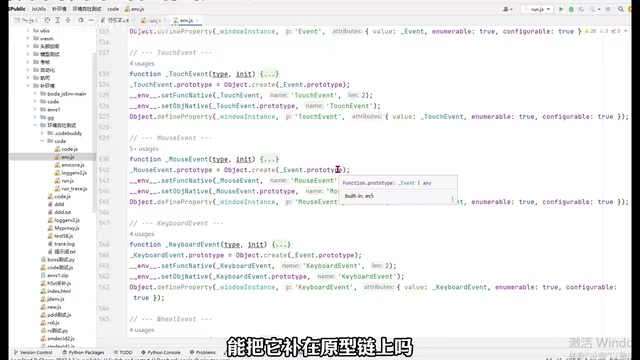
When you extract JS code from a browser and run it in Node.js, all these checks fail. This is because although Node.js is also based on the V8 engine, it lacks the browser's Web API layer. In a browser, the JS runtime consists of the rendering engine (Blink), the JS engine (V8), and the browser API layer, where global objects like window and document are implemented in C++ and exposed to JS. Node.js only has the V8 engine without this C++ binding layer, so it natively lacks all BOM/DOM objects. More critically, the property descriptors (configurable, writable, enumerable) and prototype chain structures of browser native objects are fixed — any slight deviation during manual simulation will be detected. "Environment patching" means manually constructing these missing browser objects at the top of the code, making the code "think" it's still running in a browser.
Why Simply Asking ChatGPT to Patch Doesn't Work Well
Many people have tried sending JS files directly to ChatGPT and asking it to patch the environment, but results are typically unsatisfactory. There are three reasons:
- AI doesn't understand the target website's specific detection logic: Every website has different detection points, so generically patching a bunch of properties is useless
- The patched environment isn't realistic enough: Property values are randomly filled in, prototype chain relationships don't match, and detection immediately exposes the simulation
- Lack of a systematic environment patching methodology: AI doesn't know what order to patch in, which properties are mandatory, or how to set descriptors
The key issue isn't that AI lacks capability — it's that you haven't given it sufficient guidance. You need to tell AI through a Prompt: what the patching rules are, what templates look like, and what workflow to follow.
Core Approach: System Prompt + OpenCode + LLM
System Prompt: "Feeding" Reverse Engineering Expertise to AI
System Prompt engineering is the core methodology for applying LLMs to vertical domains. Unlike general conversation, professional domain Prompts need to include three layers: domain knowledge injection (telling AI the rules and constraints of the domain), operational workflow definition (specifying execution steps and decision logic), and output format constraints (ensuring results can be directly used by downstream tools). This pattern is called an "expert system Prompt," which essentially transforms human experts' tacit knowledge into explicit rules that AI can execute.
The core of this approach is a carefully crafted System Prompt (referred to as "Sky" by the creator), designed following this paradigm to accomplish the following:
- Define patching rules: For example, environment code must be placed above the original code, and properties must be set according to real browser descriptors
- Provide code templates: Give AI a set of verified environment simulation code templates, including construction methods for core objects like
window,navigator, anddocument - Specify trigger mechanisms: When a user says "help me patch the environment," AI automatically executes a preset 5-step sequence
- Constrain output format: Specify how logs should be output and how file structures should be organized
In plain terms, the System Prompt "injects" the methodology of an experienced reverse engineer into the AI in text form. AI's code generation capabilities are already strong — what it lacks is domain knowledge and operational standards, which is exactly what the Prompt provides.
OpenCode: Letting AI Directly Operate Your Files
OpenCode belongs to the "Agentic AI" tool category. Its fundamental difference from conversational AI like ChatGPT lies in its Tool Use capability. Through the Model Context Protocol (MCP) or similar mechanisms, it encapsulates file system operations, Shell command execution, and other capabilities as tool functions callable by AI — when AI decides it needs to read a file, it calls the read_file tool; when it needs to execute code, it calls the shell_exec tool. This architecture transforms AI from an "advisor" into an "executor," representing the mainstream implementation pattern in today's AI Agent space. Similar tools include Cursor, Cline, Devin, etc.
Specifically, OpenCode's capabilities in this workflow include:
- Reading and writing local files
- Executing command-line operations (e.g.,
node xxx.jsto test code) - Supporting integration with multiple LLMs (DeepSeek, Claude, GPT, etc.)
- Loading custom System Prompts
With OpenCode, AI doesn't just "talk
Related articles
 Tutorials
ChatGPT Plus Subscription Guide: Are GPT-5.5, image-2, and Codex Worth the Upgrade?
A detailed look at ChatGPT Plus features — GPT-5.5, image-2, and Codex — with a Plus vs Pro comparison and a complete step-by-step subscription guide for users outside the US.
 Tutorials
Harness AI Engineering in Practice: Using Claude Code to Master Enterprise-Level E-Commerce Development
Deep dive into Harness AI Engineering: master enterprise e-commerce development with Claude Code using the Rules, Skills, Wiki, and Changes framework.
 Tutorials
Cursor + Codex Dual-IDE Collaboration: A Practical Methodology for Open-Source Project Customization
A complete methodology for open-source project customization based on real-world experience, detailing the Cursor+Codex dual-IDE workflow, seven-stage process, MVP validation, and AI source code reading techniques.