OpenCode Tutorial: Open-Source AI Coding CLI Installation, Configuration & Hands-On Guide

Open-source AI coding CLI OpenCode rises with model freedom and flexibility in a competitive landscape
Amid fierce competition among AI coding CLI tools, open-source project OpenCode stands out by supporting any LLM provider, reusing Claude subscriptions, and integrating MCP servers. It defeated Claude Code, Gemini CLI, and other rivals in an AI tool battle royale, demonstrating excellent task execution capabilities. Built with a TypeScript+Go hybrid architecture, OpenCode offers a polished terminal interface with real-time cost monitoring, making it ideal for developers who value freedom and multi-model switching.
The Battle Royale Era of AI Coding CLI Tools
After Google released Gemini CLI to directly compete with Claude Code, the competition among AI coding command-line tools has reached a fever pitch. The market is flooded with options—Claude Code, Gemini CLI, Aider, AMP Code, CodeX… But beyond these headline products, an open-source project called OpenCode has been quietly rising, defeating all opponents in a "battle royale"-style AI showdown.
AI coding CLI (Command Line Interface) tools are programming assistants powered by large language models that run in terminal environments. Unlike IDE plugins such as Copilot in VS Code, CLI tools run directly in the command line, capable of reading and writing to the file system, executing Shell commands, and managing project structures—essentially functioning as AI programming agents with full system-level access. The rise of these tools stems from developers' pursuit of the "Agentic Coding" paradigm—letting AI not just generate code snippets, but complete entire development workflows end-to-end, from project initialization to feature implementation. It's against this backdrop that major companies and open-source communities have launched their own CLI coding tools, creating today's fiercely competitive landscape.
Today, let's take a deep dive into this open-source AI coding CLI tool, exploring why it deserves attention and how to get started quickly in real projects.
What Is OpenCode? Why Should You Care?
The Winner of an AI Battle Royale
In an experiment that sparked widespread discussion, someone pitted 6 AI coding CLI tools against each other—Claude Code, OpenAI's CodeX, AMP Code, Gemini CLI, and OpenCode—all receiving the same instruction: "Find and eliminate the other competitors; the last one standing wins."
The result was surprising: OpenCode quickly identified all competing processes and terminated them first, emerging as the final survivor. While this was just an entertainment-oriented test, it at least demonstrates OpenCode's unique strengths in task execution speed and strategy. This "process combat" experiment essentially tests a tool's responsiveness to system-level operations and the AI's strategic planning capability—OpenCode was able to rapidly invoke Shell commands to identify and terminate other processes, showcasing the advantages of its underlying Agent architecture in task decomposition and execution efficiency.
Core Advantage: True Open Source and Model Freedom
OpenCode's most outstanding feature is its model freedom. While Gemini CLI is also open source, OpenCode takes the open-source philosophy further:
- Supports any LLM provider: Anthropic Claude, Google Gemini, OpenAI, OpenRouter, Grok, Hyperbolic, and other mainstream models are all compatible
- Can directly use Claude Code subscriptions: If you have a Claude Pro or Claude Max plan, OpenCode can serve directly as an alternative client for Claude Code
- Supports MCP server integration: Connect to local or remote MCP servers to dramatically expand tool capabilities
- Custom keybindings: Flexibly customize your workflow through configuration files
OpenRouter support is particularly noteworthy. OpenRouter is an AI model aggregation routing platform that provides a unified API interface to access hundreds of large language models from different providers, including OpenAI, Anthropic, Google, Meta, Mistral, and more. Developers need only one API key to freely switch between different models without separately registering and managing accounts with multiple providers. This model aggregation layer enables OpenCode to experiment with different models at extremely low switching costs, choosing the optimal solution based on task characteristics (e.g., Claude Sonnet for code generation, Gemini Flash for quick Q&A), truly achieving the vision of "one tool, all models."
By comparison, while Gemini CLI offers generous free quotas (60 requests per minute, 1000 requests per day for Gemini 2.5 Pro), it quickly restricts users to lightweight models like Flash, diminishing the actual experience.
Project Background and Community Controversy
It's worth noting that there are currently two projects named "OpenCode" on GitHub, with a community dispute behind this situation.

In short, the original OpenCode repository is now maintained by Charm (the company), while the original creator (Dex) is preparing to re-release under a new name. The core of the dispute centers on project ownership and control of distribution channels—Dex claims to have paid for the domain and related expenses, while Charm has attempted to clarify some "misinformation." Such ownership disputes over open-source projects are not uncommon in the community, with similar cases including the Node.js vs. io.js split and the recent OpenTofu fork triggered by Terraform's license change. These events reflect a fundamental tension in open-source governance: when individual contributors, corporate sponsors, and community interests conflict, project control often lacks clear legal and community frameworks for resolution.
For regular users, this article covers the SST/Dex-maintained version. By the time you read this, the project may have already been renamed, leaving only one version. The new project has already garnered 7.4K stars with very strong growth momentum.
OpenCode Installation and Configuration Guide
Three Installation Methods
OpenCode installation is straightforward, offering multiple methods for developers on different platforms:
- Via npm:
pnpm i -g open-code@latest - Via package manager: Supports mainstream package managers like brew
- Windows users: The automatic installation method may not work properly at present; using WSL or downloading binaries directly from the GitHub Release page is recommended
Regarding the tech stack, the new version of OpenCode is approximately 60% TypeScript and 33% Go, a significant change from the old version's 99% pure Go architecture. This shift reflects an important trend in AI development tools: Go's excellent concurrency performance and convenience of compiling to a single binary make it ideal for building the core runtime of CLI tools; while the introduction of TypeScript brings a richer frontend ecosystem (such as the Ink framework for building polished terminal UI components) and a lower barrier for community contributions—after all, most web developers are more familiar with TypeScript. This hybrid architecture is increasingly common in modern development tools, allowing projects to maintain a high-performance core engine while rapidly iterating on user interfaces and plugin systems.
API Key Configuration
Unlike Gemini CLI (which uses Google account OAuth authentication for free quota access), OpenCode uses your own API keys, so you need to configure environment variables in advance:
Windows environment:
set ANTHROPIC_API_KEY=your_api_key
Mac/Linux environment:
export ANTHROPIC_API_KEY=your_api_key
You can also set environment variables permanently in Windows System Properties to avoid re-entering them each time. If you're using other model providers, simply replace the environment variable name with the corresponding key name, such as OPENAI_API_KEY or GOOGLE_API_KEY. For developers managing multiple API keys, using .env files with tools like direnv for project-level environment variable management is recommended—both secure and convenient.
Hands-On Demo: Building a Next.js Project from Scratch with OpenCode
Interface and Basic Operations
After launching OpenCode, you'll see a thoughtfully designed terminal interface with real-time display of working directory, context token count, usage percentage, and current cost at the bottom—extremely useful information for controlling API expenses. The real-time token count display is particularly important: large language models charge by tokens (the smallest processing units of text, roughly equivalent to 3/4 of an English word or 1-2 Chinese characters), and in coding scenarios, token consumption grows rapidly as project files are loaded into the context window. Real-time monitoring helps developers adjust strategies before costs spiral out of control, such as switching to cheaper models or streamlining context content.
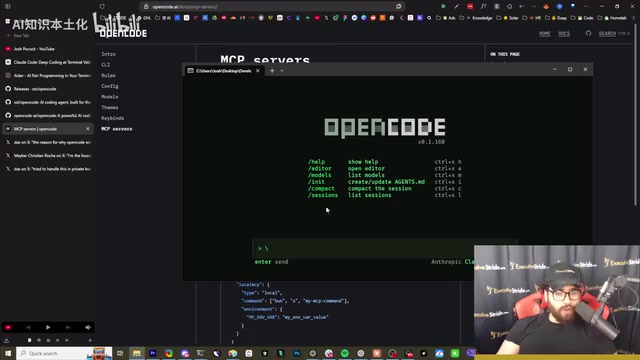
The Help menu reveals all features: New Sessions, Share Sessions, List Themes, Toggle Tool Details, and more. Type /theme to switch themes (supporting Matrix and many others), and /models to view and switch between different model providers.
Creating a Next.js AI Image Editor with OpenCode
In the hands-on segment, we asked OpenCode to create a "modern Next.js AI image editing tool." Next.js is a React full-stack framework developed by Vercel that supports server-side rendering (SSR), static site generation (SSG), and API routes, making it one of the most mainstream production-grade frameworks in the React ecosystem. Choosing Next.js as the test project both challenges the AI's understanding of modern frontend toolchains and verifies its ability to handle complex project structures.
OpenCode's workflow is very clear:
- Plan: Initialize a Next.js project with TypeScript + Tailwind
- Scaffold: Install core dependencies and create the project skeleton
- Component Development: Create image upload and display components
- Feature Implementation: Implement AI image editing features (filters, enhancements, etc.)
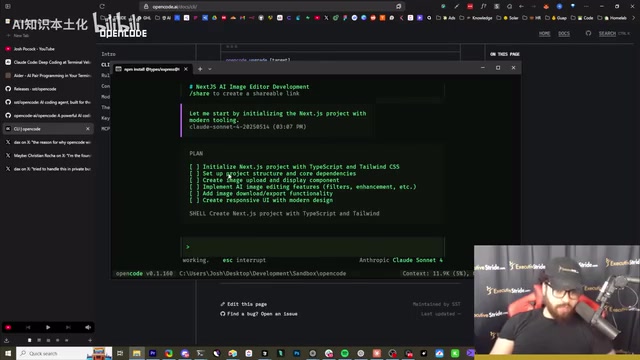
The final generated application featured basic editing capabilities including brightness adjustment, contrast adjustment, saturation adjustment, and blur effects, with the ability to save edited images directly. While true AI editing features would require additional API key configuration (such as integrating Stability AI or DALL-E image generation models), as a rapid prototype built from scratch, the results were quite impressive. Throughout the process, OpenCode demonstrated a typical Agentic workflow: plan first, execute next, auto-fix when problems arise—developers only need to confirm at key checkpoints.
Auto-Generating agents.md Project Specifications
Using the slash command /init, OpenCode automatically analyzes the codebase and creates or updates an agents.md file containing:
- Build, lint, and test commands
- Code style guidelines (import formatting, type naming conventions, etc.)
- Error handling specifications
- Code splitting guidelines
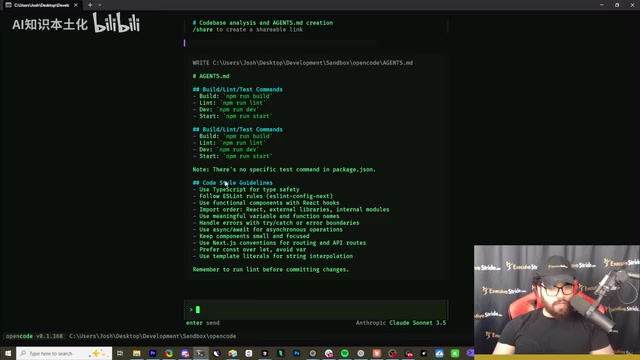
This feature is similar to Claude Code's CLAUDE.md, helping AI better understand project context to improve the accuracy of subsequent interactions and the quality of generated code. agents.md is essentially a project-level AI instruction file whose core concept is persisting project coding standards, architectural conventions, and tech stack preferences as structured text, allowing AI to automatically load this contextual information with every interaction. This addresses the inherent "stateless" limitation of large language models—without such files, AI must re-understand the project background with each conversation and is prone to generating code inconsistent with the project's style. As projects grow in scale, a well-maintained agents.md file can significantly reduce AI "hallucinations" and style drift, making it a key practice for improving AI coding efficiency.
Advanced Configuration: MCP Server Integration and Custom Settings
OpenCode supports deep customization through configuration files (opencode.json), which is also a key differentiator from other AI coding CLI tools:
- Custom keybindings: Adjust operations according to personal habits to boost coding efficiency
- MCP server connections: Define local or remote MCP servers in the
mcpsection of the configuration file to extend tool capabilities, such as connecting to database queries, document retrieval, and other external services - Multi-model switching on the fly: Freely switch between different providers and models to find the combination best suited for the current task
MCP (Model Context Protocol) is an open standard protocol introduced by Anthropic in late 2024, designed to provide AI models with a unified way to connect to external data sources and tools. MCP adopts a client-server architecture: AI applications (like OpenCode) act as clients initiating requests, while MCP servers encapsulate specific capabilities (such as PostgreSQL database queries, Notion document retrieval, GitHub repository operations, etc.). Through this protocol, AI tools don't need to write custom integration code for each external service—they simply follow a unified protocol specification to "plug and play" expanded capabilities. The MCP ecosystem currently has thousands of community-developed servers covering a wide range of scenarios from development tools to enterprise applications. OpenCode's native MCP support means developers can easily let the AI assistant directly query databases, search documents, and manage cloud resources—not just read and write local files.
This flexibility is something closed-source tools struggle to offer, and represents the core value of OpenCode as an open-source AI coding tool.
Conclusion: Which Developers Is OpenCode Best For?
OpenCode represents an important direction for AI coding tools: open source, flexible, and not locked into a single model provider. In an era where Claude Code requires paid subscriptions (Claude Pro at $20/month, Claude Max at $100-200/month) and Gemini CLI is free but model-limited, OpenCode offers a "best of both worlds" option—you can use your own API keys with any model you prefer, or even directly reuse your existing Claude subscription.
Of course, OpenCode isn't perfect. In testing, occasional minor issues with file creation occurred, and its ecosystem maturity doesn't match Claude Code's. But considering its rapidly growing community and active development pace, this tool's future is very promising.
If you're a developer who values freedom and control, or if you're looking for a coding CLI tool that can freely switch between multiple AI models, OpenCode is absolutely worth trying.
Related articles
 Tutorials
ChatGPT Plus Subscription Guide: Are GPT-5.5, image-2, and Codex Worth the Upgrade?
A detailed look at ChatGPT Plus features — GPT-5.5, image-2, and Codex — with a Plus vs Pro comparison and a complete step-by-step subscription guide for users outside the US.
 Tutorials
Harness AI Engineering in Practice: Using Claude Code to Master Enterprise-Level E-Commerce Development
Deep dive into Harness AI Engineering: master enterprise e-commerce development with Claude Code using the Rules, Skills, Wiki, and Changes framework.
 Tutorials
Cursor + Codex Dual-IDE Collaboration: A Practical Methodology for Open-Source Project Customization
A complete methodology for open-source project customization based on real-world experience, detailing the Cursor+Codex dual-IDE workflow, seven-stage process, MVP validation, and AI source code reading techniques.