Oz Platform in Practice: A Complete Configuration Guide for AI Agents That Auto-Earn Money and Fix Bugs

AI agents auto-earn money and fix bugs, with Oz platform enabling management at scale.
Through developer Travis's real-world cases, this article showcases two production-grade AI agent use cases: auto-updating Udemy coupon pages for $1,000+ monthly passive income, and auto-fixing open-source project bugs via GitHub Actions event-driven triggers. It then introduces the Oz AI agent orchestration platform's core value—solving environment isolation, scheduling, and secret management challenges in multi-agent management at scale—with a detailed walkthrough of its "Triggers → Agents → Environments → Artifacts" architecture.
When we talk about AI agents, most people think of personal assistants that organize emails or manage calendars. But what if an AI agent could automatically earn you over a thousand dollars a month, while another could automatically locate issues and submit code fixes after users report bugs?
AI agents are autonomous execution systems built on large language models (LLMs) that can perceive their environment, formulate plans, and take actions to achieve objectives. Unlike traditional chatbots, AI agents possess Tool Use capabilities—they can manipulate file systems, call APIs, execute code, browse the web, and more. Modern AI agents typically employ the ReAct (Reasoning + Acting) framework, where they reason first, then act, and dynamically adjust strategies based on execution results. This enables them to handle complex, multi-step tasks requiring contextual judgment, rather than merely answering single questions.
Developer Travis recently shared his hands-on experience using the Oz platform (built by the Warp team) to manage multiple AI agents, demonstrating the real path from AI agents as "personal toys" to "scalable productivity tools."
Two Real AI Agent Use Cases: Earning Money and Fixing Bugs
Use Case 1: AI Agent Auto-Updates Udemy Coupon Pages, Earning $1,000+ Monthly
Travis runs a Udemy course coupon aggregation page that generates over $1,000 in passive income each month. Previously, he had to manually sift through hundreds of Udemy coupon variants, update data, and clean up expired deals—a tedious and time-consuming task.
Now, he's created a dedicated AI agent to handle all of this:
- Data scraping: Automatically crawls the latest Udemy coupon information
- Smart filtering: Filters by month, groups by campaign, generates coupon IDs
- Content updates: Modifies YAML data files and web page displays
- Maintenance cleanup: Removes expired coupons, converts timestamps
- Review submission: Packages all changes into a Pull Request for human review
This AI agent runs daily, and Travis only needs to glance at the PR content on his phone and decide whether to merge. This "agent executes, human decides" collaboration model is the ideal working pattern for AI agents in production environments—it frees humans from repetitive labor while preserving human oversight for critical decisions.
Use Case 2: AI Agent Auto-Fixes GitHub Bugs
The second use case is more technically sophisticated. When users discover a bug in Travis's open-source project and submit an Issue, the AI agent automatically steps in:
- Reads the Issue title and description
- Analyzes the entire codebase to locate the root cause
- Spins up containers for test verification when necessary
- After finding a solution, automatically creates a branch and commits the fix
- Opens a PR with a detailed problem description and fix explanation
- Comments the PR link on the original Issue
The trigger condition for the entire workflow is remarkably simple—just add an "Oz agent" label to the Issue. A developer sees an Issue, determines the LLM can handle it, adds a label, and that's it. The AI agent handles all the tedious work, and the developer only needs to review the PR and decide whether to merge.
The underlying technical foundation for this use case is GitHub Actions' event-driven architecture. GitHub Actions is GitHub's CI/CD automation platform that responds to various repository events (Issue label additions, PR creation, code pushes, etc.) to automatically trigger predefined workflows. Combining AI agents with GitHub Actions essentially embeds LLM reasoning and code comprehension capabilities into the software development event loop—every Issue label addition becomes a signal to initiate an intelligent code analysis and repair process.
Why Do You Need an AI Agent Orchestration Platform?
Managing a single AI agent isn't difficult, but when you need to run multiple agents simultaneously across different environments and codebases, challenges emerge:
- How do you track each agent's progress and events?
- How do you provide the correct environment dependencies for different codebases?
- How do you schedule cloud-based runs on a timetable?
- How do you auto-trigger agents in response to system events?
As Travis put it: "Anyone can open 10 Cloud Code terminals to execute tasks, but that's not management at scale." This is exactly the core problem that AI agent orchestration platforms like Oz are designed to solve.
The technical positioning of an AI agent orchestration platform is analogous to Kubernetes in the container orchestration space—it abstracts the infrastructure complexity of multi-agent operations (environment isolation, state persistence, scheduling strategies, permission management) into a unified configuration layer. This allows developers to focus on defining agent business logic without worrying about "which machine the agent runs on, whether dependencies are installed, or how to securely pass secrets." This Separation of Concerns design philosophy is the critical leap from individual agent experiments to multi-agent production deployments.
Oz Platform Core Architecture: Triggers → Agents → Environments → Artifacts
Oz's workflow can be summarized in one clear pipeline: Triggers → Agents (Skills) → Environments → Artifacts.
Triggers: Defining When to Start an Agent
Triggers determine "when to start the AI agent" and support multiple methods:
- Slack tag mentions
- API calls
- Cron scheduled tasks
- GitHub events (such as Issue creation, PR comments)
- Manual triggering
Environments: Defining How Agents Run
Environments are one of Oz's core concepts, defining how an agent runs rather than what it does. This includes:
- Docker images: Providing the runtime foundation (Oz offers pre-built images and supports custom ones)
- GitHub repositories: The codebases the agent needs to clone
- Setup commands: Pre-execution commands for installing dependencies or preparing the environment
Docker container technology is particularly valuable in AI agent scenarios. Containers provide OS-level isolation, ensuring each agent run starts in a clean, consistent environment, avoiding the classic "it works on my machine" problem. For AI agents, this reproducibility is critical—the same skill definition should produce identical behavior whether running on a developer's MacBook or a cloud server. Additionally, containerization naturally supports concurrent execution of multiple agent instances, each with independent file systems and process spaces, without interference.
The key advantage lies in environment reusability—once you create an environment for your website project, all subsequent agents targeting that project can reuse the same environment configuration.
Skills: The Agent's Core Logic
Skills are the AI agent's "brain," defining exactly what the agent should do. Travis recommends defining skills in the codebase, which Oz automatically detects and loads. The benefits of this approach:
- Consistent behavior with repeatable execution
- Version-controlled for easy rollback
- Shareable and reusable across teams
Storing skill definitions in the codebase essentially means incorporating AI agent behavior into GitOps workflows. This means every skill modification has a complete change history, can undergo code review via PRs, and can be quickly rolled back to the last stable version if issues arise—a critical engineering practice for transitioning AI agents from personal experiments to team collaboration.
Artifacts: Agent Output Results
The results produced after an AI agent completes its run—such as Pull Requests, execution plans, session sharing links—can all be viewed and managed centrally within the Oz platform.
Oz Platform Practical Configuration Details
GitHub Action Triggering the Bug Fix Agent
The workflow for configuring an AI agent to auto-fix bugs via GitHub Actions:
- Checkout repository code
- Dynamically build the Prompt from the Issue's title and description
- Pass the Prompt and Warp API Key to the Oz agent
- The agent analyzes code, locates the issue, and commits the fix
- Automatically creates a branch, opens a PR, and replies to the Issue
Complete Configuration Steps for the Udemy Coupon Agent
The configuration process in the Oz Web interface:
Step 1: Add GitHub Integration — Add GitHub as an integration and restrict access to only the target project repository, ensuring minimal permissions.
Step 2: Create the Runtime Environment — Since the project is a Next.js application, select the corresponding Docker image and associate the GitHub repository.
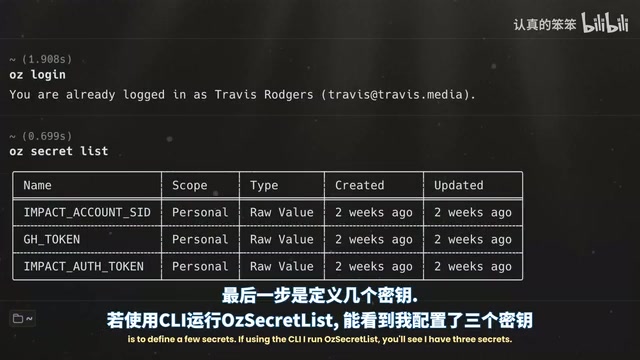
Step 3: Configure Secret Management — Add necessary secrets via the oz secret create command (such as coupon platform credentials, GitHub Token). Secrets are stored securely—they cannot be read after creation and are injected as environment variables at runtime. This design follows the Principle of Least Privilege—agents can only access credentials necessary to complete their tasks, and secrets are stored in encrypted form, making plaintext unreadable even if the platform is compromised.
Step 4: Create Agent Skills — Define Skill files in the codebase, detailing each execution step for the agent.
Step 5: Set Up Scheduled Runs — Configure daily automatic execution to ensure no coupon information updates are missed.
Cloud Execution and Observability
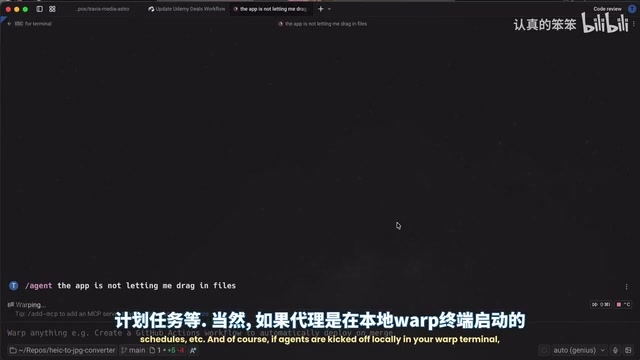
A key feature of the Oz platform is cloud observability. Unlike running in a local Warp terminal, AI agents triggered through Oz's cloud display all activity in the web interface. You can:
- View agent run status and logs in real-time
- Access detailed session information via "View Session"
Related articles
 Tutorials
ChatGPT Plus Subscription Guide: Are GPT-5.5, image-2, and Codex Worth the Upgrade?
A detailed look at ChatGPT Plus features — GPT-5.5, image-2, and Codex — with a Plus vs Pro comparison and a complete step-by-step subscription guide for users outside the US.
 Tutorials
Harness AI Engineering in Practice: Using Claude Code to Master Enterprise-Level E-Commerce Development
Deep dive into Harness AI Engineering: master enterprise e-commerce development with Claude Code using the Rules, Skills, Wiki, and Changes framework.
 Tutorials
Cursor + Codex Dual-IDE Collaboration: A Practical Methodology for Open-Source Project Customization
A complete methodology for open-source project customization based on real-world experience, detailing the Cursor+Codex dual-IDE workflow, seven-stage process, MVP validation, and AI source code reading techniques.