Parall: Run Multiple Independent Instances of the Same App on Your Mac

Parall lets Mac users run multiple fully isolated instances of the same app via HOME overrides and custom data paths.
Parall is a macOS utility by indie developer Ighor July that breaks the system's single-instance limitation. Its core features include custom data paths, HOME environment variable overrides, and injectable environment variables for true account and config isolation. It also converts websites into standalone Web App shortcuts with dedicated Dock icons, and supports command-line launchers. Aimed at multi-account operators, developers, and testers, it ranked #17 on Product Hunt with 71 upvotes on its launch day.
On macOS, the system defaults to allowing only a single instance of any given app to run at a time. For users who need to be logged into multiple accounts simultaneously or manage several separate work environments, this limitation is a constant source of frustration. Parall, which debuted on Product Hunt and landed at #17 on the day's leaderboard, is a Mac utility built specifically to solve this problem.
What Problem Does Parall Solve?
macOS's single-instance behavior stems from its application lifecycle management logic: clicking an already-running app in the Dock simply brings its existing window to the foreground rather than launching a new process. This is perfectly reasonable for the average user, but it falls short for developers, multi-account managers, and professionals who need environment isolation.
Parall's core capability is enabling users to run multiple independent instances of the same app on a single Mac. This means you can be logged into completely separate work and personal accounts in two fully isolated instances, with no data or configuration bleed between them. Beyond native apps, it can also convert websites into Web App shortcuts with their own dedicated Dock icons, letting you treat frequently used web pages as standalone applications.
macOS's single-instance behavior is managed at the technical level by the Launch Services framework. When a user tries to open an app that's already running, the system sends an activation event to the existing process (via the
applicationShouldHandleReopencallback inNSApplicationDelegate) rather than spawning a new one. Developers who want multi-instance support need to handle this logic explicitly at the app level — something the vast majority of mainstream apps simply don't do. Furthermore, macOS's App Sandbox and application container directories (~/Library/Containers/<BundleID>) are a natural extension of this single-instance design philosophy: a given Bundle ID maps to exactly one data container at the system level. Parall's core technique for working around this limitation is assigning each instance a distinct data path and environment context, causing the system to treat them as entirely separate runtime environments.
Feature Breakdown: More Than Just "Multi-Instance Launch"
According to its official description, Parall offers far more than a simple multi-launch mechanism. It's built around a fairly complete toolset centered on instance isolation and customized app launching:
Data and Environment Isolation
- Custom data paths: Assign each instance its own dedicated data storage location for physical isolation of configs and caches.
- HOME directory overrides: Rewrite the HOME environment variable so different instances each read from their own user directory — this is the key mechanism behind account isolation.
- Environment variables: Inject custom environment variables into specific instances, which is especially useful for development and debugging workflows.
The HOME directory override approach deserves a closer look. In Unix/Linux systems,
HOMEis a fundamental environment variable pointing to the current user's home directory. Most applications rely onHOMEto determine where to store config files, caches, and credentials — paths like~/.configand~/.cacheare all expanded relative toHOME. By overridingHOMEat launch time with a custom path, Parall essentially tricks an app into thinking it's running in a brand-new user environment, causing it to read and write to a completely independent set of configs and data. This concept predates both Linux server administration best practices and containerization technology. Parall's innovation is packaging this command-line technique into a macOS GUI, dramatically lowering the barrier for non-technical users.
Shortcuts and Launch Options
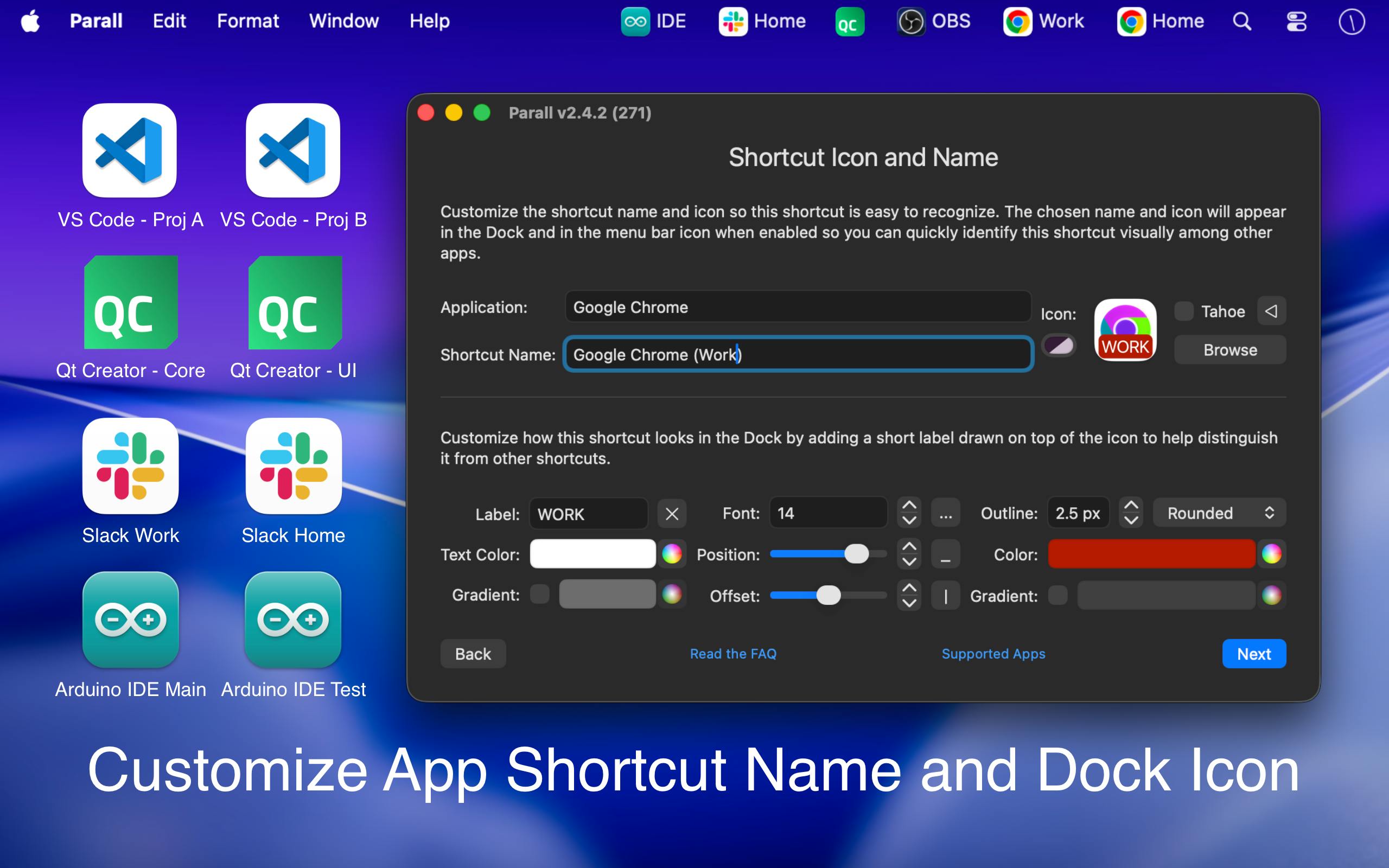
- Dedicated Dock icons: Each instance or Web App can have its own distinctive icon to avoid confusion in the Dock.
- File/folder shortcuts: Quickly navigate to resources associated with a specific instance.
- Command-line launchers: Launch instances from the terminal, enabling scripting and automation workflows.
- Dock effects: Visual differentiation to make managing multiple instances more intuitive.
This feature set reveals Parall's positioning: it's not a one-click tool for beginners, but rather an environment management powerhouse aimed squarely at developers and power users. Features like HOME overrides, environment variables, and command-line launchers are essentially Unix-style environment isolation techniques packaged as a ready-to-use macOS GUI.
Who It's For and Typical Use Cases
Given its placement in the Mac, Productivity, and Developer Tools categories, a few clear user profiles emerge:
Multi-account operators: People managing multiple accounts simultaneously — social media managers, customer support agents, e-commerce operators — can run a separate isolated instance for each account and avoid the constant hassle of switching logins.
Developers and QA engineers: When you need to run the same app with different configurations or environment variables for comparative testing, Parall's data path and environment variable isolation can significantly cut down on manual setup overhead.
Users who value information compartmentalization: Keep work and personal usage completely separate — for example, using the same messaging app for both professional and private communication, with data fully siloed between the two.
For users who rely heavily on web apps, the Web App shortcut feature also provides a lightweight "web-to-app" solution that frees up browser tabs.
Product Hunt Performance and Observations
At the time of listing, Parall had received 71 upvotes and 4 comments on Product Hunt, ranking #17 for the day. It was built by indie developer Ighor July. By the numbers, it sits in the upper-middle tier for a daily listing — enough upvotes to signal genuine interest, but with limited comment activity suggesting the community discussion hasn't fully taken off yet.
The real value of a utility like this tends to reveal itself through hands-on use. Multi-instance execution touches low-level process and file permission management, which means stability, compatibility (particularly the range of apps it supports for multi-instance launch), and macOS version support are the critical factors that determine whether it actually delivers — and these are details the official description doesn't fully address. Interested users are advised to check the official website for a specific compatibility list and pricing information before committing.
Summary
Parall targets a genuine pain point — macOS's single-instance restriction — and addresses it with a cohesive set of isolation and customization features tailored to multi-account users and developers. Its differentiator isn't simply "can it run multiple instances" but rather the true instance isolation it achieves through data paths, HOME overrides, and environment variables. For Mac users with clear multi-environment needs, it's well worth trying. For those who just occasionally want two windows open, it may well be overkill.
Related articles

OpenAI Partners with Shield: How the Astra Agent Revolutionizes IT Troubleshooting
OpenAI and Shield launch the Astra agent, which autonomously logs into computers and legacy systems to fix IT issues in real time, 35-40% faster than traditional models, with humans involved only when judgment is needed.

iPhone Duo Battery Life Tested: One Charge a Day Is Unavoidable, and the Large Screen Is the Culprit
iPhone Duo battery test: heavy use needs at least one charge a day, and about 30% remains after 6.5 hours of screen-on time. How often the large screen is unfolded is key; a MagSafe battery pack helps, and long-term degradation is also worth watching.

Kimi K3.1 Pro Open-Sourced: 2.8 Trillion Parameters Close In on Opus
Moonshot releases the open-source MoE model Kimi K3.1 Pro, with 2.8T total parameters and 104B activated, trailing Opus 5.5 by under 1 point on Terminal Bench 4.0.