Partitioning Your Digital Life into Security Domains: A Privacy Isolation Practice

Split digital life into security domains that don't share credentials to limit single-point breach impact.
Inspired by a Hacker News practice note, the article explains why "one account to rule them all" is dangerous: a single email and reused passwords let attackers move laterally and seize every identity. It proposes dividing digital life by risk into high-value, identity, consumption, and device domains—with no credential sharing between them. Implementation covers password managers with email aliases, browser profiles, and VMs/separate devices. It also weighs costs like maintenance, login friction, and recovery risk, stressing offline recovery paths, and notes partitioning can't stop phishing or endpoint trojans.
Why "One Account to Rule Them All" Is Dangerous
Most people's digital lives look like this: one email to register every service, one password reused everywhere, and a browser logged into work backends, social accounts, and online banking all at once. Breach any single link, and an attacker can move laterally along this chain to take over your entire identity.
The Hacker News post titled Partitioning my digital life into security domains makes the opposite argument: rather than hardening every single account to the maximum, first split your digital life into several mutually isolated "security domains" so the blast radius of any breach is contained within a single domain. The post itself didn't get much traction (5 points, 0 comments)—it reads more like a personal practice note—but the problem it points at is universal enough.
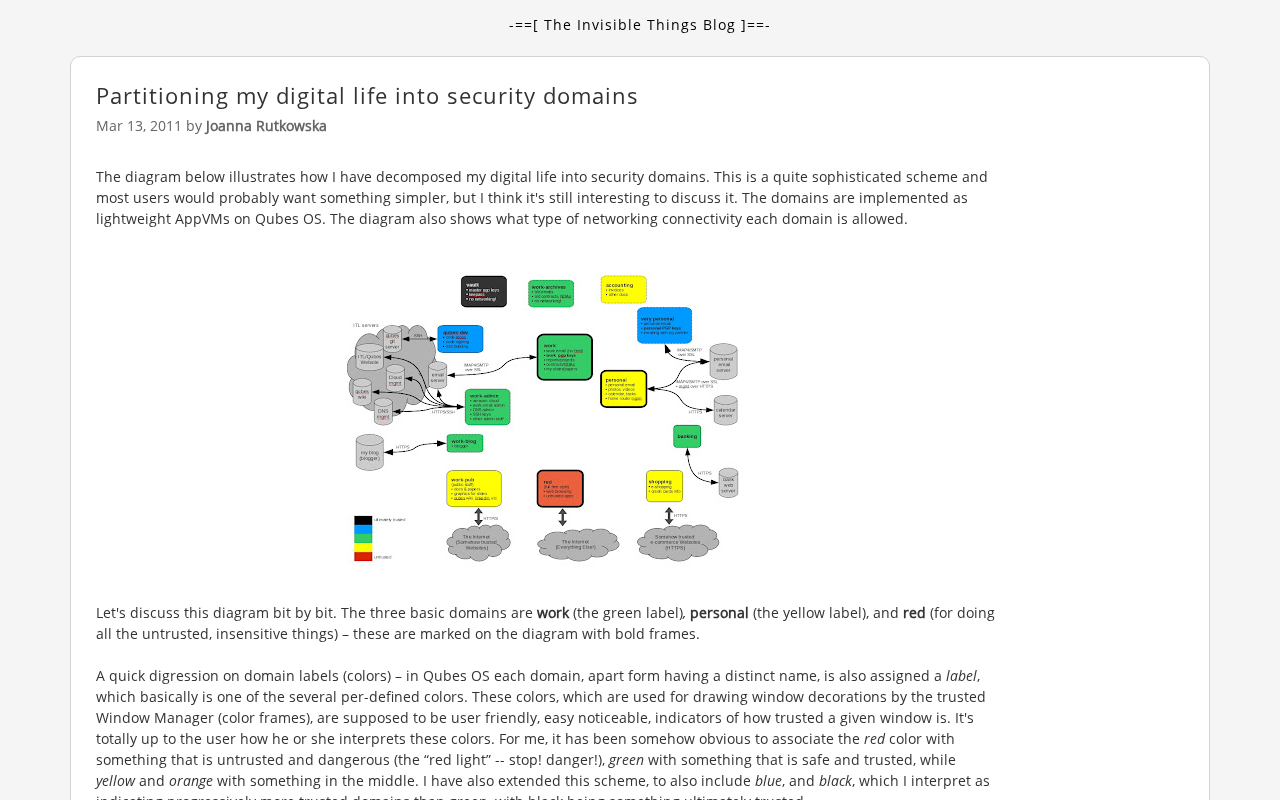
What a Security Domain Actually Is
The core of a security domain isn't a tool—it's a boundary. It assumes that "getting breached" is a matter of when, not if, so it focuses on the impact scope after failure.
A practical way to divide is by the risk level of each identity:
- High-value domain: primary email account, online banking, password manager, cloud storage root directory. This layer requires unique passwords, unique email aliases, mandatory multi-factor authentication, and must never be logged in on any other device.
- Identity domain: social accounts, messaging tools, forums. These carry "who you are"; the consequences of a leak are mainly impersonation and social engineering attacks.
- Consumption domain: throwaway site registrations, trial services, download sites. This layer is disposable by default—use one-time emails and unique passwords, and bind no real information.
- Device domain: work machines separated from personal ones, browser profiles separated, virtual machines or containers hosting software of uncertain origin.
The key isn't the number of domains, but that domains don't share credentials. If a consumption-domain account leaks, the attacker only gets a set of isolated credentials that can't log in anywhere else.
Multi-factor authentication (MFA) is a mandatory requirement for high-value domains in security domain layering. It refers to adding a second, independent credential on top of the password, commonly including one-time codes generated by SMS or authenticator apps, hardware security keys (such as FIDO2/U2F devices), and biometrics. Its security significance: even if the password leaks through credential stuffing or phishing, the attacker still lacks the second factor and cannot complete the login. Different factors vary widely in attack resistance—SMS codes can be intercepted via SIM-swap attacks, push confirmations can be tricked by fatigue bombing, while hardware keys bind to the origin domain and are inherently immune to phishing sites. So in domains where "lose this and lose everything"—like primary email accounts and password managers—prioritizing hardware keys or TOTP authenticators over SMS is a detail worth making explicit in domain design.
What Makes the Isolation Work
The original post leans toward "structural isolation" rather than relying on a single security product. It breaks down into three layers:
Credential Layer
The password manager generates a distinct password for each domain and uses different email aliases to register for services in different domains. Email aliases are a low-cost isolation mechanism here—they also cut off "account recovery," the most commonly exploited channel.
Email aliases differ from "plus addressing": plus addressing (e.g., name+shop@example.com) only tags mail into the same inbox, with all messages flowing into the primary account—so if the primary mailbox is breached, everything is still exposed. An alias service instead generates an independent address for each service, which can be disabled or forwarded separately and doesn't reveal the real primary address. It's a low-cost isolation mechanism because "account recovery" almost always anchors trust in email—an attacker who controls or guesses your registration email can trigger the password reset flow. After assigning different aliases to different security domains, a data leak from a consumption domain won't reverse-expose the login entrances to high-value domains, and you can also trace back through aliases to determine which service leaked your information.
Browser Layer
Browser profiles are the isolation boundary most accessible to ordinary people. Use a separate profile for work, personal, and temporary browsing—cookies and login states are naturally not shared, avoiding exposing multiple identities in the same session.
Device Layer
For higher-risk operations, use virtual machines or separate devices. Device-layer isolation is far stronger than the software layer, at the cost of usability, so it should only cover the scenarios that truly need it.
The Trade-offs
Partitioning isn't free. Each additional domain means another set of credentials to maintain, another recovery path that might be forgotten, another round of login friction. The place where personal practices like the original post most easily fail is precisely the recovery process: when the primary email is lost, when the password manager itself is unavailable, will the domain structure lock you out of your own life?
So domain design needs an "emergency backbone": an offline-stored recovery key, a backup contact method that doesn't depend on any online service. The purpose of isolation is to limit losses, not to create an unrecoverable state.
Another thing to face honestly is the boundary of benefits. Partitioning can effectively block lateral movement and chain leaks caused by credential reuse, but it doesn't prevent phishing, nor does it prevent endpoints from being infected with trojans. Treating security domains as a silver bullet will instead relax your vigilance about basic hygiene.
Blast radius is the key metric for understanding the benefits of partitioning: it refers to how many assets and permissions a security incident can affect as it spreads outward from the initial point of compromise. In a single-point structure, a leaked account with a reused password can let an attacker move laterally along the credential-reuse chain to email, social media, and even online banking—the blast radius approaches "all identities." After partitioning, the same leak is truncated at the domain boundary, shrinking the blast radius to a single isolated account. This perspective explains why the point of partitioning isn't "stopping breaches from happening" but "making the loss calculable and bearable when a breach happens"—security investment should prioritize cutting the link with the largest blast radius rather than uniformly hardening every account.
What's Worth Borrowing
The value of this post isn't that it provides a standard answer, but that it redefines "security" from a product-selection question into a structural design question. For individual users, going from "change all passwords to be different" to "layer by risk and cut off credential sharing between domains" is a cognitive upgrade; for teams, the same logic maps onto permission boundaries and environment isolation.
If your digital identity is still a single-point structure, the smallest first step isn't buying tools—it's drawing a diagram: which accounts, if breached, would drag down everything else? Then pull those out separately and give them independent credentials and independent recovery paths. Establish the boundaries first; only then do tools make sense.
One-line Summary
Split your digital life into security domains that don't share credentials, to limit the scope of a single-point breach.
Paragraph Summary
Drawing on a personal practice note from Hacker News, the article discusses why "one account to rule them all" is dangerous: a single email and reused passwords let attackers move laterally along the credential chain to take over all identities. The author proposes replacing per-account hardening with "security domains," dividing digital life by risk into high-value, identity, consumption, and device domains, with the core principle that domains don't share credentials. Implementation spans three layers: a password manager plus email aliases to cut off the account recovery channel, multiple browser profiles to isolate cookies and login states, and virtual machines or separate devices for high-risk operations. The article also acknowledges the costs—maintenance overhead, login friction, and recovery risk—emphasizing the need for offline recovery paths, and notes that partitioning can't defend against phishing or endpoint trojans.
Related articles

Will GitHub Die? Open Source Maintainer Burnout and the Collaboration Crisis in the AI Era
Lex Fridman podcast discussion on open source maintainer burnout and GitHub's predicament: massive pull requests overwhelm core maintainers, and AI worsens code bloat. Using math journal peer review and Poincaré conjecture verification as analogies, the article analyzes why verification in knowledge production must be deliberately slow, and how open source communities can avoid the failure mode of maintainers exiting.

Stop Building Cookie-Cutter AI Websites: 3 Tools That Transform Your Coding Agent
Three tools that boost AI coding agents: FFmpeg skill for local video editing in Claude Code and Cursor, Hallmark's 50 design themes to fix cookie-cutter AI sites, and Jailbreaks' 25+ model prompts.

How America's Gerontocracy Squeezes the Younger Generation
Americans over 55 hold nearly three-quarters of national wealth, alongside an 80-year-old president and elderly congressional leaders. The Atlantic's Idrees Kahloon explains how gerontocracy drives up housing costs, squeezes opportunities for the young, and explores zoning reform and child poverty reduction as practical fixes.