PeekPaste: A Native Mac Clipboard Manager That Slides In from the Edge
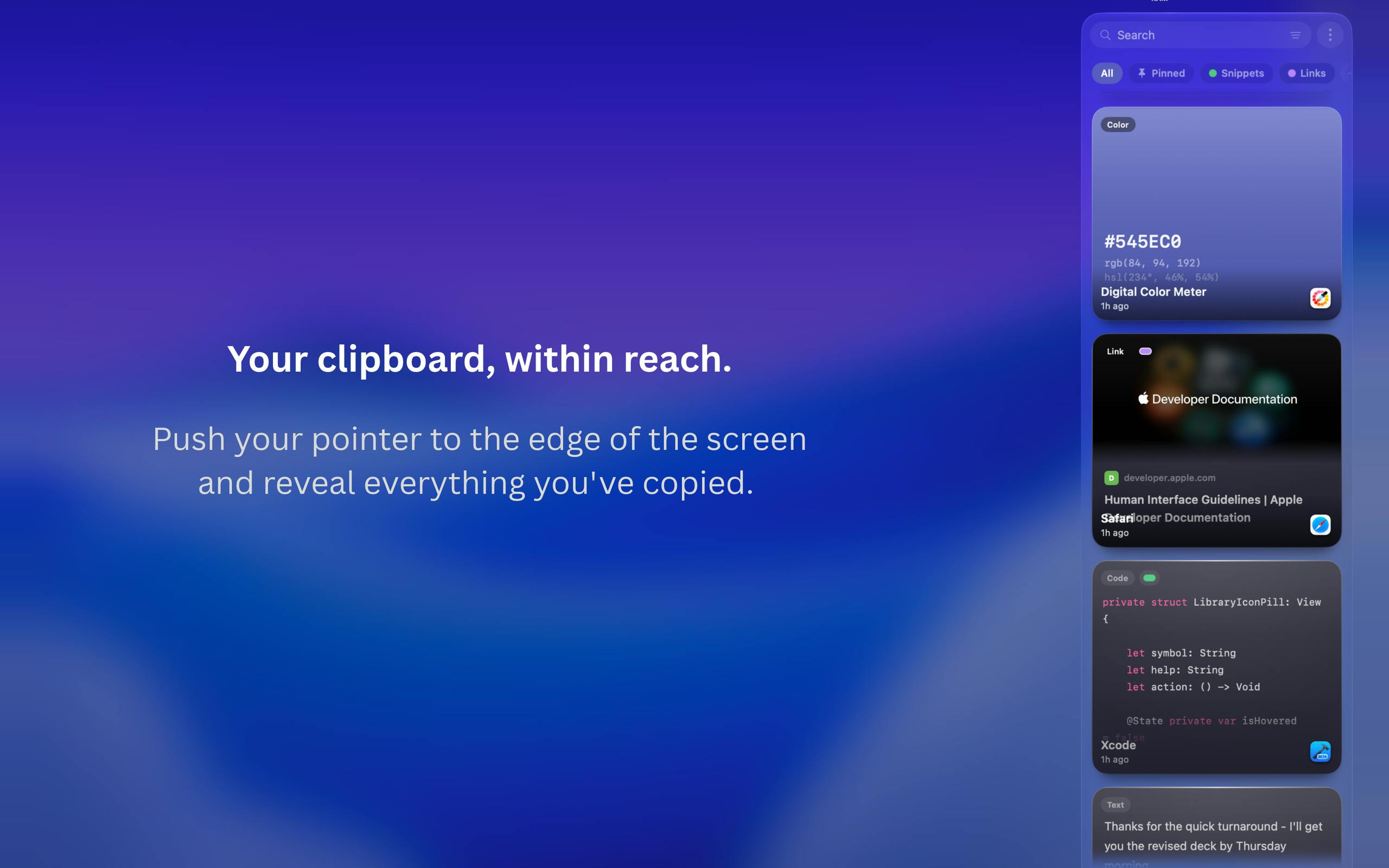
PeekPaste is a privacy-first Mac clipboard manager with edge-triggered access and on-device OCR search.
PeekPaste is a clipboard management tool designed for Mac users, solving the core frustration of the system clipboard only retaining the last copied item. Its standout design is edge-triggered interaction — push your cursor to the screen edge to summon the panel, which auto-hides when done. It supports text, code, links, images, color values, and files, with built-in on-device OCR to search text within screenshots. On the privacy front, all data stays local with no accounts, no telemetry, and no cloud sync — ideal for security-conscious users, though cross-device sync is absent. The product is still early-stage, and stability and long-term support remain to be proven.
For Mac users who copy and paste constantly throughout the day, the system clipboard's limitation of only retaining the last copied item can be genuinely frustrating. PeekPaste is a native clipboard management tool built to solve exactly this problem. It landed 9th on Product Hunt's daily chart with 82 upvotes, positioning itself around two core strengths: privacy-first design and instant accessibility.
Edge-Triggered Interaction Design
PeekPaste's most distinctive feature is its "invisible until needed" interaction model. When you push your cursor toward the edge of the screen, the clipboard panel slides in from that edge — and slides right back out when you're done, leaving your desktop uncluttered and your workflow uninterrupted.
This edge-triggered design philosophy means the tool is virtually invisible when not in use, which aligns with what great productivity tools should do — serve your work, not become another window you have to manage. Compared to alternatives that live in the menu bar and require clicking an icon or memorizing a keyboard shortcut, the edge-swipe gesture becomes more naturally intuitive once the muscle memory kicks in.
Multi-Type Content Support and OCR Search
PeekPaste's content recognition covers a broad range, handling text, code snippets, links, images, color values, and files. This means a developer's copied code, a designer's color codes, and everyday links and documents all flow into a single unified history.
Perhaps more noteworthy is its built-in on-device OCR (optical character recognition). Users can search for text directly within screenshots — so if you captured an image containing important information but can't remember where it came from, you can simply search for words in the image to locate it. This is particularly useful for anyone who regularly works with screenshots or needs to extract information from images.
PeekPaste also supports pinning frequently used clipboard items, organizing content into categories, and opening a full Library view for deeper management — covering both the quick-access and power-user scenarios.
The key difference between on-device OCR and cloud-based OCR lies in where the computation happens. Cloud OCR requires uploading images to a server (such as Google Cloud Vision or Apple's online services) for processing before returning results, while on-device OCR relies entirely on the local CPU, GPU, and Neural Engine. Since macOS 12 Monterey, Apple has included the Live Text framework at the system level, allowing third-party apps to call on-device text recognition directly without developers needing to train their own models. PeekPaste's local OCR is likely built on this system-level API — which means it maintains privacy while achieving recognition accuracy on par with the system itself, including solid support for mixed Chinese-English text and code screenshots.
Privacy-First: All Data Stays Local
With data privacy increasingly front of mind, PeekPaste positions local storage as a core selling point. The product explicitly commits that all content stays on your Mac — no account system, no analytics, no telemetry, and no cloud clipboard service.
The clipboard often carries sensitive information: passwords, private links, internal code, and more. While many cross-device sync clipboard services are convenient, they upload this data to the cloud, introducing potential privacy risks. PeekPaste takes the opposite approach, trading cross-device sync convenience for the security of keeping data entirely on-device. This is also why it fits squarely into Product Hunt's "Privacy" category.
The on-device OCR reinforces this philosophy as well — image recognition happens locally, with no screenshots ever sent to an external server, further reducing the risk of data exposure.
In software products, telemetry typically refers to an app silently collecting user behavior data in the background — things like feature usage frequency, crash logs, and navigation patterns — which gets periodically uploaded to developer servers for product analytics. Many free or subscription-based tools rely on telemetry data for improvement, but this process is often opaque to users. Clipboard managers are particularly sensitive in this regard: since virtually every copy action passes through them, a tool with telemetry could theoretically capture a large volume of highly sensitive content. PeekPaste's explicit no-telemetry stance means the developer has proactively closed off this data collection channel — which serves as an important trust signal for professionals whose clipboards regularly carry passwords, API keys, internal file paths, and similar sensitive material.
Positioning and Takeaways
PeekPaste targets the intersection of productivity and privacy tools within the Mac ecosystem. Clipboard managers aren't a new category — there are already several mature competitors — but PeekPaste attempts to carve out its own space through three differentiators: native experience, a unique edge-triggered interaction, and a thoroughgoing local-only privacy stance.
For Mac users who prioritize privacy and don't have a strong need for cross-device sync, this is worth trying. For users who rely on multi-device workflows and need to share a clipboard between iPhone and Mac, the lack of cloud sync may be a dealbreaker.
As a product still in its early promotional stage (7 reviews, 82 upvotes), PeekPaste's real-world stability, OCR accuracy, and long-term maintenance track record still need more user validation. Those interested can head to the official website to learn more.
Related articles
DeepSeek Harness in Practice: Building a Low-Cost AI Coding Powerhouse
Learn how to transform DeepSeek's open-source harness using Claude Code, Bright Data scraping, and vision models to build an AI coding workflow costing just half a cent per task.
Overseas Developer Tests: DeepSeek Already Rivals Opus — Stop Waiting for the Next Model
An overseas developer finds DeepSeek V4 Pro rivals Opus 4.8 at a fraction of the cost. Learn how DeepSeek + BrightData compares to Claude Code for building SaaS.
DeepSeek V4.1 Flash Hands-On: Can a Small-Activation New Architecture Top the Open-Source Charts?
DeepSeek V4.1 Flash deep dive: new MoE encoder-decoder architecture, 552B total params, tiny active params, reduced KV cache. Open-source on Hugging Face. Full hands-on test from BrowserOS to 3D printing.