Perplexity MFA Lockout: What to Do When You Can't Recover Your Account

A Perplexity user's MFA lockout reveals critical gaps in AI product account recovery and customer support.
After a phone reset wiped their MFA authenticator tokens, a Perplexity user was completely locked out with zero response from customer support. This case highlights the fragility of TOTP-based authentication without proper recovery mechanisms, exposes the customer support gaps common in fast-growing AI startups, and offers practical guidance for users to prevent MFA lockout through recovery codes, cloud-synced authenticators, and hardware security keys.
A Cry for Help on Reddit That Raises Bigger Questions
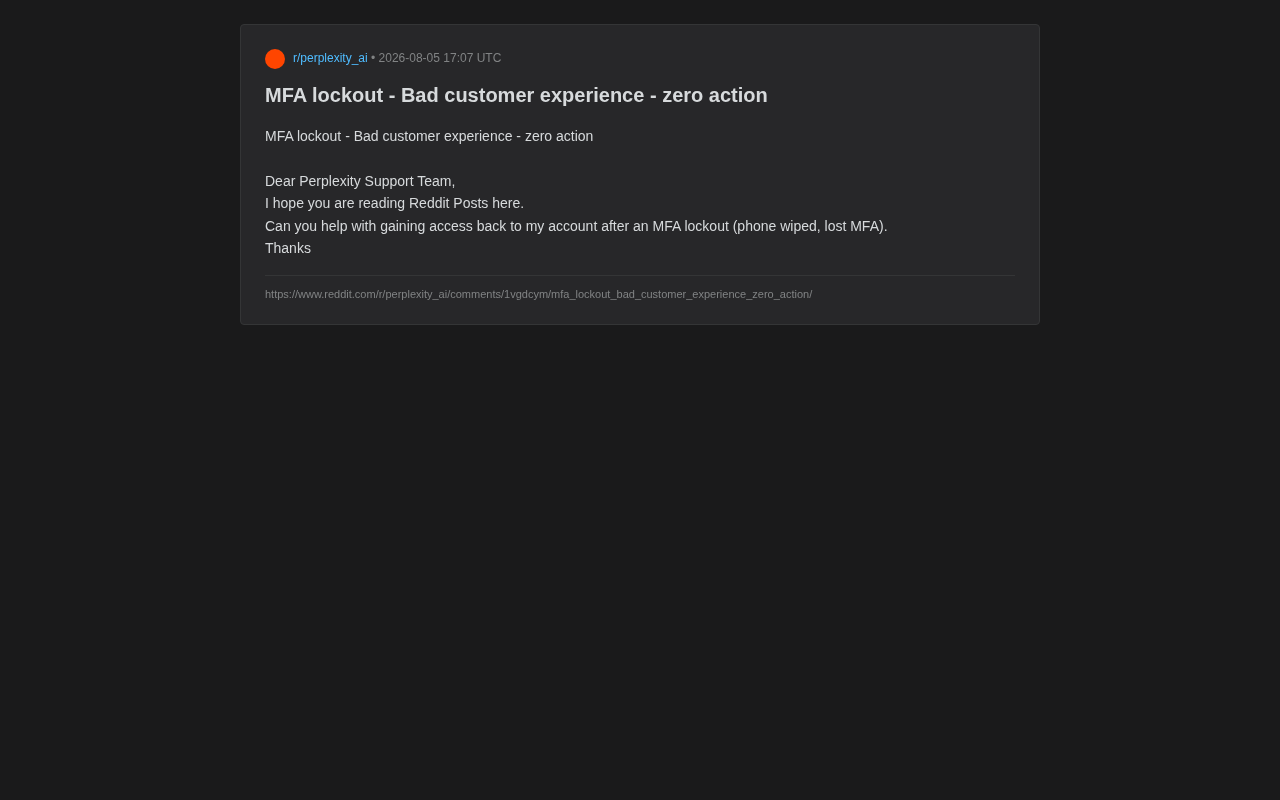
Recently, a Perplexity user posted a plea for help on Reddit with a title that was both blunt and helpless — "MFA lockout - Bad customer experience - zero action."
The user's situation wasn't complicated: their phone was wiped, the multi-factor authentication (MFA) tokens stored on the device were lost along with it, and they were completely locked out of their own account. What made it even more frustrating was that after getting no response from official support channels, they had no choice but to turn to the Reddit community, hoping that someone from the Perplexity team might see the post.
This is a seemingly minor yet highly representative case. It reflects the deep-seated tension that many AI products — and internet services in general — face when trying to balance account security design with user experience.
What Is MFA Lockout? Why Do Users Get Locked Out?
The Double-Edged Sword of Multi-Factor Authentication
MFA (Multi-Factor Authentication) is a critical line of defense in modern account security. It requires users to provide a second verification factor beyond their password — typically a dynamic token generated by a phone authenticator app (like Google Authenticator or Authy) or an SMS verification code.
However, MFA's strong security inherently comes with a risk: when the second factor itself is lost, users can be permanently locked out. In this case, the user's phone was wiped, and the secret keys stored in the authenticator app vanished with it. Since TOTP-based (Time-based One-Time Password) tokens are typically stored locally on the device, once the device data is lost without a backup, recovery becomes nearly impossible.
TOTP Technical Principles and the Fragility of Local Storage
TOTP (Time-based One-Time Password) is a dynamic password algorithm defined by the RFC 6238 standard. It works by combining a pre-shared secret key with the current timestamp, generating a 6-digit or 8-digit dynamic verification code through the HMAC-SHA1 algorithm that refreshes every 30 seconds. When a user first enables MFA, the server generates a Base32-encoded secret key, typically displayed as a QR code for the user to scan. Once scanned, this key is stored in the authenticator app's local database — meaning the key's security depends entirely on the device itself.
Unlike cloud-based SMS verification, TOTP's design philosophy is "offline availability" — it doesn't rely on network communication. This is both its security advantage (avoiding SIM-swapping, SMS interception, and other attacks) and its fatal weakness: once the device is lost, damaged, or wiped, the key becomes unrecoverable. This explains why account recovery was so difficult after the user's phone was reset.
The Choice of Authenticator App Matters Enormously
Google Authenticator has long been the most widely used TOTP client, but it didn't introduce cloud backup functionality until 2023, and that feature initially lacked end-to-end encryption (later fixed). This means many early users' tokens still exist only locally. By contrast, Authy has supported multi-device sync and encrypted cloud backup since its inception — users can recover all tokens even after switching devices. Microsoft Authenticator similarly supports iCloud or Google account backup.
This architectural difference directly determines a user's fate in device-loss scenarios — using an authenticator without cloud sync means placing all hope of account recovery on a single physical device. The Reddit user in question very likely used an earlier version of Google Authenticator or a similar local-only storage authenticator.
What's Missing from Perplexity's MFA Recovery Mechanism
Mature security designs typically provide multiple recovery paths for MFA:
- Recovery Codes: When MFA is enabled, the system generates a set of one-time backup codes for users to use when they lose their device.
- Backup Verification Methods: Such as a linked backup email or backup phone number.
- Manual Identity Verification: Unlocking the account after rigorous identity verification through customer service.
The recovery code mechanism was first introduced by Google in the early 2010s for its two-step verification system and has since become an industry standard. A typical implementation generates 8-16 single-use backup codes when a user enables MFA, each usable only once. Platforms like GitHub, GitLab, and AWS force users to confirm they've saved their recovery codes during the MFA setup process — some even require users to enter one of the codes to prove proper safekeeping. More advanced practices include: allowing users to regenerate recovery codes at any time (automatically invalidating old ones), immediately prompting users to reconfigure MFA after using a recovery code, and including recovery code usage in security audit logs.
Judging from this user's complaints, Perplexity has clear shortcomings in at least some of these areas — either the recovery mechanism design is insufficient (failing to mandate that users save recovery codes when enabling MFA), or the customer service response process is essentially non-functional ("zero action").
Customer Support Concerns Amid Rapid AI Product Expansion
Growth-First Mentality Leading to Service Lag
As a star product in the AI search space, Perplexity has seen its user base grow rapidly in recent years. However, fast-growing AI startups like this tend to concentrate resources on model capabilities, product iteration, and market expansion, leaving customer support infrastructure relatively underdeveloped.
The general weakness of AI startups in customer support has structural causes. Take Perplexity as an example — the company's valuation exceeded $9 billion in 2024, yet its team size remains lean relative to its user volume. The competitive logic of the AI space is "speed is life" — whoever can iterate models faster and capture user mindshare quicker gains advantages in fundraising and market position. In this environment, the short-term ROI of customer support teams is far less visible than that of engineering and product teams. Moreover, AI products have highly complex tech stacks, and handling account security issues requires specialists with security engineering backgrounds rather than ordinary customer service agents. This creates a paradox: the larger the user base, the more a robust support system is needed, but the more a company is in growth mode, the harder it is to allocate resources to support teams.
Once the user base reaches a certain scale, even an extremely small percentage encountering edge cases like account lockouts represents a non-trivial absolute number. And once there's no efficient channel for human intervention, individual users fall into a "nowhere to turn" predicament — exactly like this user who had to "shout out" to the company on Reddit.
A Trust Crisis for Paying Users
Here's a notable detail: Perplexity has a large number of Pro paid subscribers. For paying users, their account carries not just usage habits and historical data, but is directly tied to subscription benefits they've paid real money for. When an account is locked and support requests go unanswered, what's lost isn't just access — it's fundamental trust in the product.
Once this trust is damaged, it's likely to translate into user churn and even negative word-of-mouth on social media. This Reddit post itself is a direct manifestation of that reputation risk.
The Right Approach to Account Security Design in the AI Era
Security and Recoverability Must Coexist
The core challenge of account security design is striking a balance between "preventing unauthorized access" and "ensuring legitimate users can recover their accounts." Overemphasizing security while neglecting recovery paths locks legitimate users out; overly lenient recovery mechanisms can be exploited by attackers for account hijacking.
The Security Game of Recovery Mechanisms Themselves
Recovery mechanism design is difficult precisely because it can itself become an attack vector. In social engineering attacks, attackers frequently impersonate account owners to bypass MFA protection through customer service channels. The massive celebrity account hijacking incident Twitter experienced in 2020 was partly due to internal tools being used to bypass security verification. Therefore, manual recovery processes need strictly designed identity verification protocols — such as requiring users to provide a combination of their registration email, recent login IPs, payment records, account creation time, and other multi-dimensional information.
An overly lenient recovery strategy is essentially a backdoor in the security wall; an overly strict one, as this case demonstrates, leaves legitimate users with nowhere to go. This is the classic "Usability-Security Trade-off" in security engineering, and a core topic that the entire identity authentication field has been researching for decades.
The ideal approach is to build a layered recovery system:
- Proactive Prevention: When users enable MFA, mandate that they save recovery codes and bind backup verification methods.
- Self-Service Recovery: Provide clear self-service unlock workflows covering most common scenarios.
- Human Fallback: For users who cannot self-recover, provide an accessible human customer service channel with strict but reasonable identity verification.
Customer Support Should Not Be a "Black Hole"
"Zero action" — these two words are the most glaring part of this complaint. They indicate that the user's normal support channels failed to produce any effective response. For any service-oriented product, the "reachability" and "responsiveness" of customer support channels are baseline requirements.
While AI companies chase the technological frontier, they should not treat customer support as a cost item that can be infinitely compressed. A product that can't help users recover their accounts — no matter how powerful its AI capabilities — can hardly be called a complete, reliable service.
User Self-Help Guide: How to Avoid MFA Lockout
For everyday users, this case serves as a strong cautionary tale. Here are practical tips for preventing MFA lockout:
- Always save recovery codes when enabling MFA — store them in a password manager (like 1Password or Bitwarden) or on physical media (such as printing them and locking them in a safe). Never just screenshot them and save on the same device.
- Bind multiple backup verification methods, such as a backup email or backup phone number.
- Use an authenticator app that supports cloud sync, such as Authy (supports encrypted multi-device sync) or Microsoft Authenticator (supports iCloud/Google backup), to avoid single-device dependency. Google Authenticator has also supported Google account sync since 2023, but users need to manually enable it.
- Regularly check your MFA settings to confirm recovery options are still valid.
- Consider a hardware security key, like YubiKey, as an additional backup verification method. Hardware keys are based on the FIDO2/WebAuthn standard, don't depend on a phone, and can serve as redundant MFA backup.
Conclusion: The Fundamentals Beyond the Tech Halo
This short Reddit plea hits a real pain point in AI product development. While the industry hotly debates large model reasoning capabilities and multimodal breakthroughs, the most fundamental aspects of account security and customer service are easily overlooked.
For Perplexity and all rapidly expanding AI products, this case is a reminder: truly excellent product experience isn't just about impressive AI capabilities — it's also about whether users can receive timely, effective help when they encounter difficulties. Comprehensive security design and accessible customer support are the invisible moats that retain users.
Related articles

Why Does the Tesla Roadster Need to Fly? A Deep Dive into Musk's Wild Demo
Tesla's Roadster launch showed wall-climbing, upside-down driving, and flying stunts—but The Vergecast notes the demo car may lack a battery, the Rocket version is invite-only and not street-legal, and the website terms don't guarantee delivery. After nine years of delays, why does this car still need to exist?

AI Is Not a Replacement: Human-AI Collaboration Through the Lens of Factory Root Cause Analysis
Starting from factory root cause analysis, this article explains how AI accelerates evidence chain construction rather than replacing human experts, exploring the pragmatic implementation logic and business value of 'AI supporting people rather than replacing them.'

AI Agent Decision Auditing: Building an Evidence Chain in Regulated Workflows
Starting from a Reddit discussion, this article analyzes three core issues in AI agent decision auditing within regulated workflows: what fields audit records should contain, how to handle feedback latency for erroneous decisions, and how to continuously calibrate LLM judge consistency with human judgment.