PewDiePie's AI Agent: Build Your Own Odysseus from Scratch

PewDiePie's Odysseus project shows how anyone can build their own local AI agent.
Using PewDiePie's open-source project Odysseus as a starting point, the article breaks "building an AI agent"—something that seems highly inaccessible—into a few understandable concepts. It explains that an agent is fundamentally a loop of LLM calls, clarifies the difference between "app local" and "model local," lays out the practical path for local models via Hugging Face and llama.cpp, and covers fine-tuning, including why OpenAI's encrypted reasoning tokens block direct distillation and what alternatives exist.
How an Influencer Brought AI Agents into the Mainstream
PewDiePie is getting into AI. The significance here is straightforward: a creator with enormous reach is trying to build his own AI agent—and he's doing the whole thing in public. Many people see what he's doing and think "that's too complicated," but once you start from the most basic concepts, this stuff is far more approachable than it looks.
The project he's building is called Odysseus, a locally deployed AI agent application. At its core it's a ChatGPT-like chat interface, but it's completely LLM-agnostic—you can plug in any model. It supports external tools through MCP servers, and ships with built-in features like an email client, a memory system, skill extraction, model comparison, and deep research. Installation is on the technical side: clone the repo from GitHub, mount the Docker container, and the whole app runs inside Docker on your own machine.
You might not have noticed, but he also tried fine-tuning a small Qwen 3.5-series model to run locally, specifically to handle tool calling for Odysseus. This article breaks down what he did, how you can replicate it, and the technical principles behind it.
What Is an Agent Harness: A Loop of Two or Three LLM Calls
To understand Odysseus, you first need to understand the concept of an "agent harness." The explanation in the video is remarkably clear: an agent is essentially a loop of calls to a language model, and that's it.
How an Agent Works
When you send input to an agent, that input goes to the language model. The model reads the context—system prompt, tool definitions, relevant memories, conversation history—and then decides how to respond. If the question can be answered in plain text, it outputs an answer. If it needs to call a tool (say, search the internet, run a program, or hit an external service), it issues a tool call. Your application (Odysseus, in this case) executes that tool call, returns the result to the model, and the model reasons again, deciding whether to keep calling tools or deliver a final answer.
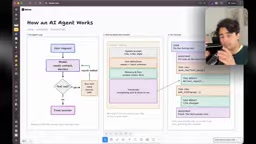
This loop sounds simple, but the entire complexity of an agent is hidden in "context management." The context sent with each model call typically includes: the system prompt (defining the agent's goal and identity), the list of tool definitions (telling the model which tools are available), memories and files (extracted from prior conversations or resources the user shared), and the complete conversation history (every message is persisted and resent on each interaction).
Tools Aren't Just for the Model
Odysseus has an interesting design philosophy: tools have their own user interfaces, and you can operate them manually. Take the calendar tool—you can create events yourself, and so can the model. This "tools-as-apps" pattern is becoming more common among MCP servers—an agent can operate your Notion or Airtable, but those apps still have interfaces you can use.
MCP (Model Context Protocol) is a protocol proposed and open-sourced by Anthropic in late 2024. Its goal is to define a unified communication standard between LLM applications and external data sources and tools. Before MCP, every agent framework had to define its own tool interface—OpenAI used function calling with JSON Schema, LangChain had its own Tool abstraction, and none of them were compatible. MCP abstracts all of this into a JSON-RPC-based client-server protocol: tools, resources, and prompt templates are all wrapped as capabilities exposed by a server, and a client (i.e., the agent harness) only needs to implement an MCP client once to connect to any server following the protocol. This makes "write a tool once, reuse it across agents" possible, and it's exactly why applications like Odysseus can quickly connect to external services like calendars, email, and Notion.
The Truth About Local: App Local ≠ Model Local
PewDiePie says Odysseus runs locally, and that's true—it runs in a Docker container on your computer, and if you share the URL with someone else, they can't access it. But that doesn't mean the model is running locally too.
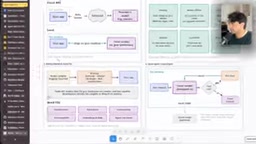
This is where a lot of people get confused. When you pick a cloud model like Mistral Large inside Odysseus, your data leaves your machine, gets routed through OpenRouter to Mistral's API, and then comes back. Every iteration of the agent loop works this way.
"Local model" means the model itself is running on your hardware, and your data never leaves your device. This is why many people prefer local setups: stronger privacy, offline capability, and no per-token billing. But be careful—running locally doesn't mean it's free. You still pay for electricity, and running large models draws a fair amount of power.
The advantage of local models also extends to control: you can fully customize them, even fine-tune them. For small-to-medium applications and self-contained tasks, local models are already impressively fast.
Quantization is the technique of compressing model weights from high precision (like FP16 or BF16, where each parameter takes 2 bytes) to lower precision (like INT8 or INT4, where each parameter takes 1 or 0.5 bytes). It directly determines whether you can run a given model on consumer hardware: a 27B-parameter model needs roughly 54GB of VRAM at FP16, but only about 14GB after Q4 quantization—small enough to fit on an ordinary gaming GPU or Mac unified memory. The trade-off is reduced precision, which usually comes with a small quality loss—formats like Q4_K_M have proven in practice to be a good compromise between quality and size. The Q4, Q5, and Q8 labels you see on Hugging Face pages refer to different quantization levels; the higher the number, the higher the precision and the larger the file. llama.cpp natively supports GGUF-format quantized models, which is a major reason it's so widely used for local inference.
Finding the Right Model for You on Hugging Face
Hugging Face is the largest hub for open-source models. You can filter by "text generation" and then by model size. Generally speaking, the upper limit for models that consumer hardware can run is around 24 to 32 billion parameters (depending on quantization and the specific hardware). For example, the 27B version of Qwen 3.8 will run on most consumer devices after quantization.
The most direct way to run a local model is with llama.cpp (llama.app). Not only does it run models for you, it also recommends suitable models based on your hardware. After installing, you'll see a menu with a list of recommended models for your machine.

Enter your hardware info in the Hugging Face settings (say, Apple M4 Max 36GB), and the system gives you a compatibility score. Then on a specific model page you'll see a hardware compatibility chart that recommends the best quantization level for you—say, Q4. If the model is too big to run, you can step down to a smaller version.
Loading a local model in Odysseus is also simple: go into the Cookbook and find the model you downloaded.
Fine-Tuning Small Models: The Pitfalls PewDiePie Hit and the Path You Should Take
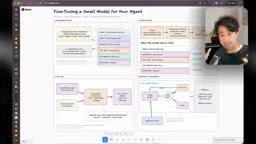
PewDiePie's Ajax project is a fine-tuned Qwen 3.5 9B model. Why did he need fine-tuning? Because after he switched from GPT-series models to the local Qwen 9B, the agent became unreliable—tool calls frequently failed or picked the wrong tool.
Why Small Models Need Fine-Tuning
Large cloud models (GPT-4 class) are stable at tool calling, but small-parameter models tend to struggle with complex tool definitions. One possible optimization direction is to simplify tool definitions to make them friendlier to small models. But if that still isn't enough, fine-tuning is the next step.
The beauty of open-source models is that you can download existing weights and continue training on your own task data. Even at just 9 billion parameters, targeted fine-tuning can produce excellent performance in specific scenarios.
Tool Calling / Function Calling isn't just about the model "understanding tools"—it requires the model to reliably generate structured JSON within natural language output, pick the correct one from dozens of candidate tools based on user intent, and fill in the right parameters. This depends on whether the pretraining phase saw enough structured call samples, and whether the model has enough capacity to remember each tool's parameter schema. The larger the parameter count, the more headroom the model has for handling this "format constraint + semantic matching"; a 9B-class model often generates calls that are syntactically valid but pick the wrong tool or omit parameters. LoRA (Low-Rank Adaptation) is the mainstream approach for fine-tuning such models—it freezes the original weights and trains only a pair of small low-rank matrices alongside the attention layers. Its VRAM footprint and training time are far lower than full-parameter fine-tuning, which is exactly why it's feasible on consumer hardware.
Where Does Training Data Come From
Fine-tuning a tool-calling model requires conversation histories that show correct tool calls. PewDiePie originally wanted to use agent trajectories generated by GPT to train the small model, but hit a hard obstacle: in the generations OpenAI returns through the API or subscription, the reasoning tokens are encrypted. And the reasoning process is critical to fine-tuning—the model thinks before it answers, and that thinking contains the key decision logic. He tried to extract this reasoning content and got banned by OpenAI twice.
A smarter approach is to use trajectories generated by open-source models (like DeepSeekAd or GLM) to train the small model. Or simply filter existing public agent-trajectory datasets on Hugging Face. If you're running your own agent, you can also anonymize your local trajectory data and upload it to Hugging Face—strip the credentials and make it public to help the community train more small models.
Reasoning tokens are the internal chain of thought that reasoning models like o1 and o3 generate before giving a final answer—the model "thinks" first and then "answers." Many model providers, for reasons of distillation prevention and commercial protection, encrypt or hide this content when returning it through their APIs, exposing only the final answer. This means researchers can't directly obtain trainable "thought trajectories" from API outputs. By contrast, open-source reasoning models like DeepSeek-R1 and GLM output their reasoning in plaintext, and their accompanying open weights and datasets allow researchers to do distillation—using a large model's reasoning trajectory to supervise a small model. This is precisely the core reason the original article suggests switching to open-source model trajectories, and it's currently the most common path in the community for generating agent training data.
The Complete Learning Path
The Hugging Face channel has a full "post-training agents" playlist with five videos. If you want to do what's described above, start with the third video (training agents), which walks through in detail how to use large-model trajectories to train small models.
You Can Start Right Now
To sum up, the path to building your own AI agent (whether you build your own harness or use Odysseus) is clear:
First, understand the essence of the agent loop—input, reasoning, tool call, result returned, reason again. Then pick a harness (Odysseus or another), and configure the model you want (cloud or local). If you want full local operation, use Hugging Face to find models, llama.cpp to run them, and the hardware compatibility chart to pick a quantization level. If the small model's tool calling isn't stable enough, collect trajectories from correct executions and follow Hugging Face's fine-tuning tutorials to do targeted training.
None of the steps in this chain are insurmountable. What PewDiePie is doing, you can do at home too.
One-line Summary
PewDiePie's Odysseus project shows how anyone can build their own local AI agent.
Paragraph Summary
Using PewDiePie's open-source project Odysseus as a starting point, the article breaks "building an AI agent"—something that seems highly inaccessible—into a few understandable concepts. First, it explains that an agent is fundamentally a loop of LLM calls: input, reasoning, tool call, result returned, reason again, with all the complexity hidden in context management. Next, it clarifies that "app local" and "model local" are two different things—Odysseus runs in Docker on your machine, but you can choose cloud or local models. Then it lays out the practical path for local models: filter models on Hugging Face, run them with llama.cpp, and pick a quantization level based on the hardware compatibility chart. Finally, it covers fine-tuning, explaining why small models are unstable at tool calling and how OpenAI's encrypted reasoning tokens prevent direct distillation—along with alternatives like using open-source model trajectories or public datasets.
Related articles

AI Is Not a Replacement: Human-AI Collaboration Through the Lens of Factory Root Cause Analysis
Starting from factory root cause analysis, this article explains how AI accelerates evidence chain construction rather than replacing human experts, exploring the pragmatic implementation logic and business value of 'AI supporting people rather than replacing them.'

AI Agent Decision Auditing: Building an Evidence Chain in Regulated Workflows
Starting from a Reddit discussion, this article analyzes three core issues in AI agent decision auditing within regulated workflows: what fields audit records should contain, how to handle feedback latency for erroneous decisions, and how to continuously calibrate LLM judge consistency with human judgment.

Apple Opens Multiseat Subscription Purchasing: App Subscriptions Can Now Be Sold in Bulk to Businesses and Schools
Apple opens multiseat purchasing for auto-renewable subscriptions: businesses and schools can bulk-buy via Apple Business and Apple School Manager, adding or removing seats anytime. Enabled by default in App Store Connect—developers should verify settings; group purchasing sandbox testing opens October 2026.