Pi Agent in Practice: A Complete Guide to the Minimalist Terminal AI Coding Assistant

Pi Agent is a minimalist open-source AI terminal agent that handles DevOps tasks without complex configuration.
Pi Agent (pi.dev) is an open-source minimalist AI agent that runs directly in the terminal, requiring no MCP setup, sub-agents, or permission pop-ups—using only basic CLI commands to get work done. It leverages agents.md context files to help AI understand projects, supports 15+ model providers (including local LLMs), and is particularly well-suited for DevOps scenarios like Terraform infrastructure automation, container orchestration, and server operations, embodying the Unix "less is more" design philosophy.
Why Pi Agent Deserves Your Attention
AI coding tools are emerging constantly, with new products generating buzz on social media every day. But most tools are either bloated with features or rely on complex configuration processes. Pi Agent (pi.dev) takes a completely different path—it's an open-source, minimalist AI agent that runs directly in the terminal, with no MCP setup, no sub-agents, no permission pop-ups, using only basic CLI commands to get work done.
About MCP: MCP (Model Context Protocol) is an open protocol introduced by Anthropic in late 2024, designed to standardize how AI models connect with external tools and data sources—similar to a "USB port" for the AI world. However, MCP configuration often requires JSON server definitions, permission declarations, and process management, adding significant friction for engineers seeking rapid iteration. Pi Agent bypasses this layer of abstraction entirely, accomplishing equivalent tasks directly with shell commands, embodying the Unix philosophy tradition of "do one thing and do it well."
This "less is more" design philosophy has made Pi Agent the sole daily AI tool for a seasoned DevOps engineer, covering all home lab scenarios including code development, scripting, Ansible/Terraform infrastructure as code, server operations, and container orchestration.
Pi Agent's Core Design Philosophy
Minimalist But Not Simplistic
Pi Agent's developers deliberately avoided feature bloat. Unlike platform tools such as Cloud Code and OpenAI Codex, Pi focuses on a few core capabilities:
- agents.md context: A project description file oriented toward AI, similar to a README
- Skills: Reusable capability definitions
- Prompts: Custom slash commands
- Multiple input modes: Direct command execution and conversational interaction
No planning mode, no repeated confirmations—just direct CLI command execution. This design also makes it particularly well-suited for use with local LLMs. Open-source models running locally (such as Llama 3 or Mistral deployed via Ollama) are limited by hardware memory, typically offering only 4K to 32K tokens of context capacity. Pi Agent's characteristic of "requiring minimal context" gives it far better compatibility with local LLMs compared to MCP-architecture tools that need to inject large amounts of tool descriptions and system prompts. For users running local models on consumer-grade GPUs in home labs, this means faster inference speeds and lower VRAM pressure.
Broad Model Support
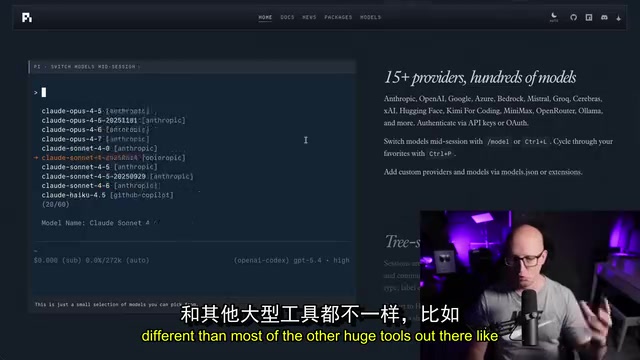
Pi supports over 15 different AI providers, including:
- Subscription services: ChatGPT Plus, Claude Pro/Max, GitHub Copilot
- API keys: Amazon, Cloudflare, DeepSeekAd, Google Gemini, Groq, Hugging Face, etc.
- Local models: Ollama, LM Studio, and other OpenAI-compatible LLMs configured via models.json
Hands-On: Using Pi Agent in a Home Lab
Basic Operations and Thinking Mode Configuration
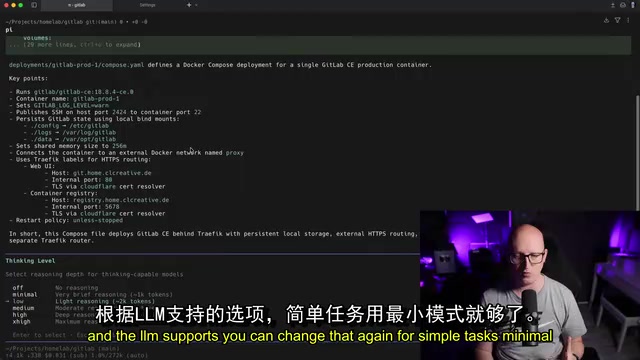
After installing Pi, launch the agent with the pi command and use /model to select a model (GPT 5.5 recommended). Pi offers different thinking mode settings:
- Minimal/Low: Suitable for simple tasks, fast responses
- Medium/High: Suitable for complex coding and reasoning tasks
A practical tip: Prefixing input with an exclamation mark ! during a conversation executes the command directly in the shell without sending it to the AI. For example, !ls or !docker ps—no need to exit the Pi session.
agents.md Configuration: Making AI Truly Understand Your Project
agents.md is Pi Agent's most essential concept. Its design philosophy stems from "Context Engineering"—an emerging practice of systematically designing the information accessible to AI to maximize task completion quality. The difference from Prompt Engineering is that prompt engineering focuses on optimizing wording for individual conversations, while context engineering focuses on injecting persistent, structured background knowledge.
agents.md is essentially an "AI operations manual" that makes explicit the tacit knowledge previously scattered in engineers' minds. Similar concepts exist in other tools: Cursor's .cursorrules file, GitHub Copilot's copilot-instructions.md, and Claude's "project instructions" feature are all different implementations of the same approach. Pi Agent makes this mechanism a core design element rather than an optional feature, reflecting its deep understanding of the importance of "AI understanding the project."
Just as a README helps humans understand a project, agents.md helps AI understand project context. A typical agents.md contains:
- Repository map: Explains directory structure, e.g., "Docker Compose deployment files are in this directory"
- Deployment information: Server addresses, FQDNs, where services run
- Operational guidelines: e.g., "Check existing files before creating resources, follow the same naming and indentation patterns"
- Workflow constraints: e.g., "Don't execute Terraform apply locally, only validate then push to Git"
It's precisely because agents.md defines "GitLab production runs on server-production-1" that when a user says "check if containers are running on my remote server," Pi can automatically SSH into the correct server and execute docker ps.
Terraform Infrastructure Automation with Pi Agent
This is an impressive real-world use case: managing GitLab repositories with Pi Agent through Terraform.
IaC Toolchain Background: Ansible and Terraform/OpenTofu are the two pillars of the modern DevOps toolchain. Ansible focuses on configuration management and application deployment, using declarative YAML Playbooks to push changes via SSH without requiring agents on target machines. Terraform (and its open-source fork OpenTofu) focuses on declarative provisioning of cloud infrastructure, tracking resource lifecycles through state files. Both share the principle of "code as documentation"—the desired state of infrastructure is entirely described by version-controlled text files. This is precisely the scenario where Pi Agent delivers enormous value: AI can read existing IaC files, understand naming conventions and module structures, then generate stylistically consistent new configurations rather than creating code from scratch that might conflict with team standards.
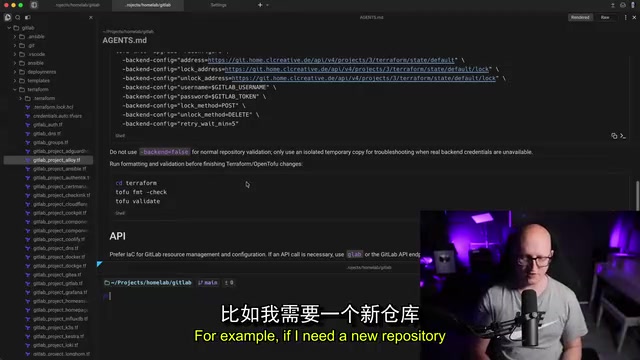
When you input "create a new test repo for my user," Pi Agent will:
- Read instructions from agents.md to understand that the IaC approach is needed
- Examine the structure and patterns of existing Terraform files
- Create a new Terraform file following the same naming conventions
- Execute validation (rather than local apply)
- Push changes to the Git repository, letting CI/CD handle the actual deployment
The workflow here follows the GitOps pattern—using the Git repository as the single source of truth for infrastructure configuration. Engineers don't execute changes directly on servers; instead, they trigger automated pipelines (such as GitLab CI or GitHub Actions) through code commits to perform actual operations. This approach provides complete change audit trails and rollback capability. Configuring "don't execute Terraform apply locally" in Pi Agent's agents.md enforces this pattern.
Related articles
 Tutorials
ChatGPT Plus Subscription Guide: Are GPT-5.5, image-2, and Codex Worth the Upgrade?
A detailed look at ChatGPT Plus features — GPT-5.5, image-2, and Codex — with a Plus vs Pro comparison and a complete step-by-step subscription guide for users outside the US.
 Tutorials
Harness AI Engineering in Practice: Using Claude Code to Master Enterprise-Level E-Commerce Development
Deep dive into Harness AI Engineering: master enterprise e-commerce development with Claude Code using the Rules, Skills, Wiki, and Changes framework.
 Tutorials
Cursor + Codex Dual-IDE Collaboration: A Practical Methodology for Open-Source Project Customization
A complete methodology for open-source project customization based on real-world experience, detailing the Cursor+Codex dual-IDE workflow, seven-stage process, MVP validation, and AI source code reading techniques.