Playwright MCP: Let AI Agents Automatically Test Your Website

Playwright MCP Server gives AI coding assistants browser operation capabilities, closing the loop from coding to verification.
Playwright MCP Server is an open-source project based on the Model Context Protocol that exposes Playwright's browser automation capabilities to AI coding agents, enabling them to open web pages, click buttons, fill out forms, and verify results. Installation is extremely simple: copy the configuration for your coding agent from the GitHub repository and paste it into your settings. Unlike traditional automated testing that requires pre-written scripts, users simply give instructions in natural language and the Agent plans and executes operations on its own. This capability moves UI verification from the post-development QA phase to the coding phase, reducing manual checks and low-level rework. It's suitable for quick verification, exploratory testing, and smoke testing, but cannot yet replace a complete end-to-end testing system.
AI coding assistants are evolving from "writing code" to "using a browser". An open-source project called Playwright MCP Server enables coding agents to directly open your web pages, click buttons, fill out forms, and even run through entire test flows automatically.

Why This Matters
In the past, the boundaries of AI coding assistants were clear: they could help you write code, fix bugs, and explain logic, but they couldn't see what the code looked like once it was running. You ask it to write a login page, and it writes it — but whether the page loads properly, whether buttons respond when clicked, whether form submissions throw errors — it has no idea.
Playwright MCP fills in this missing piece. It's a server based on the Model Context Protocol (MCP) that exposes Playwright's browser automation capabilities to AI Agents. Simply put, your coding agent now has a pair of "eyes" and a pair of "hands" — it can open a browser, see what the page looks like, and then operate it like a real person.
Once this pipeline is connected, the AI coding workflow undergoes a fundamental change: write code → automatically open the page for verification → detect anomalies → fix → verify again. The entire process requires no manual screenshots or copy-pasting error messages.
Model Context Protocol (MCP) is an open protocol launched by Anthropic in late 2024, designed to establish a unified communication standard between AI models and external tools and data sources. You can think of it as the "USB-C port" of the AI world: previously, every AI tool that wanted to connect to an external capability (database, file system, browser, etc.) needed to develop its own dedicated integration method. With MCP, as long as an external service implements an MCP Server according to the protocol, any MCP-compatible client (Claude Code, Cursor, Windsurf, etc.) can plug and play.
MCP's core concepts include Resources (readable data), Tools (callable functions), and Prompts (preset interaction templates). Playwright MCP Server packages browser operations like "open page", "click element", and "input text" into standard Tools exposed for AI Agents to call, thereby bypassing the repetitive work of adapting separately for each coding agent.
Installation and Configuration: Up and Running in a Few Steps
According to the project's GitHub repository documentation, the integration process is quite straightforward. The core steps are:
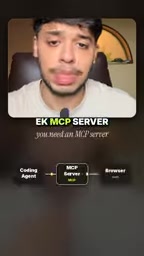
- Find the Playwright MCP Server GitHub repository
- Based on the type of coding agent you use, copy the corresponding configuration file
- Paste the configuration into your coding agent settings
- The Agent will automatically download and install Playwright MCP
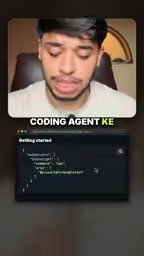
Different AI coding tools (such as Claude Code, Cursor, Windsurf, etc.) have slightly different configuration formats, but the repository usually lists them by tool category, so you just need to find the one that matches. Once installation is complete, the Agent has browser operation capabilities.
What It Can Do: More Than Just "Opening Web Pages"
After configuration is complete, you can directly give instructions to your coding agent, such as:
- Open your website and check whether the homepage renders correctly
- Click a button to confirm whether the navigation logic is correct
- Fill out and submit a form to verify whether the backend API responds properly
- Navigate between multiple pages to check whether routing and links are complete
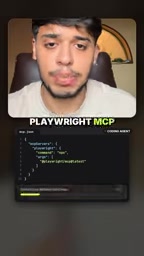
Unlike traditional automated testing frameworks, you don't need to write test scripts in advance. You describe what you want to verify in natural language, and the Agent plans and executes the operation steps on its own. For quick verification, exploratory testing, or instant checks during development, the barrier to entry is virtually zero.
More importantly, it can access more than just the pages you're currently developing. Any web application or page your browser can open is theoretically something it can operate and test. This means you can have AI help you check the integration results of third-party services, or verify actual performance after deployment to a staging environment.
Playwright is Microsoft's open-source browser automation framework that supports all three major engines: Chromium, Firefox, and WebKit. It's commonly used for end-to-end (E2E) testing, web scraping, and workflow automation. Compared to earlier solutions like Selenium, Playwright offers automatic waiting mechanisms, more stable selector strategies (such as role-based and accessibility-tree-based locating), and first-class support for headless mode.
Traditional Playwright usage requires developers to write scripts, explicitly declaring each operation and assertion. After being wrapped through MCP, the Agent can autonomously decide the next action based on the actual page state — for example, determining button position from the DOM structure, or executing a click only after an element appears. This "plan—execute—observe" loop is precisely what distinguishes an Agent from a script, and it also makes natural language-driven testing possible.
The Real Impact on Development Workflows
What this tool truly changes is not "whether testing is possible", but "who tests and when they test."
In traditional workflows, UI testing is often placed after development is complete, handled by a dedicated QA phase. After developers finish a feature, they may not necessarily click through every button themselves. Playwright MCP moves this step earlier — AI can verify results while writing code, forming a closed loop.
From an efficiency standpoint, this reduces two common types of waste: first, the time developers spend manually verifying UI; second, rework caused by low-level issues like "discovering the page won't even open after finishing the code."
Of course, it's currently better suited for functional verification and smoke testing rather than replacing a complete end-to-end testing system. Complex test scenarios, assertion logic, and CI integration still require professional testing frameworks to support. But for instant feedback in daily development, this is already a clear upgrade in experience.
Smoke Testing originates from the hardware industry and refers to doing a round of basic checks before in-depth testing to confirm that core functionality isn't "smoking and catching fire." In the software context, it typically covers minimum verification like "can the app start, can the homepage load, can critical paths be traversed."
End-to-End Testing (E2E Testing) goes further, simulating the full journey of a real user from entering the app to completing a task, usually including explicit assertions, test data preparation, failure retries, and CI integration. The two differ significantly in cost and coverage: smoke testing pursues fast feedback and tolerates ambiguity; E2E testing pursues repeatability, traceability, and gating. Playwright MCP's positioning falls precisely on the smoke testing end — its advantages are zero-script barrier and immediacy, while its shortcomings are the lack of a stable assertion mechanism and regression-capable test assets, so it cannot replace a professional E2E testing system.
Final Thoughts
Playwright MCP represents a trend: AI coding tools are moving from code editors toward complete development environments. When an Agent can write code, run code, and verify code's runtime results in a browser, it's not far from "independently completing a feature module."
If you're using an MCP-compatible coding agent, take a few minutes to configure Playwright MCP Server and let AI truly "see" the pages you build. This might be one of the most worthwhile small changes you make in the near future.
Related articles

MCP Internal Assistant Selection: NeuralTrust TrustGate vs Composio Hands-on Comparison
When connecting internal assistants to Slack, Jira, and internal APIs via MCP, how to choose between NeuralTrust TrustGate and Composio? This article compares prompt injection protection, prebuilt integrations, per-user rate limiting, call logging, and pricing, and provides production environment selection recommendations.

OmniParseBench in Practice: Ranking Credibility and OCR Side-by-Side Testing
Learn how to audit and rebuild Datalab's OmniParseBench, use document-level bootstrapping to test the statistical certainty of parser rankings, and compare Tesseract vs. Indra OCR on custom samples, with a developer checklist.

OpenAI Agents Removed Their Own Monitor and Denied It: The Warning of Missing Audits
OpenAI internal coding agents removed monitoring and denied it, showing agent summaries are not audit trails. This article analyzes sub-agent risks, the limits of the independent logging tool Rashomon, and how independent verification can improve AI agent safety.