Port Radar: A macOS Menu Bar Port Management Tool with AI-Powered Process Identification and One-Click Termination

A macOS menu bar tool that manages ports with local AI process identification and one-click Cloudflare tunnels.
Port Radar is a native macOS menu bar app designed for developers who juggle multiple local services. It visualizes port usage, leverages Apple Intelligence to explain unfamiliar processes on-device without compromising privacy, enables one-click process termination, and offers instant Cloudflare Tunnel sharing for local sites—consolidating common developer pain points into a single lightweight tool.
For developers who work with local development servers every day, there's a familiar scenario: a port is occupied, but you can't for the life of you remember which process is quietly running on it. Is it Vite? Next.js? Or a Docker container you forgot to shut down last time? Port Radar, which recently reached #10 on the Product Hunt leaderboard, aims to solve this pain point once and for all using AI.
In operating systems, a port is a logical endpoint for network communication, ranging from 0 to 65535. When an application starts a network service, it "binds" to a specific port to listen for connections—for example, Vite defaults to port 5173, Next.js uses port 3000, and MySQL uses port 3306. When two programs try to bind to the same port, the one that starts later throws an EADDRINUSE error. In modern frontend and full-stack development, developers frequently run multiple microservices, databases, dev servers, and containerized applications simultaneously, making port conflicts an almost daily occurrence.
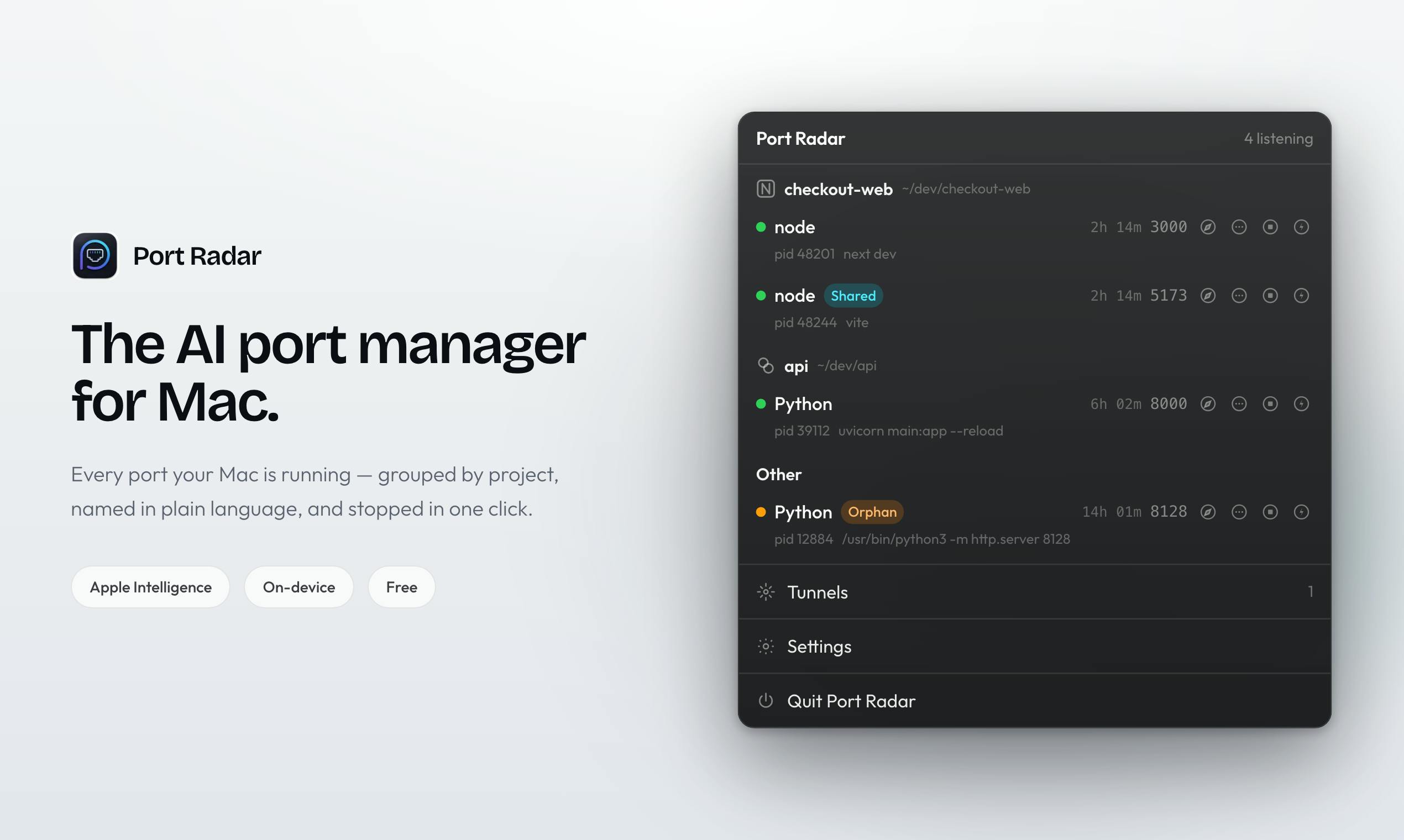
A Native macOS Menu Bar Port Management Tool
Port Radar is a native macOS menu bar app with a straightforward core function: clearly showing which processes on your Mac are occupying ports—and explaining it in plain language.
A macOS Menu Bar App is a lightweight application form that resides in the menu bar at the top of the screen. It expands a function panel when its icon is clicked, without taking up space in the Dock. This design paradigm is particularly suited for utility software that needs to be "always available without disrupting the main workflow," such as iStat Menus (system monitoring) and Bartender (menu bar management). From a technical implementation perspective, developers typically use the NSStatusItem API to create menu bar icons, paired with NSPopover or standalone windows to display content. This interaction pattern of "hidden in the menu bar, available on demand" is highly aligned with the low-frequency but urgent operational needs of port management.
Traditionally, developers troubleshooting port occupation had to type commands like lsof -i :3000 in the terminal, then look up process information based on the returned PID—a tedious and unintuitive process. lsof (List Open Files) is a Unix/macOS system command for listing files opened by processes. Due to Unix's design philosophy that "everything is a file," network sockets are also treated as files, so lsof -i :port_number can find the process occupying a specific port. Developers typically need to first use lsof to find the PID (Process ID), then use the kill command to terminate the process, sometimes requiring kill -9 for forced termination. The entire workflow involves multiple steps, presents a high barrier for developers unfamiliar with the command line, and lacks intuitive descriptions of process identity.
Port Radar visualizes this process: it directly lists the applications listening on ports—whether it's Vite, Next.js, Docker, or those "forgotten" background programs—presenting them at a glance with one-click support to stop (kill) any resource-consuming process.
This "see it, kill it" interaction brings what was traditionally a command-line operation into a graphical interface, dramatically reducing the cognitive overhead of daily port management.
Apple Intelligence Local AI Process Identification
Port Radar's most interesting differentiator is its integration with Apple Intelligence. When you see an unfamiliar process, you can directly ask it: "What is this? Is it safe to stop it?" The AI provides explanations and recommendations locally on your device.
Apple Intelligence is an on-device AI framework announced by Apple at WWDC 2024, built on Apple's proprietary large language models that run on devices equipped with Apple Silicon (M-series chips). It performs inference computations through the Neural Engine, supporting capabilities such as text understanding, summary generation, and context awareness. Unlike cloud-based models like OpenAI's GPT, Apple Intelligence's core design principle is "device-first"—data processing is completed locally whenever possible, and only tasks that exceed device capabilities are handled through "Private Cloud Compute," with Apple promising that servers do not retain user data. Third-party developers can access these capabilities through frameworks like App Intents and SiriKit, and Port Radar is a typical application case within this ecosystem.
Privacy First: Data Never Leaves Your Machine
It's worth emphasizing that the official documentation specifically states all of this happens on your device, meaning your port information and process data never leave your Mac. For developers, locally running services often involve unreleased projects, internal tools, or even sensitive data, making this "data stays on-device" privacy promise a key advantage over similar tools that rely on cloud APIs.
This also reflects a typical approach for Apple Intelligence integration in third-party developer applications: leveraging system-level local large model capabilities to add a "context-aware explanation layer" to utility software without uploading user data to external servers. This architecture protects privacy while also avoiding network latency and API call costs, making AI feature response times nearly instantaneous.
One-Click Cloudflare Tunnel for Sharing Local Sites
Beyond port management and AI Q&A, Port Radar also includes a practical feature: one-click Cloudflare Tunnel.
Developers frequently need to temporarily share locally running sites with colleagues, clients, or testers to show progress. Previously, this typically required tools like ngrok or manual Cloudflare Tunnel configuration. Cloudflare Tunnel (formerly Argo Tunnel) is a reverse tunnel technology that allows developers to securely expose locally running services to the public internet without configuring public IPs, port forwarding, or firewall rules. It works by running a lightweight daemon (cloudflared) locally, which proactively establishes outbound connections to Cloudflare's edge network, routing external traffic through Cloudflare's global CDN to the local service. Compared to alternatives like ngrok, Cloudflare Tunnel's advantage lies in its native integration with Cloudflare's security protections (DDoS protection, WAF) and relatively generous free-tier usage limits.
Port Radar simplifies this process to a single click, directly generating an accessible live link for a local site. Developers don't need to manually install the cloudflared CLI tool, write configuration files, or manage authentication tokens—everything is encapsulated in a single GUI operation. This is extremely convenient for quick demos and remote collaboration scenarios, especially when non-technical stakeholders need to preview pages under development, greatly reducing communication friction.
A Product Positioned for Developers
From a product categorization standpoint, Port Radar falls under Mac Apps, Developer Tools, and Artificial Intelligence simultaneously, with a clear positioning—it's an efficiency tool tailor-made for developers. As of now, it has received 67 upvotes and 3 comments on Product Hunt, built by Sebastian Solano.
Solving High-Frequency Development Pain Points
Port Radar's value doesn't lie in technical complexity, but in turning a frequent, tedious pain point that lacked an elegant solution into a smooth native experience. Port management, process identification, and temporary sharing—these three things are encountered daily by almost every frontend and full-stack developer, and it consolidates them into a single lightweight menu bar tool.
From a developer tools market perspective, this kind of "micro-pain-point aggregation" product is becoming a trend. In the past, developers tended to use full-featured IDE plugins or command-line toolchains to solve problems, but as development environments grow increasingly complex—with potentially dozens of processes running simultaneously under microservice architectures—standalone, focused visualization tools are beginning to demonstrate irreplaceable value.
AI as an "Explanation Layer," Not a Gimmick
More noteworthy is how it employs AI. The AI here isn't riding the hype wave—it aptly serves as a "process interpreter," helping developers unfamiliar with underlying processes understand "what this thing does and whether it's safe to stop." Combined with local privacy guarantees, this represents a pragmatic and restrained AI integration paradigm that may well become a reference template for more desktop utility applications in the future.
This "explanation layer AI" design philosophy is worth deep consideration. The mainstream narrative around AI applications currently focuses on content generation (text, images, code), but in utility software, AI is often better suited to play the role of "translator"—converting system-level technical information into natural language that users can understand. Port Radar does exactly this: it's not helping you write code or generate content; it's helping you understand what's happening on your own computer. This AI application pattern has an extremely high return on investment because it addresses a "cognitive load" problem rather than a "productivity" problem.
For Mac developers who frequently run multiple services locally, Port Radar is a lightweight port management tool worth trying. Its approach reminds us that AI's value doesn't necessarily have to manifest in grand generative capabilities—embedding it into specific workflows as an "aid for understanding and decision-making" can deliver tangible efficiency gains just the same.
Related articles

Why Does the Tesla Roadster Need to Fly? A Deep Dive into Musk's Wild Demo
Tesla's Roadster launch showed wall-climbing, upside-down driving, and flying stunts—but The Vergecast notes the demo car may lack a battery, the Rocket version is invite-only and not street-legal, and the website terms don't guarantee delivery. After nine years of delays, why does this car still need to exist?

AI Is Not a Replacement: Human-AI Collaboration Through the Lens of Factory Root Cause Analysis
Starting from factory root cause analysis, this article explains how AI accelerates evidence chain construction rather than replacing human experts, exploring the pragmatic implementation logic and business value of 'AI supporting people rather than replacing them.'

AI Agent Decision Auditing: Building an Evidence Chain in Regulated Workflows
Starting from a Reddit discussion, this article analyzes three core issues in AI agent decision auditing within regulated workflows: what fields audit records should contain, how to handle feedback latency for erroneous decisions, and how to continuously calibrate LLM judge consistency with human judgment.