Practical Guide to OpenAI Agents SDK Message Types and Conversation History Management

Treating Agent interactions as event sequences rather than chat history is key to building robust Agent systems.
This article, based on practical OpenAI Agents SDK development experience, argues that Agent interactions should be viewed as event sequences rather than simple chat history. It systematically covers static and dynamic instructions, the five message types (Developer, User, Assistant, Function Call, and Function Call Output), and highlights two critical pitfalls: Agents don't automatically maintain conversation history (you must pass it in manually), and Function Calls must be strictly paired with Outputs via call_id. It concludes with an advanced technique for dynamically inserting Developer Messages.
Introduction: Rethinking Agent Conversation History
When building AI Agent applications, many developers treat interactions with Agents as ordinary "chat history"—the user says something, the assistant responds, and so on. But this understanding often limits your ability to build more complex Agent systems.
This article systematically organizes the core mechanisms of Agent messaging systems based on practical development experience with the OpenAI Agents SDK. The central argument is: Don't think of Agent interactions as chat history—think of them as a sequence of events. Understanding this will help you design more flexible and robust Agent workflows.
This mental shift has deep engineering roots. Event-Driven Architecture (EDA) is one of the core design paradigms of modern distributed systems, where system components collaborate by publishing and consuming events rather than directly calling each other's interfaces, giving systems stronger decoupling and scalability. Viewing Agent interactions as event sequences essentially brings this mature engineering philosophy into AI application development. For Agent systems, this means that what triggers an Agent's actions isn't just active user input—it can be timers, webhook callbacks, database change notifications, or any other signal that can be serialized into a message.
Basic Prompts: Static and Dynamic Instructions
Static Instructions
In the Agents SDK, the instructions parameter is essentially the system prompt, used to define the Agent's behavioral guidelines:
agent = Agent(
    name="pirate_agent",
    model="gpt-4.1-mini",
    instructions="Speak like a pirate"
)
When running the Agent, execution goes through the Runner object. The async approach is recommended:
result = await Runner.run(starting_agent=agent, input="Write me a haiku")
The naming of the starting_agent parameter is worth noting—it implies that an Agent can hand off tasks to other Agents, even if only one Agent is currently working.
Dynamic Instructions
When instructions need to include real-time information (such as the current time or user state), a static string isn't sufficient. The Agents SDK allows you to pass a function as an instruction generator:
def time_based_instructions(context: RunContextWrapper, agent: Agent):
    current_time = get_current_time()
    if is_afternoon(current_time):
        return "Speak like a pirate"
    return "Do not speak like a pirate"

This function executes every time the Agent is invoked, ensuring instructions always reflect the latest state. Although the context and agent parameters aren't used in this example, they become critical in complex scenarios involving multi-Agent collaboration and state sharing.
Five Message Types: Understanding the Agent's Event Stream
The Mental Shift from Chat Logs to Event Streams
In the traditional understanding, conversation history is a linear alternation of "user speaks → assistant responds → user speaks → assistant responds." But a more accurate understanding is: An Agent is essentially a workflow execution engine that performs different tasks based on various triggers.
Triggers aren't necessarily messages actively sent by users—they could be a user opening a page, a scheduled system task expiring, or other background events. Users may not even realize they've triggered a workflow.
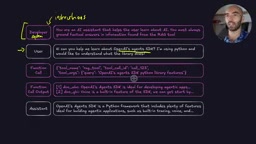
The Five Message Types Defined by OpenAI
1. Developer Message
This is what used to be called the System Message—OpenAI recently renamed it. This change isn't just cosmetic—it reflects OpenAI's redefinition of who owns control at each prompt hierarchy level. In OpenAI's Model Spec, there's a clear trust hierarchy: values embedded during OpenAI training > Developer Message > User Message. This hierarchy is designed to prevent users from overriding developer-set safety boundaries and behavioral constraints through conversation content, known as "Prompt Injection" attacks. In the Agents SDK, this corresponds to the instructions parameter, used to guide the Agent's behavioral boundaries, capabilities, and constraints.
2. User Message
Corresponds to the input parameter. This can be text manually entered by a user, or information passed in after any event trigger.
3. Assistant Message
Response content generated by the LLM, typically the final output returned to the user.
4. Function Call
Structured JSON data generated by the LLM, containing the tool name, a unique call_id, and call parameters. This is the core mechanism through which Agents invoke external tools.
Function Calling (now called Tool Use) is a core capability introduced by OpenAI in 2023 that evolved LLMs from pure text generators into execution engines capable of interacting with the external world. The underlying mechanism works as follows: developers describe available tools in JSON Schema format in API requests, the model decides during inference whether to call a tool and how to populate parameters, then outputs the call intent as structured JSON (rather than executing directly). Actual execution is handled by developer code, and results are fed back to the model as Function Call Output. The call_id design supports Parallel Tool Calls—the model can initiate multiple tool calls simultaneously in a single response, and call_id ensures each call's result is correctly attributed.
5. Function Call Output
The result returned after tool execution, which must be paired with the corresponding Function Call via call_id.
An easily confused detail: User, Developer, and Assistant messages all actually belong to the same message type, differentiated only by the role field.
Key Pitfalls in Conversation History Management
Pitfall 1: Agents Don't Automatically Maintain Conversation History
This is very easy to overlook: The Agents SDK's Runner does not automatically save or maintain conversation history. Every call to Runner.run() is independent—if you need contextual continuity, you must manually pass in previous history messages.
This design embodies the engineering philosophy of stateless services. Stateless design makes every call independent and repeatable, greatly simplifying the complexity of horizontal scaling and fault recovery—any server can handle any request without session affinity. The trade-off is that state management responsibility shifts to the caller. Developers are free to store history messages in Redis, databases, or memory; the framework makes no assumptions. This contrasts sharply with stateful frameworks (like LangChain's Memory module), each having its own applicable scenarios.

The specific approach is to use the to_input_list() method to convert the previous run result into a re-inputtable format:
# Convert previous result to input format
previous_messages = result.to_input_list()
# Append new message and run again
new_input = previous_messages + [new_user_message]
result = await Runner.run(starting_agent=agent, input=new_input)
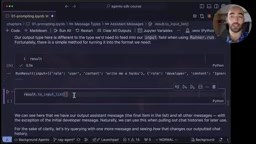
Without this step, the Agent runs in an "amnesiac" state every time, with no memory of previous interactions.
Pitfall 2: Function Calls Must Appear in Pairs
This is another common source of errors: Every Function Call must have a corresponding Function Call Output, and the call_id of both must match exactly.
# Correct example
function_call = {
    "type": "function_call",
    "call_id": "call_123",
    "name": "get_current_weather",
    "arguments": {"location": "London"}
}

function_output = {
    "type": "function_call_output",
    "call_id": "call_123",  # Must match the above
    "output": "London: It is raining"
}
If a pair is missing or the call_id doesn't match, the OpenAI API will reject the request outright and return an error. This requires particular attention when manually assembling conversation history.
Practical Tips: Dynamically Inserting Developer Messages
A useful but often overlooked advanced pattern: Dynamically inserting Developer Messages at specific nodes in the conversation flow.
A typical scenario—after an Agent retrieves relevant documents through a RAG tool, you can insert a developer message after the retrieval results to reinforce behavioral constraints:
rag_reminder = {
    "role": ...
Related articles
 Tutorials
ChatGPT Plus Subscription Guide: Are GPT-5.5, image-2, and Codex Worth the Upgrade?
A detailed look at ChatGPT Plus features — GPT-5.5, image-2, and Codex — with a Plus vs Pro comparison and a complete step-by-step subscription guide for users outside the US.
 Tutorials
Harness AI Engineering in Practice: Using Claude Code to Master Enterprise-Level E-Commerce Development
Deep dive into Harness AI Engineering: master enterprise e-commerce development with Claude Code using the Rules, Skills, Wiki, and Changes framework.
 Tutorials
Cursor + Codex Dual-IDE Collaboration: A Practical Methodology for Open-Source Project Customization
A complete methodology for open-source project customization based on real-world experience, detailing the Cursor+Codex dual-IDE workflow, seven-stage process, MVP validation, and AI source code reading techniques.