Product Hunt Launches Visual Launch Editor, Saying Goodbye to Tedious Form Filling

Product Hunt launches a Visual Launch Editor with in-place editing and checklist guidance to improve launch page quality.
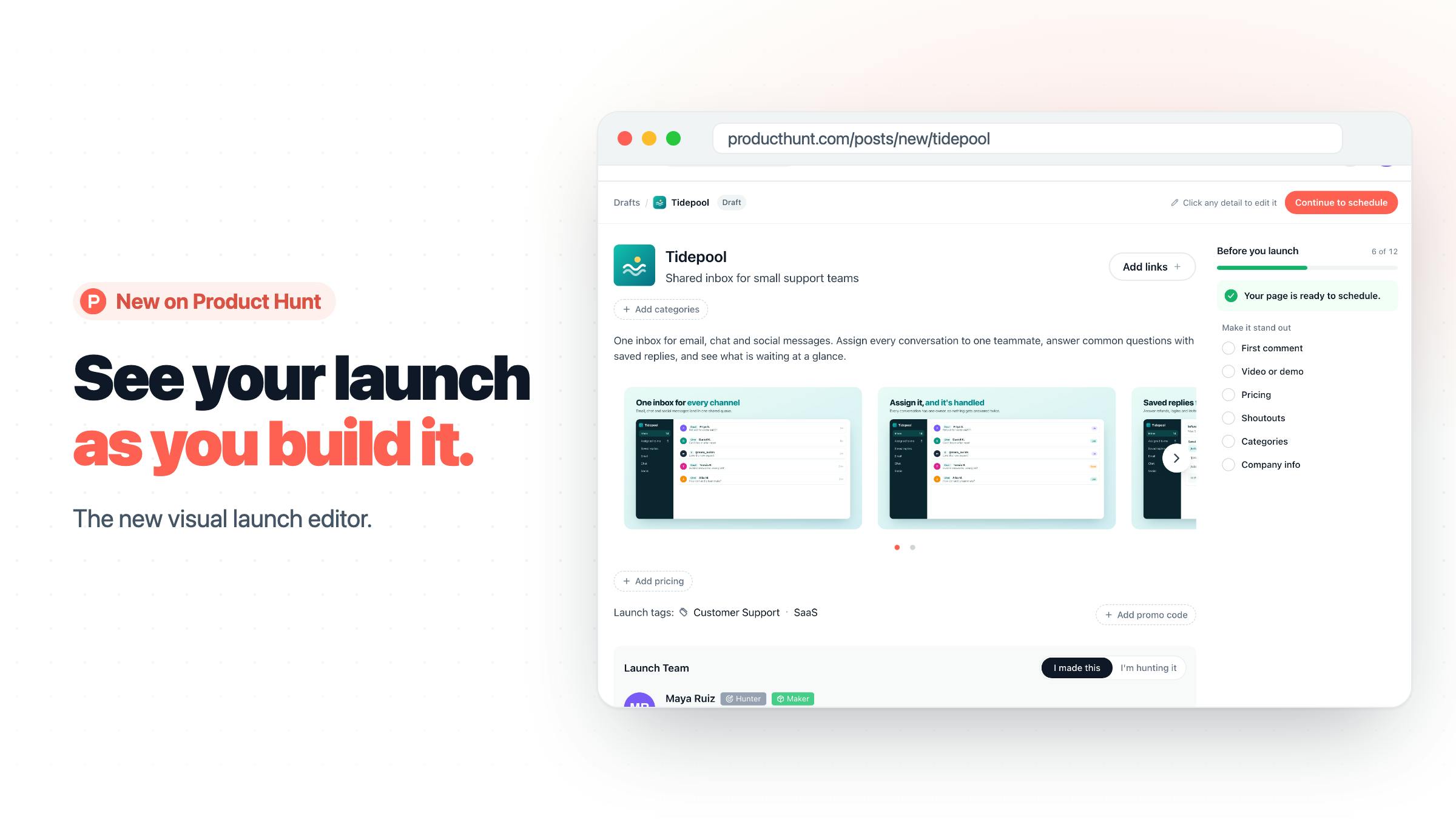
Product Hunt released a new Visual Launch Editor that lets creators click on the name, tagline, gallery, or maker section to edit directly in place, without switching between multiple form fields. The editor embeds a checklist indicating required and bonus items, with clicks jumping to the corresponding fields. Drafts are auto-saved, and drafts, scheduled launches, and live launches share the same editor, reducing the learning curve. This update focuses on launch quality rather than algorithmic recommendations or traffic distribution, aiming to guide creators to submit more complete and clearly laid out launch pages, thereby improving community dwell time and engagement rates. For indie developers and startup teams, the editor lowers operational costs, but polishing the content itself remains the key to launch effectiveness.
Product Hunt recently released a new Visual Launch Editor, allowing creators to build and preview their product launch pages in a more intuitive way. The tool hit the top spot on Product Hunt with 168 upvotes, marking an effort by this established product discovery platform to optimize its core launch experience.
WYSIWYG Editing Logic
In the past, launching a product on Product Hunt required creators to toggle between multiple form fields to fill in the name, tagline, image gallery, and maker information. The new editor's approach is "build while you see" — click on the name, tagline, gallery, or maker section on the page, and you can edit it directly in place without jumping to a separate form page.
This interaction pattern is already quite mature in website builders (such as Wix and Carrd), but bringing it into the product launch process means Product Hunt is starting to treat "launch" itself as a designable work. The official description emphasizes "fewer steps" and "automatic draft saving," two details that directly address the pain points creators most often encounter when preparing launch materials: information lost on the spot and a fragmented process.
It's worth noting that drafts, scheduled launches, and live launches now share the same editor. This reduces the learning curve and avoids the confusion caused by inconsistent interfaces across different states.
WYSIWYG (What You See Is What You Get) is an editing paradigm in which the content layout users see in the editing interface matches the final output, eliminating the need to switch back and forth between source code and preview. The concept originated in desktop publishing software and was later widely adopted by web builders (such as Wix and Carrd) and content management systems. Its technical implementation typically relies on real-time rendering engines and DOM manipulation, mapping interactions like clicks and drags directly to the final page structure. In Product Hunt's launch editor, WYSIWYG means creators can instantly see how modules like the name, tagline, and gallery will actually appear on the launch page, thereby reducing cognitive load and minimizing rework before launch.
Checklist Mechanism: From Filling Out to Guidance
The editor embeds a checklist that indicates which content is required and which content can help a launch stand out. Clicking an item in the checklist takes the interface directly to the corresponding editing field.
This guidance logic is essentially a dual safeguard for compliance and quality: for newcomers, it clarifies the minimum threshold for a launch; for veterans, it serves as a self-check tool before going live. Product Hunt officially categorizes it under Maker Tools and Community, which somewhat hints at the tool's positioning — it serves not one-way information submission, but display and interaction among community members.
From a product design perspective, a checklist-driven editing flow also makes future iteration easier. If the platform later wants to encourage more video content or more complete maker introductions, it only needs to add a prompt to the checklist to drive behavioral change without significantly overhauling the interface.
Checklist in form design is often called "progressive guidance" or "compliance check," and its role is to break down complex launch requirements into checkable items that help users complete them step by step. It not only lists required fields but also reinforces behavioral guidance through visual feedback (such as completion status and highlighted prompts). In product launch scenarios, the checklist mechanism can significantly lower the barrier for newcomers while providing existing users with a basis for self-check before going live. From a product iteration perspective, checklist items can be added or removed independently, allowing the platform to adjust launch standards without restructuring the interface — a low-cost behavioral design tool.
Launch Experience Becomes a Competitive Focus
Although this update from Product Hunt does not involve algorithmic recommendations or traffic distribution, it touches on the platform's most core asset: launch quality. A clearly laid out launch page with complete information often earns longer community dwell time and higher engagement rates, which in turn affects a product's performance on the daily leaderboard.
For indie developers and startup teams, the visual editor lowers the operational cost of preparing launch materials, but it cannot replace polishing the content itself. Whether the name and tagline accurately convey value, whether gallery screenshots are clear enough, and whether the maker introduction builds trust remain the key factors determining launch effectiveness. What the editor can do is connect these elements more smoothly.
The feature is currently open to all launch flows, and draft states are also automatically saved. For teams planning to debut on Product Hunt, it's worth trying out this editor in advance to rehearse the final presentation of their launch page.
Community dwell time and engagement rate are key metrics for measuring the activity of a product discovery platform's community. Dwell time reflects users' level of interest in launch page content, while engagement rate (such as upvotes, comments, and shares) reflects the depth of participation among community members. These two metrics are usually positively correlated with the completeness of information and visual clarity of a launch page: pages with messy layouts or missing images and text tend to cause users to bounce quickly. By improving launch page quality through the visual editor, Product Hunt is essentially optimizing these community metrics, which in turn affects a product's ranking weight on the daily leaderboard.
Key Takeaways
- Visualization at the core: click to edit the name, tagline, gallery, and maker information in place.
- Automatic draft saving: reduces the risk of information loss and supports drafts, scheduled launches, and live launches sharing the same editor.
- Checklist guidance: required and bonus items are clear at a glance, and clicking jumps to the corresponding field.
- Launch quality upfront: the platform guides creators through tool design to submit more complete launch pages.
One-line Summary
Product Hunt launches a Visual Launch Editor, using in-place editing and checklist guidance to improve launch page quality.
Paragraph Summary
Product Hunt released a new Visual Launch Editor that lets creators click on the name, tagline, gallery, or maker section on the page to edit directly in place, without switching between multiple form fields. The editor embeds a checklist that indicates required and bonus items, with clicks jumping to the corresponding fields. Drafts are automatically saved, and drafts, scheduled launches, and live launches share the same editor, reducing the learning curve. This update focuses on launch quality rather than algorithmic recommendations or traffic distribution, aiming to guide creators through tool design to submit more complete and clearly laid out launch pages, thereby improving community dwell time and engagement rates. For indie developers and startup teams, the editor lowers operational costs, but polishing the content itself remains the key to launch effectiveness.
Related articles

A Single Prompt Triggers a Global PHP Security Storm: Is AI a Savior or a Hidden Risk?
A single AI prompt triggered a global PHP security crisis affecting Wikipedia and the Internet Archive. This article reviews the incident, analyzes the OpenAI-Amazon controversy, and explores the security paradox of lowered vulnerability discovery barriers in the AI era and developer response strategies.

When AI Is Taken Away: How Reliance on Shortcuts Undermines Your Problem-Solving Resilience
A study of 1,222 people found that after using AI to answer questions, once AI was removed, people gave up on more problems than a control group that never used AI. The article analyzes the impact of AI reliance on learning resilience and metacognition, and explores design implications for AI learning tools.

Carta and NewView Partner to Let Startup Employees Cash Out Equity Early
Carta and NewView Capital partner to simplify startup tender offers, helping employees sell equity early. Analysis of the mechanism, liquidity pain points, and impact.