PySpark Crash Course: Core Principles of Distributed Data Processing & Five Key Use Cases

A comprehensive PySpark guide covering distributed architecture, lazy evaluation, Shuffle, and five real-world use cases.
This article systematically explains PySpark's core distributed computing principles—including Master-Worker architecture, partitioning, lazy evaluation, and Shuffle mechanisms—along with five practical application scenarios: ETL pipelines with S3, DataFrame vs. RDD API comparison, Structured Streaming for real-time processing, and distributed machine learning with MLlib. It provides actionable guidance for Python developers to quickly master large-scale data processing.
Apache Spark is one of the most essential distributed computing engines in large-scale data processing today, and PySpark is its Python interface. When you're dealing with massive datasets that a single machine can't handle, Spark allows you to split the work across multiple nodes for parallel processing. This article systematically covers PySpark's core principles and five typical use cases, helping you build a complete cognitive framework in a short time.
Spark Core Architecture & Key Terminology
Before understanding Spark, you must first grasp its distributed architecture. Spark uses a Master-Worker structure: the Master node handles coordination and resource allocation, while Worker nodes perform the actual computation. On top of this are two key concepts—the Driver process (typically runs on the Master, responsible for defining tasks and scheduling) and Executors (run on Workers, actually executing computational tasks).
The Master-Worker architecture is one of the most classic design patterns in distributed systems, widely used in Hadoop, Kubernetes, Elasticsearch, and other systems. The core idea of this architecture is separation of concerns: the Master node assumes the global coordination role, including task scheduling, resource allocation, and fault detection; Worker nodes focus on executing specific computational tasks. In Spark, this architecture is implemented through a Cluster Manager, supporting four deployment modes: Standalone, YARN, Mesos, and Kubernetes. Standalone mode is Spark's built-in cluster manager, suitable for learning and small deployments; YARN is the Hadoop ecosystem's resource manager and is most common in enterprise big data platforms; Kubernetes, as a container orchestration platform, is becoming the mainstream choice for cloud-native Spark deployments.
Data in Spark is divided into Partitions. Suppose you have 10,000 rows of data—you can split them into 10 partitions of 1,000 rows each, and each partition is further decomposed into several Tasks distributed to different Executors for execution. This design both improves processing speed and handles datasets too large to fit in a single machine's memory.
The Relationship Between RDD and DataFrame
Spark provides two data abstractions. RDD (Resilient Distributed Dataset) is the low-level object with lineage characteristics—even if a partition is lost, it can be regenerated by replaying the recorded creation steps. Operating on RDDs requires using primitives like map, filter, and reduce.
RDD's lineage mechanism is one of Spark's core innovations that distinguishes it from traditional distributed systems. Traditional distributed computing frameworks (like early MapReduce) typically rely on data replication for fault tolerance—keeping copies of each piece of data on multiple nodes, which brings enormous storage and network overhead. Spark's RDD takes a completely different approach: instead of replicating the data itself, it records the data's "creation lineage"—that is, starting from the original data source, what transformation operations were applied. When a partition is lost due to node failure, Spark simply traces back along the lineage graph and recomputes the lost partition from upstream data. This design is called "lineage-based fault tolerance" and is far more efficient than data replication in data-intensive scenarios. However, when the lineage chain becomes too long, the cost of recomputation increases, at which point you can use the checkpoint mechanism to persist intermediate results to reliable storage (such as HDFS) to truncate the lineage.
DataFrame is built on top of RDD and is a higher-level abstraction. It's based on the Spark SQL engine, with query planning and automatic optimization capabilities, and its syntax is close to database operations—intuitive and easy to use. The vast majority of production scenarios recommend using the DataFrame API first.
The fundamental reason DataFrame outperforms RDD lies in the Spark SQL engine behind it, particularly the Catalyst Optimizer and Tungsten Execution Engine. Catalyst is a query optimizer based on both rules (Rule-based) and cost (Cost-based), performing multiple rounds of optimization on user-submitted query plans: first logical optimization, such as Predicate Pushdown (applying filter conditions as early as possible to reduce data volume), Column Pruning (reading only needed columns), constant folding, etc.; then physical optimization, selecting the most efficient JOIN strategy (such as Broadcast Hash Join or Sort Merge Join). Tungsten optimizes at an even lower level, including manual memory management (avoiding JVM garbage collection overhead) and code generation (Whole-Stage Code Generation) that compiles query plans into optimized Java bytecode. These optimizations are unavailable to developers using the RDD API because RDD operations are opaque black-box functions to Spark.

Setting Up a PySpark Multi-Node Cluster with Docker Compose
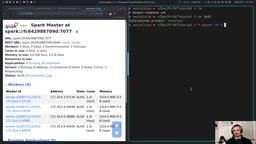
The best way to learn distributed computing locally is to use Docker Compose to simulate a cluster with 1 Master + 4 Workers. Key configuration points include:
- All nodes use the same image
apache/spark:4.2.0—version consistency is essential - Master runs
start-master.sh, Workers runstart-worker.shand register to the Master addressspark://spark-master:7077 - Use
SPARK_NO_DAEMONIZE=trueto keep processes running in the foreground, preventing container exit - Intentionally limit resources for each Worker (e.g., 2 cores, 1GB memory)—this is what truly demonstrates the value of distributed computing; otherwise, concentrating all computing power on a single Worker defeats the purpose of distribution
Regarding ports, 8080 is for the Web UI status monitoring, and 7077 is the inter-node communication channel. After startup, visit localhost:8080 to see all four Workers registered and in alive status. When submitting scripts, use the spark-submit binary inside the container, specifying the Master address and script path.
Lazy Evaluation & Shuffle Mechanism Explained
The first important characteristic of the DataFrame API is Lazy Evaluation. When you execute Transformations like select, filter, or groupBy, Spark doesn't compute immediately—it only records the operation plan. The entire plan is actually executed only when an Action (like show or write) is triggered. This design allows Spark to perform global optimization across the entire pipeline.
You can view the physical execution plan using the explain() method. Taking a group-by-employment-status-and-compute-average-age operation as an example, the execution plan will show a Shuffle stage. The essence of Shuffle is: first compute partial aggregations within each partition (such as saving sum and count), then move data belonging to the same group key to the same Worker to complete the final aggregation.
Shuffle is one of the most expensive operations in distributed computing because it involves massive disk I/O and network transfer. During the Shuffle phase, each Executor needs to repartition local data by the target partition key, writing to temporary files (called Shuffle Write), then downstream Executors pull their data from all upstream nodes via the network (called Shuffle Read). This process is similar to the Shuffle phase in MapReduce, but Spark has performed extensive optimization through the Sort-based Shuffle Manager, reducing the number of temporary files generated. In production environments, optimizing Shuffle is the core technique for tuning Spark jobs. Common strategies include: using Broadcast Join to avoid large-table Shuffle, controlling post-Shuffle partition count through spark.sql.shuffle.partitions (default 200, but should be adjusted based on data volume), and using Bucketing to pre-distribute data by key to eliminate subsequent Shuffles.
Interestingly, partial aggregation for averages must simultaneously save both sum and count, because averages from different partitions cannot simply be averaged again—they must be weighted by sample size. Understanding the cost of Shuffle is key to optimizing Spark job performance.
ETL Pipeline in Practice: Read from S3, Process, Write Back
The most production-relevant scenario is building an ETL pipeline (Extract-Transform-Load). Below demonstrates the complete workflow of reading approximately 1.5GB of CSV data from AWS S3, processing it in a distributed manner, and writing it back to S3.
Key technical details:
- Access credential configuration: Create an IAM user with S3 permissions, write the Access Key to a
.envfile, and pass it to each node via Docker Compose'senv_file. AWS IAM (Identity and Access Management) is Amazon Web Services' identity and access management service that protects cloud resources through fine-grained permission control. The generated Access Key ID and Secret Access Key are essentially a pair of long-term credentials, similar to a username and password. In production environments, using IAM Roles (Instance Profiles) is preferred over direct Access Keys, as roles provide temporary credentials (automatically rotated via the STS service) with higher security. - Dependency package matching: Reading from S3 requires
spark-submitwith--packages org.apache.hadoop:hadoop-aws:3.5.0, and this version must be compatible with Spark 4.2.0 - Data reading:
spark.read.csv(path, header=True, inferSchema=True)—if the schema is known, manually defining it is recommended for better performance - Writing results back: Use
coalesce(1)to merge results into a single partition, then write back to S3 with.write.mode('overwrite').parquet(path). Parquet is an open-source columnar storage format under the Apache Foundation. Unlike traditional row-based storage (like CSV), Parquet organizes data by columns, bringing three major advantages: high compression efficiency (typically compressing data to 1/5 to 1/10 of original CSV size), excellent query performance (supporting column pruning—reading only needed columns), and built-in schema information. Parquet also supports predicate pushdown and partition discovery, deeply integrated with Spark's Catalyst optimizer. Note that whilecoalesce(1)is convenient for downloading, it's generally not recommended in large-scale production scenarios as it breaks the advantage of parallel writing.
Additionally, User-Defined Functions (UDFs) can implement custom logic, such as categorizing by age into young/middle-aged/senior groups. However, special attention is needed: UDFs are typically less efficient and should be used as a last resort—if a problem can be solved with built-in functions, don't use UDFs.
The fundamental reason PySpark UDFs are less efficient lies in the cross-process communication overhead between Python and the JVM. Spark's core engine runs on the JVM (Java Virtual Machine), and PySpark UDFs need to serialize each row of data from the JVM, transmit it through a Socket to the Python process, execute the Python function, then serialize the result back to the JVM. This frequent cross-process data transfer (called Py4J communication) brings enormous serialization/deserialization overhead. In contrast, Spark's built-in functions (those in pyspark.sql.functions) execute directly in the JVM, completely avoiding this overhead. To mitigate this issue, Spark introduced Pandas UDFs (also called Vectorized UDFs) starting from version 2.3, which uses Apache Arrow for columnar data transfer, dramatically reducing communication overhead through batch processing rather than row-by-row transfer—typically 3-100x faster than traditional UDFs. When custom logic is needed, Pandas UDFs should be the first consideration.

DataFrame API vs. RDD API: A Comparative Analysis
Through two tasks—word frequency counting and order-customer JOIN—we can intuitively compare the differences between the two APIs.
Word Frequency Counting Comparison
Using the DataFrame API requires only chained calls: split for tokenization → explode to expand into rows → groupBy → count—the logic is clear and concise.
With the RDD API, you need to explicitly express the MapReduce approach: flatMap to split words → map to generate (word, 1) tuples → reduceByKey to accumulate by key. While the concept isn't complex, it requires developers to think through "how to yield, how to reduce" themselves.
JOIN and Aggregation Comparison
In the DataFrame API, orders.join(customer, 'customerId').groupBy('country').avg('amount') is almost a direct translation of SQL. The RDD version requires separately mapping two datasets into key-value pairs, combining them through join, then multiple rounds of map/reduce to accomplish the same logic.
Core conclusion: The more complex the task, the more code the RDD API requires—and the more low-level it becomes. The DataFrame API is not only more concise but also benefits from the query optimizer's performance advantages. This is the mainstream choice in modern Spark development.

Spark Streaming & Distributed Machine Learning
Structured Streaming
Spark also supports real-time stream processing. By monitoring a port with spark.readStream.format('socket').option('host','localhost').option('port',9999).load(), combined with writeStream.outputMode('complete').format('console').start() for continuous output of updated results, you can implement scenarios like real-time word frequency counting. In production environments, the data source is typically Kafka rather than a socket, but the processing logic remains identical.
Structured Streaming is the stream processing engine introduced in Spark 2.0. It treats real-time data streams as a continuously appending unbounded table, allowing developers to write stream processing logic using the exact same DataFrame API as batch processing. This design philosophy is called "batch-streaming unification" and significantly lowers the barrier to stream processing development. In production environments, Apache Kafka is the most common streaming data source—it's a distributed message queue system developed by LinkedIn with high throughput, persistence, and partition ordering characteristics. When Spark integrates with Kafka through the Kafka connector, it supports three output modes: Append (output only new rows), Complete (output the full result table each time, suitable for aggregation scenarios), and Update (output only changed rows). Additionally, Structured Streaming has built-in Exactly-Once semantics guarantees and a Checkpoint mechanism, ensuring no data loss or duplicate processing during node failures. Compared to the earlier DStream API, Structured Streaming is not only easier to use but also benefits from all optimization capabilities of the Catalyst optimizer.
Distributed Model Training
PySpark also supports training simple models like logistic regression classifiers. It's important to note that this approach is only suitable for traditional algorithms like logistic regression and cannot be used for neural networks or Transformer architectures.
PySpark's MLlib library supports distributed machine learning algorithms primarily in the traditional statistical learning domain, including logistic regression, decision trees, random forests, Gradient Boosted Trees (GBT), K-Means clustering, ALS recommendation algorithms, and more. These algorithms are suitable for distributed training because their optimization processes can naturally decompose into data parallelism—each Worker computes gradients or statistics on local data subsets, then aggregates them on the Driver for global updates. Deep learning models (such as CNNs, RNNs, Transformers), however, involve extensive matrix operations and GPU acceleration, and their parameter update patterns (like backpropagation) have a fundamental mismatch with Spark's MapReduce paradigm. For deep learning scenarios, the industry typically uses specialized distributed training frameworks like PyTorch's DistributedDataParallel (DDP), Horovod, or DeepSpeed. Nevertheless, Spark still plays an important role in deep learning workflows—it's commonly used for large-scale feature engineering and data preprocessing, then hands the processed data to deep learning frameworks for model training.
The complete workflow is organized using Pipeline:
VectorAssemblermerges multiple feature columns into a single vectorStandardScalerperforms standardizationLogisticRegressioncompletes trainingBinaryClassificationEvaluatorevaluates performance using AUC
Since the default image doesn't include NumPy, you need to rebuild the image with a custom Dockerfile (pip install numpy). This reminds us: in distributed ML environments, all nodes must have exactly the same dependencies.
Summary & Learning Recommendations
PySpark opens the door to large-scale distributed computing for Python developers. Mastering it comes down to understanding three things: Master-Worker architecture and the partitioning mechanism, the performance impact of lazy evaluation and Shuffle, and the practical principle of preferring DataFrame over RDD. From ETL pipelines to stream processing to distributed machine learning, PySpark covers most scenarios in data engineering and data science. For beginners, I recommend starting with the DataFrame API and gradually deepening your understanding of the underlying execution principles through real projects.
Related articles

Uber Deploys ChatGPT Work Company-Wide: AI in the Workplace Enters the Scaled Implementation Phase
Uber deploys ChatGPT Work to 30,000+ employees, extending it from engineering to all roles. We analyze its expert-engineer pairing, end-to-end automation, and questions of AI control and power concentration—insights for scaling AI in the workplace.

Shift at Midnight Hands-On: When "ID Verification" Becomes Alien Hunting
Shift at Midnight blends ID verification with horror survival in a four-player co-op game. We break down its inspection mechanics and chaotic humor.

Zelensky Recounts the Outbreak of War: I Need Ammunition, Not a Ride
Zelensky recalls the first day of war in a YouTube interview: farewell to family, rejecting Biden's evacuation offer with "I need ammunition, not a ride," and how Bucha shaped his stance on compromise and peace talks.