QApilot MCP: Test Android Apps in Natural Language Inside Your AI Coding Assistant
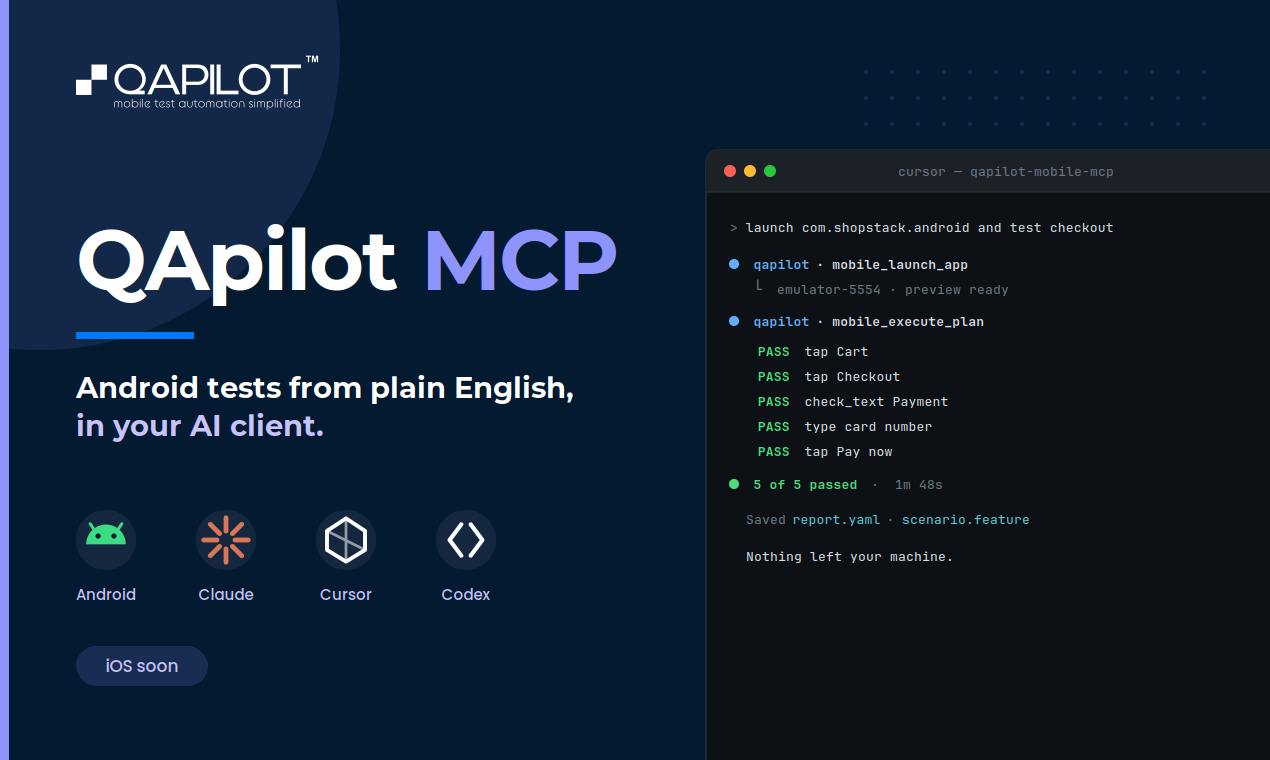
QApilot MCP lets AI assistants run Android tests from natural language and saves results as reusable Gherkin cases.
QApilot MCP for Android embeds mobile test automation into AI coding workflows via the Model Context Protocol. Developers describe test intent in plain English, and AI assistants like Claude, Cursor, or Codex break it into steps that QApilot executes on real devices or emulators. The engine handles element discovery, UI stability waits, retry logic, and learning caching to handle frequent UI changes. Each passing test is automatically saved as a Gherkin feature file, turning one-time exploratory checks into maintainable regression suites. Requires Node, Java, and Android SDK; best suited for mobile dev teams already using AI coding assistants.
Mobile test automation has long been plagued by two persistent problems: the high barrier to writing Appium scripts and the steep maintenance cost, plus the constant drift between test code and evolving app UIs — even minor changes can force a full rewrite. QApilot MCP for Android tackles this from a different angle by bringing testing capabilities directly into AI coding assistants. The tool earned 116 upvotes and 22 comments on Product Hunt, landing at #3 on the day's leaderboard, sitting at the intersection of Software Engineering and Artificial Intelligence.
Describe Your Test Flow in Plain English
QApilot MCP's core value proposition is letting developers describe a test flow in plain English without writing a single line of Appium code. It communicates with coding agents like Claude, Cursor, and Codex via MCP (Model Context Protocol): your AI assistant breaks down the test intent into a series of steps, while QApilot handles execution on a real Android device or emulator.
This division of labor fits neatly into the current trend toward agent-driven development. Developers no longer wrestle directly with element locators, wait logic, or assertion syntax — instead, they articulate what they need and let the agent and execution engine handle the rest collaboratively. For developers who aren't familiar with mobile testing frameworks but need to quickly validate functionality, this significantly lowers the barrier to entry.
Key Capabilities of the Execution Engine
Based on the product description, QApilot has done considerable engineering work at the execution layer — details that often determine whether automated testing is actually usable in practice:
- Element discovery and UI stability waiting: It automatically locates UI elements and waits for the screen to stabilize before interacting, avoiding false failures caused by animations or async loading.
- Mobile retry mechanism: When a UI element shifts position, the tool retries rather than immediately failing. This addresses one of the most common pain points in mobile testing.
- Learning cache: QApilot caches what it has learned, making repeated test runs progressively faster. This means efficiency improves the more often the same flow is executed.
Taken together, these features point toward a more resilient test execution experience — one that doesn't immediately break when the UI changes slightly, which is precisely where scripted tests are most fragile.
Every Test Run Becomes a Reusable Asset
Worth highlighting is how QApilot handles test output. Every test that passes successfully is saved as a Gherkin feature file and becomes a replayable test case.
Gherkin is the description language commonly used in behavior-driven development (BDD), structured around Given/When/Then scenarios. This design has two layers of value: first, test results are preserved in a standardized, human-readable format that's easy for teams to collaborate on and review; second, these feature files are reusable assets in their own right, turning a one-time ad hoc validation described in natural language into a regression test suite that can be maintained long-term.
In other words, QApilot bridges the gap between exploratory manual testing and structured automated testing — you describe it, it executes it, then automatically solidifies that execution into a formal test case.
Environment Requirements and Ideal Use Cases
QApilot MCP requires three foundational dependencies: Node, Java, and the Android SDK. This stack is standard equipment for teams with an Android development background, but may require additional setup for pure frontend or non-mobile developers.
In terms of positioning, this tool is best suited for teams already using AI coding assistants like Claude, Cursor, or Codex. If your development workflow already relies heavily on agents, pulling testing into the same conversational interface reduces the cost of context switching. For scenarios where you want to quickly validate UI flows without taking on the burden of maintaining Appium scripts, it offers a significantly lighter path forward.
Conclusion
QApilot MCP for Android represents an approach to embedding testing capabilities directly into the AI coding workflow: driven by natural language, decomposed by an agent, executed on real devices, and preserved in a standard format. It doesn't reinvent the testing framework — instead, it makes the mobile testing experience within the MCP ecosystem smoother and more resilient. For teams exploring agent-driven development workflows, tools like this are worth watching closely. They are steadily pulling more and more development activities into a single conversational interface.
Related articles

Salesforce Acquires Rune for $375M: AI Logistics Tech Bolsters Defense Business
Salesforce reportedly acquires defense tech startup Rune for $375M. Rune's AI logistics tech will strengthen Salesforce's Missionforce defense platform, continuing its M&A spree.

Why Fair Use Benefits Everyone in the AI Era
Starting from a Hacker News discussion, this article analyzes the legal logic and controversies of the fair use principle in AI training and content creation, and its dual impact on creators and the tech ecosystem.

Mistral Large 4 Open-Sources a Trillion Parameters, Microsoft Offers Voluntary Severance to 60,000 Employees
Mistral Large 4 open-sources a trillion-parameter multimodal model with a coding agent score of 48; SanDisk earnings show AI inference reshaping NAND demand; Google Gemini adds in-app file editing, OpenAI raises Codex quotas, and Microsoft offers voluntary severance to 60,000 employees.