Qwen3 Local Deployment Guide: Launch Your AI Assistant with One Command Using llama.cpp
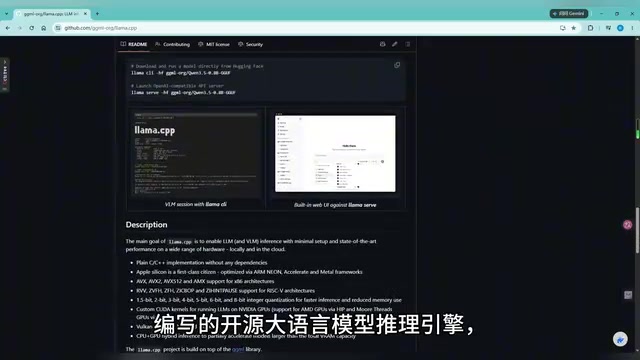
Deploy Qwen3 locally with llama.cpp in one command — free, private, and GPU-friendly.
This guide walks through deploying Alibaba's Qwen3 distilled model on a personal computer using llama.cpp. With a single command and a sub-2GB quantized model file, even a regular gaming GPU can run it smoothly. The tutorial covers the built-in Web UI, MCP protocol for internet access and tool extensions, and real-world tests including Chinese poetry composition, text RPG gameplay, and frontend code generation.
Why Run Large Language Models Locally
As open-source large language models continue to close the gap with closed-source flagships, more and more developers and enthusiasts are trying to run AI on their own computers.
Capability Comparison Between Open-Source and Closed-Source Flagship Models: In recent years, the pace of open-source LLM development has been remarkable. Open-source models from Meta's Llama series, Alibaba's Qwen series, and Mistral AI have approached or even surpassed the performance of closed-source flagships like OpenAI GPT-4 and Claude on multiple benchmarks. This convergence is most evident in general conversation, code generation, and multilingual understanding tasks. Open-source models offer the advantages of fully transparent architectures, freely modifiable weights, and no need for paid APIs. That said, closed-source flagship models still maintain a lead in complex reasoning, multi-step planning, and ultra-long context handling.
Local deployment offers three core advantages: completely free, no internet required, and data security. All your conversation logs and generated content stay on your machine and are never uploaded to any third-party server — a truly personal AI assistant.
This article is based on a hands-on tutorial from a Bilibili content creator, outlining the complete workflow for deploying the Qwen3 distilled model on a personal computer using llama.cpp. Even with just an ordinary gaming GPU, you can run it smoothly — that's the democratizing power of quantization technology.
Getting to Know the Qwen3 Model Family
The demonstration uses a distilled small model version from the Qwen3 series. It "distills" the knowledge of a massive full-parameter model into a more compact architecture, making it the lightest member of the family and enabling smooth operation on regular computers.
Distillation Technology and Small Model Training: Knowledge Distillation is a technique for transferring knowledge from a large model to a smaller one. The approach involves having the small model (Student) learn from the output distribution of the large model (Teacher) across vast amounts of data, rather than simply learning from original labels. The Qwen3 distilled version uses this method to compress the capabilities of the full Qwen3 (potentially tens of billions of parameters) into a model with only a few billion parameters. The distilled model is not only smaller and faster at inference but also retains 70–90% of the teacher model's capabilities. This makes it possible to deploy near-flagship AI performance on consumer-grade hardware.
After Q4_KM quantization, the model weight file is under 2GB.
Principles and Impact of Quantization: Quantization is one of the core techniques for deep learning model compression. Neural network weights are typically stored as 32-bit floating-point numbers (FP32), with each parameter taking up 4 bytes. Quantization maps these high-precision values to lower-bit representations: 8-bit quantization reduces precision to INT8 (1 byte), while 4-bit quantization compresses further to 0.5 bytes per parameter. For example, a 7-billion-parameter model requires roughly 28GB of VRAM in FP32 but only about 3.5GB after 4-bit quantization — an 8x compression ratio. Quantization introduces some precision loss, but through calibration datasets and improved quantization algorithms (such as the mixed-precision strategies used by GPTQ, AWQ, and GGUF formats), performance degradation can be kept under 5%, and in some tasks, it's virtually lossless.
Choosing the Right Quantization Level: Common quantization levels include Q2, Q4, Q5, Q6, and Q8 — higher numbers mean higher precision and larger files. Q4_K_M is the most popular balanced choice: 4-bit quantization compresses the model to roughly 1/8 of its original size, the K-quants method uses mixed precision across different layers (preserving higher precision for important layers), and the M (Medium) configuration strikes a balance between speed and quality. Q2 is suitable for extremely low VRAM scenarios but with noticeable quality degradation, Q5/Q6 is ideal when pursuing higher quality with sufficient VRAM, and Q8 is near-lossless but produces larger files. In practice, you need to weigh hardware resources, task requirements, and inference speed.
llama.cpp: A Lightweight and Efficient Local Inference Engine
llama.cpp is an open-source LLM inference engine written in pure C/C++, designed to run large language models and multimodal models efficiently with low resource consumption across a wide variety of hardware.
Its biggest advantage is that it requires no complex Python environment or additional third-party libraries — you can run models on your local machine directly using standalone binaries. It supports GGUF-format quantized models and comes with a built-in Web UI (compiled into the source code as character arrays), ready to use out of the box.
GGUF Format Explained: GGUF (GPT-Generated Unified Format) is a model file format specifically designed by the llama.cpp project, replacing the earlier GGML format. Its core advantages include: single-file packaging (model architecture, weights, vocabulary, and configuration all bundled together), efficient memory-mapped loading, support for multiple quantization schemes (mixed precision from 2-bit to 8-bit), and strong cross-platform compatibility. GGUF files are typically named by their quantization level — for example, Q4_K_M indicates 4-bit quantization using the K-quants method with Medium precision configuration. This format makes model distribution and deployment extremely simple, freeing users from dealing with complex multi-file dependencies.
Launch Qwen3 with a Single Command
The startup command is designed to be extremely concise — the only essential parameter is -m to specify the model path. Here are the specific steps:
- Open the project folder, type
cmdin the address bar and press Enter to open a command prompt; - Paste the prepared startup command and press Enter;
- Wait for the model to load, and copy the local address once you see the success message;
- Paste the address into your browser to access the Web interface.
The entire process is very beginner-friendly — no tedious environment configuration required. You can complete the local deployment of Qwen3 in just a few minutes.
Web UI Interface Features Explained
The Web UI that launches provides full interactive capabilities. In the "General" settings, you can switch themes (e.g., light mode) and set an API key — so other applications calling the model must authenticate via the key, enhancing security.
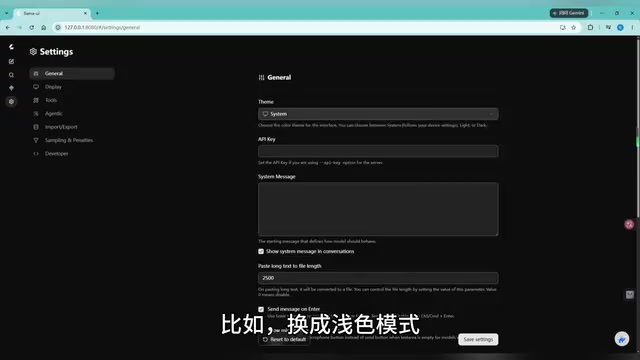
MCP Tool Extensions: Giving Your Local Model Internet Access
The "Tools" and "MCP" tabs in the interface are a major highlight. Through MCP (Model Context Protocol) services, you can extend your local model with external capabilities:
The Design Philosophy of MCP: MCP (Model Context Protocol) is an open protocol introduced by Anthropic in late 2024, aimed at standardizing how AI models connect with external tools and data sources. In traditional approaches, each model requires custom adapter code for different tools. MCP defines a unified interface specification that allows models to seamlessly call any protocol-compliant tool — search engines, databases, API services, and more. The protocol uses a client-server architecture where the model acts as a client sending structured requests and tools act as servers returning standardized responses. This design enables local models to gain "internet access," "database querying," and other extended capabilities just like cloud-based AI, greatly expanding the range of applications.
Specific tools available include:
- Hugging Face Connector: Access model community resources;
- GitHub Query Tool: Search code repositories;
- Context7: Look up programming documentation;
- Exa: Web search for news and information.
The creator specifically recommends installing Exa, which allows the local model to break through knowledge cutoff limitations. Once installed, simply send a URL to the model and it can fetch and summarize the article content. In testing, the model accurately produced a Chinese summary of a news article, demonstrating reliable web retrieval and content summarization capabilities.
Qwen3 Distilled Model in Action: Poetry, Games, and Coding
Chinese Literary Creation Ability Exceeds Expectations
When asked to play the role of a poetry expert and compose a seven-character regulated verse about the "Yangtze River," the model produced majestic lines like "Thunder crashes through the Three Gorges, startling the white sun; the Yangtze surges mightily, carrying great leviathans." Further tests with five-character quatrains and seven-character quatrains showed the model not only choosing words with formal precision but also self-analyzing its creative intent — for example, noting that a summer poem "appears to describe scorching heat on the surface, but actually dissolves the oppression of the heatwave with cool imagery, conveying Zen-like tranquility," and commenting on its use of color contrast and the interplay between reality and imagination.
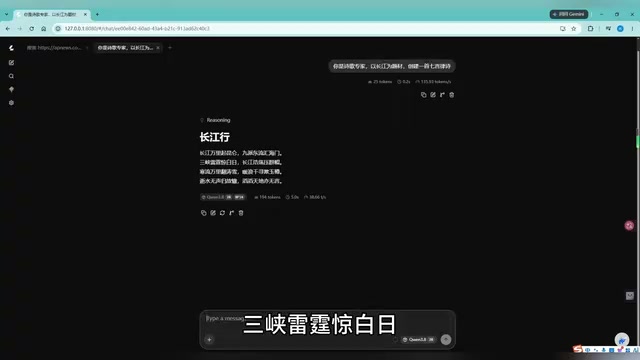
This ability to "both create and self-interpret" demonstrates that the distilled small model still retains impressive language understanding and generation capabilities in Chinese contexts.
Text RPG Interactive Experience
Even more interesting is having it play the role of a "storyteller" in a text adventure game. After receiving the prompt, the model immediately gets into character, setting the atmosphere with descriptions like "candlelight flickering, hoofbeats thundering like an approaching storm," and generating branching storylines based on the player's choices (such as "pour wine as an offering to the heavens"). The interactive experience closely resembles a real text RPG.
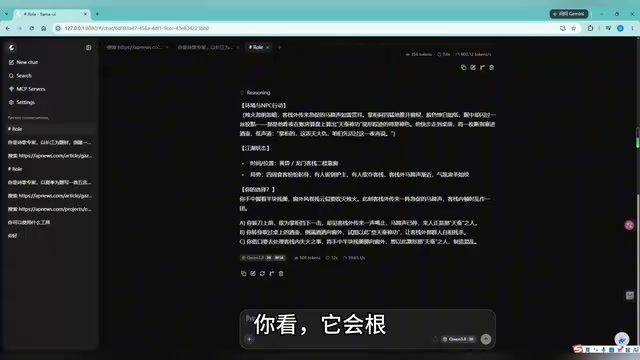
It's worth noting that all conversation records are stored locally in the browser. Press F12 to open Developer Tools, and navigate to "Application → Storage → IndexedDB → Llama UI" to find the complete chat history.
IndexedDB and Local Data Persistence: IndexedDB is a client-side database API provided by browsers that supports storing large amounts of structured data. Unlike localStorage (which can only store strings with a 5–10MB capacity limit), IndexedDB can store objects, Blobs, files, and other complex types, with capacity typically reaching hundreds of megabytes or more. The llama.cpp Web UI stores chat logs, model configurations, session contexts, and other data in IndexedDB, meaning all interaction history remains entirely in the user's local browser and is never uploaded to any server. Even after closing the browser, history persists on the next visit. This design ensures both privacy and a great user experience.
Frontend Code Generation Capabilities
Finally, a coding test: the model was asked to generate a browser-based Snake game. It quickly produced complete code, and after saving it as an HTML file and double-clicking to open it, a playable Snake game was up and running. This validates the Qwen3 distilled model's practical utility for common frontend code generation tasks.
Conclusion: How Low Is the Bar for Local LLM Deployment?
This workflow demonstrates that local LLM deployment has become remarkably accessible:
- llama.cpp eliminates complex environment setup — launch the inference service with a single command;
- Quantization technology makes it possible to run 2GB-class model files on ordinary GPUs;
- The MCP ecosystem gives local models internet access and external tool integration, breaking through isolation;
- From poetry to games to coding, the Qwen3 distilled small model delivers comprehensive performance sufficient for everyday needs.
For users who care about privacy, want to reduce costs, or simply enjoy tinkering with AI, local deployment has evolved from "geek-exclusive" to "accessible to everyone." Distilled small models still lag behind flagship versions in complex reasoning and long-context tasks, but as a free, offline, and controllable personal assistant, the value proposition is already impressive.
As quantization algorithms and inference engines continue to improve, the barrier to local AI will drop even further — a truly personal AI assistant may be closer than you think.
Related articles

Why Does the Tesla Roadster Need to Fly? A Deep Dive into Musk's Wild Demo
Tesla's Roadster launch showed wall-climbing, upside-down driving, and flying stunts—but The Vergecast notes the demo car may lack a battery, the Rocket version is invite-only and not street-legal, and the website terms don't guarantee delivery. After nine years of delays, why does this car still need to exist?

AI Is Not a Replacement: Human-AI Collaboration Through the Lens of Factory Root Cause Analysis
Starting from factory root cause analysis, this article explains how AI accelerates evidence chain construction rather than replacing human experts, exploring the pragmatic implementation logic and business value of 'AI supporting people rather than replacing them.'

AI Agent Decision Auditing: Building an Evidence Chain in Regulated Workflows
Starting from a Reddit discussion, this article analyzes three core issues in AI agent decision auditing within regulated workflows: what fields audit records should contain, how to handle feedback latency for erroneous decisions, and how to continuously calibrate LLM judge consistency with human judgment.