RAGFlow Deployment Tutorial: Complete Hands-On Guide from Docker Installation to Agent Workflows

Complete tutorial on deploying RAGFlow, building knowledge bases, and creating Agent workflows
RAGFlow is an open-source RAG engine with 50K+ GitHub Stars, deployable via Docker with integrated Redis, MySQL, and Elasticsearch. It supports LLMs like DeepSeek, uses Deep Document Understanding for high-precision parsing and intelligent chunking, and provides traceable knowledge-based Q&A. Its standout feature is a visual Agent workflow orchestration system supporting intent classification, multi-knowledge-base retrieval, and third-party API calls — embeddable into business websites for complex enterprise AI scenarios.
RAGFlow is an open-source RAG engine project by InfiniFlow that has earned over 50,000 Stars on GitHub, once reaching the #1 spot on GitHub Trending. It's more than just a knowledge base tool — it also integrates a rich set of AI Agent templates, enabling everyday users to quickly build intelligent assistants and complex business workflows.
This article will walk you through the entire process — from Docker installation and deployment, to knowledge base creation, to Agent applications — giving you a comprehensive mastery of RAGFlow's core features.
Environment Setup & Docker Deployment of RAGFlow
Setting Up the Docker Environment
RAGFlow is deployed via Docker containers, so the first step is ensuring Docker is installed locally. Head to the Docker website to download Docker Desktop, and follow the guided installation process. Once installed, open a command line and type docker — if the command is recognized, your environment is ready.
Docker is an OS-level virtualization technology that packages applications along with all their dependencies into standardized "containers," ensuring consistent behavior across any environment. Docker Compose is Docker's official multi-container orchestration tool that lets you define and manage multiple interrelated container services through a single YAML configuration file. The advantage of RAGFlow using this deployment approach is that users don't need to manually install and configure Redis, MySQL, Elasticsearch, and other middleware — a single command spins up the entire tech stack, dramatically lowering the deployment barrier.
Downloading and Starting RAGFlow
Next, visit the RAGFlow GitHub repository, click the Code button, and download the ZIP archive. After extracting it, navigate to the docker folder, open a command line in that directory, and run the Docker Compose startup command.
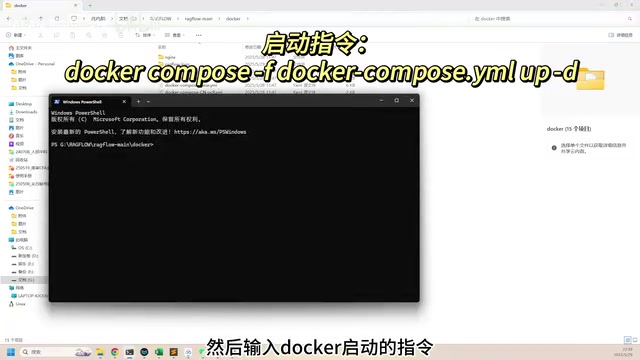
The first run requires pulling images, which are quite large, so the download may take a while. If you've prepared offline image packages in advance, you can load them locally using the docker load command, then quickly start everything with:
docker compose up -d
Once started successfully, RAGFlow runs five containers, each serving a specific role to form a complete RAG system architecture:
- Redis: A high-performance in-memory key-value database used in RAGFlow primarily for session caching and hot data acceleration, significantly reducing response latency for repeated queries
- MinIO: An open-source object storage system compatible with the Amazon S3 protocol, dedicated to storing user-uploaded raw document files like PDFs and Word documents, supporting large-scale unstructured data management
- MySQL: A relational database responsible for storing structured business data such as user accounts, knowledge base metadata, and Agent configurations
- Elasticsearch: A distributed search engine built on Lucene that serves the dual role of full-text search and vector search in RAGFlow, forming the core infrastructure of the RAG retrieval pipeline
- RAGFlow Server: The core server that coordinates all the above components to complete the full workflow of document parsing, knowledge retrieval, and answer generation
Open http://127.0.0.1 in your browser to access the RAGFlow interface. First-time users need to register an account — all data is stored in the local database, and the registration process is very straightforward.
Model Service Configuration: Connecting DeepSeek and Other LLMs
After logging in, the first thing to do is configure AI model services. Click your avatar to enter the settings page. RAGFlow supports two connection methods: locally deployed models and online service providers.
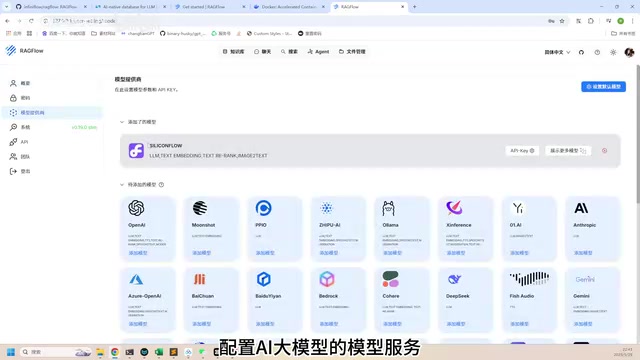
Using SiliconFlow as an example, select the provider and enter your API Key to complete the connection. SiliconFlow is a leading AI model inference service platform in China that provides a unified API interface to access various open-source and commercial LLMs, including DeepSeekAd, Qwen, ChatGLM, and other mainstream models. Its business model resembles "Model as a Service" (MaaS) — developers don't need to deploy their own GPU servers; they simply call APIs using an API Key to access inference capabilities from various models, billed by token usage. For RAGFlow users, a single API Key grants access to multiple models for different purposes, with low domestic access latency and good stability.
Next, you need to set several key default models:
| Model Purpose | Recommended Choice | Technical Role |
|---|---|---|
| Chat Model | DeepSeek V3 | Large Language Model (LLM) responsible for understanding user intent and generating natural language answers based on retrieved context |
| Embedding Model | Youdao Embedding | Converts text into high-dimensional vectors (typically 768 or 1024 dimensions), bringing semantically similar texts closer together in vector space |
| Image-to-Text | DeepSeek-VL2 | Vision-Language Model (VLM) that recognizes charts, scanned content, and other non-text elements in documents and converts them to searchable text |
The embedding model is a crucial component in any RAG system — when a user asks a question, the system also converts the question into a vector, then searches the vector database for the most relevant document chunks using algorithms like cosine similarity or Euclidean distance. The image-to-text model is particularly critical for processing PDFs with numerous charts, ensuring that information within graphics is also included in the knowledge base's search scope.
Additionally, it's recommended to enable RAGFlow's API feature in settings and generate an API Key. This key will be needed later when embedding Agents into websites. If you're a developer, you can also use this API Key to directly call RAGFlow's open interfaces for more flexible system integration.
Knowledge Base Creation & Document Parsing in Practice
Creating a Knowledge Base
With model configuration complete, you can start using RAGFlow's core feature — the knowledge base. Click the "Create" button in the upper right, enter a knowledge base name and save it, then upload local documents to the knowledge base. RAGFlow supports multiple document formats, including common types like PDF, Word, and Excel.
Document Parsing Results in Action
Using a 90+ page PDF investor handbook as an example, after uploading, click the "Parse" button and RAGFlow will automatically vectorize the document and store it in the knowledge base.
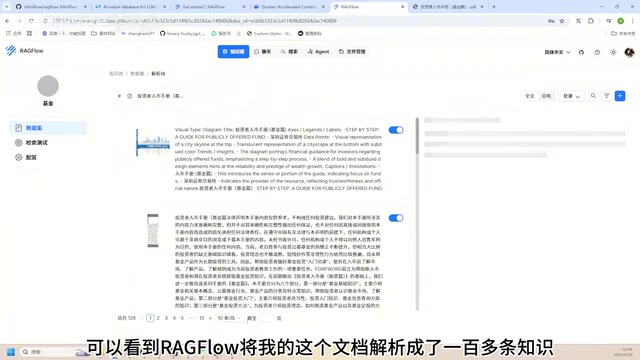
After parsing, you can see that RAGFlow has split the entire document into over 100 structured knowledge entries. Selecting any entry also shows the corresponding original document segment. The accuracy and granularity of document parsing is one of RAGFlow's core highlights — compared to many similar tools, it excels particularly in table recognition and layout understanding.
Deep Dive into RAG Technology
RAG (Retrieval-Augmented Generation) was proposed by Meta AI's research team in 2020 to address two core deficiencies of large language models: knowledge cutoff date limitations and the "hallucination" problem (where models confidently generate plausible-sounding but factually incorrect content).
The RAG workflow consists of three stages:
- Indexing Stage: Documents are split into appropriately sized semantic segments through chunking strategies, then converted to vectors via embedding models and stored in a vector database. The quality of the chunking strategy directly impacts retrieval effectiveness — chunks that are too large introduce noise, while chunks that are too small may lose contextual semantics.
- Retrieval Stage: When a user asks a question, the most relevant Top-K document chunks are found through vector similarity search (which can also be combined with keyword search for hybrid retrieval).
- Generation Stage: The retrieved chunks are concatenated as context into the prompt and sent to the LLM to generate the final answer.
RAGFlow has extensively optimized its chunking strategy using Deep Document Understanding technology, which can identify document title hierarchies, table structures, headers, footers, and other layout information to achieve more precise semantic segmentation. This is the key reason its document parsing accuracy leads competing tools — it doesn't simply split by fixed character counts or paragraphs, but truly "understands" the document's structure.
Chat Assistant: Quickly Creating an Intelligent Q&A Bot
With a knowledge base in place, you can create a chat assistant for intelligent Q&A. Click "New Assistant," set a name, and associate one or more knowledge bases. The system will automatically use the previously configured DeepSeek V3 model for conversations.
For example, create a sales assistant named "Xiaobi," associate it with a fund knowledge base, then ask it: "I'm a risk-averse customer. What fund should I buy?"
The assistant's response will thoroughly reference content from the knowledge base. Hovering over the information icon next to the answer reveals exactly which knowledge base entries it cited. This traceable answer mechanism gives users more confidence in AI outputs and makes it easy to verify answer accuracy. This design is particularly important in enterprise applications — in finance, healthcare, law, and other fields with extremely high accuracy requirements, every AI-generated recommendation needs to be verifiable, and the traceability mechanism is key to building user trust.
Agent Workflows: Visually Orchestrating Complex Business Scenarios
If chat assistants are suited for simple Q&A scenarios, then RAGFlow's Agent feature is the power tool for handling complex business workflows — and the most impressive part of the entire product.
AI Agents are an important development direction for current LLM applications, going beyond simple "question and answer" mode to give AI systems the ability to autonomously plan, call tools, and perform multi-step reasoning. Unlike traditional chatbots, Agents can dynamically decide their next action based on user input — whether to query a knowledge base, call an external API, or request additional information from the user. This autonomous decision-making capability enables them to handle business scenarios far more complex than simple Q&A.
Visual Canvas & Component Library
Click "Create Agent" and RAGFlow offers multiple preset templates covering typical scenarios like customer service and data analysis. Taking the customer service template as an example, the system provides a fully-featured visual canvas with a draggable component library on the left, containing workflow components and numerous third-party components.
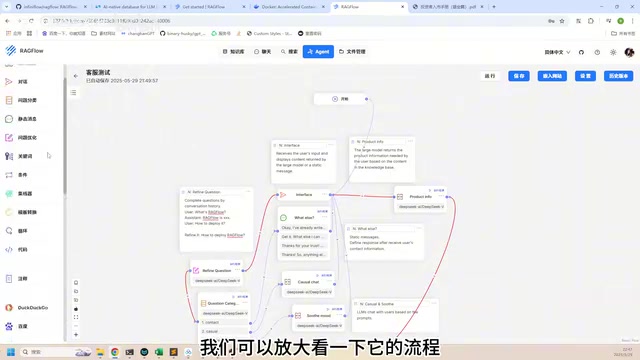
RAGFlow's Agent workflow is essentially a Directed Acyclic Graph (DAG) orchestration system, where each node represents a processing step and the connections between nodes define data flow and conditional branching logic. This visual orchestration approach draws from low-code/no-code platform design philosophies, enabling non-technical users to build complex business workflows through drag-and-drop components.
Customer Service Agent Workflow Breakdown
A typical customer service Agent workflow looks like this:
- Start Component: Receives the user's question
- Question Optimization: Semantically optimizes the user's original question — for example, converting colloquial expressions into more precise query statements and supplementing contextual information to improve subsequent retrieval accuracy
- Intent Classification: Determines the question type — contact information, casual conversation, complaint, or product-related. This step typically leverages the LLM's few-shot capability, providing a small number of examples in the prompt to guide the model in categorizing user input into predefined classes, achieving precise workflow routing
- Knowledge Base Retrieval: If the question is product-related, it enters the knowledge base component to retrieve answers
- Answer Generation: Generates the final response based on retrieval results
As you can see, the knowledge base is just one component in the entire customer service workflow. For more complex scenarios, you can introduce multiple knowledge bases or even connect third-party API components to achieve true end-to-end business automation. The advantage of this architecture lies in its high modularity — each node can be independently debugged and replaced, and enterprises can flexibly combine different processing logic according to their actual business needs.
Embedding Agents into Websites
After defining the Agent workflow, you can click Run to test it. But its real value lies in embedding it into actual business websites. Combined with the previously generated API Key, RAGFlow automatically generates an HTML embed code snippet. Copy this code into an HTML file and open it in a browser to see a complete chat interface.
From the user's perspective, it looks no different from a regular chat window, but behind the scenes it may be running an extremely complex Agent workflow — question classification, multi-knowledge-base retrieval, conditional branching logic, all executing automatically. This is the true power of Agents.
Summary: RAGFlow's Core Advantages & Use Cases
The reason RAGFlow has garnered over 50,000 Stars on GitHub comes down to solving several key pain points in enterprise AI applications:
- High Document Parsing Accuracy: Uses Deep Document Understanding technology with leading capabilities for processing complex PDFs, tables, and other formats, identifying title hierarchies and table structures for intelligent chunking
- Traceable Knowledge: Every answer can be traced back to the original document, enhancing credibility and meeting audit requirements in highly regulated industries like finance, healthcare, and law
- Agent Workflows: A DAG-based visual workflow system supporting intent classification, conditional branching, multi-knowledge-base retrieval, and third-party API calls, dramatically lowering the development barrier for AI applications
- Flexible & Secure Deployment: One-click Docker deployment with all data stored locally, meeting data security needs — particularly suitable for enterprises and government agencies with strict data sovereignty requirements
For individual users, RAGFlow helps you quickly build personal knowledge bases and intelligent assistants. For enterprise users, its Agent capabilities and API interfaces provide the complete infrastructure for building production-grade AI applications. If you're looking for an open-source RAG solution, RAGFlow is absolutely worth exploring in depth.
Related articles
 Tutorials
ChatGPT Plus Subscription Guide: Are GPT-5.5, image-2, and Codex Worth the Upgrade?
A detailed look at ChatGPT Plus features — GPT-5.5, image-2, and Codex — with a Plus vs Pro comparison and a complete step-by-step subscription guide for users outside the US.
 Tutorials
Harness AI Engineering in Practice: Using Claude Code to Master Enterprise-Level E-Commerce Development
Deep dive into Harness AI Engineering: master enterprise e-commerce development with Claude Code using the Rules, Skills, Wiki, and Changes framework.
 Tutorials
Cursor + Codex Dual-IDE Collaboration: A Practical Methodology for Open-Source Project Customization
A complete methodology for open-source project customization based on real-world experience, detailing the Cursor+Codex dual-IDE workflow, seven-stage process, MVP validation, and AI source code reading techniques.