Reassign: A 24-Hour Circular AI Schedule Planner Built for Makers

Reassign reimagines daily planning with a 24-hour circular dial, AI scheduling, and multi-tool two-way sync.
Reassign is an AI-native scheduling tool delivered as a Chrome extension, replacing the traditional linear calendar with a 24-hour circular dial that makes your day's shape instantly visible and reshapable by drag. Its built-in AI command palette lets users input tasks in natural language and have their schedule rebuilt in real time. On the integration side, it offers two-way sync with Google Calendar, Outlook, Todoist, and Linear, plus a focus mode and a sleep-data-based energy curve. Currently in early stages on Product Hunt (68 upvotes), key questions around AI accuracy, sync stability, and privacy handling still await real-world validation.
Reimagine Your Day with a Single Dial
Most calendar apps look the same: a top-to-bottom timeline, rows of boxes, mechanically reminding you how long until your next meeting. Reassign takes a different approach — it compresses your entire day into a 24-hour circular dial. Midnight sits at the top, noon at the bottom, and time flows around the face like a clock.
The brilliance of this design is that it makes the shape of your day immediately visible. You can drag to carve out time blocks, and when plans fall apart, reshaping them is just a flick of the finger. For makers whose work rhythms are fragmented and constantly shifting, this kind of visualization feels far more intuitive than a traditional linear calendar.
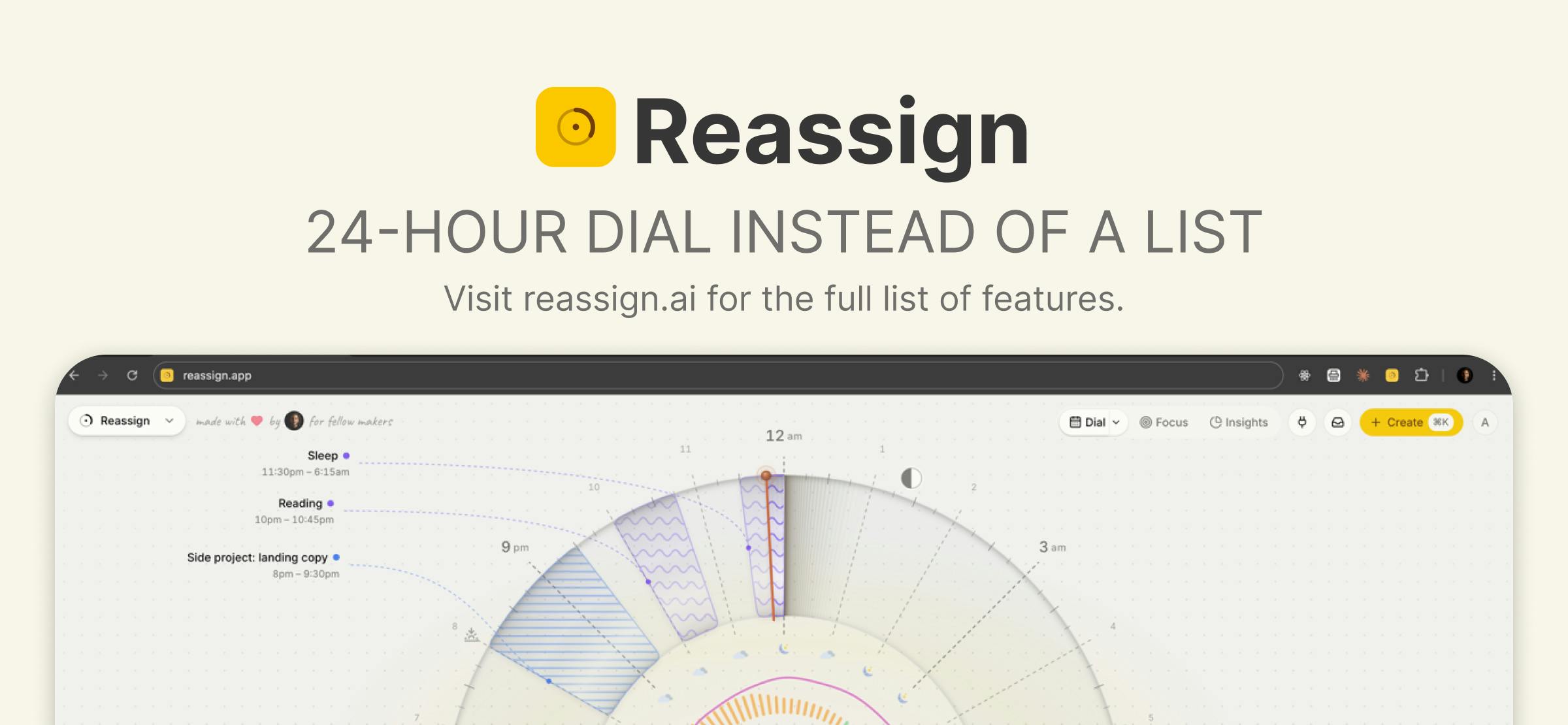
The product currently has 68 upvotes and 6 comments on Product Hunt, ranking 19th. Developed by Leo Spanovic, it ships as a Chrome extension and falls under the Productivity, Calendar, and AI categories.
AI That Actually Rearranges Your Afternoon
Reassign's most compelling pitch is that its AI integration is more than cosmetic. It includes a built-in command palette where you can dump a chaotic list of to-dos or just brain-dump freely — and the AI will rebuild your afternoon schedule in real time.
This means AI isn't treated as an isolated chat window. Instead, natural language input directly acts on the schedule itself. You describe what you need; it figures out how to fit tasks into the right time blocks. This "intent in, schedule out" interaction is one of the most genuinely valuable ways AI is landing in productivity tools right now. Compared to manually dragging every task around, this approach has clear potential to reduce cognitive load for creative workers.
Two-Way Sync: One Dial, Every Source
The life or death of a productivity tool often isn't about features — it's about whether it fits into workflows people already use. Reassign takes this seriously, claiming it can mirror everything.
Google Calendar, Outlook, Todoist, and Linear all support two-way sync. Changes you make in Reassign write back to the original tool, and vice versa. For developers and product managers juggling a project management tool (Linear), a task list (Todoist), and two calendars (Google and Outlook) simultaneously, this ability to aggregate all sources into a single dial may be Reassign's real competitive moat — the thing that genuinely sets it apart from the sea of calendar apps.
Linear is a project management tool designed specifically for software development teams, known for being lightweight and fast, with significant penetration in Silicon Valley developer circles. Todoist is a more general-purpose task list app with millions of users across professions. Bringing together two fundamentally different tools — one focused on team collaboration and issue tracking, the other on personal task lists — alongside Google Calendar and Outlook events in a single interface relies technically on each platform's open APIs and webhook mechanisms. The hard part of "two-way sync" isn't reading data; it's conflict resolution. When both ends modify the same item simultaneously, the system needs clear priority logic — otherwise data corruption is almost inevitable. This is the most common failure point for aggregation tools of this kind, and worth watching closely.
Focus Mode and Energy Curves
Beyond scheduling and sync, Reassign adds two features that speak to how people actually work: a focus mode and a sleep-data-based energy curve.
The energy curve infers your daily energy highs and lows from your sleep data, theoretically helping you slot high-intensity tasks into your peak periods and leave routine work for your low-energy windows. The concept of scheduling around your biological rhythms isn't new, but integrating it with AI scheduling and multi-source sync inside a single circular interface makes the tagline "One dial. Every source." feel a lot less like marketing fluff.
The idea of aligning work to biological rhythms comes from chronobiology. Research into ultradian rhythms has found that human attention cycles through roughly 90-minute peaks and troughs. Better known is the circadian distinction between "larks" (morning types) and "owls" (night types). Reassign's "sleep-data-based energy curve" likely works by pulling last night's sleep duration and quality from Apple Health, Oura, or manual input, then applying these rhythm models to estimate your energy distribution for the day. The real-world value of this feature depends heavily on the quality of that input data — if the sleep data is coarse, the resulting energy curve is just a noisy estimate, not a truly personalized scheduling guide.
What to Watch and What to Question
Reassign has a clear product identity: an AI-native scheduling tool for busy makers, centered on visualization, natural language scheduling, and deep integration. It isn't trying to be another bloated all-in-one calendar — it's built around the single narrative of "reshaping your day."
That said, as a Chrome extension, its use cases may be constrained to browser environments. The accuracy of AI real-time rescheduling, how sleep data is collected and handled from a privacy standpoint, and the stability of two-way sync across a real multi-tool setup all require more user feedback to validate. With 68 upvotes at this early stage, it reads more like a promising product worth watching than a mature, battle-tested solution.
For creative workers who've long struggled with linear calendars and constantly context-switching between task tools, the combination Reassign offers — circular visualization + AI scheduling + universal sync — at minimum represents a fresh and pragmatic direction worth exploring.
Related articles

Why Does the Tesla Roadster Need to Fly? A Deep Dive into Musk's Wild Demo
Tesla's Roadster launch showed wall-climbing, upside-down driving, and flying stunts—but The Vergecast notes the demo car may lack a battery, the Rocket version is invite-only and not street-legal, and the website terms don't guarantee delivery. After nine years of delays, why does this car still need to exist?

AI Is Not a Replacement: Human-AI Collaboration Through the Lens of Factory Root Cause Analysis
Starting from factory root cause analysis, this article explains how AI accelerates evidence chain construction rather than replacing human experts, exploring the pragmatic implementation logic and business value of 'AI supporting people rather than replacing them.'

AI Agent Decision Auditing: Building an Evidence Chain in Regulated Workflows
Starting from a Reddit discussion, this article analyzes three core issues in AI agent decision auditing within regulated workflows: what fields audit records should contain, how to handle feedback latency for erroneous decisions, and how to continuously calibrate LLM judge consistency with human judgment.