Remotion Tutorial: Skill Installation and AI Animation in Practice, With Less Token Burn

The key to AI animation isn't copying prompts, but stating requirements clearly, providing references, and setting up the engineering environment.
Centered on Remotion code-based animation, the article argues that copying prompts alone won't produce good animation—the real method lies in the exploration process. The author contrasts visual generation models with Remotion: the former generates images, while the latter defines motion trajectories in code and renders frame by frame, making Remotion more suitable for scenes needing precise rhythm and position synchronization like bouncing notes. Beyond programming, models differ in aesthetics and directing ability, and an Agent framework's Harness Engineering also determines success. In practice, it recommends installing the Remotion Skill, building a long-term "Motion Library" to reuse dependencies and components, and combining image generation models to boost expressiveness. Expressing requirements matters more than prompts, and providing reference animations is most effective; difficulty depends on requirement precision rather than duration, and details can be adjusted visually via Remotion Studio with Git.
Why Copying Prompts Alone Won't Produce Good Animation
Many people's first reaction when doing AI animation is: what's the prompt, which Skill to use, how many Tokens will it cost. This Bilibili creator's answer is simple—he rarely writes his own prompts, instead chatting about requirements with AI and letting it write them for him. There's no standard answer for Token consumption either: for the same 50-plus animations, some people burn through more than a week of Codex quota, while others exhaust a week's quota on a single bouncing-note animation.
This shows that the copy-the-prompt path doesn't work, and the real method is hidden in the exploration process. The video starts with the essential difference between visual models and Remotion: visual models use neural networks to generate images, while Remotion uses code to define element motion trajectories and timelines, then renders frame by frame into video. One is generative AI, the other is procedural animation—completely different paths.
Take a flower-growing animation for comparison: the Kling-generated version has changes in form, branch growth, and swaying light and shadow; the Remotion version looks stiff, because it uses code parameters to control image motion trajectories, scaling, and opacity to simulate growth. But for animations like bouncing notes, Remotion is actually more suitable—two glowing orbs correspond to the piano's left and right hand voices and must land precisely on the corresponding notes, requiring high synchronization of musical rhythm, note positions, and animation trajectories, which video generation models basically can't do.
Cost can't be compared simply either: video models charge by duration and number of uses, while Remotion animation is close to vibe coding, mainly consuming Tokens or quota. Remotion does burn Tokens with repeated revisions, but code is reusable—what's left after finishing an animation isn't just a video, but animation components, motion trajectories, visual effects, camera design, and adjustable parameters. When making similar animations, you just swap assets and adjust parameters, which is more efficient and usually consumes fewer Tokens.
Remotion is an open-source React-based framework that uses JavaScript/TypeScript code to describe the timeline, motion trajectories, styles, and transitions of each element in a video, ultimately rendering frame by frame into an MP4. Its core idea is "video as component": each frame is a React component, with the frame number as an input parameter driving animation state, so the content of any frame can be precisely controlled. Unlike generative video models like Runway and Kling, Remotion doesn't do pixel-level generation—it "programs" the image like writing a frontend page. It's naturally suited to animations that need precise alignment with musical beats, data, or UI, and is also easy to version-manage and reuse parametrically.
The Invisible Pitfalls of Model Tiers and Agent Frameworks
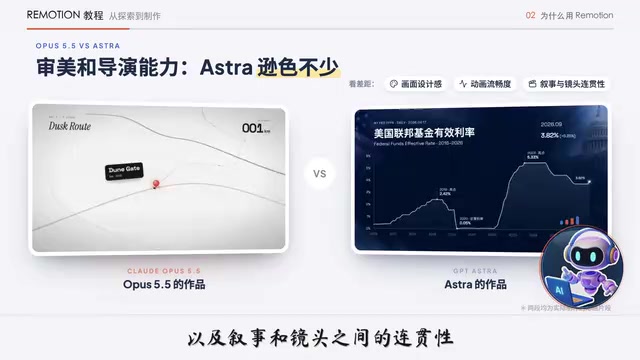
Mainstream large models have already formed clear tiers for code-based animation. The creator uses Opus 5.5, Astra, and DeepSeekAd V4 as examples: the gap isn't just in programming skill, but in aesthetics, motion design, and the ability to direct and plan the entire animation. Opus 5.5 often only needs a reference video or a style to grasp the feel and produce good results; Astra likewise doesn't need painstaking direction, but its aesthetics and directing ability are considerably weaker, with obvious gaps in visual design sense, animation smoothness, and narrative shot coherence.
DeepSeek has a different positioning. For the same bouncing-note animation, giving it only a reference video and prompt to start from scratch produces results that look "like it got struck by lightning"; but if you hand DeepSeek a motion template Astra made well (motion trajectories, visual design, camera parameters, Composition), the results are very solid. This reveals a key insight: beyond model capability, the engineering design of the Agent framework (Harness Engineering) also determines success or failure.
The creator habitually uses Codex to make animation templates, then uses WorkBody to call DeepSeek to replicate similar effects to save Codex quota. But many viewers report that WorkBody runs for one to two hours on Remotion, consuming hundreds of credits and still failing; yet running the same project with the same prompt in Cloud Code with DeepSeek goes smoothly. The reason is that WorkBody's runtime environment is unfriendly to Remotion—the Agent keeps falling into environment pitfalls, changing paths, writing workarounds, and limiting animation complexity, with friction becoming more obvious. The creator's advice is to add a prompt to WorkBody to help the Agent avoid a few pitfalls.
Measured data: DeepSeek consumes only a few credits for a few seconds of simple animation, and 30 credits for a roughly one-minute bouncing-note animation, for reference only.
Harness Engineering refers to the "scaffolding" engineering built around large models—including tool-calling interfaces, file read/write permissions, runtime environment, error retry strategies, context compression, and task decomposition. The same model can perform vastly differently under different Harnesses: if environment dependencies can't be installed, paths can't be found, or commands time out, the Agent will repeatedly write workarounds, burning quota and reducing output quality. So when evaluating an Agent product, don't just look at which model it's backed by, but also whether its runtime sandbox fits the target tech stack (e.g., Remotion depends on Node and Chromium rendering), and whether it provides stable error feedback mechanisms.
Basic Setup: Skill Installation and Long-Term Project Structure
Before formal production, complete the basic capability setup. First, install the official Remotion Skill—just tell the Agent. This is actually a collection of Remotion Skills, the most commonly used being Remotion Best Practice. Remotion Studio is worth mentioning: it lets the Agent directly open the console to preview animations in real time, and you can adjust element positions, angles, colors, and other parameters yourself, without repeatedly communicating every small detail to the Agent—very practical. If you use Codex, you can also install it directly in the plugin. Then have the Agent check your computer's basic runtime environment.
A more important suggestion is to build a long-term maintained Remotion project. The creator created a folder called "Motion Library" and had the Agent initialize the project there, so all future animations are completed in this library: dependencies are managed uniformly at the root directory, and each animation creates an independent subfolder under the Effects folder. When making a new animation, you can directly reuse the existing environment and dependencies. Because Remotion is essentially a React-based frontend project, if you create a new independent project for every animation, the Agent has to repeatedly initialize the project, install dependencies, and configure the environment—burning quota before the animation even starts, and each animation installing its own set of dependencies takes up a lot of disk space.
Over time, this Motion Library becomes your own animation asset library, and you can even build a motion workbench on top of it—but it's better to tinker with that after the workflow is stable and mature, otherwise building and changing it constantly just makes trouble for yourself.
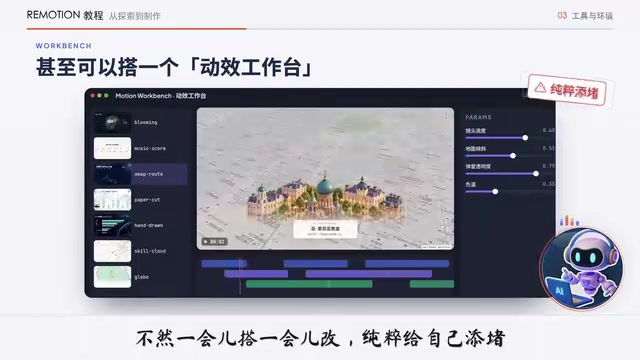
Image Generation: Taking Code Animation's Expressiveness Up a Level
Opus, Astra, and DeepSeek are all large language models and don't have image generation capabilities themselves, so where do beautiful animations come from? Many visual elements are drawn through code: have Opus draw a moon, write a few lines of CSS plus mountains, stars, and a gradient night sky, and you get a night scene. But drawing graphics with code alone has limited expressiveness; combining image generation models to create exquisite image assets can take animation expressiveness up a level.
Many Agents now have built-in image generation tools: Codex has built-in ImageGen, which can call OpenAI's Image 2.5 model to directly generate image assets; WorkBody also has built-in ImageGen, which can call Hunyuan's image generation model. Cloud itself has no image generation model, and Cloud Code has no built-in image generation tool either, so the creator configured a Codex Image Skill for it, directly calling Codex to generate images whenever image assets are needed.
Expressing Requirements Matters More Than Prompts
Once dependencies are configured, you can start making animations, and many people's first reaction is still "what's the prompt." Better to shift your thinking: First, stating requirements clearly matters more than researching prompts. Remotion is just a frontend project, and AI understands technical language and implementation approaches better than you do—leave prompt writing to AI, and what you need to do is make it understand the requirements. Second, providing reference animations is more effective than text descriptions.
Take the bouncing-note animation as an example: the creator came across a similar video, found it interesting but didn't know how to implement it, so he saved a video sample and sent it to GPT, asking whether these animations could be done with Remotion or only with Blender. GPT suggested Remotion, which can achieve 3D effects without Blender; then the creator asked what assets were needed, and GPT listed audio, sheet music, MIDI/XML, and other files with explanations of their roles, and even helped choose Bach's C major prelude and find a download link.
Next, create a folder under the Motion Library's Effects directory, download the assets, and the prompt sent to Codex was of course written by GPT. The model chosen was Astra with medium thinking intensity (the creator mostly uses medium intensity, switching to high only when hopping mad), and the first version came out after about 18 minutes of running, followed by several rounds of tweaking details like brightness and the jumping amplitude of the small balls. Making an animation template from scratch usually can't be finalized in one go, but once the template is done, reusing it for similar effects mostly finalizes in one go.
The whole process had no fancy prompts, not even much technique. The creator now rarely studies how to write prompts when using AI, focusing more on what capabilities can achieve what effects and how to express requirements clearly. Many AI sharing posts don't discuss the actual exploration process and methods, only showing good-looking results and reverse-engineered prompts organized by AI, but telling the real exploration process makes it much less mystical.
Difficulty Isn't in Duration, But in Requirement Precision
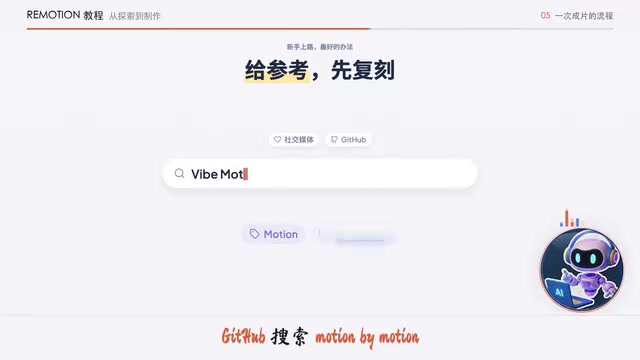
The best way for beginners to start is to replicate given references—search keywords like Motion by Motion, Motion Array, Remotion, Opus 5.5 animation on social media and GitHub, or find inspiration on Pinterest. Animation templates with public code are easier for AI to replicate. But purely pursuing good-looking design has no end, and you'll gain fleeting false accomplishment, accumulating a bunch of good-looking but useless templates.
The difficulty of making Remotion animations isn't necessarily proportional to duration or visual complexity—the more refined the requirements, the harder it gets. The creator gives examples: he came across a paper-cut style video he liked and had Codex learn the style to make a casual daily Vlog piece, which it freely developed into a 40-second animation that was fine on the first version; a Nobel Prize in Medicine popular science animation running a full two and a half minutes, made with Opus 5.5, was almost finalized in one version, because such requirements are open—only the style and content theme need to be right, with no restrictions on specific elements, camera angles, or animation details, giving AI plenty of creative freedom.
But a mere few-second map transition, if it has tricky requirements for map size, tilt angle, pop-up module opacity, camera push timing and speed, even if AI makes it look great, will still need continued tweaking as long as one detail doesn't match expectations. Sometimes it takes several rounds of back-and-forth with AI over just a few parameters—in such cases, it's recommended to bring up Remotion Studio, have the Agent configure the parts you want to adjust as editable parameters, then open Studio and adjust them yourself in the visual interface. Before doing so, remember to have the Agent save the current version with Git first, because parameters adjusted in Studio are saved directly back to the project code—if you're not satisfied, have the Agent restore the previous version, and don't worry about breaking things.
Asset Preparation and the Pitfalls of SVG Hand-Drawn Animation
It's recommended to prepare some image assets first, which will make the formal production process much smoother later. The creator saw a video style on YouTube suitable for narrative content and sent it to GPT, saying he wanted to reference this style to tell the story of OpenAI and Anthropic; GPT started writing the story script and first made several important static frames—once the images came out, things immediately became concrete, and you could tell at a glance whether it was what you wanted, with any deviations correctable at this stage. Then have GPT turn the key figures and assets in the frames into transparent-background PNGs that Codex can use directly; if something turns out unsuitable during actual production, you can fill in or redo the assets yourself.
Hand-drawn style animation comes in two cases. Simple line art can be made directly into SVG assets, because SVG itself contains graphic path information, and Remotion can use code to make lines gradually appear along paths, simulating the brush drawing process—especially suitable for images with few lines, clear structure, and simple paths. But when the image is complex, using SVG for the main drawing becomes difficult: the creator wanted to use hand-drawn animation to tell the story of the entanglement between Musk and OpenAI, and after GPT generated the scene images and made 4 SVGs, GPT then advised against drawing paths with SVG, because the image was too complex, with too many paths and messy order, and recommended instead using a brush or mask that progressively reveals wherever it goes to simulate hand-drawing. The creator "refused to believe it" and insisted on trying real SVG path drawing, and the result was "you should listen to advice when it's given"—the version remade according to the suggestion clearly looks like pretending to draw. If you want more realistic hand-drawn animation, the creator recommends a dedicated Skill that redrew the images; the original version's lines were too complex, but this Skill is a bit Token-hungry, so choose according to your desired effect.
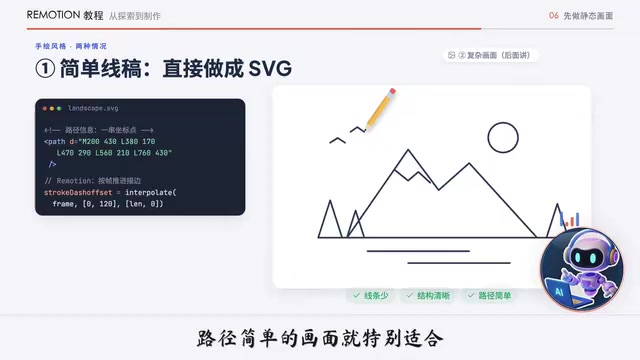
SVG (Scalable Vector Graphics) uses XML to describe geometric paths such as points, lines, and curves, with small file sizes and no distortion when enlarged. Remotion can read SVG's <path> elements and use the two CSS properties stroke-dasharray and stroke-dashoffset combined with frame-number animation to make lines gradually "draw" along paths, simulating the hand-drawing process. This technique works well for simple line drawings with few lines and clear path order; but when the image is complex, with hundreds or thousands of paths and chaotic drawing order, per-path animation is both hard to choreograph and easily looks mechanical—at that point, switching to masks or brush textures for gradual reveal is more natural.
When There's No Reference Template, Chat About Requirements by Voice
In actual animation work, you won't necessarily find a suitable template for every idea you want to express. The creator habitually uses voice input to chat about ideas with AI like shooting the breeze. For example, when making a personal knowledge base explainer video, one visual requirement was to express that after building the knowledge base there are many files, and clicking through them one by one in system folders is a hassle—he also sent screenshots of the folders and Obsidian to AI, letting AI design a more intuitive animation to convey this. Sometimes he simply and crudely sends the narration text to AI, requiring intuitive and clear presentation without being fancy. These animations look ordinary and not cool, but they meet the requirements and are intuitive and easy to understand.
Animations that need real map data can integrate the Amap (Gaode) API, which has a free call quota that's completely sufficient for ordinary individuals. Apply for an API key on the Amap Open Platform, choose "Travel" as the type when creating a new application, and add a Key choosing "External Service." External services mainly obtain geographic data and static map images, while the JS API is better suited for loading interactive maps in web pages; for scenarios of making animations with Remotion, external services are enough. Check the quota to learn the details of the monthly free call allowance, then have the Agent integrate the Amap API into your Remotion project. Reminder: don't send the key directly to AI in the conversation—have the Agent configure the env file and fill it in yourself, or it will pop up a window for you to enter it.
For making transparent-background animation assets, you can tell the Agent from the start to output a transparent background, and existing animations can also be redone with a transparent background. These animations can be put into PPT as assets, since PPT supports inserting videos, but pay attention to semi-transparent animation effects: when an animation has shadows or semi-transparency, clicking play may cause black edges or aliasing.
Related articles

Gemini 4 Neon Leak: A Potential Strong Contender Against Opus 5.5
A Hacker News thread suggests Gemini 4 Neon looks like an Opus 5.5 competitor. This article unpacks the product positioning behind this community signal, shifts in the top-model competitive landscape, and what it means for developers' model selection strategy.

Claude Fable 5.2's Self-Authored Short Film 'Fable' Sparks Discussion
A short film 'Fable,' credited to Claude Fable 5.2 for script, visuals, and directing, appears on Hacker News. This article analyzes the significance of full-pipeline AI creation, community reactions, and what it means for content creators.

Anthropic IPO Pricing: A Signal of AI Giants Going Public
Anthropic's IPO pricing draws attention. This article analyzes its potential impact on AI industry valuation, commercialization paths, and the competitive landscape, and highlights public-market expectations and challenges for AI companies.