Replace Claude Code's Default Model with DeepSeek V4 in VS Code in Three Minutes

Use CC Switch to replace Claude Code's backend with the low-cost, high-performance DeepSeek V4 model
This article explains how to use the open-source CC Switch tool to replace Claude Code's expensive Claude API backend with the highly cost-effective DeepSeek V4 in VS Code. DeepSeek V4 offers a million-token ultra-long context window at roughly ¥1/million tokens—10 to 50 times cheaper than Claude. The entire setup process includes installing the Claude Code extension, installing the CC Switch proxy tool, and configuring the DeepSeek API Key and model parameters, all completable in just three minutes.
Introduction
Claude Code is a highly popular AI programming assistant in VS Code. Developed by Anthropic and built on the Claude series of large language models, it benefits from the company's expertise—Anthropic was founded in 2021 by former OpenAI core members and focuses on AI safety research, with models renowned for powerful code comprehension and long-text processing capabilities. However, Claude's official API pricing isn't exactly friendly to individual developers: taking Claude 3.5 Sonnet as an example, input costs approximately $3/million tokens and output around $15/million tokens. For development scenarios requiring frequent API calls, monthly costs can easily exceed hundreds of dollars.
In contrast, DeepSeekAd V4 offers a million-token ultra-long context window at a price of just ¥1/million tokens (approximately $0.14), delivering a cost-performance ratio that crushes competing products. DeepSeek is an AI research team incubated by Chinese quantitative hedge fund High-Flyer. With extremely low training costs and performance rivaling top-tier models, it sent shockwaves through the global AI industry between 2024-2025. Its core technical breakthroughs include Mixture-of-Experts (MoE) architecture, Multi-head Latent Attention (MLA), and an FP8 mixed-precision training framework, compressing training costs to roughly one-tenth of comparable industry models—the fundamental reason it can offer services at such low prices.
This article will walk you through using the CC Switch tool to replace Claude Code's backend model with DeepSeek V4 in VS Code. The entire process takes just three minutes.
Installing the Claude Code for VS Code Extension
Open VS Code, go to the Extensions Marketplace, search for "Claude Code for VS Code", and click Install.
After installation, open any file, and a Claude Code button will appear in the top-right corner of the editor. Clicking it opens a window that defaults to requiring login with a Claude official account—you can skip this step for now.
Installing CC Switch Model Switching Tool
Next comes the core step: installing CC Switch. This is an open-source tool specifically designed to switch Claude Code's backend model to models from other AI service providers.
CC Switch's core mechanism intercepts API requests sent by the Claude Code extension and redirects them to user-specified third-party AI service endpoints. From a technical implementation perspective, CC Switch launches a lightweight proxy server locally and modifies environment variables or system proxy configurations so that the extension's requests first pass through this proxy layer. The proxy layer converts Anthropic-format requests into the target provider's API format (e.g., DeepSeek, Gemini) and reverse-converts responses before returning them to the extension. This architecture is completely non-invasive to the extension itself—no plugin code modifications are needed, and it can theoretically connect to any AI provider compatible with the OpenAI standard interface.
Download and Installation
Search for "CC Switch" in your browser, enter the official webpage, click the free download button, and you'll ultimately be redirected to the GitHub project page.
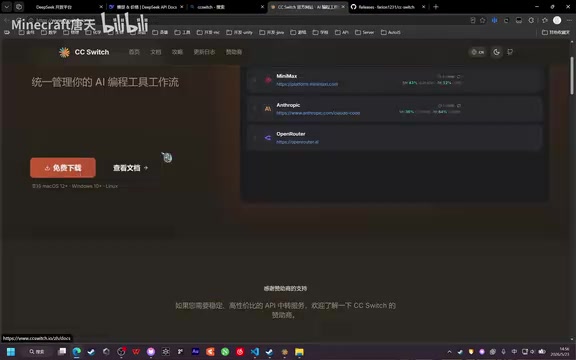
On the GitHub Release page, click "Show all assets" to expand all download options and select the version corresponding to your operating system. Windows users should choose the .msi installer package—download and double-click to complete installation.
Configuring the DeepSeek V4 Model
After installation, open CC Switch. A row of AI provider options (Gemini, Claude, etc.) will appear at the top.
Adding the DeepSeek Provider
Click the plus button to add a new provider and select DeepSeek.
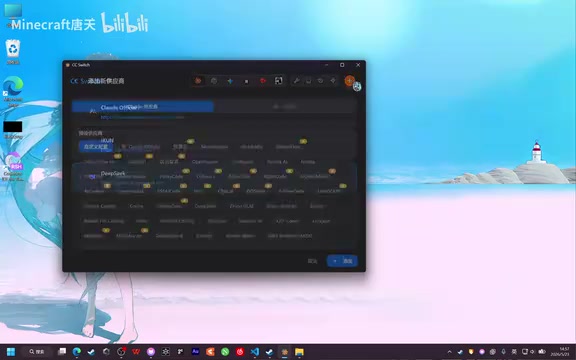
After switching to DeepSeek, the tool provides a preset configuration template. Next, you need to enter your API Key:
- Go to the DeepSeek Open Platform and register an account
- Click "API Key" → "Create Key"
- Copy the generated key into CC Switch's API Key input field
Changing to the DeepSeek V4 Model
The default preset may use an older model version (e.g., 3.2), so you need to manually change it to the latest V4 series:
- Change the default model to DeepSeek V4 Pro
- Change the Sonic (fast model) to DeepSeek Flash
- Set the primary model to V4 Pro as well
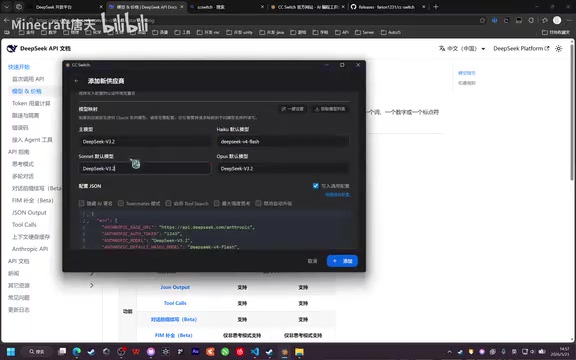
Regarding enabling the million-token context: The context window refers to the maximum text length a large language model can process in a single conversation. DeepSeek V4's supported 1M (million) token context means you can input approximately 750,000 English words or 1.5 million Chinese characters at once—equivalent to dozens of complete codebase files. For programming scenarios, this means you can submit an entire project's source files, documentation, and test cases to the model simultaneously, allowing the AI to modify and refactor code with a complete understanding of the project architecture, rather than only seeing code snippets. Previously, some users reported that the default configuration enabled 256K mode rather than 1M mode; following the configuration method above correctly enables the million-token ultra-long context.
After configuration, click "Add" to save, then click "Enable" to activate the configuration. Make sure to enter a valid API Key, then click the "Verify" button to confirm the connection is working properly.
Usage Verification and Model Switching
After configuration, return to VS Code and click the Claude Code button. You should now see the interface switched to the DeepSeek model.

Switching Models and Reasoning Intensity Settings
In the Claude Code window, you can switch between different model configurations using the "Switch Model" command.
According to DeepSeek's official documentation, the model has two reasoning intensity levels, corresponding to the model's internal Chain-of-Thought depth control mechanism—DeepSeek series models have built-in extended reasoning capabilities similar to OpenAI o1, performing multi-step internal reasoning before giving a final answer when handling complex problems:
- Default intensity: The model adaptively determines reasoning depth based on problem complexity. Suitable for everyday programming tasks (code completion, simple bug fixes, etc.), with fast response times typically returning results within 2-10 seconds
- Max intensity: Forces deep reasoning mode, where the model spends more computational resources on multiple rounds of self-verification and reflection. Suitable for algorithm design, architecture refactoring, complex mathematical derivations, and other tasks requiring rigorous logic. Response times may extend to 30+ seconds, and token consumption also increases significantly (since the reasoning process itself counts toward token consumption)
When Max intensity is needed, you can explicitly specify it in the conversation or preset it in the CC Switch configuration.
Summary
Through the combination of the Claude Code extension + CC Switch tool, you retain Claude Code's excellent interactive experience while using the more cost-effective DeepSeek V4. Leveraging its Mixture-of-Experts architecture and extreme engineering optimization, DeepSeek achieves top-tier performance at one-tenth the training cost while compressing API pricing to approximately ¥1/million tokens—10 to 50 times cheaper than Claude and GPT-4 series. The million-token context window means you can feed your entire project to the model for comprehensive understanding and assistance.
Related articles
 Tutorials
ChatGPT Plus Subscription Guide: Are GPT-5.5, image-2, and Codex Worth the Upgrade?
A detailed look at ChatGPT Plus features — GPT-5.5, image-2, and Codex — with a Plus vs Pro comparison and a complete step-by-step subscription guide for users outside the US.
 Tutorials
Harness AI Engineering in Practice: Using Claude Code to Master Enterprise-Level E-Commerce Development
Deep dive into Harness AI Engineering: master enterprise e-commerce development with Claude Code using the Rules, Skills, Wiki, and Changes framework.
 Tutorials
Cursor + Codex Dual-IDE Collaboration: A Practical Methodology for Open-Source Project Customization
A complete methodology for open-source project customization based on real-world experience, detailing the Cursor+Codex dual-IDE workflow, seven-stage process, MVP validation, and AI source code reading techniques.