Replit Agent Tutorial: Build and Launch an AI Website in 30 Minutes with Zero Code

A complete hands-on tutorial for building an AI website with Replit Agent using zero code.
This article uses an "AI Photography Mentor" website as a case study to demonstrate how to use Replit Agent—a full-stack AI development platform—to build, iterate, and deploy a web application with AI image analysis capabilities through natural language conversation alone. No programming experience required. It covers requirement description, API configuration, feature iteration, Chinese localization, and UX optimization, showcasing how AI coding tools can minimize the barrier to product idea validation.
Introduction: Can You Build an AI Website Without Knowing How to Code?
Have you ever had a brilliant product idea but couldn't move forward because you don't know how to code or configure servers? Today, with full-stack AI development tools like Replit Agent, you can turn an idea into a live, accessible website in just half an hour—even with zero programming experience.
This article uses an "AI Photography Mentor" website as a hands-on case study, walking you through the complete process of building, iterating, and deploying a web application with AI analysis capabilities using Replit Agent—all without writing a single line of code.
What Is Replit Agent? Why Should You Care?
An All-in-One Cloud AI Development Platform
Replit is an online Integrated Development Environment (IDE) that supports multiple languages including Python, JavaScript, and C++, requiring no local installation of development tools or environment configuration. An IDE is a comprehensive tool programmers use to write, test, and debug code. Traditional IDEs like Visual Studio Code and IntelliJ IDEA need to be installed on your local machine and often require manual configuration of language runtimes, package managers, databases, and various other dependencies—a process that's nearly insurmountable for non-technical users. Replit moves everything to the cloud browser, letting you start developing the moment you open the webpage, completely eliminating the "environment setup" hurdle that deters countless beginners.
Replit Agent is its built-in AI programming assistant, similar to Cursor or Bolt.new, but its key differentiator is its "closed-loop capability." Cursor is essentially a local code editor enhanced with AI capabilities, excelling at helping developers with programming experience boost their coding efficiency. Bolt.new focuses on rapid frontend interface generation. What makes Replit Agent unique is that it doesn't just generate code—it autonomously handles environment setup, dependency installation, database creation, service startup, and even final deployment, forming a complete loop from "idea" to "accessible product":
- Zero environment configuration: No need to buy servers or configure domains—Replit has built-in hosting and deployment capabilities
- AI-driven end-to-end workflow: From requirement descriptions to code generation, environment setup, and database construction—Agent handles it all
- Instant deployment: One-click publishing after development, generating a shareable public URL
Replit Agent Pricing and Accessibility
Replit Agent requires a subscription at approximately $25/month. Considering it simultaneously solves costs for servers, domains, development tools, and more, the value proposition is quite compelling. For comparison, setting up an equivalent development environment on your own would cost at least $7-15/month for cloud servers alone, plus domain registration, SSL certificates, database services, and other fees that often far exceed Replit's subscription price. Users in China can complete payment through virtual card services like WildCard. For domains, Replit provides a free domain, and you can also purchase a custom domain for a few dollars from providers like Alibaba Cloud or Tencent Cloud to bind to your project.
Hands-On Tutorial: Building an AI Photography Mentor Website with Replit Agent
Step 1: Describe Your Requirements in Natural Language
In Replit Agent's chat box, simply type a rough project description to kick off development. This relies on the powerful intent understanding and code generation capabilities of Large Language Models (LLMs)—during training, the model has learned from massive amounts of open-source project code, technical documentation, and software architecture patterns. It can "translate" a natural language description into a concrete technical plan: choosing appropriate frameworks (like React, Flask), planning frontend/backend architecture, designing database schemas, and then generating runnable code file by file. This is why the clearer your requirement description, the closer the final product matches your expectations—because essentially, your Prompt serves as the "product requirements document" for the AI.
The initial Prompt for this case study was roughly:
I want to build an AI photography tutorial website for photographers. Users can upload their work, and AI will act as a professional photographer to analyze it, listing strengths and weaknesses while providing parameter adjustment suggestions—like a teacher instructing beginners on shooting and post-processing.
Replit Agent offers an Improve Prompt feature that automatically expands vague descriptions into detailed product requirement documents. This feature is essentially an application of Prompt Engineering—having AI structurally expand the user's initial input, supplementing functional details, technical constraints, and design specifications the user might have missed, thereby significantly improving the quality and completeness of subsequent code generation. The expanded requirements document includes:
- Core features: Photo upload, AI composition/lighting/technical analysis, strengths and weaknesses feedback, camera settings suggestions, step-by-step tutorial system
- UI design direction: Gallery-style layout, film-style transition effects, professional photography aesthetics
- Personalization mechanism: Adaptive adjustments based on user skill level and learning progress
After clicking Start Building, Agent automatically begins thinking about architecture, writing frontend and backend code, installing dependencies, and building the database.
Step 2: Configure OpenAI API for AI Analysis
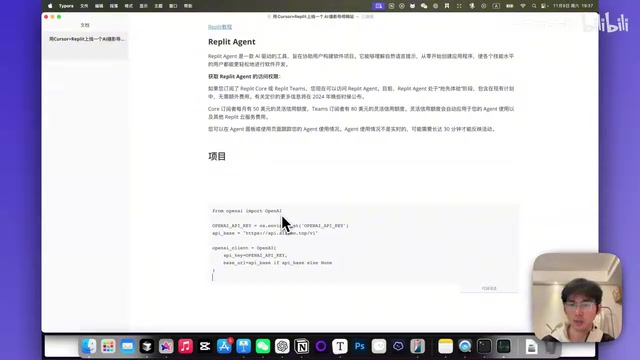
The website's core feature is AI image analysis, which requires connecting to OpenAI's API. An API (Application Programming Interface) can be simply understood as a "communication protocol" between two software systems—our website sends an image and analysis instructions to OpenAI's servers via the API, and OpenAI's multimodal model (like GPT-4 Vision) "understands" the image content and returns professional photography analysis results. "Multimodal" here means the model can simultaneously understand both text and images. It doesn't simply identify objects in pictures but can evaluate composition, lighting, color, depth of field, and other professional dimensions like a human photographer.
Since OpenAI services aren't directly accessible in China, you can use an API relay service to solve this. The principle behind API relay services is deploying a proxy server overseas—domestic applications send requests to the relay, which forwards them to OpenAI, thus bypassing network access restrictions. Configuration steps:
- Register on the relay platform and create a Token
- Replace the Base URL with the relay address
- Enter the API Key in Replit's Secrets management
Secrets here is Replit's secure environment variable storage mechanism. An API Key is essentially the "password" for accessing OpenAI services—if written directly in code, anyone who can see the code could steal your credits. The Secrets feature encrypts and stores sensitive information server-side, automatically reading it during code execution—both secure and convenient.
Relay services typically price at 30-40% of official rates (approximately $0.37/yuan), significantly reducing development costs. Once configured, Agent automatically integrates the API calling logic into the code.
Step 3: Iterate and Refine Through Conversation
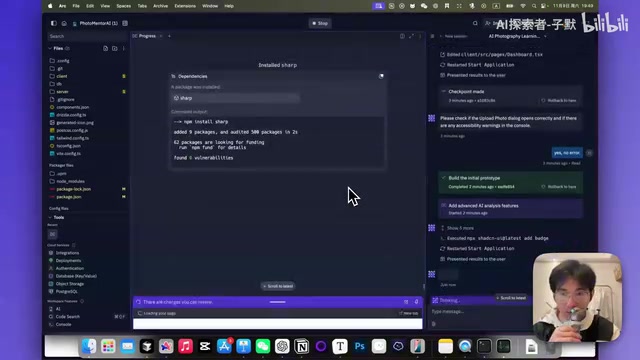
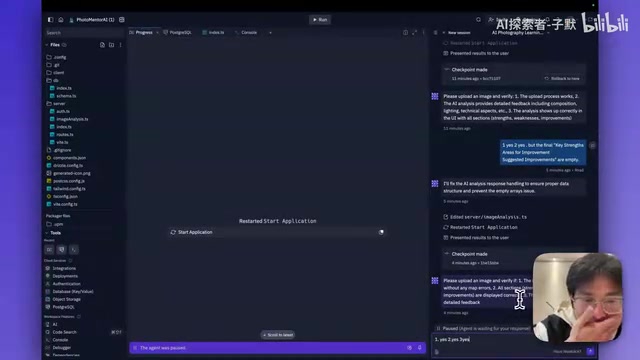
Developing with Replit Agent is essentially a continuous conversational iteration process. After completing each phase, Agent asks about the running status, and you simply provide feedback:
- ✅ "Yes, I can access the homepage" — Positive feedback, continue to next step
- ❌ "Upload failed, I see these errors..." — Negative feedback, attach error information
Throughout the process, the developer plays the role of a product manager, not a programmer. You don't need to know how to write code—you only need to judge whether features meet expectations and propose modifications in natural language. This human-AI collaboration model closely mirrors the traditional software development workflow of "PM submits requirements → engineer writes code → testing feedback → modification iteration," except the engineer's role has been replaced by an AI Agent.
Feature Iteration: Key Optimizations for a Better AI Website
Switching GPT Models for Faster Response
In real-world testing, GPT-4 Vision Preview took about 30 seconds for analysis, while switching to GPT-4o reduced this to approximately 14 seconds—nearly doubling the speed. This performance difference stems from their architectural designs: GPT-4 Vision Preview "bolts on" a visual encoder module to the text-based GPT-4, requiring images to be processed through the vision module before being fed to the language model, with data transfer between modules adding latency. GPT-4o ("o" stands for "omni") uses a native multimodal architecture where text, images, and audio are processed uniformly within a single model, eliminating cross-module communication overhead, resulting in significant improvements in both speed and comprehension accuracy.
With a simple conversational instruction like "Please change the model to GPT-4o," Agent completes the model switch.
Chinese Localization
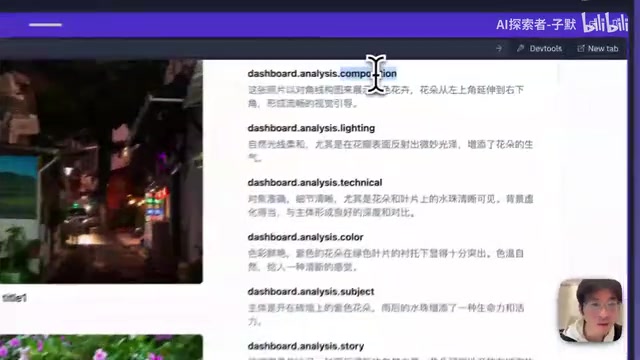
The default generated interface and analysis results are in English. By instructing "Please change the default language to Chinese," Agent progressively switches all UI labels, analysis results, titles, and descriptions to Chinese output. This process may require multiple feedback corrections, as some labels (like Dashboard, Composition, etc.) are easily overlooked. This reveals a typical characteristic of current AI coding assistants: they tend to have "missed corners" when executing global batch modifications, requiring users to gradually fill gaps through multiple conversation rounds.
User Experience Polish
During iteration, several UX improvements were proposed:
-
Automatic title generation: Users no longer need to manually fill in titles and descriptions when uploading photos—AI generates them automatically (Prompt: "You are a photographer, generate a Chinese title of no more than 20 characters and a 50-character description for this image")
-
Asynchronous processing: Upload and AI analysis are split into two independent steps—upload completes instantly while analysis runs in the background, so users don't have to wait. This involves an important architectural concept in web development—synchronous vs. asynchronous processing. Synchronous processing means users must wait for the server to complete all operations before receiving a response; if AI analysis takes 15 seconds, users stare at a loading animation for 15 seconds—terrible UX. Asynchronous processing places time-consuming tasks in a background queue, with the server immediately returning a "received, processing" response, allowing users to continue browsing other content and view results once analysis is complete. This pattern is extremely common in modern web applications—for example, you don't need to wait for delivery to complete before closing the page after placing an e-commerce order, which is a classic application of asynchronous processing.
-
Status indicators: Each photo gets an analysis status badge so users clearly know whether AI analysis is complete
-
Modal popup for results: Analysis results are displayed through Modal popups with the original image on the left and analysis content on the right, making it easy to compare without scrolling up and down long pages
Strengths and Limitations of Replit Agent
Core Strengths
- Extremely low technical barrier: No programming experience needed—natural language drives development
- Full-stack integration: Frontend, backend, database, and deployment all completed on one platform
- Rapid prototype validation: From idea to accessible online product in as little as 10-30 minutes
- Ideal for MVP development: Perfect for validating business ideas and creating demo prototypes
Points to Consider
- Iteration efficiency: Complex requirements may need multiple conversation rounds for accurate implementation; Agent occasionally misses details
- Performance limitations: Replit-hosted applications may face performance bottlenecks under high concurrency. Replit's free and basic paid plans use shared computing resources—when multiple users access your application simultaneously, server response speeds may noticeably decrease. It's perfectly adequate for small applications with dozens to hundreds of daily active users, but if your product suddenly goes viral and traffic surges, you'll need to consider migrating to more professional cloud service platforms like AWS or Vercel
- Debugging costs: Non-technical users may struggle to accurately describe problems when bugs occur. An effective tip is to directly screenshot error pages or copy error messages from the browser console and send them to Agent—this is far more effective than describing "the page isn't working right" in text
- Monthly cost: The $25/month subscription requires consideration for purely exploratory use
Conclusion: Zero-Code Development Lets Everyone Validate Their Ideas
This hands-on case study demonstrates that Replit Agent truly realizes the vision of "everyone can be a developer." Someone with absolutely no programming experience, armed only with natural language conversation, can build a web application with complete features including user registration, image upload, AI-powered analysis, and Chinese localization—and deploy it live instantly.
For those with side project ideas, this means the cost of validating a product concept has dropped to unprecedented lows. You no longer need to spend thousands hiring an outsourcing team, nor months learning to code—you just need a good idea plus the ability to clearly express requirements, and AI can help turn it into reality.
Of course, Replit Agent is best suited for rapid validation at the MVP (Minimum Viable Product) stage. The MVP concept originates from Eric Ries's methodology in The Lean Startup. The core idea is: don't spend massive time and money building a "perfect" product. Instead, create a prototype at minimal cost that can verify your core assumptions, get it to market quickly to gather real user feedback, then decide whether to continue investing or pivot directions based on that feedback. Under traditional development models, even an MVP often requires weeks of development time and thousands of dollars in costs. Replit Agent lowers this threshold to half an hour and a few dozen dollars—meaning you can validate multiple startup ideas in a single weekend, finding directions with genuine market demand at extremely low trial-and-error costs.
If your product does gain market validation, subsequent scaling still requires more professional technical architecture. But at the very least, the step from 0 to 1 is no longer an obstacle.
Related articles
 Tutorials
ChatGPT Plus Subscription Guide: Are GPT-5.5, image-2, and Codex Worth the Upgrade?
A detailed look at ChatGPT Plus features — GPT-5.5, image-2, and Codex — with a Plus vs Pro comparison and a complete step-by-step subscription guide for users outside the US.
 Tutorials
Harness AI Engineering in Practice: Using Claude Code to Master Enterprise-Level E-Commerce Development
Deep dive into Harness AI Engineering: master enterprise e-commerce development with Claude Code using the Rules, Skills, Wiki, and Changes framework.
 Tutorials
Cursor + Codex Dual-IDE Collaboration: A Practical Methodology for Open-Source Project Customization
A complete methodology for open-source project customization based on real-world experience, detailing the Cursor+Codex dual-IDE workflow, seven-stage process, MVP validation, and AI source code reading techniques.