Reproducing GitHub Projects from Scratch: A Complete Guide to Environment Setup and Practical Pitfall Avoidance

A systematic guide to reproducing any GitHub project from evaluation to debugging.
Reproducing GitHub projects involves far more than cloning and installing. This guide covers a complete workflow: evaluating projects via Stars and Issues, setting up isolated conda environments with matched Python versions, handling dependency pitfalls like CPU-only PyTorch, running .sh scripts on Windows through PyCharm, and debugging common errors like KeyError from extra quotation marks. It also outlines the optimal search priority for resolving errors.
In the AI era, whether you're doing research or engineering development, reproducing open-source projects from GitHub is a fundamental skill. Many people think running a project is as simple as "git clone + pip install," but in practice, environment conflicts, command-line errors, and unrunnable scripts are constant headaches. Based on a comprehensive walkthrough by an experienced content creator on Bilibili, this article distills a systematic methodology from project selection to successful execution.
Step 1: How to Determine Whether a Project Is Worth Reproducing
After finding a project on GitHub, many people's first instinct is to download and run it immediately. A smarter approach is to do your "due diligence" first — just like checking sales numbers and reviews before buying something on an e-commerce platform.
Check Stars, Forks, and Watches
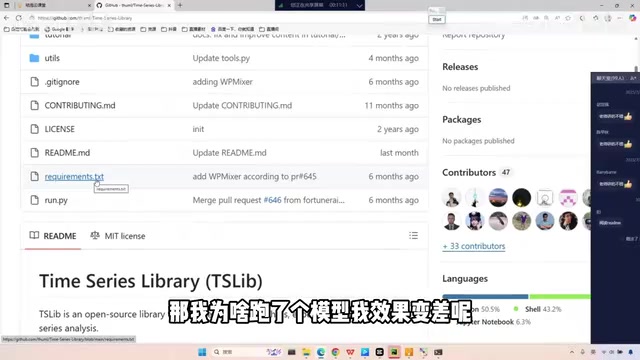
The Star count reflects a project's popularity and influence to some extent. A useful rule of thumb: for larger open-source projects, the Star count should typically be above 1K; for paper-accompanying code, 100+ Stars already indicates reference value. The more users a project has, the more motivated the official team is to maintain it and fix bugs. If a project has only single-digit or a couple dozen Stars, its influence is likely limited, it may contain numerous unfixed errors, and it's not worth investing your time.
Read the Issues First, Not the Code
This is the most crucial insight in this guide: before reading the source code, go through the Issues section first. The README is the official "product description," while Issues are real user feedback — the equivalent of "product reviews."
Specifically, focus on Closed Issues, as these problems have most likely already been resolved by the author or other users. A quick scan of the Issues gives you two key takeaways: first, whether the project is "worth pursuing" — if numerous users report that it "doesn't run" or "results don't match the paper," cut your losses and switch projects; second, these Issues often reveal pitfalls you'll encounter later, including common bugs and their solutions.
Step 2: Set Up an Isolated Environment According to the Author's Requirements
After evaluating the project, read the README document carefully. The more complete the README (including changelogs, performance leaderboards, comparative experiments, paper citations, etc.), the more effort the author has put in, and the higher the code quality typically is.
Strictly Match the Python Version
The Usage section of the README usually specifies the recommended Python version, such as Python 3.8. Here's an important principle: to ensure your results match the paper, create a new isolated conda environment and align your configuration with the author's as closely as possible.
conda create -n py38_timesnet python=3.8.0
conda activate py38_timesnet
Creating an isolated environment has two benefits: it prevents version conflicts from installing various dependencies into your base environment, and when your results deviate from the paper, you can rule out environmental factors first.
Batch Install Dependencies with requirements.txt
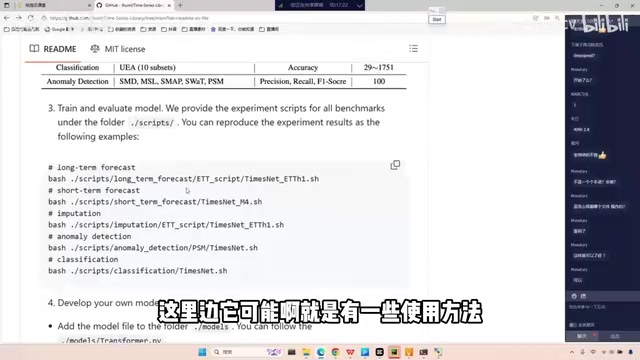
The project root directory usually contains a requirements.txt file listing all dependency packages and their versions. After activating your environment, run the batch installation:
pip install -r requirements.txt
An easily overlooked pitfall: the PyTorch (torch) version specified in requirements.txt often defaults to the CPU version. If you need GPU acceleration, you'll need to manually reinstall the GPU version of torch after the batch installation. Additionally, any dependency packages involving distributed training (e.g., DDP) basically won't work properly on Windows — these projects should be run on a Linux server. Renting GPU cloud servers is quite affordable these days, making it a cost-effective option.
Step 3: How to Run .sh Scripts on Windows
Many projects provide .sh scripts to run experiments, which can be daunting for Windows users. Once you understand the essence, it's not hard: .sh scripts are simply collections of "sequentially executed commands," and their core is usually just a single python run.py --parameters... command.
Authors use scripts because in actual research and engineering development, experiments are almost always run on remote servers without graphical interfaces — execution can only happen through scripts with parameters. Understanding this, you can manually extract the parameters from the script, configure them in PyCharm's Run Configuration, and run run.py directly.
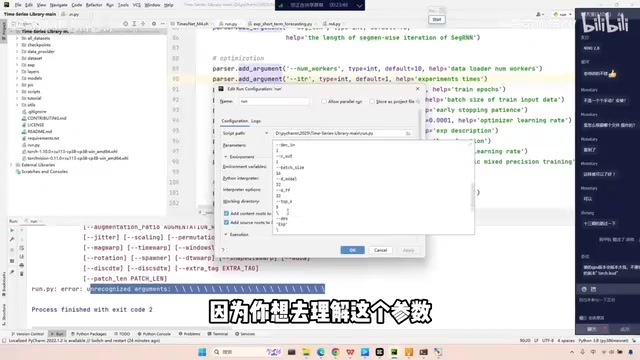
When configuring the environment, remember to switch to your newly created conda environment in PyCharm's bottom-right corner (select existing environment and point to the corresponding python.exe). If you don't have a GPU and want to run on CPU, find the use_gpu parameter and change it to False.
Step 4: Hands-On Debugging — Errors Are Minor Issues
Once things actually start running, errors are par for the course. The right mindset is: problems that produce error messages are actually minor issues; the truly difficult ones are those mysterious cases where "it runs fine but the results are worse than the paper" with zero hints.
KeyError: The Extra Quotation Mark Problem
The first typical error is a KeyError, indicating that a key can't be found in a dictionary. By setting a breakpoint at the error line and observing the passed parameters in Debug mode, you'll find the issue is extra quotation marks carried over when copying command-line arguments from the script. The quotes in the script are for command-line parsing; pasting them into PyCharm's parameter configuration box causes the string to have extra quotes, which then fail to match the dictionary keys. Simply removing the extra quotes solves the problem.
The Quotation Mark Trap in Model Names and Loss Functions
The model name error and the loss function being empty (NoneType) error are essentially the same category of problem — script variables or extra quotation marks have crept into the parameters. Taking the loss function as an example, the error points to an if-elif-else structure that selects a loss function based on loss_name. When the passed name doesn't match any branch, it returns a null value. Checking the parameters reveals that smape had extra quotation marks added.
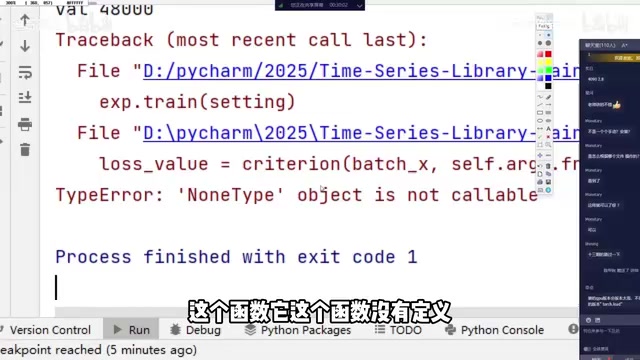
This demonstrates a universal debugging approach: when you encounter an error about "a variable being null," trace the data flow backward — is the path wrong? Is the function undefined? Set a breakpoint at the error location, hover over each variable to inspect its value, and you'll quickly find the source of that "null."
Don't Forget to Download the Dataset
There's another routine step in the reproduction process that's easily overlooked: downloading the dataset. Authors typically provide download links in the README and specify which folder the data should be placed in. Look for this information in the README, not in the command-line arguments.
The Right Priority Order for Searching Error Messages
When you encounter an error you can't solve on your own, search in the following order:
- Search the project's Issues first: Search for error keywords in the Issues — someone else has very likely encountered and resolved the same problem;
- Then search Google: The broadest coverage of technical Q&A resources;
- Then ask an LLM: AI tools like ChatGPT are very helpful at explaining common errors;
- Use Baidu as a last resort.
Another good habit to develop: if you plan to use a project as a long-term Backbone or a Baseline for your paper, read through all the Issues from start to finish, get a head start on understanding the pitfalls others have encountered, and form a mental map that helps you quickly recall and locate solutions when you face similar problems later.
Conclusion: Environment Setup Is a Core Competency for AI Practitioners
Some might ask: is it worth spending so much time on environment configuration? The answer is absolutely yes. In practice, opportunities for low-level algorithm development are relatively limited. More often, the scenario is "applying open-source frameworks to your own business needs," and business iterations move fast, requiring frequent configuration and debugging of various environments. The more you do it, the better you get — this ability becomes an indispensable core competency for AI practitioners.
At the same time, set the right expectations: errors are the norm in reproduction, and problems with error messages are actually "friendly." The truly tricky ones are those mysterious issues with no hints at all where the results just don't match. Master the complete workflow of "checking Issues to assess value → aligning environments → manually configuring parameters → breakpoint debugging," and you'll have the ability to reproduce any GitHub project from scratch.
Related articles

Kimi K2/K3 Technical Speculation: Deep Dive into RL Hyperparameters and Multi-Teacher Distillation
Deep analysis of RL hyperparameter tuning challenges and 9-policy multi-teacher distillation in Kimi K2/K3 training, exploring the shift from scale to training craft.

SeaTicket: An AI Agent That Automatically Resolves GitHub and Discord Issues
SeaTicket is an AI Agent that automatically resolves GitHub Issues and Discord questions. This article analyzes its architecture, use cases, challenges, and value for open-source maintenance.

Breaking Through CI/CD Storage Bottlenecks: Why Senior Engineers Are Returning to the Storage Domain
Exploring overlooked storage and caching bottlenecks in CI/CD pipelines, how Blacksmith redesigns storage architecture to accelerate builds, and why storage is a rebirth opportunity in cloud-native.