Restoring 169 Episodes of a Classic TV Show with AI Super-Resolution: A 95-Hour Home PC Diary

A Bilibili creator used a home desktop and open-source AI tools to restore 169 episodes of an old TV show to 1080P in 95 hours, costing only 20 yuan in electricity.
A Bilibili creator used a 12th-gen i5 + RTX 3070 Ti home desktop and open-source tools like MPEG deinterlacing and Video2X to restore 169 episodes of Growing Pains from 720×480 to 1440×1080 in 95 hours, costing just over 20 yuan in electricity. The pipeline had two steps: deinterlace and denoise to 720×540P, then 2x upscale with a lightweight super-resolution model, finally muxing original audio and subtitles. Model selection favored throughput over cost—the heavy model needed 96 days while the lightweight one ran at 18 fps. During the automated run, OOM failures and silent stalls occurred; the creator had the executing AI write self-check reports and another AI cross-review them, revealing the third stage wasn't running at all. The article notes AI-upscaled details involve guesswork and can't recover true information, and that what really mattered was clear judgment and letting AI watch the pipeline.
A Bilibili creator used a home desktop PC and open-source AI super-resolution tools to restore 169 episodes of Growing Pains from 720×480 DVD quality to 1440×1080, taking 95 hours. The entire process ran fully automatically, with an electricity cost of just over 20 yuan—but it also exposed real pitfalls in AI workflows.
From Childhood Regret to a Technical Challenge
The restoration diary shared on Bilibili began with something personal: the creator watched Growing Pains on and off as a child, then moved abroad and relocated repeatedly, never finishing the series. Upon learning that Shanghai Television had restored the first three seasons, he decided to handle the rest himself. This wasn't about adding filters or simply upscaling the resolution—it was about recovering lost details frame by frame.
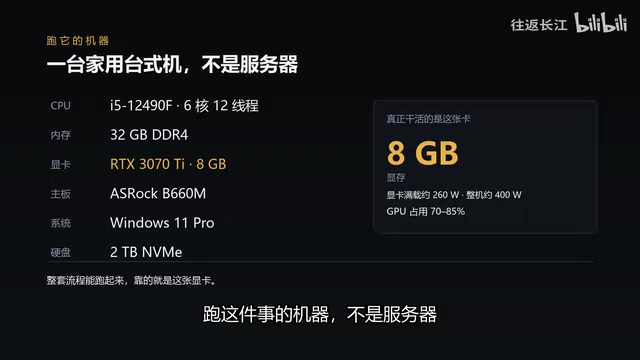
The source material comprises 163 episodes at an original resolution of 720×480, just one-sixth of 1080P. The hardware was an ordinary home desktop: a 12th-gen i5 processor, 32GB of RAM, and an RTX 3070 Ti graphics card (8GB VRAM). The whole pipeline ran primarily thanks to this GPU.
Deinterlacing and Super-Resolution: A Two-Step Technical Approach
First, Tackle the "Jaggies" from Interlaced Scanning
DVD-era television used interlaced scanning, where each frame records only half the lines—odd and even lines captured at different moments. In fast-motion scenes, character outlines show jagged edges. The first step in restoration is deinterlacing: reconstructing a complete moment from two half-frames captured at different times. The creator used MPEG deinterlacing for fast denoising, unifying the footage to 720×540P.
Interlaced scanning was designed for analog TV to save bandwidth: each frame is split into two fields, first scanning all odd lines, then all even lines, with the two fields separated by about 1/50 or 1/60 of a second. Because the two fields capture motion at different moments, merging them directly causes jagged or comb-like artifacts around moving objects, while using a single field loses half the vertical resolution. The goal of deinterlacing is to reconstruct a complete frame based on the correlation between the two fields. Common algorithms include blend, bob (intra-field interpolation), motion adaptive, and advanced motion-compensated methods. MPEG deinterlacing typically refers to using field information carried in the MPEG bitstream (such as top_field_first, picture_structure) for quick judgment, combined with simple interpolation to complete deinterlacing. It's computationally light and suitable for batch processing, but has limited effectiveness with complex motion. This is why the creator first did fast denoising and unified to 720×540P—to eliminate interlacing artifacts before handing off to AI super-resolution, preventing the network from amplifying jaggies as if they were details.
Then Let the Neural Network "Guess" the Details
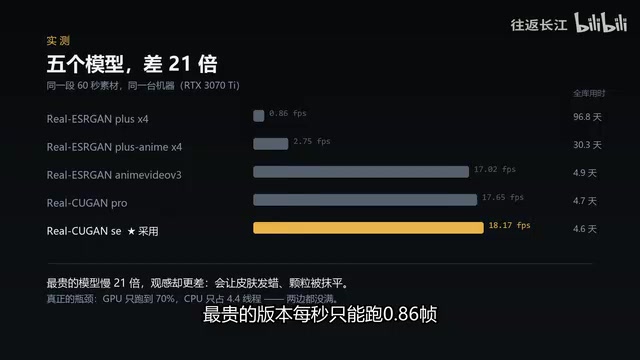
The second step is upscaling. Traditional interpolation merely averages neighboring pixels, leaving the enlarged image blurry; AI super-resolution uses neural networks to reconstruct details that didn't exist based on images seen during training. The creator tested multiple models available at the time and ultimately chose not the most expensive version—the most expensive model could only process 0.86 frames per second, requiring 96 days to complete the entire set; the lightweight model with the best visual quality could do 18 frames per second.
It's worth noting that the creator had previously generated a 2880×1920 version using a different pipeline, but it had three problems: no deinterlacing, only a 416-second test run, and a bitrate as high as 120Mbps—the file sat unused. This shows that piling on parameters doesn't equal a usable result.
AI super-resolution is essentially an ill-posed inverse problem: given a low-resolution image, there are infinitely many high-resolution images that could downsample to it. Neural networks learn a mapping prior from low to high resolution by training on large numbers of high-low resolution image pairs. Common models include ESRGAN, Real-ESRGAN, SwinIR, etc., which typically use perceptual loss and adversarial loss to improve visual sharpness—at the cost of potentially "fabricating" textures. Video2X is an open-source video super-resolution/frame-interpolation tool wrapper; it doesn't train models itself but calls backend models like Real-ESRGAN and Waifu2x, handling the pipeline work of frame extraction, batch inference, and audio track muxing. The difference between "0.86 frames per second" and "18 frames per second" in model selection mainly comes from network depth, parameter count, and input resolution. Heavy models tend to be more refined on individual frames, but the time cost scales linearly; for 169 episodes at 24 minutes each, throughput becomes the decisive factor. This also explains why "most expensive" doesn't equal "most suitable."
Fully Automated Pipeline: 169 Episodes in Five Days
The entire pipeline has three steps: deinterlace and denoise, unifying to 720×540P; use Video2X for 2x super-resolution to output 1440×1080; finally, mux only the original audio track and subtitles without re-encoding. Each episode is 24 minutes, and all 169 episodes ran automatically over five days. Along the way, there were incidents like out-of-memory failures causing four consecutive stage failures, and silent truncation midway through a run. The ComfyUI process detected anomalies itself, reran itself, and kept its own records. There was also a case that wasn't a crash but a stall—progress hadn't moved for 40 minutes. The creator had the AI pause, write the logs and progress into a report, then opened another conversation and threw the report over asking "is there a problem?" The other model looked at it and said: "The third stage isn't running at all." The creator relayed the report back verbatim, and only then did the working AI realize what was happening.

This detail reveals a practical pattern: have the AI executing the task write a self-check report, then use another AI for cross-review—this can catch stalls that a single model would struggle to notice.
ComfyUI is a node-graph-based Stable Diffusion workflow tool, originally for image generation, but because it's orchestratable, scriptable, and supports batch processing and queue management, the creator also used it to organize the video restoration pipeline. It allows steps like deinterlacing, super-resolution, and muxing to be chained into a directed acyclic graph, and records the execution status and output of each node—providing the data basis for "self-check reports." The so-called "silent truncation" means the process hasn't crashed and shows no errors, but is no longer advancing the task—possibly due to GPU context loss, VRAM fragmentation, or a hung asynchronous call. Such failures don't trigger exception handling, making them hard to spot through log keyword searches alone. The logic of using another AI for cross-review is: the executing AI has local context but easily falls into the blind spot of "believing it's running," while the reviewing AI only reads the report with no path dependency, making it easier to spot contradictions from progress timestamps and stage status. This "execute-report-review" division of labor is essentially a lightweight multi-agent collaboration pattern.
Cost and Results: 20 Yuan in Electricity, but Details Involve Some Guesswork
The full system draws about 400 watts under load, and running for 95 hours costs just over 20 yuan in electricity. All software is open source, at zero cost. Renting a cloud GPU for the same task would cost roughly 100 to 200 yuan.
In terms of results, hair, sweater textures, and background details are noticeably improved. But the creator candidly admits: AI-upscaled details involve some guesswork—they make the picture clearer but can't conjure information that genuinely exists. The real answer might be Shanghai Television's film restoration, though unfortunately it only covered the first three seasons.

Details generated by AI super-resolution aren't "restoration" but conditional generation based on the training distribution. When a region in the low-resolution image has very little information (such as distant faces or dark-area textures), the model tends to output statistically plausible textures rather than details that actually exist. This looks "clearer" to the human eye but may introduce elements inconsistent with the original footage—for example, generating a blurry button as some kind of pattern, or "hallucinating" background text into readable but incorrect characters. For film and TV restoration, the industry typically distinguishes "restoration" (aimed at removing degradation and recovering original information) from "enhancement" (aimed at improving subjective visual quality). AI super-resolution is closer to the latter. True film restoration relies on physical scanning, color science, and manual frame-by-frame correction, capable of extracting genuine high-frequency information from film grain—something no pure-software super-resolution can replace. Therefore, the creator's remark that "the real answer might be Shanghai Television's film restoration" is an honest recognition of technology's limits.
What Limits AI Isn't Capability—It's Judgment
The creator concludes that completing the restoration didn't depend on technical mastery—terms like deinterlacing, super-resolution, and muxing took him months to learn. What really mattered was being clear about what he wanted to do, then having AI keep an eye on it: tracking progress, rerunning on its own, and finishing the work while he slept. His advice for friends wanting to learn AI: don't buy textbooks—they're already outdated from the day you order them; figure out what you really want to do, hand the tokens to AI, and you'll learn things no book can teach.
The value of this case isn't restoring an old TV show—it's demonstrating how an ordinary person can manage a multi-day AI pipeline using consumer-grade hardware and open-source tools. Compared to model benchmarks, this kind of "engineering endurance" may be closer to the reality of AI implementation.
Related articles

iPhone Duo Battery Life Tested: One Charge a Day Is Unavoidable, and the Large Screen Is the Culprit
iPhone Duo battery test: heavy use needs at least one charge a day, and about 30% remains after 6.5 hours of screen-on time. How often the large screen is unfolded is key; a MagSafe battery pack helps, and long-term degradation is also worth watching.

Kimi K3.1 Pro Open-Sourced: 2.8 Trillion Parameters Close In on Opus
Moonshot releases the open-source MoE model Kimi K3.1 Pro, with 2.8T total parameters and 104B activated, trailing Opus 5.5 by under 1 point on Terminal Bench 4.0.

Costco Tech Price Guessing: Are Monitors, Keyboards, Mice, and Bose Speakers Worth It?
A YouTube blogger guesses prices of Costco tech products: 2K 180Hz monitor, Logitech keyboard and mouse, Bose speaker, and CyberPower UPS, revealing warehouse-store selection and brand premium.