Run Pixel 3D Multi-View Locally: Generate High-Quality 3D Models Free with 8GB VRAM

Pixel 3D multi-view integrates into ComfyUI, enabling free local 3D generation on consumer GPUs.
Pixel 3D's new multi-view feature is natively integrated into ComfyUI, letting users generate 3D models locally for free on consumer GPUs (as low as 6–8GB VRAM). Unlike single-view mode, multi-view uses multiple reference angles to significantly improve back and side accuracy. Users can generate free multi-angle inputs with Flux 2 Klein instead of paid turnaround generators. Real-world tests show multi-view clearly outperforms single-view on back-facing surfaces, though buildings and organic models still have limitations, and outputs require retopology for production use.
The open-source 3D generation tool Pixel 3D has introduced a Multi-view feature, now natively integrated into ComfyUI. This means users can generate more accurate 3D models than single-view mode allows — for free, on a consumer-grade GPU, right on their own machine. Based on a hands-on tutorial by Philip from the Pixel Artistry channel, this article walks through the full installation, generation, and optimization workflow, and breaks down the real-world differences between single-view and multi-view outputs.
Why Multi-View Matters
Previously, Pixel 3D could only infer a model's complete shape from a single image — the front looked decent, but the back was entirely fabricated by the algorithm, often with significant errors. The multi-view feature allows you to upload images from multiple angles (such as a character turnaround sheet), giving the model real spatial reference during generation and substantially improving the accuracy of the back and sides.
Philip notes that after the creator published the multi-view inference code, KJ and the ComfyUI team completed the native integration. Visual Bruno's Trellis 2 repository has also implemented Pixel 3D with a multi-view workflow. This means two technical paths currently exist: the native ComfyUI integration (easier to install) and the Trellis 2 version (more powerful but with more setup steps).
What is Retopology? Retopology is the process of restructuring a high-polygon, messy 3D model into a clean, organized topology. AI-generated 3D models typically consist of hundreds of thousands of irregularly distributed triangles that are difficult to use directly in animation rigs, game engines, or for further sculpting. Tools like ZRemesher or Instant Meshes are used to convert them into low-polygon meshes with mostly quad faces and logical edge flow. This step is indispensable in professional 3D pipelines and is one of the core reasons current AI 3D generation tools still aren't truly "plug-and-play."
Installation and Model Setup
The first step is updating ComfyUI to the latest version. Desktop users can go to the ComfyUI menu and click "Update Now" then restart; portable version users simply run the update ComfyUI.bat file to pull the latest build.
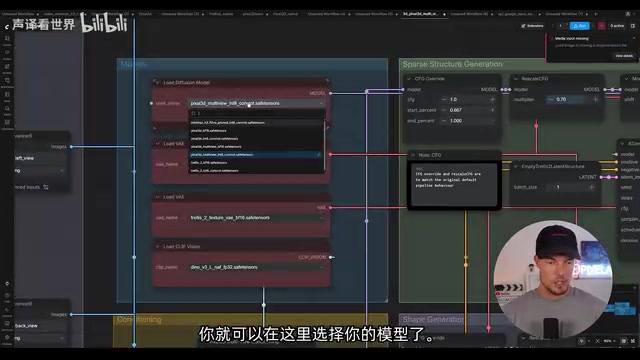
After updating, navigate to the "3D Models" section of the template library, where you'll find the newly added "Pixel 3D Multi-View" workflow template — clicking it opens the workflow automatically. Model files need to be downloaded from the ComfyUI Pixel 3D page on Hugging Face, with the key file being the Pixel 3D multi-view Safe Tensor. Philip primarily uses the Int8 version of the Safe Tensor. You'll also need the Trellis shape VAE, texture VAE, and the Deno V3 model. Place all of them in the corresponding ComfyUI model folders and restart for them to load correctly.
What is Safe Tensor and Int8 Quantization?
.safetensorsis a model weight storage format introduced by Hugging Face. Compared to traditional PyTorch.pt/.binformats, it doesn't execute arbitrary code during loading, fundamentally eliminating the security risk of malicious model files, while also loading faster. Int8 quantization compresses model weights from 32-bit or 16-bit floating point down to 8-bit integers, reducing VRAM usage by roughly 50% with minimal loss in generation quality — making it feasible to run otherwise VRAM-hungry models on mid-range consumer GPUs (8–12GB VRAM).
Getting Consistent Multi-View Inputs
The multi-view workflow requires consistent views from multiple angles as input. Philip outlines two approaches.
Option 1: Character Turnaround Generator
ComfyUI's template library includes a built-in "Character Turnaround" generator — simply upload one image and it produces a multi-angle view sheet. However, Philip notes this generator costs around 60 credits per image, making it a paid option.
Option 2: Free Generation with Flux 2 Klein
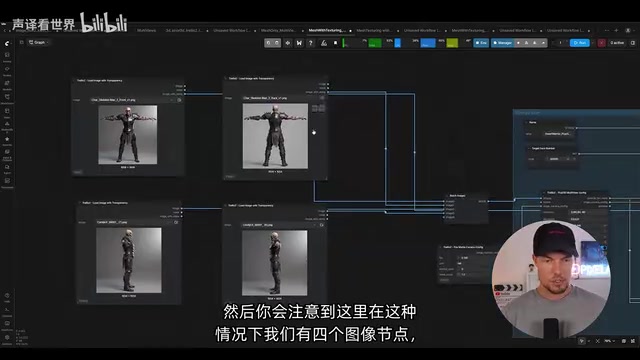
The recommended free alternative is using the Flux 2 Klein 9B image editing model. Search for flux client in the template library's image section, download the corresponding model, upload your original image, then generate side, back, and left views separately using prompts like "show side view." Download each one, and once you have all four views, return to the main workflow. Disable (bypass) the turnaround-related node groups, import each view using image loader nodes, connect them through background removal nodes (RMBG), and plug them into the Pixel 3D multi-view conditioning ports. Philip mentions he'll provide this workflow for free, saving users the manual setup.
VRAM Requirements and Hardware Thresholds
Philip conducted real-world VRAM usage tests — the most critical factor for local deployment:
- Default settings (four views): ~8–12GB VRAM required
- High settings (full 50-step sampling + high resolution): ~12–16GB VRAM required
- Bypassing the texturing stage: Can run on as little as 6–8GB VRAM
No GGUF quantized version exists yet, and Philip encourages users to experiment with lower VRAM configurations. For mid-range GPUs with 8GB VRAM, this is already a reasonably accessible threshold.
Tips for Better Results
Models generated with default settings aren't highly detailed and often show a "faceted" appearance, poor facial smoothness, or holes. Philip's optimization suggestions align with the official ComfyUI recommendations:
- Change the seed: The most direct fix for holes and artifacts
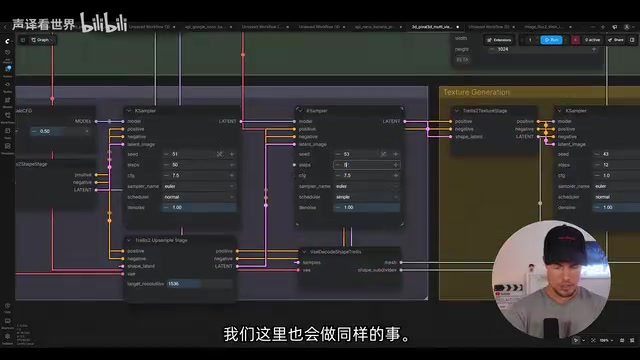
- Increase sampling steps to 50: Noticeably improves texture quality and fills previously present holes
- Adjust the field of view (default: 20): Pixel 3D multi-view projects views onto the mesh using different camera angles in 3D space. The FOV controls the camera layout and significantly affects the final mesh — try higher or lower values to find what works best
What is Field of View (FOV) in 3D Generation? Field of View (FOV) determines the range a virtual camera "sees" when looking at an object. A smaller FOV (like 20°) simulates a telephoto lens effect with low perspective distortion, suitable for preserving accurate proportions. A larger FOV acts like a wide-angle lens and introduces more perspective warping. Pixel 3D's multi-view workflow reconstructs shape by "projecting" each angle's image onto a 3D mesh — FOV directly affects this projection mapping. Incorrect settings can cause the mesh to be compressed or stretched in the depth direction, which is one potential reason rooftops appeared distorted in building tests.
Single-View vs. Multi-View: Real-World Comparison
Philip ran the same character through both single-view and multi-view pipelines and compared the results in Blender:
- Front view: Single-view was actually closer to the reference image with better textures
- Back view: Multi-view was significantly more accurate with clearer textures, since single-view relies entirely on algorithmic guessing for the back
- Organic model (human head): Facial details and proportions were largely correct, but eyelashes were mistakenly interpreted as geometry
- Architecture test: Multi-view performed poorly on buildings, with rooftop distortion — indicating that input images must be truly consistent and shot from orthographic (front-facing) angles
Philip repeatedly emphasizes that regardless of which method is used, the resulting wireframes are very messy and require retopology before being usable in production.
Advanced Capabilities in the Trellis 2 Version
Visual Bruno's Trellis 2 version is more complex to install, requiring step-by-step setup per the official guide, but it unlocks additional capabilities. Its workflow includes four image nodes and a batch merge node, with camera angles set to 0°, 180°, 90°, and -90° corresponding to each view.
The most practical addition is mesh re-texturing: you can take an existing 3D model (even one you've manually edited) and generate a new texture for it, as long as the model has materials attached. Additionally, Visual Bruno's workflow offers stronger UV unwrapping capabilities within Blender and supports hole-filling using MeshLab — directly addressing the hole artifacts that are common in the native ComfyUI workflow.
What is Mesh Texturing and UV Unwrapping? Mesh Texturing refers to the process of generating or projecting surface maps onto an existing 3D geometry — as opposed to generating shape and texture simultaneously from scratch. The practical value here is that users can first manually fix geometric issues in Blender (fill holes, retopologize), then feed the clean mesh back into the AI workflow to obtain high-quality textures, combining AI image understanding with human geometric repair. UV Unwrapping is the step that "flattens" a 3D surface into a 2D plane — a prerequisite for textures to map correctly onto a model — and Blender provides comprehensive tools for this.
Conclusion
The value of Pixel 3D's multi-view feature lies in bringing "high-accuracy 3D generation" within reach of local, free deployment on consumer-grade GPUs. It's not perfect — faceting, holes, and handling of organic models and architecture all have notable shortcomings, and the output still requires retopology before entering production. But for creators who want to explore AI 3D generation locally and for free, combining the free view generation pipeline via Flux 2 Klein with the multi-view workflow already delivers meaningfully more reliable model results than single-view mode.
Related articles

Gemini 4 Argon Hands-On: AI Builds Board Games, Constructs Temples, and Trains Robots Autonomously
Gemini 4 Argon hands-on roundup: AI autonomously builds a desk racetrack and temple in Blender, writes a ray tracing engine, trains a humanoid robot to sink 7 shots, plus API pricing and developer access.

The Magic Octagonal Coin: Why Only 9% of People Can Predict Its Flip?
Only 9% of people can correctly predict the Magic Octagon coin flip. This article explains its spatial rotation mechanism, common cognitive pitfalls, and a new hypothesis based on Relevance Theory, exploring the limits of human spatial reasoning.

Sam Altman: AI Is Entering the Era of Scientific Discovery — Math Breakthroughs Will Replicate in Biology and Energy
Sam Altman says AI is entering the era of scientific discovery — math breakthroughs will replicate in biology, materials science, and energy to help develop new drugs and energy sources.