Running Open-Source AI Video Models on 8GB VRAM: FreeVideo Hands-On Test

Open-source FreeVideo compresses MiniMax H3 to run on 8GB VRAM; tested 5-second video in about 7 minutes on a 16GB cloud GPU.
The article introduces FreeVideo, an open-source AI video project and lightweight port of MiniMax H3 that officially runs on as little as 8GB VRAM and generates a 10-second video in 1m49s on an RTX 5090. A YouTuber rented a 16GB VRAM, 32GB RAM cloud GPU via RunPod and generated a 5-second video in about 7 minutes, comparable to the original H3 on a 5090. Deployment takes 15–20 minutes and requires exposing port 8188. A 12GB-card build costs about $1,200–$1,357, and existing gaming PCs can run it directly. The article notes license exclusions for the US, EU/UK, and South Korea, data-loss risks from port changes, and the need for more user verification.
Title
8GB VRAM Runs Open-Source AI Video Model: FreeVideo Hands-On Test
Meta Description
An overseas YouTuber tests the open-source AI video model FreeVideo: generating a 5-second video takes about 7 minutes on a 16GB VRAM cloud GPU, the official claim is that it runs on 8GB VRAM, with a full RunPod deployment walkthrough and $1,200 build cost analysis.
Article Content
The capabilities of open-source AI video generation models are rapidly approaching those of closed-source products, but the hardware barrier has always been a high wall for ordinary users. Running mainstream video models usually requires a large-VRAM GPU, while most gamers' graphics cards only have 8GB to 16GB. In his latest video, a YouTube tech blogger hands-on tested an open-source project called FreeVideo, which claims to run on 8GB of VRAM, and provided a complete deployment process and generation speed data on a cloud GPU.
What Is FreeVideo: A Lightweight Port of H3
According to the blogger, FreeVideo is essentially a ported and compressed version of the MiniMax H3 model. H3 is one of his favorite local AI video models, but the original has harsh hardware requirements—running H3 in the ComfyUI environment with 12GB, 16GB, or even 8GB graphics cards makes generation wait times extremely long. On his own RTX 5090, generating a 10-second video takes about 10 minutes.
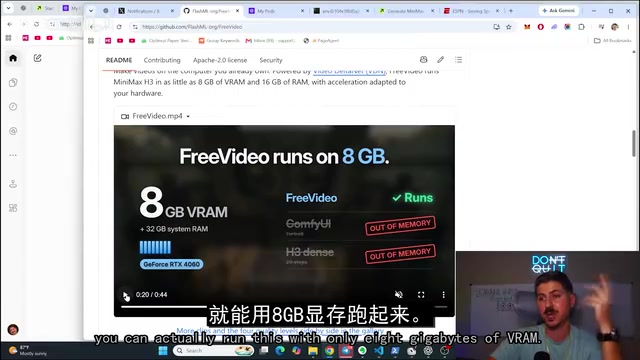
FreeVideo's selling point is "compressing" this model so it can run on low-VRAM devices. The project's stated figures are: on an RTX 5090, a 10-second clip takes only 1 minute 49 seconds. This number forms an order-of-magnitude difference from the blogger's experience with the original H3—if true, it means about a 5x improvement in generation efficiency. The official claim also states a minimum of 8GB VRAM is sufficient, covering mainstream cards like the RTX 4060 and 3070.
MiniMax H3 is a video generation foundation model launched by the Chinese AI company MiniMax, belonging to the video generation branch of its large model matrix. H3 is known for high generation quality and good motion consistency, but its parameter count is large, placing high demands on VRAM and compute. When running the original H3 in visual workflow tools like ComfyUI, model weights, intermediate activation values, and video frame caches occupy VRAM simultaneously, so low-VRAM cards easily trigger memory swapping, significantly prolonging generation time. FreeVideo addresses this bottleneck through engineering-level trimming and compression, enabling the model to complete inference on consumer-grade graphics cards at acceptable speeds.
Test Environment: Deliberately Choosing a "Budget Configuration"
The blogger did not directly use his own 5090 for testing, but rented an RTX 2088 (16GB VRAM, 32GB RAM) cloud GPU through RunPod. His reasoning was straightforward: the 5090 does not represent most viewers' real devices; 12GB, 8GB, and 16GB graphics cards are more common configurations.
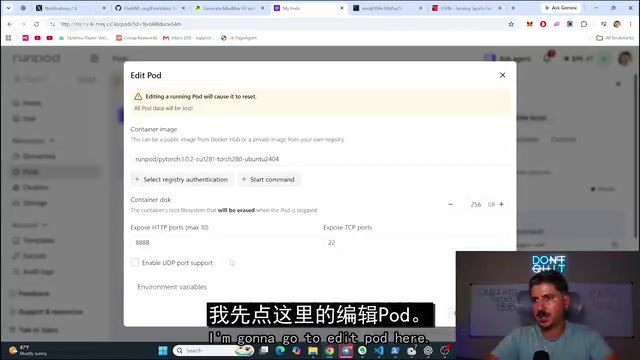
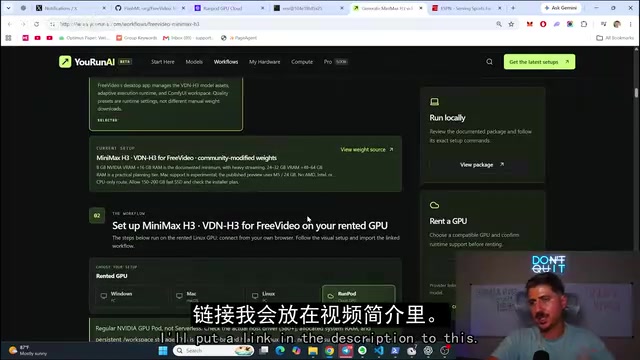
The deployment process follows the official guide on YouRunAI.com: deploy a Pod on RunPod, edit the configuration to expose port 8188, execute a series of commands through the web terminal, check the CUDA environment (measured as CUDA 13), install dependencies, configure Tmux to keep the session alive, clone the repository and run the Linux install script. The whole process takes about 15 to 20 minutes, after which the interface is started and an access URL is generated.
It is worth noting that the blogger mentioned an easily overlooked detail: the model license excludes regions such as the United States, the EU, the UK, and South Korea, so users should verify compliance before use. In addition, modifying the Pod port configuration may cause existing data loss.
RunPod is a cloud GPU rental platform that charges by the hour, where users can create Pods (containerized running instances), choose different GPU and memory configurations, and operate remotely via web terminal or SSH. The "expose port 8188" mentioned in the article refers to mapping the 8188 port used by default by ComfyUI inside the Pod to the public internet so that the generation interface can be accessed through a browser. CUDA is NVIDIA's parallel computing platform; CUDA 13 represents a newer runtime version, and dependencies need to match it during installation. Tmux is a terminal multiplexer used to keep processes running in a remote session and prevent deployment interruption after SSH disconnects.
Generation Speed: Real Data on 16GB VRAM
With a 16GB VRAM and 32GB RAM configuration, the blogger generated a 5-second video in 420 seconds, about 7 minutes. He specifically pointed out that this speed is "roughly equivalent" to, or perhaps slightly faster than, the time he spent running the original H3 on an RTX 5090.

The significance of this result is that users do not need top-tier hardware to get a generation experience close to top-tier devices. The blogger also admitted that if VRAM drops further to 12GB or 8GB, generation time will increase accordingly, but the overall process remains usable. The interface operation is similar to mainstream online video generation platforms—enter a description, select landscape or portrait and quality, and click generate.
Cost Accounting: What $1,200 Can Build
To answer the question "how much does it actually cost," the blogger simulated a build centered on a 12GB graphics card on PC Part Picker, totaling about $1,357, and believes that through price comparison it can be brought down to around $1,200. His judgment is: if you already have a reasonably capable gaming PC, you can absolutely use it to run FreeVideo; if building from scratch, $1,200 for a machine that handles both gaming and local AI is acceptable value for money.
For users with no GPU at all, the blogger also mentioned that they can run it by renting a cloud GPU, or even operate it remotely from a basic laptop. The essence of this path is converting hardware costs into hourly compute expenses, suitable for users who just want to try it out without a one-time investment.
PC Part Picker is a build configuration simulation and price comparison website where users can select components such as CPU, graphics card, motherboard, and memory, and the site automatically checks compatibility and aggregates prices. The blogger used it to simulate a 12GB graphics card plan to give viewers a reproducible budget reference. It should be noted that graphics card prices fluctuate considerably, and taxes and channel prices vary significantly by region; $1,200 is an optimistic estimate, and the actual cost may be higher. For users who already have a gaming PC, as long as the graphics card has 8GB or more VRAM, they usually do not need to purchase additional hardware to try it.
Why This Matters
The trend represented by FreeVideo is more important than any single project: open-source video models are using quantization, distillation, and engineering optimization to bring generation capabilities that originally belonged to high-end workstations down to consumer-grade hardware. When 8GB VRAM becomes a usable lower bound, the target audience for local AI video creation expands from geeks and researchers to ordinary gamers.
Of course, the measured data comes from a single source, and performance under different hardware combinations and parameter settings still needs verification by more users. The license's regional restrictions, the data risk of port configuration, and the actual time consumption under low VRAM are all factors to consider before getting started. But at least from this test, "running AI video on 8GB VRAM" has gone from a slogan to a reproducible workflow.
One-line Summary
The open-source project FreeVideo compresses MiniMax H3 to run on 8GB VRAM; a hands-on test on a 16GB cloud GPU generated a 5-second video in about 7 minutes.
Paragraph Summary
The article introduces the open-source AI video generation project FreeVideo, a lightweight port of the MiniMax H3 model that officially claims to run on as little as 8GB of VRAM and can generate a 10-second video on an RTX 5090 in just 1 minute 49 seconds. A YouTube blogger rented a cloud GPU with 16GB VRAM and 32GB RAM through RunPod for a hands-on test; a 5-second video took about 7 minutes, comparable to the original H3 on a 5090. The deployment process takes about 15 to 20 minutes and requires exposing port 8188 and executing commands through a web terminal. A build centered on a 12GB graphics card costs about $1,200 to $1,357, and an existing gaming PC can run it directly. The article also notes that the model license excludes regions such as the United States, the EU, the UK, and South Korea, that modifying port configuration may cause data loss, and that the measured data still needs verification by more users.
Related articles

Gemini 4 Argon Hands-On: AI Builds Board Games, Constructs Temples, and Trains Robots Autonomously
Gemini 4 Argon hands-on roundup: AI autonomously builds a desk racetrack and temple in Blender, writes a ray tracing engine, trains a humanoid robot to sink 7 shots, plus API pricing and developer access.

The Magic Octagonal Coin: Why Only 9% of People Can Predict Its Flip?
Only 9% of people can correctly predict the Magic Octagon coin flip. This article explains its spatial rotation mechanism, common cognitive pitfalls, and a new hypothesis based on Relevance Theory, exploring the limits of human spatial reasoning.

Sam Altman: AI Is Entering the Era of Scientific Discovery — Math Breakthroughs Will Replicate in Biology and Energy
Sam Altman says AI is entering the era of scientific discovery — math breakthroughs will replicate in biology, materials science, and energy to help develop new drugs and energy sources.