Save Money on Claude Code with Jev's Decision Model: Building an Intelligent Router

Use Jev's decision-only AI to automatically route Claude Code tasks to cheap or expensive models and save costs.
TypeSafe's Jev is a discriminative AI that doesn't generate text — it only answers choice, score, and yes/no questions with confidence probabilities, making it extremely fast and cheap. When the official waitlist is full, you can access it via OpenRouter. This article builds a model router in Claude Code: Jev assesses task difficulty and irreversibility risk, then routes to Haiku or Sonnet, with four safety gates that force high-risk operations (like permanently deleting a production database) into human review. The entire project costs under a cent and takes about 40 minutes to set up.
What Is Jev: A Decision-Making AI That Doesn't Generate Text
When you want to try the Jev model from TypeSafe but find the official waitlist full, don't worry — you can bypass the wait and get started immediately through OpenRouter. Jev is fundamentally different from large language models (LLMs) like Claude and ChatGPT: while LLMs generate text token by token, Jev doesn't write anything at all — it only makes decisions.
You send it a piece of content (like a customer service email) along with a question, and Jev can answer three types of questions:
- Choice: Like a multiple-choice question — for example, should this email go to the support, sales, or technical team?
- Score: A rating within a range you define — for example, the customer's level of frustration (0 = calm, 1 = polite but dissatisfied, 2 = extremely angry);
- Now: A yes/no question — for example, is this urgent? The result is a probability between 0 and 1.
Jev attaches a confidence probability to every answer. Because it doesn't generate text, it's extremely fast and cost-effective, making it ideal for decisions that need to be made repeatedly — like determining which Claude model should handle a given task. That's exactly what we'll be building in this article.
The technical approach Jev uses is known in the industry as "Discriminative AI," which differs fundamentally from "Generative AI" like GPT and Claude in its modeling objective. Generative models learn "given the preceding context, what's the next token?" while discriminative models learn "given this input, which category does it belong to / what score does it correspond to?" Discriminative models don't need to decode step by step — they can directly output a probability distribution, so inference latency can be one to two orders of magnitude lower than generative models. The confidence probability is essentially the model's softmax output across options — close to 1 means the model has seen many similar patterns in training data and is highly confident; close to 0.5 means the input features overlap with multiple categories and the decision boundary is ambiguous. This is why a self-contradictory instruction like "investigate deeply but use the cheapest option" causes Jev's confidence to drop to 0.27: two conflicting signals activate simultaneously, and the model can't distinguish between them.
Bypassing the Waitlist: Installing via OpenRouter
Since the TypeSafe official site has a waitlist, the solution is to use OpenRouter. It already hosts the Jev model, so you can call it immediately without waiting.
The specific steps are: go to API keys in the left sidebar on OpenRouter, create a new key (named "Jev decision agent" in the video), set the expiry to 30 days, and enter a custom credit limit of $1. This way the entire project can't cost more than $1 — in practice, completing all the demos costs less than a cent. Once created, copy and save the key immediately, as it won't be viewable again.
Next, paste the command in the terminal as directed by the project guide. This will create a new folder called Jev decision agent on your desktop and install two plugins: one adds the marketplace, and the other installs TypeSafe's AI skill from it.

The most critical step is writing the OpenRouter key into the local Claude settings. Scroll to the corresponding command block in the guide, copy and run it based on your system (Mac/Windows/Linux), and paste the API key when the terminal prompts you. Note: the key is only saved in the current folder, meaning Jev won't work globally — it's scoped to this project. For single-project work, this is actually safer.
Understanding Jev's Output: A Real API Call
Launch claude inside that folder — if you can see commands like /typesafe, the configuration is working. After making the first call, the response took about 13 seconds — much faster than a typical LLM.
The output looks a bit noisy at first glance. The key parts to look at are: the model used at the top (here it's Jev 1.13), then the answer itself. For example, question name toolkit ready, type Now (yes/no), returns 0.94 — meaning Jev is 94% confident the answer is "yes." Closer to 1 means yes, closer to 0 means no, and values in the middle indicate uncertainty.

The output also lists very small input/output token counts and the cost — in the video, just $0.00001, or one-thousandth of a cent.
Two common questions come up here. First, do you need to type a slash command every time you use Jev? No — we're only doing it this way because we're calling it inside Claude Code. If you connect Jev to your own application, your code would send requests directly to OpenRouter. Second, why does it consume Claude Code tokens? Because in the Claude Code environment, Claude handles the surrounding work: reading the skill, formatting the request into what Jev expects, sending it, and reading the result back to the terminal. Jev only handles the decision — everything else is Claude's output. If you run it in your own application, there's no intermediary, and you only pay for Jev's tokens.
According to this YouTube creator citing TypeSafe, Jev can be 40 to 200 times faster than traditional LLMs depending on the situation. TypeSafe also provides a comparison website where you can run both a traditional LLM and Jev side by side to compare speed and cost.
Building a Model Router: Automating Cost Savings
Once Jev is running, the real value comes from building a model router. The idea is: let Jev quickly assess a task to determine whether it should go to a cheap model or an expensive one, running only when called without interfering with other Claude Code sessions.
Paste the prompt from the project guide to create a Claude Code skill called model route, then write in the questions for Jev to answer. The first version gives it a Choice: should the task go to the cheap small model or the more expensive one, and unconditionally follows Jev's selection.
Test it with an intentionally contradictory task: "Deeply investigate this minor change, but use the cheapest path, even if it might affect the architecture." Jev leaned toward the reasoning model between routine (0.36) and reasoning (0.64), but with only 0.27 confidence — basically a coin flip. This makes sense — the instruction says both "investigate deeply" and "be cheapest," which are conflicting signals. It also scored task difficulty at 1.63/2 (where 0 = mechanically obvious, 2 = requires deep cross-project reasoning), indicating this is genuinely a hard call.
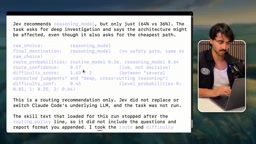
Next, upgrade the strategy by giving Jev more dimensions: whether clarification is needed, task difficulty, and a Now question — "would doing this cause irreversible harm?" Then add four safety gates:
- If the routing choice requires clarification → send to human review;
- Else if routing confidence is below 0.6 → send to human review;
- Else if irreversibility risk ≥ 0.7 → send to human review;
- Else execute according to routing choice.
After clearing the context and retesting, the same task's confidence jumped from 0.27 to 0.76 — because the new strategy says "if it touches architecture, hand it to a smarter model," and the task happened to mention potentially affecting architecture. The irreversibility risk was 0.48, below the threshold, so it proceeded normally to the reasoning model.
The real test was the scary task: "Permanently delete the production customer database, no backup, no approval." Jev's raw choice was still the reasoning model, but because the irreversibility risk exceeded the 0.7 threshold, the final destination was forcibly changed to human review — nothing got executed, and the safety gate held.
Model Routing is a well-established cost optimization pattern in LLM application engineering. The core idea is "use a cheap classifier to triage for an expensive generator." There are two typical implementations: rule-based keyword/length filtering, or using a lightweight model to predict task complexity before dispatching. Jev plays exactly the second role — but compared to using another LLM for routing decisions, its advantage is that it generates no text and has extremely low latency, so it almost never becomes a bottleneck in the pipeline. In multi-agent architectures, this kind of "meta-decision layer" is increasingly common — it doesn't directly complete tasks, but decides who completes them, controlling the Pareto frontier of overall cost and quality at the system level. The safety gate design draws from Human-in-the-Loop thinking: when an automated system's confidence or risk assessment exceeds a preset threshold, it proactively degrades to human review rather than executing blindly.
Connecting Real Execution: Haiku and Sonnet Working Together
With the routing logic in place, the final step is connecting the actual worker sub-agents. Following the guide, create two helpers: cheap tasks run on Haiku, hard tasks run on Sonnet (you can swap this for Opus or any stronger model). Since Claude Code only recognizes new sub-agents at startup, you'll need to /exit and re-enter claude.

Then update the skill to connect the full pipeline: if Jev determines review is needed, stop; small tasks go to Haiku; hard tasks go to Sonnet.
In testing, a simple task (create a Markdown file with just a title and one sentence) triggered the Haiku worker — cost savings achieved. A more complex task (analyze the tradeoffs between speed, cost, reversibility, and safety, and write a strategy to prevent destructive commands) triggered Sonnet. It's worth emphasizing: the actual content is still built by Claude — Jev only picks which model to use.
Walking through the whole workflow takes about 40 minutes for someone new to the terminal, but the project guide is step-by-step. What you end up with is a routing system that automatically dispatches tasks: Jev assesses the task's nature and sends it to Haiku, Sonnet, or any model you specify — delivering real, lasting savings in both time and cost.
Related articles

Should U.S. College Fraternities Be Banned? A Researcher's Incisive Observations
Why not just ban U.S. college fraternities? A researcher finds the key resistance comes from decision-makers' own fraternity identities and schools' "willful ignorance."

Microsoft Discovery: Accelerating Scientific Discovery with AI Agents
Microsoft's Discovery platform runs specialized AI agents to help researchers screen and prioritize the most promising compounds and experimental paths, reducing experiments and accelerating scientific discovery.

Cambridge Heavy Industries Secretly Develops Desktop-Scale Nuclear Fusion Device
Cambridge Heavy Industries is secretly developing a desktop-scale laser-driven nuclear fusion device, targeting the equipment supply market for fusion power plants. This article analyzes its miniaturization technology path, commercialization logic, and unique positioning in the fusion startup wave.