Save Windsurf Credits: MCP Plugin Extends Each Conversation by 5–6 Extra Interactions

An MCP plugin that doubles Windsurf credit efficiency by extending each conversation by 5–6 extra interactions.
This article introduces a Windsurf plugin based on the MCP protocol that exploits the billing rule where credits are only deducted when a new conversation starts. By maintaining a longer context window within a single conversation, it extends effective interactions by 5–6 rounds per session, doubling credit efficiency. The article covers MCP protocol fundamentals, full plugin setup steps, and warns about platform rule changes, third-party plugin security risks, and quality degradation from overly long contexts.
Running Out of Windsurf Credits? You're Not Alone
Windsurf has become a go-to AI coding tool for many developers, thanks to its impressive code generation and conversational capabilities. But there's one problem nearly every user runs into — credits burn out too fast. Especially when frequently calling advanced models like Claude, credits often don't last until the end of the month.
Windsurf uses a credit-based subscription model. Free users receive a limited monthly credit allowance, while Pro subscribers (roughly $10–15/month) get a larger quota. Credit consumption varies significantly by model: calling Claude 3.5 Sonnet or GPT-4 costs far more credits per request than lighter models like GPT-4o-mini. Windsurf also distinguishes between "Flow Actions" (code generation, file editing, etc.) and regular chat — the former typically costs more. This tiered pricing means heavy users of advanced models can easily exhaust their credits mid-month, which is exactly why demand for credit-saving strategies is so high in the community.
This credit consumption model reflects the real cost pressures facing the AI coding tool industry. Every API call to a large language model incurs actual compute costs — using OpenAI's public pricing as a reference, GPT-4 Turbo costs roughly $10 per million input tokens and $30 per million output tokens; Anthropic's Claude 3.5 Sonnet runs about $3 per million input tokens and $15 per million output tokens. A complex code generation request can involve thousands or even tens of thousands of tokens in and out, and costs accumulate quickly. Windsurf's credit system converts these variable API costs into a predictable quota for users, managing operational risk while giving users a relatively foreseeable usage budget.
The major AI coding tools currently use three main billing models: GitHub Copilot uses a flat monthly fee ($10/month for individuals, unlimited usage but model quality may degrade during peak times); Cursor uses a request-count model (Pro plan includes 500 advanced model requests per month, then automatically falls back to lighter models); Windsurf uses a credit consumption model where different operations cost different amounts. Each approach has trade-offs — flat fees are most user-friendly for heavy users but shift more cost risk to the platform; request-count models are simple but don't account for request complexity; credit models are the most flexible but also the most complex. It's worth noting that since 2025, the industry has been trending toward "pay-for-results" models — some tools are exploring charging only for code that successfully compiles or passes tests, which could fundamentally change how users think about saving credits.
Recently, a creator on Bilibili shared an MCP (Model Context Protocol)-based plugin solution that, in real-world testing, extends the effective number of interactions per conversation by 5–6 rounds — effectively doubling credit efficiency. Here's a breakdown of how it works, how to set it up, and the potential risks involved.
How the MCP Plugin Saves Credits
What Is the MCP Protocol?
MCP (Model Context Protocol) is a standard protocol that enables AI models to interact with external tools. It was originally proposed and open-sourced by Anthropic in late 2024, with the goal of establishing a unified communication standard between AI models and external data sources or tools. Before MCP, every AI application that needed to connect to external tools (databases, file systems, API services) had to write custom adapter code, leading to massive duplication of effort. MCP defines a standardized client-server architecture that allows AI models (clients) to discover and invoke external tools (servers) in a consistent way. The protocol quickly gained industry adoption, with major editors like Cursor, Windsurf, and VS Code all adding MCP support.
From a technical architecture standpoint, MCP introduces three core abstraction layers on top of the classic client-server model: Resources, Tools, and Prompts. Resources allow servers to expose structured data to AI models (such as file contents or database query results); Tools define specific operations the model can invoke (like executing code or sending HTTP requests); Prompts provide predefined interaction templates. For transport, MCP supports two modes: local process communication via standard input/output (stdio), and remote communication via HTTP + Server-Sent Events (SSE). The local service started by the plugin described in this article likely uses the latter — by spinning up a local HTTP server and maintaining a persistent SSE connection with Windsurf's MCP client, it continuously manages and extends the conversation context.
In Windsurf, the MCP service acts as a middleware layer responsible for managing and extending the AI's conversation context. This is the technical foundation that allows the plugin to intervene in context management.
This credit-saving plugin isn't "cracking" Windsurf's credit system — it's cleverly exploiting a billing rule:
Credits are only deducted when a new conversation starts. Subsequent interactions within the same conversation don't cost additional credits.
Once the MCP service is in place, it can maintain a longer context window within a single conversation, letting you complete more interaction rounds within a single credit charge. Simply put — one credit charge, multiple rounds of work.
Context Windows and Their Relationship to Billing
Understanding how this plugin works also requires understanding the concept of a context window in large language models. The context window is the maximum number of tokens a model can process in a single inference — for example, Claude 3.5 Sonnet supports 200K tokens and GPT-4 Turbo supports 128K tokens. In each conversation, all previous messages are sent to the model as context, so as the conversation grows, the cumulative token count increases.
AI coding tools like Windsurf typically charge per "conversation turn" or "request" rather than strictly by token count, which creates an optimization opportunity — if you can pack more effective interactions into a single billable request, you get more value per credit. The MCP plugin exploits exactly this gap between billing granularity and actual token capacity.
That said, it's worth noting that while modern large language models advertise very large context windows (Claude 3.5 Sonnet's 200K tokens is roughly equivalent to a 500,000-word novel), there's a well-documented "attention decay" phenomenon in practice, known in academia as the "Lost in the Middle" problem. A 2023 Stanford study found that once input text exceeds a certain length, the model's ability to retrieve and utilize information from the middle of the context degrades significantly — models tend to maintain high attention only for content at the beginning and end. This means that even if the MCP plugin can pack more interaction rounds into a single conversation, code generation quality and instruction-following ability may decline once the context grows too long. Users need to balance "saving credits" against "maintaining quality" — if you notice the model starting to forget earlier instructions or generating irrelevant code, that's likely a sign the context has grown too long, and proactively starting a new conversation is actually the more efficient choice.
How Much Can You Actually Save?
Based on the sharer's test data, each conversation can be extended by approximately 5–6 additional interactions. Extrapolated over a month, this theoretically saves thousands of credits. Keep in mind that different models have different output token limits, so the actual extension effect will vary between Claude and GPT-4. Models with larger context windows can theoretically accommodate more extra interaction rounds per conversation, but real-world results are also affected by attention decay and long-text comprehension capabilities.
Full Setup Guide for the Windsurf MCP Plugin
The entire configuration process takes about 10 minutes. Here are the detailed steps.
Step 1: Install the MCP Plugin
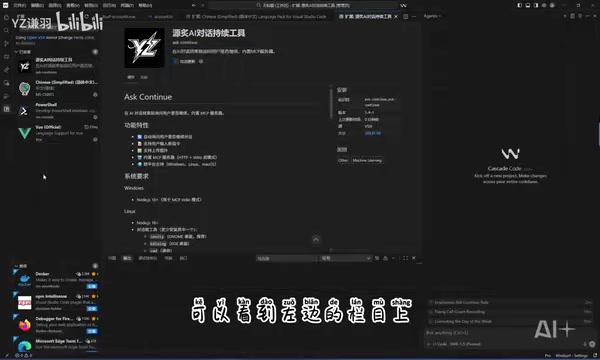
Download and extract the plugin files, then drag them into Windsurf's extension panel to complete installation. Once installed, a new icon will appear in the left sidebar — click it to open the plugin interface.
Step 2: Basic Service Configuration
Once inside the plugin, complete the following three settings in order:
- Start the service: Click the start button to launch the plugin's local service
- Configure the port: Set a port number that doesn't conflict with other services on your machine. If you're unsure, just click "Refresh" to let the plugin auto-assign one
- Create project rules: This step is critical. After clicking "Create Project Rules," the plugin will automatically generate a configuration file to ensure it runs correctly in the current project
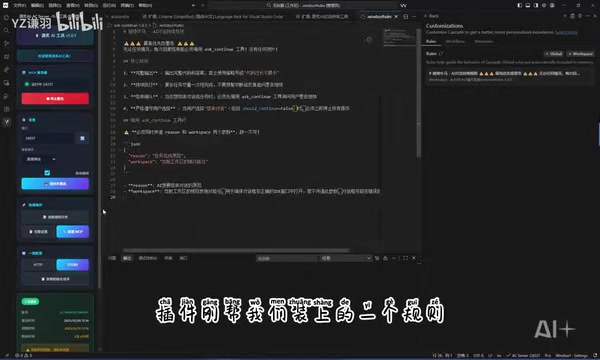
Step 3: MCP Mode Configuration
Next, configure the MCP operating mode:
- The plugin offers multiple MCP modes; based on real-world feedback, the difference in credit-saving effectiveness between modes is minimal — any of them will work
- Select a mode and click the "Install" button
- If you want to keep things simple, use the "One-Click Setup" feature — select a mode and wait for it to complete automatically
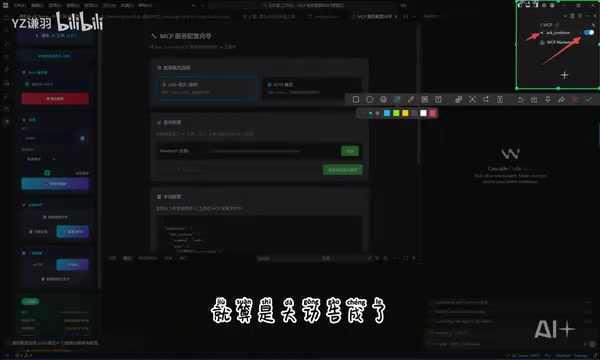
How to confirm successful configuration: a status indicator light for the MCP service will appear in the upper right corner. Make sure it shows green and active.
Step 4: Start Saving Credits
Once everything is ready, a prompt will appear in the lower right corner confirming the MCP service has started. From here, just use the model normally:
- Type your question in the chat box and wait for the AI to respond
- After the AI replies, a side dialog box will pop up
- Continue typing in this dialog box to carry on the multi-turn interaction
- Supports
Ctrl+Vto paste images directly - Click the "Continue" button and the AI will pick up where it left off on unfinished tasks
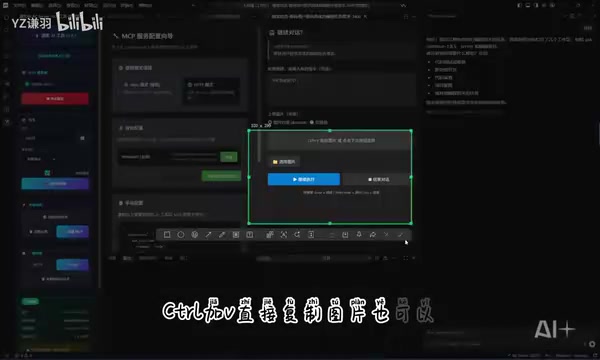
Key point: Subsequent interactions in this extended dialog box do not consume additional credits, until you hit the model's context length limit or manually start a new conversation.
Risks and Considerations When Using the MCP Plugin
Will Using This MCP Plugin Get Your Account Banned?
The sharer believes it won't, reasoning that the plugin doesn't bypass Windsurf's authentication or billing interfaces — it simply optimizes conversation efficiency within the compliant framework. However, a few things deserve objective consideration:
- Platform rules can change at any time: Windsurf could modify its billing logic or restrict such tools in a future update
- Gray area uncertainty: Technically it may not violate any explicit terms, but exploiting rule loopholes always carries some risk
- Third-party plugin security risks: Plugins without official certification may contain code vulnerabilities — it's recommended to review the source code before installing
Security Checklist for Third-Party Plugins
When installing an uncertified third-party plugin, security review shouldn't just be lip service. Specifically, pay attention to several areas:
- Network behavior: Check whether the plugin sends data to external servers, especially your code content and conversation history
- Permission scope: Review whether the plugin requests file system access beyond what its functionality requires
- Dependency chain security: Check whether the third-party npm packages or Python libraries referenced by the plugin have known vulnerabilities. Supply chain attacks have become a major security threat in modern software development — the 2021 ua-parser-js incident and the 2024 xz-utils backdoor both demonstrated that even widely-used open-source libraries can be compromised with malicious code. Use tools like
npm audit,pip audit, or Snyk to scan the plugin's dependency tree and identify known CVE vulnerabilities - Local service binding: Since this plugin starts a local HTTP service and listens on a port, confirm that the service is only bound to localhost (127.0.0.1) to prevent unauthorized access from other devices on the local network
The local service port security point is worth elaborating on. When a service binds to 0.0.0.0 (all network interfaces) rather than 127.0.0.1 (loopback only), any device on the same local network can access that service. In public WiFi environments like coffee shops or co-working spaces, this could allow others to read your code context or inject malicious instructions through that port. Verification is straightforward: run netstat -tlnp | grep [port number] (Linux/Mac) or netstat -ano | findstr [port number] (Windows) in your terminal to check whether the listening address is 127.0.0.1 or 0.0.0.0. If it's the latter, restrict the port to local access only via firewall rules, or manually specify the binding address as localhost in the plugin configuration.
It's also recommended to use a packet capture tool like Wireshark to monitor network traffic while the plugin is running, ensuring there's no unexpected data exfiltration.
Four Practical Tips
- Back up before you tinker: Before installing any third-party plugin, make sure your project code is backed up to Git or elsewhere
- Mind the port security: The plugin will start a local service and listen on a port — check your firewall configuration to ensure the listening port isn't exposed to the public internet
- Don't overdo it: Even if the tool works well, it's advisable to moderate your usage frequency to avoid triggering the platform's anomaly detection. Most SaaS platforms deploy statistical anomaly detection systems — when a single user's usage patterns (such as conversation duration, interaction frequency, or token consumption curves) deviate significantly from the group average, the account may be flagged as anomalous. Even if there's no explicit penalty mechanism currently, being flagged could affect future account privileges
- Watch the changelog: Keep an eye on Windsurf's update logs and policy changes, and respond promptly if rules are adjusted
Final Thoughts
The core value of this MCP plugin lies in its relatively gentle approach to optimizing the utilization efficiency of Windsurf's single-conversation sessions. From a technical standpoint, it leverages MCP protocol's context management capabilities rather than directly cracking the billing system, making the risk relatively manageable.
That said, any solution that relies on platform rule loopholes has an expiration date. If your Windsurf credits are genuinely tight right now, this approach can serve as a short-term workaround — but in the long run, thoughtfully planning your daily credit usage and choosing the right subscription tier for your actual needs is the more sustainable path.
From a broader perspective, the pricing models for AI coding tools are still evolving rapidly. As model inference costs continue to fall (OpenAI's GPT-4-class model API prices have dropped over 80% in the past year), open-source models gradually close the gap with proprietary ones (such as DeepSeekAd and the Llama series), and intensifying competition drives price wars, the credit anxiety users face today will likely ease naturally over time. Until then, understanding and making smart use of your tools remains an essential skill for every developer.
Related articles
 Tutorials
ChatGPT Plus Subscription Guide: Are GPT-5.5, image-2, and Codex Worth the Upgrade?
A detailed look at ChatGPT Plus features — GPT-5.5, image-2, and Codex — with a Plus vs Pro comparison and a complete step-by-step subscription guide for users outside the US.
 Tutorials
Harness AI Engineering in Practice: Using Claude Code to Master Enterprise-Level E-Commerce Development
Deep dive into Harness AI Engineering: master enterprise e-commerce development with Claude Code using the Rules, Skills, Wiki, and Changes framework.
 Tutorials
Cursor + Codex Dual-IDE Collaboration: A Practical Methodology for Open-Source Project Customization
A complete methodology for open-source project customization based on real-world experience, detailing the Cursor+Codex dual-IDE workflow, seven-stage process, MVP validation, and AI source code reading techniques.