Scout by Fini: The AI Support Teammate in Slack That Reads Tickets and Drafts Fixes

Scout by Fini is an AI teammate in Slack that analyzes tickets and drafts fixes, with human approval.
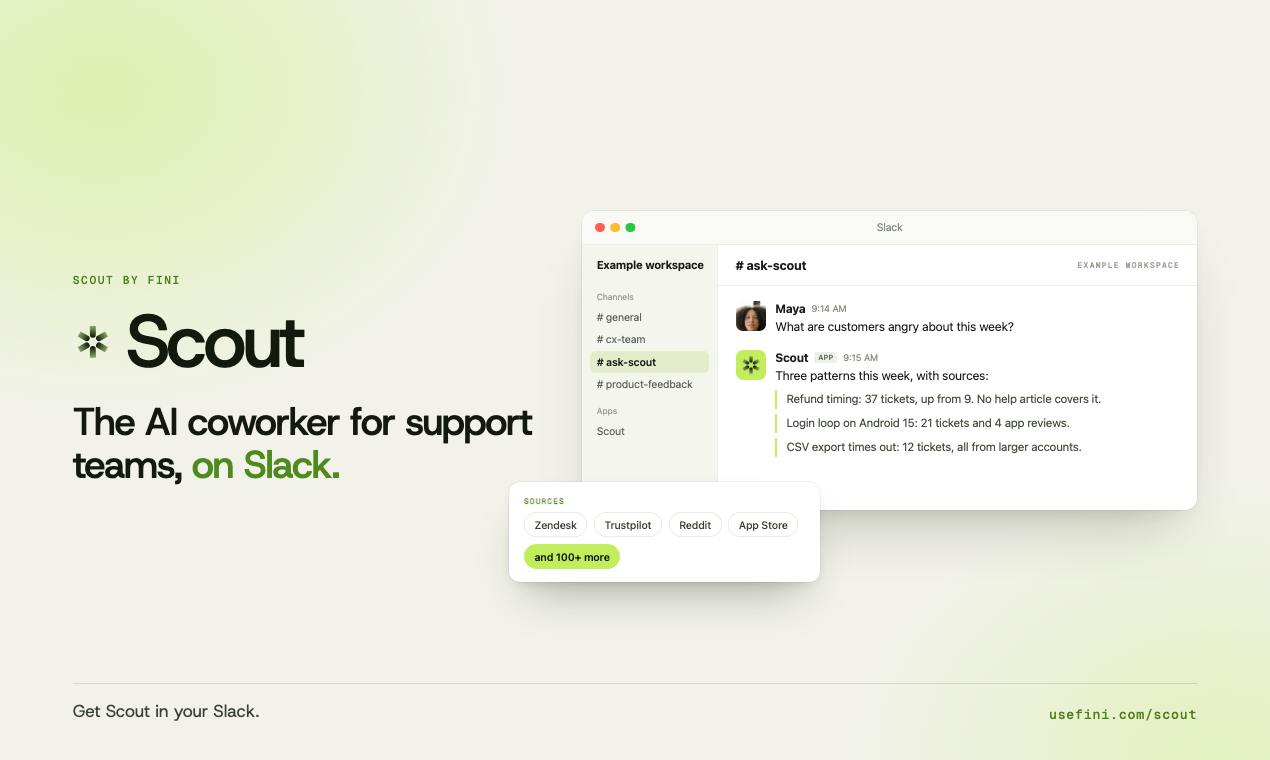
Scout by Fini is an AI tool on Product Hunt positioned as an "AI teammate for support teams." In Slack, users ask questions in plain language; the AI reads tickets, transcripts, and reviews, summarizes patterns, and drafts fixes—all human-approved. Onboarding requires Fini team permission setup, so the trial barrier is high. It received 71 votes and ranked 17th; still early-stage.
Customer support teams spend their days combing through tickets, call transcripts, and user feedback to spot patterns and write up fixes—a time-consuming process that's easy to get wrong. Scout by Fini, launched on Product Hunt, aims to hand this work to AI: ask a question in plain language in Slack, and it reads the relevant materials, summarizes patterns, and drafts changes for human approval.
What problem it solves
Scout positions itself as an "AI teammate for support teams," not just another customer service bot. Traditional support tools focus on replying to users; Scout focuses on helping teams digest information internally—connecting the dots across ticket systems, call transcripts, and review records to answer questions like "What do these complaints have in common lately?" or "How should we fix this?"
According to its Product Hunt page, users simply ask questions in plain language, and Scout reads tickets, reviews, and call transcripts, identifies patterns, and drafts fixes. This process compresses the repetitive work of "manually digging through records to find patterns" into a single conversation.
Human-in-the-loop design
Scout explicitly requires that "every change be approved by a human." This constraint is worth noting: AI handles discovery and drafting, while humans handle decisions and implementation. For support scenarios, this reduces the risk of AI misjudgments reaching users directly, and it keeps the team in control of fixes.
In terms of onboarding, Scout requires permission configuration through the Fini team rather than self-service signup. This means it's better suited to teams that already have some support processes in place and are willing to invest in setup, rather than individual users who want to try it immediately.
"Human-in-the-Loop" (HITL) is a common paradigm in AI system design, referring to keeping human review or decision points at key stages of an automated workflow. The opposite is a fully automated "human-out-of-the-loop" model. In support scenarios, HITL is especially important because AI's summarization of ticket patterns and proposed fixes may be wrong; if these reached users directly, they could pose brand risk. HITL sacrifices some efficiency but significantly lowers the cost of errors and lets teams gradually build trust in AI output over time. Scout explicitly builds approval into the workflow—a textbook application of this paradigm.
How it differs from similar tools
Most AI support products on the market revolve around "auto-replies," while Scout stands behind the support team to do analysis and drafting. It doesn't face end users directly; instead, it amplifies the team's ability to process feedback. This "AI teammate" positioning fits well with collaboration habits in Slack: asking questions, discussing, and approving all happen in the same workflow.
Based on launch data, Scout received 71 votes and 4 comments, ranking 17th. That's moderate traction—the concept is appealing, but the product is still early-stage, and its real-world effectiveness remains to be validated by more teams.
As an enterprise collaboration platform, Slack's value lies not just in instant messaging but in how it has become the workflow hub for many teams. Ticket systems, monitoring alerts, and approval flows can all be integrated into the same interface via Slack apps. By choosing Slack as its entry point, Scout lets users complete the "ask—analyze—approve" loop without switching tools, lowering the psychological barrier to adopting a new tool. For teams already deeply invested in Slack, this native integration fits existing habits more easily than a standalone web app—and it's a key interaction difference from auto-reply–style support tools.
Who it's for
If your team already collaborates in Slack and handles a high volume of support feedback that needs regular pattern analysis, Scout is worth a look. But it relies on the Fini team to configure permissions, making the trial barrier higher than with plug-and-play tools. For small teams with limited budgets or simple processes, it may not be a priority for now.
Overall, Scout represents a new direction: AI doesn't replace support agents—it becomes their "analyst teammate." Whether this positioning holds up depends on the quality of its summarization on real ticket data and whether the approval workflow is smooth enough.
One-line Summary
Scout by Fini is an AI teammate in Slack that helps support teams analyze tickets and draft fixes, with all changes approved by humans.
Paragraph Summary
Scout by Fini is an AI tool launched on Product Hunt, positioned as an "AI teammate for support teams" rather than a customer service bot. It lets users ask questions in plain language in Slack; the AI reads tickets, call transcripts, and review records, summarizes problem patterns, and drafts fixes—all of which must be approved by a human. This human-in-the-loop design reduces the risk of AI misjudgments reaching users directly. Onboarding requires permission configuration by the Fini team rather than self-service signup, so the trial barrier is relatively high. Unlike auto-reply tools, Scout focuses on internal information digestion. It received 71 votes and ranked 17th at launch; the product is still early-stage, and its real-world effectiveness remains to be verified.
Related articles

Reinforcement Learning Takes On Getting Over It: Distributed Training Strategies Behind 63% Progress
A developer uses deep reinforcement learning to tackle Getting Over It. The agent climbs from the bottom to 63% progress but gets stuck at the anvil. The project is open-sourced, using divide-and-conquer training and CPU-only training, seeking community collaboration to break the bottleneck.

Sigma FP2 Released: The World's Smallest Full-Frame Camera Gets Sensor and Screen Upgrades
Sigma launches the FP2 full-frame camera, retaining its smallest-and-lightest design with three key upgrades: improved sensor, articulating LCD screen, and longer battery life—built for portable video creators.

AAAI 2027 Phase 2 Decisions Imminent: Community Debates Review Fairness and Submission Ecosystem
AAAI 2027 phase 2 review results are imminent, with the Reddit community debating reviewer consistency and process transparency. This article examines pre-decision sentiment, structural tensions in top conference review, and practical strategies for authors.