Scratch Text Adventure Game Tutorial: A Complete Guide to Multi-Branch Story Design
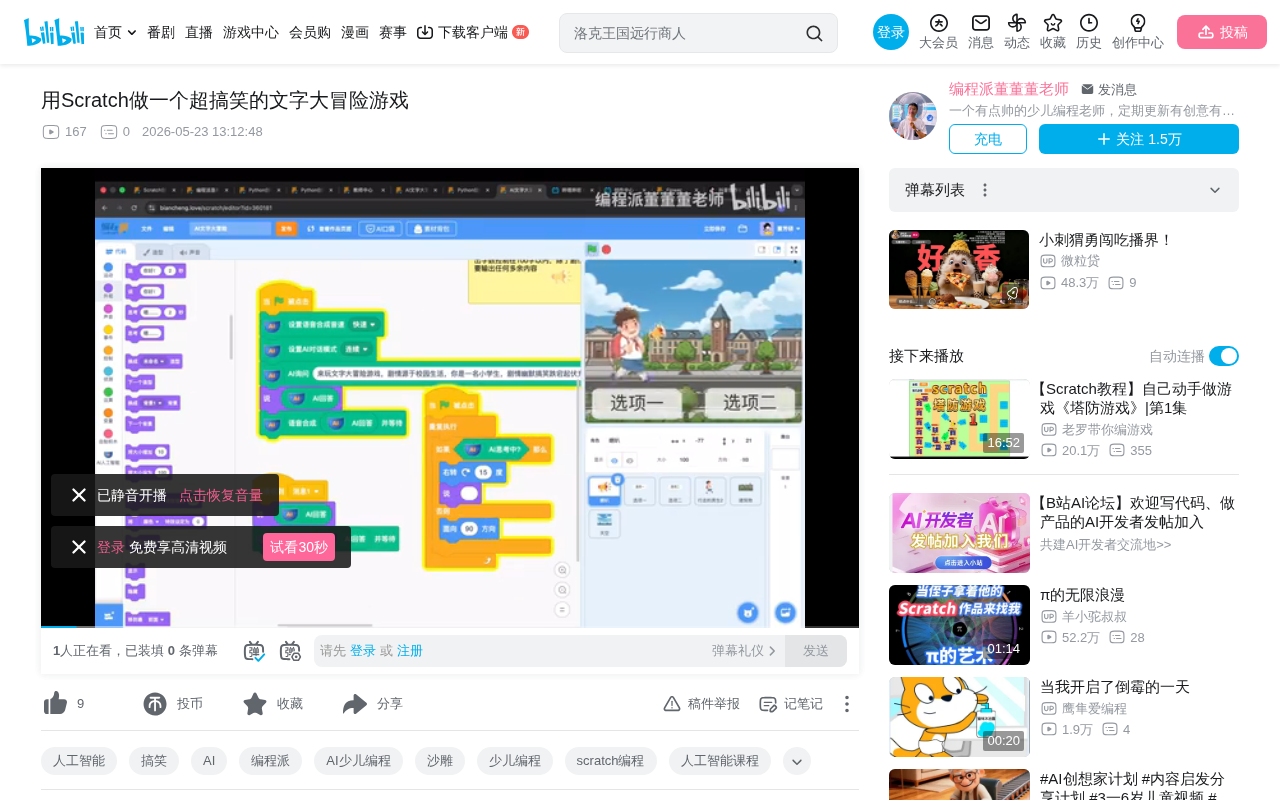
How to build a multi-branch campus text adventure game in Scratch with snowball comedy design.
This article breaks down a Scratch multi-branch text adventure game from Bilibili, themed around sneaking a steamed bun during morning study hall. Through escalating absurd plot twists — from a teacher catching a student to a school-wide culinary event — it demonstrates the charm of snowball comedy design. On the technical side, it covers how to implement branching narratives using conditional logic, variables, and broadcast messages in Scratch, emphasizing that creativity and storytelling matter more than technical complexity.
Project Overview: Building a Hilarious Campus Text Adventure in Scratch
Have you ever thought about making a text adventure game in Scratch that has players laughing out loud? Today we're breaking down a fascinating Scratch project from Bilibili — a multi-branch story game centered around the theme of "sneaking a steamed bun during morning study hall." This project is not only bursting with creativity, but also showcases Scratch's impressive potential for interactive storytelling.
The game's core premise is wonderfully relatable: during morning study hall, you're secretly eating a chive-filled steamed bun inside your desk drawer — and your homeroom teacher catches you. From that point on, the story unfolds entirely based on the player's choices, and every decision pushes the plot toward increasingly absurd and comedic territory.
A Brief History of Text Adventure Games: Text adventure games (also known as Interactive Fiction) are among the oldest genres in video game history, originating in the 1970s. The earliest landmark title was Colossal Cave Adventure (1976), where players explored a cave world by typing text commands. In the 1980s, Infocom pushed the genre to its peak with the Zork series, which became a global phenomenon. As graphics technology advanced, text adventures gradually evolved into Visual Novels and interactive narrative games — but their core mechanic of player-driven branching stories has remained a foundational paradigm in game narrative design. Today in the indie game scene, tools like Twine and Ink have made text adventure creation highly accessible, while Scratch has brought this format into the world of youth programming education.
Story Design: Building Absurdity Layer by Layer
Act One: The Teacher Approaches
The story opens with immediate tension — the homeroom teacher walks over to your desk and taps on the drawer: "What have you got in there? Hand it over." The player faces their first choice:
- Option A: Hand over the bun and say, "Teacher, you should try one — the chive filling is amazing!"
- Option B: Hand over your seatmate's comic book and say, "Teacher, I'm sorry. I shouldn't be reading comics in class."
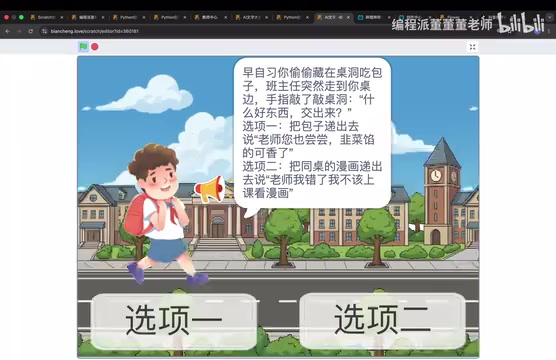
The design here is clever — one option is the "turn the situation around" social mastermind route, while the other is the classic "redirect the blame" maneuver. Either way, both choices are packed with the authentic feel and comedic energy of school life.
It's worth noting that this choice design follows the "stylistic contrast" principle of interactive narrative: the two options aren't about right versus wrong, but represent two completely different life philosophies — the first reflects proactive social intelligence, the second reflects instinctive self-preservation. This transforms the player's choice into a form of self-expression rather than a pure strategy for winning, which is precisely the design philosophy behind modern interactive narrative masterpieces like Detroit: Become Human.
Act Two: The Academic Director Appears
If you choose to offer the bun, the teacher doesn't get angry at all — she takes a big bite and nods approvingly: "Not bad at all. Bring two next time." Just as she turns to leave, the academic director suddenly appears in the doorway and demands an explanation. The player faces another choice:
- Option A: Snatch the bun back and stuff it in your mouth, saying, "The director didn't eat any — I'm the one eating it."
- Option B: Say, "Director, would you like a bite? There's still some left and it's still warm."
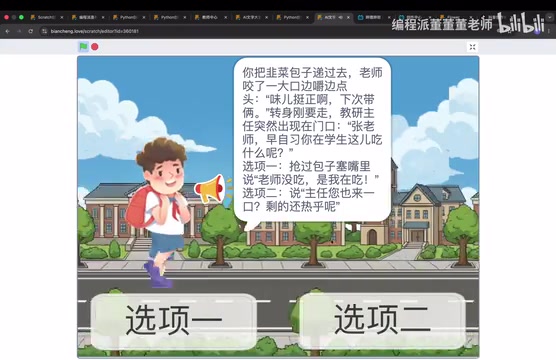
The absurdity escalates here — a single steamed bun somehow brings teachers and students together in unexpected "harmony." After tasting it, the director's eyes light up like lightbulbs: turns out he'd been trying to get his hands on buns from that breakfast shop for three days.
Act Three: The Principal Walks By
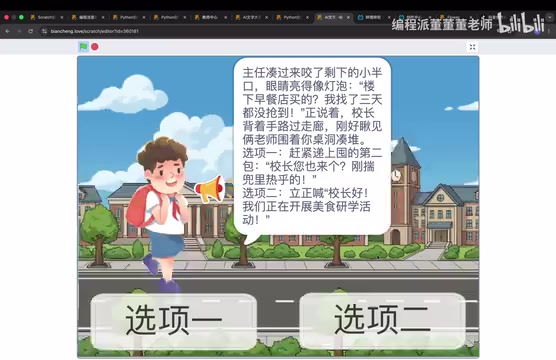
While two teachers are gathered around a student "studying" a steamed bun, the principal strolls past the hallway with his hands behind his back and catches a glimpse of the scene. Another choice appears:
- Option A: Quickly offer the second bun from your pocket, saying, "Principal, here's one for you — still fresh and hot."
- Option B: Stand at attention and announce, "Good morning, Principal! We're currently conducting a culinary research activity."
Act Four: The Absurd Climax
If you choose the "culinary research" route, the principal doesn't reprimand anyone — instead, he pulls out his phone to record a video, declaring, "This is a great research theme!" He immediately posts it to the whole-school group chat and asks every class to hold a "Chive Steamed Bun Food Appreciation Class Meeting."
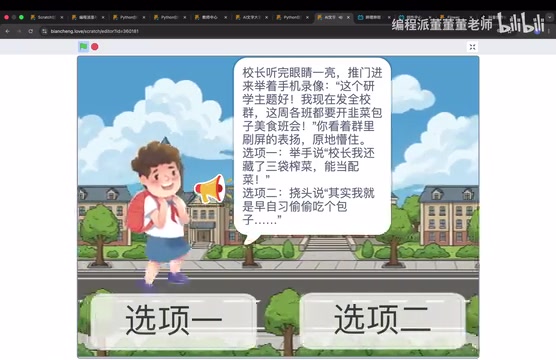
Finally, as the player watches the group chat fill up with praise, one last choice remains: do you double down and claim you've got three more bags of pickled vegetables stashed away, or come clean and admit you were just sneaking a snack? The entire story snowballs from a minor rule violation into a school-wide event — the absurdist comedy effect is cranked up to maximum.
Technical Essentials for Building a Multi-Branch Text Adventure in Scratch
How to Build Branching Logic
The core of this type of text adventure game lies in conditional logic and variable control. In Scratch, you can implement this through the following approaches:
- Use the "ask" block to capture player input, or create custom button sprites as clickable options
- Set variables to record the player's choice at each story node (e.g., "Act1Choice = 1")
- Use broadcast messages to trigger different story branches, keeping your code structure clean and readable
- Use "if...then...else" blocks to build out the complete branching tree
How Broadcast Messages Work: Broadcast messages are a core mechanism in Scratch for modular programming and event-driven logic. They work similarly to the Publish-Subscribe pattern (Pub-Sub): one sprite or script "broadcasts" a message, and all "when I receive" blocks listening for that message are triggered simultaneously. In a multi-branch text adventure, the real value of broadcast messages is decoupling — the story control script only needs to broadcast something like "Enter Act 2 Branch A," while the specific logic for displaying text, switching backgrounds, and playing sound effects can be handled independently by different sprites' scripts. This dramatically reduces the complexity of any single script. This design philosophy closely mirrors the "Event-Driven Architecture" used in professional software development, and is an important concept in Scratch education for cultivating engineering-minded thinking.
For games with many branches, it's highly recommended to first sketch out the complete story flowchart on paper, annotating the variable values at each node, before writing any code. This prevents logical tangles and missing branches.
Text Display and Pacing Control
A great text adventure game requires careful control over the rhythm at which text appears:
- Use "wait" blocks to control the pause between lines of dialogue, building suspense
- A typewriter effect (displaying text character by character) can be achieved through loops and string operations, creating a more immersive reading experience
- Background transitions paired with sound effects enhance immersion — for example, adding a tense sound cue when the teacher appears
Visual and Interaction Design Tips
Even in a text-heavy game, visual presentation matters:
- Design clear option buttons so players immediately know what they can click
- Use different backgrounds for different scenes (classroom, hallway, office, etc.)
- Character expression changes add personality — Scratch's costume-switching feature is perfect for this
Creative Takeaways: Great Games Start with Great Stories
The biggest lesson this project offers is: the technical barrier is low — creativity is what counts. Scratch may be a programming tool designed for young learners, but with a compelling enough story and cleverly designed choices, you can create something genuinely addictive.
This "snowball" approach to story structure — starting from a small incident and escalating continuously, with each escalation more absurd than the last — is a classic technique in comedic writing. Snowball Comedy operates on the principle of "small cause, massive effect": a trivial starting point triggers a chain reaction that amplifies out of control, ultimately producing results far beyond anything anyone expected. This structure is widely used in film and television, from the Mr. Bean series to countless sitcoms. Its comedic power comes from two psychological mechanisms: first, "expectation violation" — the audience/player keeps thinking things are about to settle down, only to be pushed into even more absurd territory each time; and second, the "escalation effect"
Related articles
 Tutorials
ChatGPT Plus Subscription Guide: Are GPT-5.5, image-2, and Codex Worth the Upgrade?
A detailed look at ChatGPT Plus features — GPT-5.5, image-2, and Codex — with a Plus vs Pro comparison and a complete step-by-step subscription guide for users outside the US.
 Tutorials
Harness AI Engineering in Practice: Using Claude Code to Master Enterprise-Level E-Commerce Development
Deep dive into Harness AI Engineering: master enterprise e-commerce development with Claude Code using the Rules, Skills, Wiki, and Changes framework.
 Tutorials
Cursor + Codex Dual-IDE Collaboration: A Practical Methodology for Open-Source Project Customization
A complete methodology for open-source project customization based on real-world experience, detailing the Cursor+Codex dual-IDE workflow, seven-stage process, MVP validation, and AI source code reading techniques.