seam: Turning the Mac Notch into a Dynamic Island with On-Device Voice and Claude Code Monitoring
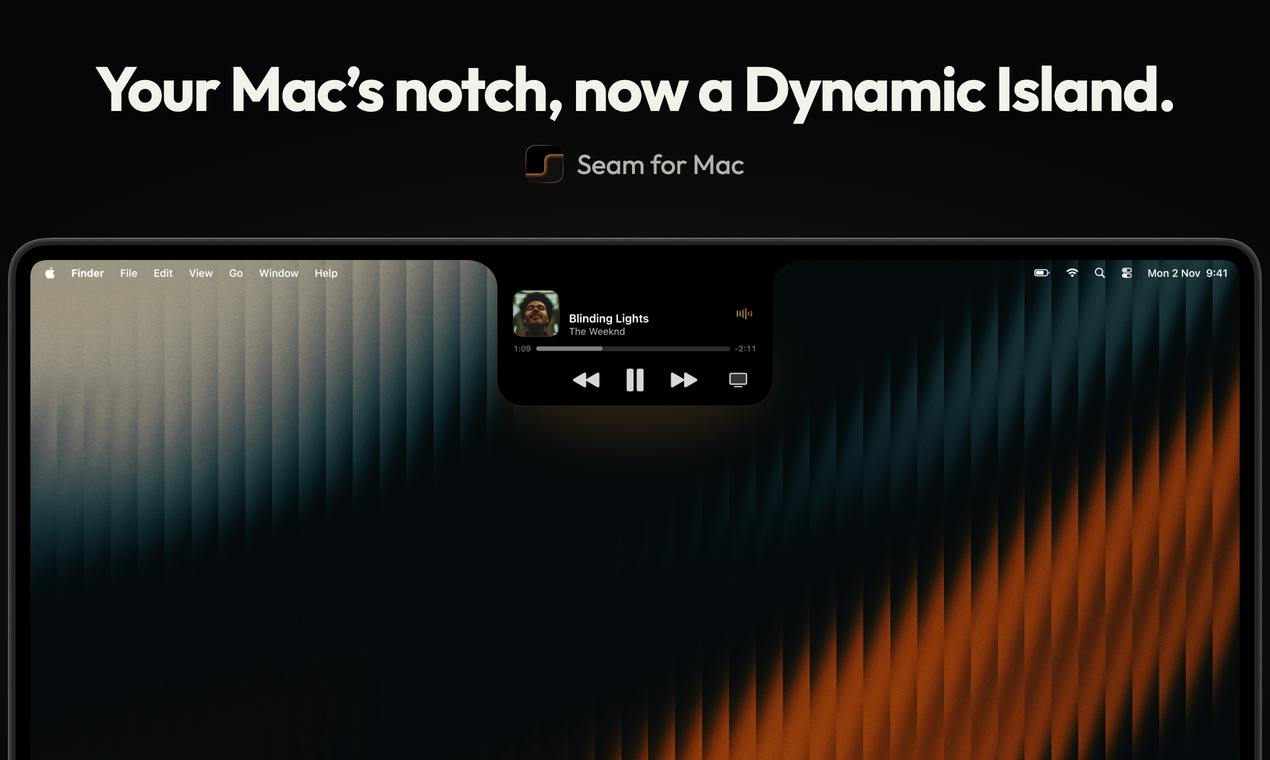
seam turns the MacBook notch into a Dynamic Island-style hub with dictation, music, AI coding alerts, and a focus timer.
seam is a Mac tool by indie developer Ramzi that turns the MacBook notch into a Dynamic Island-style interaction hub. It centers on four scenarios: on-device voice dictation in any app (audio never leaves the device), music control, Claude Code task completion alerts, and a focus timer. Priced at $19.90 one-time for 2 Macs with a 48-hour free trial and no credit card required, it got 76 upvotes and ranked 9th on Product Hunt. The angle is clever, but notch size limits, menu bar visual conflicts, no value on external monitors, and undisclosed speech recognition performance still need real-world verification.
The MacBook notch has always been an awkward presence—it occupies screen space but only houses the camera. A new tool on Product Hunt called seam wants to change that: it turns the notch area into an interaction hub similar to the iPhone's Dynamic Island, transforming this "wasteland" into an entry point for high-frequency actions.
The Notch Becomes a Dynamic Island, With Interaction Logic Borrowed from iPhone
seam's core idea is straightforward: since the notch can't disappear, make it useful. The app generates a dynamic display area around the notch, showing different information and controls based on the current task. This design clearly draws from the Dynamic Island introduced with the iPhone 14 Pro—turning a physical screen defect into an interaction highlight.
Based on the product description, seam isn't positioned as a single-function tool but as a "console on the notch": dictation, music control, task status monitoring, and a focus timer are all integrated into this narrow strip. For users who spend long hours in front of a Mac every day, this proximity-based interaction approach has real appeal—no window switching, no hunting for menu bar icons; just keep your gaze at the top of the screen to get things done.
Dynamic Island is an interaction design introduced by Apple on the iPhone 14 Pro series, turning the pill-shaped cutout at the top of the screen into a dynamically expandable display and control center. The system shows different forms of information cards in this area based on the current task (such as music playback, incoming calls, or timers), and supports gestures like tap and long-press for direct interaction. Its core logic is turning a hardware flaw into a software advantage: the cutout was originally an obstruction, and the Dynamic Island makes it an information entry point. seam borrows exactly this idea, but the Mac's notch sits in the menu bar area, and native macOS interaction is primarily mouse- and trackpad-driven, so it must address visual conflicts with menu bar icons and the design of click hot zones for the dynamic area.
Four Core Scenarios: Dictation, Music, Claude Code, and Focus Timer
seam is currently built around four functional scenarios.
Dictation in any app is the most noteworthy of these. Users can input by voice directly in any application, and voice processing "runs on your Mac"—a selling point the product explicitly emphasizes. On-device voice means audio data doesn't need to be uploaded to the cloud, which has real value for privacy-conscious users and scenarios involving sensitive content.
Music control turns the notch area into a playback control bar, eliminating the need to switch to a music app or use menu bar controls. Claude Code completion alerts target the developer audience: when Claude Code finishes a task in the background, seam displays a notification on the notch so users don't have to frequently switch back to the terminal to check progress. The focus timer serves scenarios like the Pomodoro Technique.
All four features point to a single product philosophy: turning high-frequency, fragmented actions from "finding the app" into "within reach."
On-device speech recognition refers to completing all speech-to-text computation on the device itself, without relying on cloud servers. Apple has provided the Speech framework since macOS 10.15, supporting offline recognition; open-source solutions like Whisper.cpp can also run locally. Compared with cloud-based solutions, on-device recognition offers privacy advantages (audio never leaves the device) and low latency (no network round-trip), but is constrained by device compute power—accuracy in noisy environments or with specialized terminology may be lower than cloud-based large models. seam's emphasis that voice "runs on your Mac" implies its recognition engine may be based on Apple's native framework or a lightweight local model, with actual performance depending on the chosen engine and microphone quality.
Claude Code is Anthropic's command-line AI coding assistant, allowing developers to give Claude natural-language instructions in the terminal to perform code editing, debugging, running tests, and other tasks. Since task execution takes time (ranging from seconds to minutes), developers typically need to switch back to the terminal to check progress or wait for completion notifications. seam's integration targets exactly this "waiting anxiety" scenario: when Claude Code completes a task, a visual cue is sent through the notch area, letting developers learn the result without frequently switching windows. Such integrations typically rely on Claude Code's hooks or output monitoring mechanisms, and need to be maintained as the tool's versions update.
Pricing and Distribution: One-Time Purchase, 48-Hour Trial
seam uses a one-time purchase model: $19.90 covers 2 Macs, with a 48-hour free trial and no credit card required. In a Mac tool market flooded with subscriptions, this pricing strategy is relatively user-friendly and lowers the cost of trial and error—two days is enough to judge whether the notch interaction style suits you.
The product received 76 upvotes and 2 comments on Product Hunt, ranking 9th for the day, categorized under Mac, productivity tools, and menu bar apps. The numbers aren't explosive, but considering this is a niche tool built by indie developer Ramzi, this level of attention suggests the "notch makeover" angle genuinely hits a pain point for some users.
A Few Questions Worth Considering
seam's approach is creative, but notch interaction has inherent limitations. The physical size of the notch limits how much information it can carry; the display area of the dynamic region, its clickable range, and visual conflicts with the native macOS menu bar are all issues that need verification in real-world use. For users with external monitors—where the notch area doesn't exist at all—the tool's value is moot.
The accuracy and responsiveness of on-device voice dictation are equally critical. The product only says voice "runs on your Mac" but doesn't disclose the specific recognition engine or performance metrics; actual experience requires a trial to judge.
Claude Code monitoring is a smart differentiator, capturing the developer pain point of "waiting for tasks to complete" as AI coding tools become widespread. However, such integrations need to stay in sync with the specific tool's interfaces, and long-term maintenance costs are not low.
Overall, seam is a small tool with a clear direction and a clever angle. It doesn't try to be an all-in-one productivity platform but goes deep on the single point of "the notch." For notch-screen Mac users—especially those who use both voice input and AI coding tools—the 48-hour trial is worth a try.
Menu bar apps are a common lightweight tool form on macOS, with icons permanently residing on the right side of the top menu bar and panels popping up when clicked. Such apps are typically built on the NSStatusItem API, with low resource usage and fast startup, making them suitable for always-on background productivity tools. seam is categorized as a menu bar app, but its interaction area sits on the notch rather than traditional menu bar icons, which presents a design challenge: the notch area visually overlaps heavily with menu bar icons, and it must avoid obscuring system icons or causing accidental clicks. Additionally, external monitor users can't see the notch, so seam's value is limited to built-in screen scenarios, which also limits its user reach.
One-line Summary
seam turns the MacBook notch into a Dynamic Island-style interaction hub integrating dictation, music, AI coding alerts, and a focus timer.
Paragraph Summary
seam is a Mac tool that transforms the MacBook notch area into an interaction hub similar to the iPhone's Dynamic Island, built by indie developer Ramzi. It's built around four core scenarios: on-device voice dictation in any app (audio never uploaded to the cloud), music playback control, Claude Code task completion alerts, and a focus timer. The product uses one-time purchase pricing: $19.90 covers 2 Macs, with a 48-hour free trial and no credit card required. It received 76 upvotes on Product Hunt, ranking 9th for the day. The article finds its angle clever, but issues such as notch size limitations, visual conflicts with the menu bar, ineffectiveness on external monitors, and undisclosed on-device speech recognition performance still need real-world verification.
Related articles
 Tech Frontiers
Edge AI on Microcontrollers: When Is It Actually Worth Deploying?
Drawing on Reddit discussions and Arm case studies, this article analyzes the real-world use cases for edge AI on microcontrollers: when each device needs independent inference, when a gateway or cloud is more reasonable, and the costs and boundaries of specialized hardware.
 Tech Frontiers
Pushing the Limits of Extreme Sudoku on a 16GB GPU: Insights from Depth and Flow Matching
A researcher trained a 16.54M-parameter model on a 16GB GPU to solve extreme Sudoku, finding effective depth breaks the 60% plateau and flow matching with improved sampling pushes accuracy past 99% with ~50× lower layer-evaluation budget.
 Tech Frontiers
AI Agent Approval Workflows: Why Human Confirmations Always Get Mindlessly Clicked
Why do AI agent approval workflows always get mindlessly clicked? A Reddit discussion shows that separating rules from keys, low-frequency high-risk approvals, and GitHub Environments-style gates are the keys to effective approvals.