Smol Coder: A Local Model Coding Assistant Built with Claude 5.1

Smol Coder is a zero-config, context-optimized coding assistant built for local LLMs like Ollama and LM Studio.
Smol Coder is a coding assistant built with Claude 5.1, specifically optimized for local model platforms like Ollama and LM Studio. Unlike cloud-based tools that consume 37K tokens before any task begins, Smol Coder uses minimal system prompts, a lean toolset, and an enhanced to-do system to preserve context for actual coding work. It supports both terminal and web modes and requires zero configuration. The entire project — from design and implementation to security auditing and NPM publishing — was completed with AI assistance, demonstrating a full AI-powered development loop.
A Lightweight Coding Assistant Tailored for Local Models
In the AI coding assistant space, tools like Claude Code and Cursor have become indispensable for developers. But these tools are largely optimized for cloud-based large models, leaving developers who prefer local open-source models with significant limitations. One developer leveraged Anthropic's newly released Claude 5.1 to build Smol Coder — a coding assistant purpose-built for local models — offering a fresh solution for local model development.
The Context Window Problem with Local Models
Mainstream coding assistants waste resources noticeably when paired with local models. Take Qwen 3.8, which can run on consumer hardware — while it theoretically supports a 256K token context window, the practically usable range is often just 64K–128K tokens.
To understand the technical root of this limitation, consider how context windows work. A context window is the maximum number of tokens a large language model can process at once, directly determining how much information the model can "see." While many open-source models claim support for very long contexts, real-world deployments are constrained by GPU VRAM, the quadratic complexity of attention mechanisms relative to sequence length, and the memory footprint of the KV Cache. An RTX 4090 with 24GB of VRAM, for example, may only deliver less than half the advertised context when running an 8B parameter model. This means every token is precious, and any wasteful system prompt directly eats into the user's usable workspace.
Tools like Claude Code consume 37K tokens of context before a single task is executed — a burden local models can barely afford.
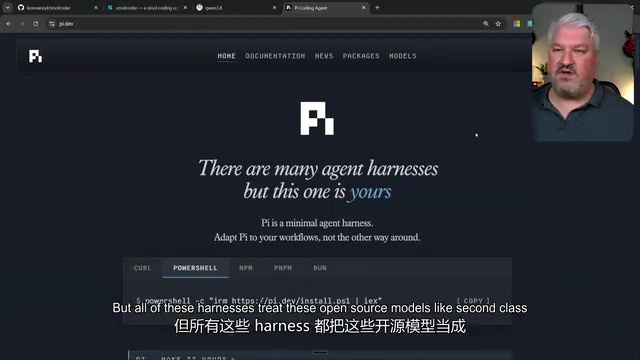
Existing lightweight alternatives like the Pi Agent SDK perform reasonably well, but they generally treat open-source models as second-class citizens, requiring extensive configuration, plugin installation, and complex setup workflows. This unfriendly posture toward local models inspired a question: could a coding assistant be built that's truly optimized for local models?
Smol Coder's Core Design Philosophy
Zero-Configuration Local Model Support
Smol Coder's central design goal is to make local models first-class citizens. It natively supports both Ollama and LM Studio — the two most popular local model runtime platforms — and automatically detects and loads installed models with zero configuration required.
Ollama is an open-source command-line tool that offers a Docker-like model management experience. Users can download and run quantized open-source models with a simple ollama run command, with an OpenAI-compatible API exposed in the background. LM Studio provides a graphical interface, supports one-click downloads of GGUF-format models from Hugging Face, includes a built-in inference server, and also offers an OpenAI-compatible API. Both platforms have dramatically lowered the barrier to running large models locally, enabling consumer hardware to run open-source models ranging from 7B to 70B parameters. Smol Coder supports both platforms, and users can install it with a single npm command for true out-of-the-box usage.
This zero-configuration philosophy manifests at multiple levels:
- API endpoint compatibility: Tool calls and responses are specifically optimized for Ollama and LM Studio interfaces
- Minimal system prompts: Only the tool definitions the agent actually needs are included, avoiding waste of precious context space
- No redundant features: MCP servers, agent skills, and other complex functionality are deliberately excluded to prevent unnecessary context consumption
The last point deserves elaboration. MCP (Model Context Protocol) is a standardized protocol proposed by Anthropic to let AI assistants connect to external data sources and tools — think of it as a USB port for the AI world. While MCP greatly expands an AI assistant's capabilities, every MCP server's tool definitions must be injected into the system prompt, significantly increasing context usage. Agent Skills refer to the ability for multiple AI agents to work in coordination — running tasks in parallel, delegating subtasks, and so on. These features perform excellently with cloud-based large models, but for local models with limited context windows, the overhead of these mechanisms can far outweigh their benefits. By decisively dropping these "nice-to-have" features, Smol Coder preserves valuable context space for actual programming tasks.

Aggressive Context Management Strategies
To address the constrained context windows of local models, Smol Coder employs an aggressive optimization strategy. It uses a minimalist system prompt that defines only the essential toolset. The initial design even considered including just a single bash tool, letting the agent accomplish everything through terminal commands. But Claude 5.1 offered professional advice during development: free models tend to struggle with formatting bash commands, so the final design settled on a limited but clearly defined and easy-to-use toolset.
Another innovative design is the enhanced to-do list system. Unlike Claude Code's simple task decomposition, Smol Coder's task planning includes important contextual information. The cleverness here lies in how it addresses the "amnesia" problem caused by context compression. In long conversations, when token counts approach the model's context window limit, the system needs to perform "context compression" to free up space. Common compression strategies include summary-based compression (condensing earlier conversations into brief summaries) and sliding windows (discarding the earliest conversation turns). For coding assistants, the biggest risk after compression is losing task context — the agent may forget what it was working on and which steps have already been completed. Since local models have smaller context windows, compression triggers more frequently. Smol Coder embeds critical contextual information (such as current objectives, completed steps, and important file paths) directly into task plans, ensuring that even after compression, core information is preserved. This effectively provides the agent with a "memory anchor," helping it quickly return to the correct working trajectory after compression.
A Complete Interaction Experience: From Terminal to Web
Dual-Mode Architecture
Smol Coder offers both terminal and web operating modes to accommodate different developer preferences:
- Terminal mode: Launch with the
smolcommand for a traditional command-line interaction experience - Web mode: Launch with
smol --webto generate a unique URL and access a graphical interface in the browser

The web interface includes a full feature set: a left sidebar for workspace and session management, a main window for code editing and interaction, and integrated browser and terminal panels. Users can use slash commands to quickly switch models, and the system automatically recognizes all models installed in Ollama or LM Studio.
Flexible Permission Management
Smol Coder supports multiple operating modes and permission levels, allowing developers to adjust the agent's autonomy based on task sensitivity. It also supports a memory file feature — when users add an agent.bash.md file to their workspace, the rules defined within are automatically loaded into context, enabling persistent behavioral customization.
Building Smol Coder with Claude 5.1
Iterative Development and Self-Auditing
The entire development process demonstrates best practices for collaborating with an AI coding assistant. The first development session lasted approximately two hours: the developer started with a requirements brainstorm to clarify optimization goals and technical constraints, then let Claude 5.1 implement the solution autonomously. Notably, Claude proactively questioned unreasonable design decisions — for instance, suggesting improvements over the "bash-only tool" approach.
After development, the developer created a new session dedicated to code auditing. This practice of separating development and auditing is highly recommended. The principle mirrors a software engineering guideline that developers shouldn't review their own code — the same AI session, after extended development, can develop blind spots from accumulated assumptions and biases in its context, a phenomenon known as "context contamination." Starting a fresh audit session lets the AI examine the code with "fresh eyes," more effectively surfacing logic flaws, security vulnerabilities, and performance issues. This practice also echoes the red team / blue team thinking in security — using one AI's output as the input for another AI's review. The audit session completed a comprehensive code review and optimization in just 15 minutes, effectively ensuring code quality.

A Complete Distribution Pipeline from GitHub to NPM
Smol Coder's distribution process was also completed with Claude 5.1's assistance. It not only created the GitHub repository, wrote the MIT license, and authored the README documentation, but also guided the developer through the NPM package publishing workflow. The end result: users can run npx smol-coder to start using the tool immediately, with no need to clone the repository or manually install dependencies.
npx is a package execution tool in the Node.js ecosystem that lets users run packages from the NPM registry without globally installing them. This distribution model means users don't need to run git clone, npm install, or any other setup commands — the tool is automatically downloaded, cached, and executed. This pattern is increasingly popular for CLI tool distribution, eliminating version management and dependency conflicts while lowering the barrier to trying the tool. From discovering it to using it, only one command and a few seconds of waiting are required.
The project also launched a dedicated website at smolcoder.dev, hosted for free via Vercel, providing project documentation and usage guides. The entire pipeline from code to distribution showcases the powerful full-stack development capabilities of modern AI coding assistants.
Lessons for Local Model Development
Purpose-Built Tools Outperform General Solutions
Smol Coder's journey demonstrates that purpose-built tools optimized for specific scenarios are often more valuable than general-purpose solutions. When resources are constrained — as with local models' context windows — extreme optimization can produce qualitative improvements. This "subtractive" design philosophy — removing complex features like MCP servers and parallel agents to focus on core coding assistance — actually makes the tool more practical and efficient. It also validates a classic principle of software engineering: constraints breed innovation. It was precisely the resource limitations of local models that forced developers to reconsider the value of every token, ultimately producing a more refined and effective tool.
Claude 5.1 as a Design Partner
The development process reveals that Claude 5.1 is not just a code executor but a genuine design partner. It proactively identifies problems with proposed approaches, offers improvement suggestions, and guides technical decisions. This interactive collaborative model lets developers focus on requirements and architecture while delegating implementation details to the AI.
Conclusion
Smol Coder provides local model developers with an efficient, lightweight coding assistant option. Its design philosophy — zero configuration, context optimization, dual-mode support — precisely addresses the real-world needs of local models. More importantly, the entire development process demonstrates how to effectively leverage an AI coding assistant: from requirements analysis to code implementation, from testing and auditing to distribution and deployment, forming a complete development loop.
For developers looking to explore the capabilities of local models, Smol Coder is not just a plug-and-play tool — it's an open-source case study worth deep examination. It proves that even in resource-constrained scenarios, thoughtful design and optimization can enable local models to deliver an excellent coding assistance experience.
Key Takeaways
Related articles

Claude Code v2.1.316 Update Analysis: Enterprise Gateway and Multiple Stability Fixes
Claude Code v2.1.316 released: new enterprise gateway pooled group budgets, layered policy mode, subagent effort control, dozens of Shell, network, and session recovery fixes, and Opus 4.8 fast mode deprecated.

17th-Century British Floods and Doomsday Panic: A New Perspective on Weather History
Based on a Hacker News discussion of '17th-Century British Floods and Foreboding,' this piece explores how extreme weather was given divine and political significance, and what weather history teaches us about contemporary climate communication.

Salesforce Acquires Rune for $375M: AI Logistics Tech Bolsters Defense Business
Salesforce reportedly acquires defense tech startup Rune for $375M. Rune's AI logistics tech will strengthen Salesforce's Missionforce defense platform, continuing its M&A spree.