snibl: Cross-App Highlight Saving with AI-Powered Reading Notes

snibl closes the knowledge loop after highlighting with global highlight capture plus personal corpus Q&A.
snibl is a productivity tool for Mac and Windows that lets users highlight text in any app and save it with source and context, then ask Snibl AI questions answered from their own saved snippets. The article notes the product addresses the missing post-highlight loop: the market doesn't lack highlighting tools—it lacks a way for highlights to be reused. It emphasizes data ownership with "Software you actually own." The article also cautions that only product page info is available; cross-app capture stability, snippet organization, AI citation transparency, and cross-platform sync await testing, and how inference costs support the business model is unexplained. Suitable for frequent readers and material accumulators; privacy-sensitive users should confirm data handling first.
When you highlight a sentence while reading, can you still find it a few days later? For most people, the answer is no. Information is scattered across browsers, PDF readers, note-taking apps, and chat windows. The act of highlighting happens, but the knowledge never accumulates. A new product on Product Hunt called snibl attempts to close this gap with "global highlight capture + personal corpus Q&A."
An Overlooked Action: What Happens After You Highlight
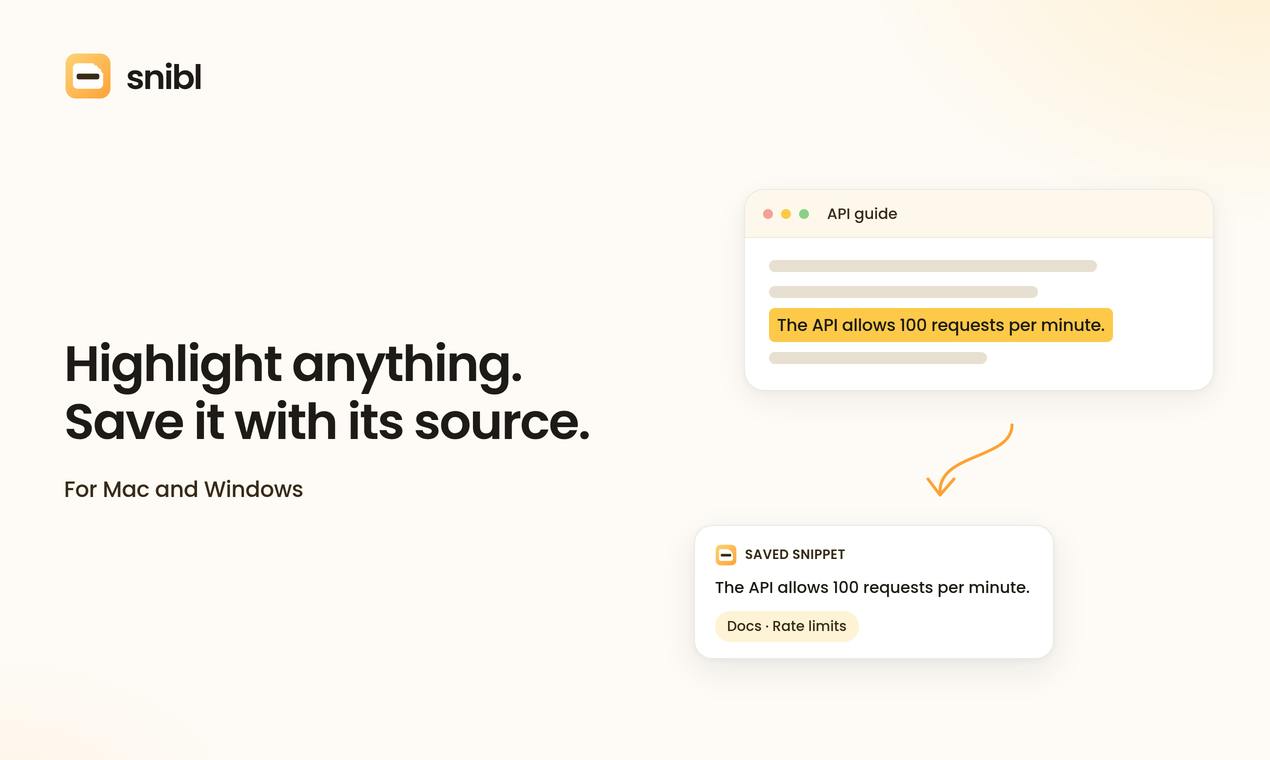
snibl's product description is straightforward: highlight text in any app on Mac or Windows, and snibl saves it along with its source and context for later retrieval. Going further, you can ask Snibl AI questions directly, and it answers using the snippets you've saved yourself.
This positioning targets a real pain point. Highlighting tools are not in short supply—what's missing is the closed loop after highlighting. Products like Readwise solve the aggregation of reading content across platforms, while snibl emphasizes "any app"—not limited to readers or browser extensions. This means system-level clipping and capture capabilities are its technical foundation.
The official description includes a notable line: "Software you actually own." This phrasing is worth noting—it hints at the product's stance on data ownership: the snippets you save belong to you, not to the platform.
Global Capture and Personal Corpus Q&A: How the Two Capabilities Work Together
Capture Layer: Source and Context Are Key
Simply saving a block of text has limited value. snibl's differentiator is recording both source and context, making snippets traceable even after they're separated from the original page. For researchers, writers, and anyone who needs to organize materials across documents, traceability determines whether a note will ever be used again.
Cross-app text capture typically relies on the operating system's Accessibility API or global event listening rather than simple clipboard polling. macOS's sandboxing mechanism requires apps to obtain user authorization when accessing content from other apps, and is constrained by Hardened Runtime and the TCC (Transparency, Consent, and Control) framework; Windows obtains control text through UI Automation. This means that "highlight in any app and save" requires handling differences in how various apps render content—some text is drawn by custom engines, and readable nodes may not exist in the accessibility tree. Therefore, the stability of cross-app capture is not a single toggle but an accumulation of engineering work involving extensive app adaptation and fallback strategies.
Q&A Layer: Turning Saved Items into Searchable Private Knowledge
The "Ask Snibl AI" step is essentially converting static saved items into a conversational knowledge base. Compared with general-purpose AI assistants, the advantage of answering based on personally saved snippets is that answers have sources and stay close to what you've actually read. Of course, the actual experience of this capability depends heavily on retrieval quality and how well snippets are organized—the product page does not elaborate on technical details.
Personal corpus Q&A typically follows a two-step Retrieval-Augmented Generation (RAG) approach: first, saved snippets are chunked and vectorized into an index; when a question is asked, the most relevant snippets are retrieved and then passed along with the question to a large language model to generate an answer. Whether snippets can be accurately recalled depends on chunking granularity, embedding model quality, and whether source metadata is preserved; citation transparency requires the generation stage to bind answers to specific snippet IDs rather than answering from model memory alone. Additionally, each answer consumes model inference compute—the larger the corpus and the more complex the retrieval, the higher the cost. This is a question that such products' business models must answer.
Market Signals and Points to Watch
The product received 82 votes and 19 comments on Product Hunt, ranking 14th, categorized under Mac, Productivity, and Artificial Intelligence. The vote count isn't explosive, but within the relatively rational productivity tools category, it falls within a normal range.
It should be noted objectively that currently available information comes only from the product page itself, lacking third-party hands-on testing and long-term usage feedback. The following points are worth watching:
- Whether cross-app capture remains stable in permission-restricted scenarios, especially for apps with higher degrees of sandboxing;
- How saved snippets are organized—whether it relies on manual user organization or automatic clustering;
- Citation transparency in AI Q&A—whether answers can clearly point to specific snippets rather than responding generically;
- Data synchronization strategy across Windows and Mac.
Another practical issue is that features like personal corpus Q&A continuously consume inference costs. How the product's business model supports the promise of "software you actually own" has not yet been explained by the company.
Product Hunt rankings are calculated based on a combination of interactions on launch day—upvotes, comments, and saves. The top of the daily leaderboard is typically occupied by the day's hottest products, and 14th place means it made the daily list but didn't get a featured position on the homepage. 82 votes is below average for the productivity tools category; audiences for these tools make decisions based on actual experience rather than launch hype, so early vote counts have limited predictive power for long-term adoption. The 19 comments often mix genuine experiences, developer thanks, and courtesy interactions—their reference value needs to be assessed carefully. For tool products, retention and word-of-mouth after launch say more than a single-day ranking.
Who It's For, Who It's Not
The target audience is fairly clear: researchers and content creators who read extensively every day and need to accumulate materials, as well as productivity tool users who want to turn scattered highlights into queryable assets. If you already use a note-taking system, snibl is more of a front-end capture entry point than a replacement.
It's less suitable for those who only need simple clipboard history, and for privacy-sensitive users who don't want their personal reading snippets entering AI processing pipelines—the latter should confirm how data is handled before deciding.
The value of a tool isn't in how many highlights it saves, but in whether those highlights get called upon again. snibl's approach is to connect "saving" and "asking"—the direction is right, and what remains is whether the engineering implementation can uphold this promise.
One-line Summary
snibl closes the knowledge loop after highlighting with global highlight capture plus personal corpus Q&A.
Paragraph Summary
snibl is a productivity tool for Mac and Windows that lets users highlight text in any app and save it along with source and context, then ask Snibl AI questions answered based on their own saved snippets. The article notes that this product addresses the missing closed loop after highlighting: the market doesn't lack highlighting tools—it lacks a way for highlights to be called upon again. The product emphasizes data ownership with "Software you actually own." The article also cautions that currently only product page information is available, and cross-app capture stability, snippet organization, AI citation transparency, and cross-platform sync all await hands-on testing. How inference costs support the business model is also unexplained. Suitable for frequent readers and material accumulators; privacy-sensitive users should first confirm data handling practices.
Related articles

Nothing CMF Buds 2A Drops to $17.89 on Black Friday: A New Low for ANC Earbuds
Nothing CMF Buds 2A wireless earbuds Black Friday deal: just $17.89 on Amazon, about $11 off retail and a record low. ANC earbuds at an entry-level price.

When AI Creation Gets Accused of "Spitting": Hacker News Heats Up Over the Glaude Controversy
A Hacker News post, "Spitting in the Face of Glaude," sparks debate on AI creation transparency and attribution ethics. This analysis examines the blurred creator identity behind the controversy and offers practical advice for AI content production.

Akai Embraces Custom Firmware: MPC Sample 1.4 Lets Users AI-Program Their Sampler
Akai embraces the modding community with MPC Sample 1.4 firmware, supporting vibe-coded custom firmware and effects. We analyze the impact of this open strategy on music hardware and AI-assisted programming.